Gemini's small business tools are a new set of Gemini app features Google announced on October 20, 2026. Centered on a business landing page, they bring together saved brand styles, financial data analysis, and connections to apps like Google Business Profile in one place. The announcement said they're rolling out gradually to all Gemini app users worldwide, but the connected apps each have their own language and country requirements, so in Korea you need to check what's actually available first.
"Between posting store updates, replying to reviews, and making promo images, my whole day disappears." If you run a shop or a small online store without staff, you've probably said something like this at least once. Working in digital marketing, I keep watching new tools appear that hand this kind of busywork to AI, and this time Google has built a dedicated workspace for small business owners inside the Gemini app. In this post I'll go through the announced features, what's available in Korea, and how to connect Google Business Profile.
1. What did Google announce in its Gemini small business tools?
Google's October 20 announcement said tens of millions of small business owners are already using Gemini to brainstorm products and manage customer feedback, and described these as tools to give them back their time. There are four main parts to the announcement.
- Business landing page: A central screen where you start tasks like building your brand, analyzing finances, and checking customer insights, all in one place.
- Brand style: Upload your website, brand kit, fonts, and color palette, and Gemini remembers that style and applies it to your promo images from then on.
- Financial insights: Turns messy spreadsheets, receipts, and purchase records into graphics and interactive models.
- Connected apps: Connects Google tools like Google Business Profile, Google Ads, and Google Workspace, plus third-party apps like Adobe, Canva, Dropbox, Shopify, Wix, Zoho, and Xero, to Gemini.
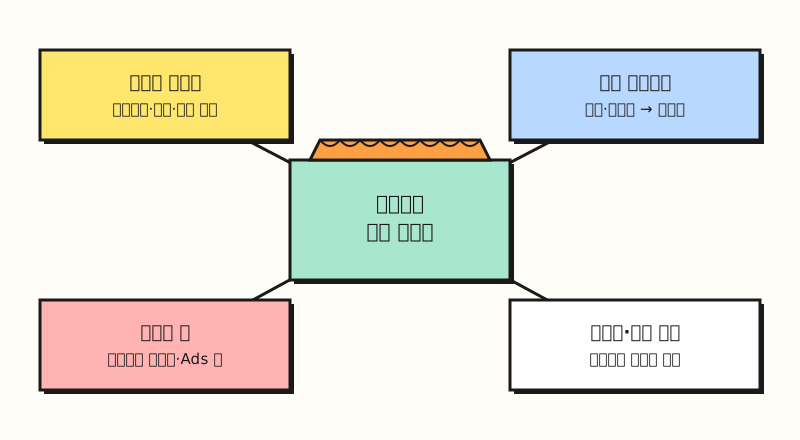 Illustration: Not an actual screen. This is a simple drawing of the four components described in the announcement (figure labels in Korean).
The announcement said the business landing page, marketing and finance skills, and new connected apps will roll out gradually to all Gemini app users worldwide over the next few days. For larger organizations that need admin controls or enterprise-grade security, it points to the separate enterprise version of Gemini. So which of these features should marketers look at first?
2. How does Gemini's brand style feature work?
Brand style is similar to leaving your logo files and color chart with your regular print shop. Once you've dropped them off, every new order, whether it's flyers or business cards, comes out in the same colors and fonts, and you don't have to resend the files each time. The announcement explains it the same way: because Gemini keeps the visual style you set once, you can create consistent images without uploading your style guide over and over.
It also says Gemini uses Google's latest image model, Nano Banana 2.1, to create images for new product launches or ongoing campaigns from start to finish. However, the Gemini image generation overview page says the free model is Nano Banana 2, and Nano Banana 2.1 is available to Google AI Pro, Plus, and Ultra plan users. The announcement doesn't say whether saving a brand style itself requires a particular plan, so it's safer to assume results on a free account may differ in quality from the announcement's examples.
The same page notes that images made with Gemini include both an invisible SynthID watermark and a visible watermark indicating they were AI-generated. If you plan to use them as ad creatives, I'd recommend checking the ad platform's policy first on whether you can use them with the watermark included.
※ Note: How much can you use in Korea?
The announcement said "all Gemini app users worldwide," but it didn't list supported languages. So it hasn't been officially confirmed yet when the business landing page and the marketing and finance skills will appear in the Korean interface. Connected apps are clearer, since the Connected Apps availability table lists the requirements for each app.
- Available in Korean: Google Business Profile and Google Workspace can be used in every language the Gemini web app supports, and the Gemini web app availability list includes both South Korea and Korean.
- English only: Google Ads, Canva, Adobe, and Xero can be used in supported countries, but only in English.
- Specific countries only: Shopify and Dropbox are listed as US-only, and Zoho apps as India-only.
- Apps where the docs disagree: Wix is listed in the availability table as all supported countries and English only, but the creative apps help article says only US residents aged 18 or older can connect it, so it's hard to say for sure that it works in Korea.
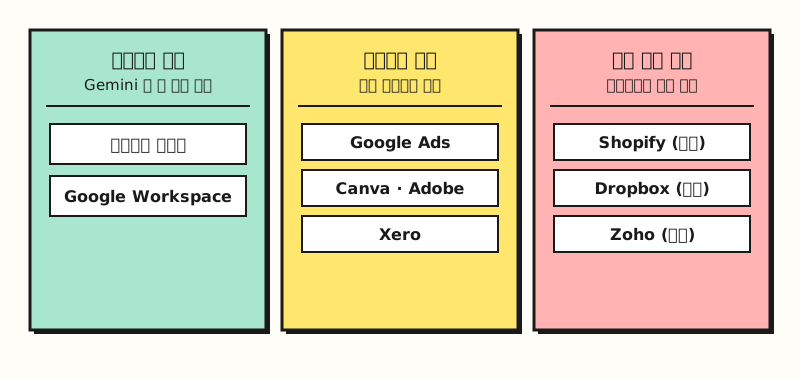 Grouped by the location and language columns in the official table; actual availability may vary by account and device (figure labels in Korean).
To sum up, the connected apps that small business owners in Korea can try right away in Korean are Google Business Profile and Google Workspace, and of those, Business Profile is the one that directly touches running a shop. So what changes when you connect Business Profile?
3. What can you do when you connect Google Business Profile to Gemini?
Google Business Profile is a free profile for managing how your business appears on Google Maps and Search. Only businesses that meet customers in person, such as storefronts or service-area businesses, can create one, and online-only stores can't. According to the Business Profile Help Center, once you connect it to Gemini, you can manage your profile by asking conversationally.
- Update your profile: Check and edit hours and special hours, food menus, photos, business attributes, website and social links, and booking and ordering links.
- Engage with customers: Check ratings and reviews, draft or delete review replies, and create, schedule, and publish update, offer, and event posts.
- Summarize reviews: Groups and summarizes recurring customer feedback from reviews.
- Business performance: Shows performance like impressions, website clicks, direction requests, and bookings, along with the search keywords customers used to find your business.
Connecting is simple.
Sign in to gemini.google.com with the same account as your Business Profile and ask about your profile, and you'll get a prompt to connect. If Gemini doesn't use the app, add @Google Business Profile to your question.
After connecting, you can create a business notebook named after your business in the notebooks list in the sidebar, where you'll see suggested tasks, like filling in missing hours or exterior photos, and tailored prompts.
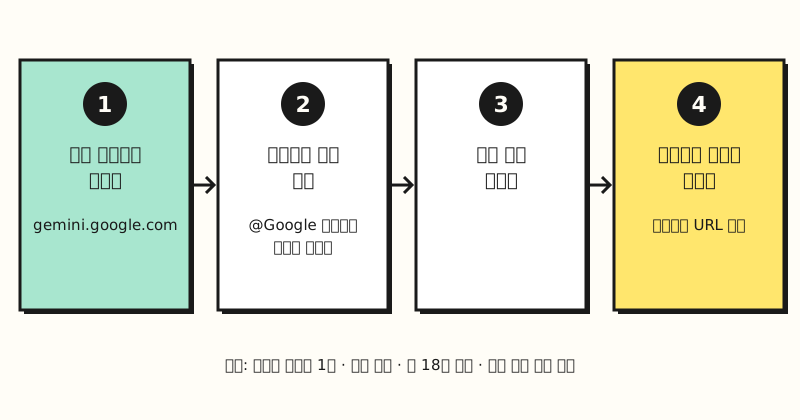 Illustration: Not an actual screen. This is a simple drawing of the connection steps described in the Help Center (figure labels in Korean).
4. What should you check before connecting?
The requirements for connecting Business Profile are fairly strict, so I'd recommend checking the items below before you try.
- An account that manages only one profile: Owners or managers of two or more verified Business Profiles can't use it. If you're on an agency account handling multiple locations, this feature doesn't apply to you.
- A personal Google account, age 18 or older: Work or school accounts can't be connected yet.
- Keep Activity turned on: If this setting is off, Gemini can't connect to Business Profile.
- Mainly the web app: The Help Center says it's only available in the Gemini web app (gemini.google.com), while the availability table also lists the Gemini app for Windows.
It's also worth remembering that Gemini doesn't stop at drafting review replies. It can delete existing replies and publish or delete profile posts too. Replies and posts are visible to customers under your business's name, so at first it's safer to just get drafts, read them yourself, and then post. You can turn off the connection anytime in Connected Apps settings, so keeping it on only when you need it is a fine approach too.
Summary
Gemini's small business tools gather saved brand styles, financial data analysis, and app connections like Business Profile on a single business landing page. In Korea, though, most connected apps are English-only or limited to other countries, so for now what you can try in Korean is roughly the Google Business Profile and Google Workspace connections. If you manage just one shop profile, start by creating a business notebook. App requirements change often, so check the official availability table before connecting. I'll write this up again once the landing page shows up in the Korean interface.
FAQ
- Are Gemini's small business tools free?
- The announcement said the business landing page, marketing and finance skills, and new connected apps are rolling out gradually to all Gemini app users, and didn't mention pricing. However, Nano Banana 2.1, which was introduced alongside brand image creation, is listed in the Gemini image generation overview as being for Google AI Pro, Plus, and Ultra plan users, and free users get Nano Banana 2.
- What do I need to connect Google Business Profile to Gemini?
- You must own or manage only one verified Business Profile, and you must be 18 or older and sign in to the Gemini web app with the personal Google account linked to the profile. Keep Activity must also be turned on, and work or school accounts and accounts that manage two or more profiles can't use it.
- Can I use the Gemini Business Profile connection in Korean?
- According to the Connected Apps availability table, Google Business Profile can be used in every country and language where the Gemini web app is supported, and the Gemini web app availability list includes South Korea and Korean. Connected apps like Google Ads, Canva, and Xero, on the other hand, are English only.
Related posts
- Gemini Connected Apps: September Additions and What's Available in Korea - How to connect Google Ads to Gemini to ask about performance, and how connected apps handle personal data
- NotebookLM Slides and Videos, and Gemini Notebook Review Features - Worth reading alongside for the Gemini notebook features that business notebooks are part of
- How to Check AI-Generated Images: SynthID Detector Launch and Gemini Verification - How to check the watermarks in promo images made with Gemini