Claude Duet is a new Claude app that reaches out to you first, before you say anything. Anthropic released it as a research preview on October 21, 2026. Every morning it scans your connected apps and sends you a brief, keeps working on the tasks you hand it in the cloud, and waits for your approval before things like sending a message or making a payment. For now, though, only Pro and Max plan users in the US can use it through a waitlist, so it isn't available to try in Korea yet.
"What did I actually need to look at in my inbox today?" If you've ever opened your email, calendar, and messenger one after another first thing in the morning while thinking exactly that, you're not alone. Until now, AI chat only answered once you opened a window and asked, but Anthropic's announcement flips that order: Claude tells you first. In this post, I'll cover what Claude Duet is, how it differs from the existing Claude app, what it does on its own and where it stops, and the availability details users in Korea should know.
1. What is Claude Duet, and who is it for?
The announcement describes Claude Duet as a new app where Claude works as a proactive agent (an AI agent that acts before you ask). It surfaces what needs your attention, finishes what you ask, keeps working while you're away, and checks with you before acting on your behalf. The stated audience is professionals and small business owners with a lot on their plates.
- App format: A standalone app for iOS and Android; on a computer you open it on the claude.ai web. For now it's a separate app from the existing Claude app.
- Model: It runs on Claude Opus 5.5, and according to the Getting started with Claude Duet help article, you can't choose the model.
- Pricing: During the research preview, it's included in Pro and Max plans at no extra cost, and it shares the same usage limits as Claude's other features.
If the Claude app so far has been like a help desk that only answers when you go and ask, Duet is closer to a teammate who reports in every morning and only brings you paperwork when something needs your sign-off. So how does this teammate spend the day?
2. How does Claude Duet work?
The day described on the product page and in the help article starts with a morning brief. Every morning it picks the most important items from your connected apps, sends a short brief, and prepares first steps such as reply drafts for you to review. During the day, it checks your connected accounts every few hours and only messages you when something needs your attention. The announcement explains that it checks at intervals because checking nonstop would use up your plan limits much faster.
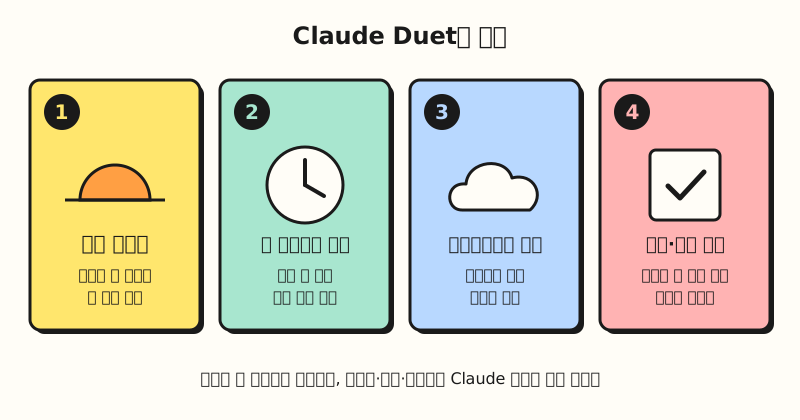 A step-by-step figure of the workflow described in the announcement and help article (figure labels in Korean).
Handing off a task takes just one message. Type it or say it by voice, and Duet decides on its own which apps to use and how much effort to put in, returning larger outputs as files such as research briefs, financial models, slide decks, and dashboards. Conversations continue in one main thread, and even if you open separate channels by topic, they share the same memory. You can see work in progress in the "Tasks" tab and finished outputs in the "Make" tab. Because Duet works on its own virtual machine and browser in the cloud, tasks keep going even if your laptop or phone is off, and it can handle sites without a connector directly through that browser.
3. How is it different from the existing Claude app?
The biggest difference is who starts the conversation. According to the product page FAQ, the Claude app waits until you open a chat and works on something together with you, while Duet tells you what needs attention every morning, handles tasks it receives by message, and contacts you when it's done or needs approval.
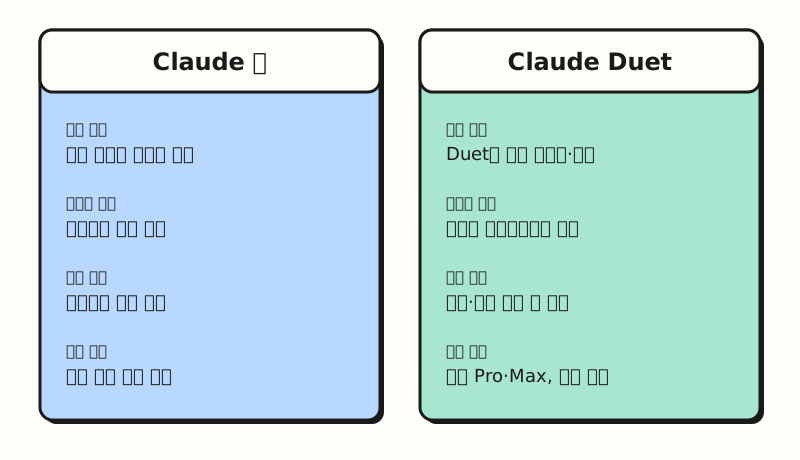 Both apps share the memory, skills, and connectors of the same Claude account (figure labels in Korean).
It's also notable how little you need to set up. Duet runs on your Claude account, so it uses the memory and skills you've built up in Claude and the connectors you've already linked, right from the first message. The announcement and product page say you can use more than 6,000 connectors and plugins from the Claude Marketplace, but the Marketplace connector list shows 995 connectors as of October 22, 2026, so the official documentation doesn't confirm how the 6,000 figure was counted. Of the examples in the announcement, here are the ones closest to a marketer's work.
- Gmail and Slack: Finds messages you missed and helps you reply.
- HubSpot: Drafts follow-up emails from contact and deal records.
- Canva: Turns a product launch announcement into a social campaign.
- LinkedIn: Drafts job postings and publishes them once you edit and approve.
On the other hand, some things don't work yet. According to the help article, some connectors such as Slack work with limitations, and Microsoft 365 isn't available yet. If your company runs on Outlook and Teams, that's why you should check this first.
4. What does it do on its own, and when does it ask for approval?
For an agent that can reach your inbox and payment methods, this is probably the biggest concern. Duet reads, drafts, and prepares work on its own, but before sending a message, making a payment, signing a document, or deleting something, it shows you exactly what it plans to do and waits for approval. If you can't approve right away, it finishes the rest of the work first and comes back for approval later. There are also things it won't do even with approval, such as securities trades and transfers between accounts.
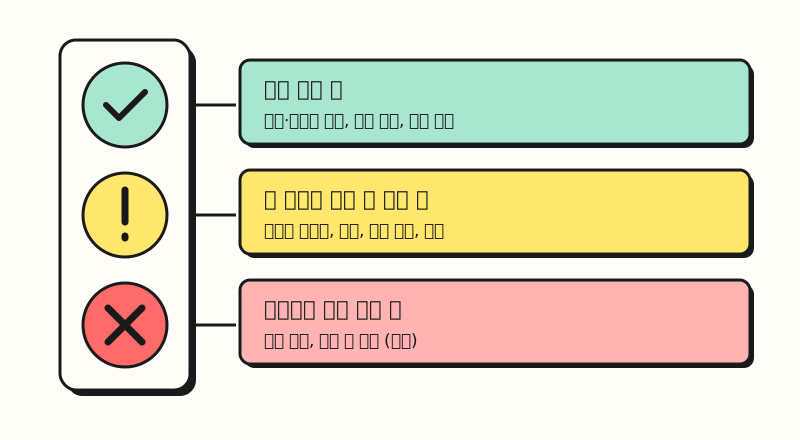 This figure includes only the examples given in the announcement and help article; it is not the full list of prohibited actions (figure labels in Korean).
The announcement also describes safeguards for sensitive information. A new classifier and a safety system prompt check every message: requests to share information in the strictest tier, such as credit card or ID numbers, are declined, and health or personal financial information is sent out only when you explicitly tell it to. Duet is designed not to see passwords and login tokens directly, and for purchases it pays with a single-use card only for items you approved through Stripe's Link or Shopify's Shop Pay. The help article notes that when Duet gives you numbers or summaries, it tells you which email, file, or spreadsheet they came from, which is handy for tracing sources before you copy them into a report.
Still, the help article itself states that no defense is perfect. Because Duet reads emails and web pages written by other people, it can be exposed to instructions hidden inside them, known as prompt injection, and the article explains this is one of the reasons important actions require approval.
Note: When will it be available in Korea?
For users in Korea, availability is the most important part. Korea is on the list of Claude supported regions, so you can use the Claude app, but Claude Duet is offered only in the US during the research preview. The help article lists three conditions, and you need all of them.
- Plan: Pro or Max. Team and Enterprise are excluded for now, with a note that they're planned for later.
- Account: A US Claude account.
- Invitation: An invite received after joining the waitlist. Access opens in stages, so no date is guaranteed.
The official documentation doesn't yet say when it will expand to other countries, including Korea. Even once it becomes available, keep an eye on usage limits: the help article notes that background work like the morning brief and regular check-ins also counts toward the 5-hour session and weekly limits, so you may hit the limit sooner than with chat alone. Other listed limitations: you can't watch Duet working in its browser, it doesn't call or text other people, and it may misread a thread or misjudge urgency.
To sum up, Claude Duet is Claude's new agent app that watches your email and calendar, reaches out first, and always gets your approval before sending, paying, signing, or deleting. For now it's a research preview for Pro and Max users in the US. Once it's available in Korea, I'll study how much of my daily ad reports and email triage I can hand off to it, and write it up again. For details, see Anthropic's announcement and the Getting started with Claude Duet help article.
FAQ
- Can I use Claude Duet in Korea?
- Not yet. During the research preview, you need a US Claude account on a Pro or Max plan and an invitation from the waitlist. The official documentation doesn't say when it will expand to other countries, including Korea.
- Does Claude Duet cost extra?
- During the research preview, it's included in Pro and Max plans at no extra cost. However, it shares the same usage limits as Claude chat, and background work like the morning brief and regular check-ins also counts toward those limits, so you may hit them sooner than with chat alone.
- What's the difference between Claude Duet and the Claude app?
- The Claude app starts working only when you open a chat, while Claude Duet sends a morning brief, checks your connected apps every few hours, and reaches out first when needed. Because it works on its own computer in the cloud, tasks continue even if you turn off your phone or laptop, and it uses the memory, skills, and connectors from your Claude account as they are.
- Can Claude Duet send email or make payments without my permission?
- It's designed to show you what it plans to do and wait for approval before sending messages, making payments, signing documents, or deleting things. There are also actions it won't take even with approval, such as securities trades and transfers between accounts. That said, Anthropic itself states there's no perfect defense against prompt injection, so it's best to review approval requests and drafts before you tap approve.
Related posts
Posts that will help you understand Claude Duet.
- Chatbots vs. AI Agents vs. Automation | How to Choose the Right AI for Your Work - A from-the-basics look at how agents like Duet differ from chatbots
- Claude Marketplace Launch: Connectors vs. Skills vs. Plugins - The connector and plugin concepts Duet builds on
- How to Use Claude in Google Sheets, Docs, and Slides | Google Workspace Add-on Beta - A Claude feature that uses the edit-after-approval approach inside Google files