Claude Cowork and chat have merged into one Claude. The change started rolling out gradually on September 16, 2026, beginning with the Pro and Max plans, and on October 23 it became generally available on Claude Enterprise as well. You no longer pick "Chat" or "Cowork" in the message box. You just write your request, and Claude decides which tools it needs.
"Is this something to ask in chat, or something to hand off to Cowork?" If you've used Claude to put together reports or organize material, you've probably wondered about this at least once. The Anthropic announcement also cites this as a reason for the merge: users found it frustrating to decide where to send their work, and work started in one place didn't carry over to the other. In this post, I'll go over how Claude Cowork and chat became one, what stays the same and what changed, and when each plan can use it.
What exactly merged between Claude Cowork and chat?
Until now, Claude had chat for quick questions and answers, and Cowork (a work mode where you hand tasks off to Claude) for creating files and handling multi-step work, as separate experiences. After the merge, you can do both in a single conversation. The announcement explains that because Claude figures out what a task needs, what Cowork and Claude Design used to do is available in any conversation, and if a request is unclear, Claude asks a follow-up question.
As an analogy, it's like an office that used to have a separate help desk and workshop, and now has just one person handling everything. Simple questions get answered on the spot, while labor-intensive jobs like a report due by noon get taken into the back workshop, finished, and handed back to you.
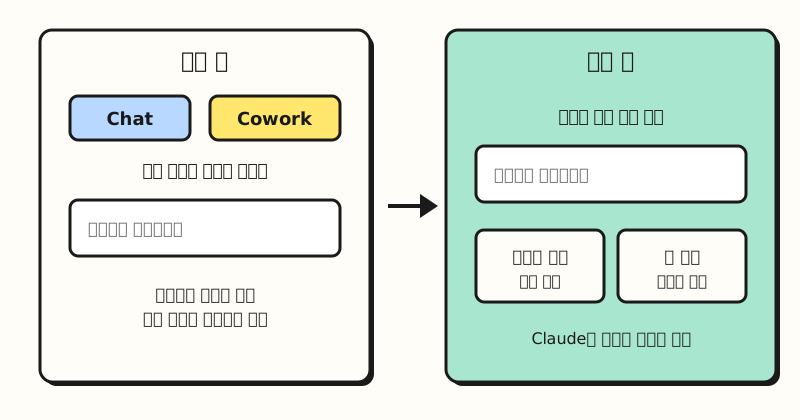 Illustration: not an actual screen, but a simplified diagram of what the help article describes. (figure labels in Korean)
You can tell whether your account has switched by looking at the message box. According to the unification help article, if you still see separate "Chat" and "Cowork" options in the message box, the new experience hasn't been applied to you yet. The timing differs by account even on the same plan, and the article says there's no setting you need to turn on.
Do my existing conversations and settings carry over?
The first worry is probably the work you've built up. According to the help article, chats, Cowork tasks, projects, connectors, skills, artifacts, and files all carry over to the new experience, and existing Cowork tasks open as before. A few things do change.
- Where global instructions live: Instructions that applied to all conversations have moved to "Instructions for Claude" in Settings.
- No going back: Once the new experience is applied, you can't return to the old layout with chat and Cowork separated.
- Local memory: Memory from Cowork tasks that ran only on your computer stays with those tasks.
The help article also lists features that aren't supported yet. Adding content from GitHub, branching conversations, and searching old Cowork tasks aren't supported, and incognito chats open in the previous experience, where you can't create files or run code. If you often attach GitHub repositories, it's a good idea to check this first.
Do handed-off tasks run in the cloud or on my computer?
Of the changes after the merge, the one you'll feel most in day-to-day work is where tasks run. According to the Cowork usage help article, starting October 6, 2026, new Cowork tasks on the Pro, Max, and Ultra plans run in the cloud, and the "Only on your computer" option has been removed. Because cloud tasks run on Anthropic's servers, they keep going even if you close your laptop or leave the page, and you can pick up something you started at your desk in the mobile app.
On the other hand, work that needs things on your computer comes with conditions. The help article explains that connected local folders, the built-in browser, and computer use (a feature where Claude looks at the screen and operates the mouse and keyboard) work only while the Claude desktop app is open.
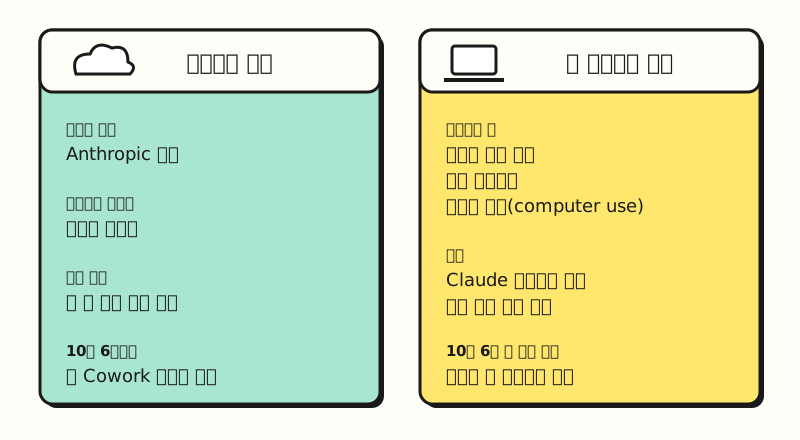 A comparison showing that local folders, the built-in browser, and computer use work only while the desktop app is open. (figure labels in Korean)
The welcome news for marketers is scheduled tasks. The announcement gives the example that if you schedule it for every Monday, Claude starts working on the report without being asked, and the help article says new scheduled tasks run in the cloud, so they execute even with no device turned on. However, if the source material for the report lives only in a folder on your computer, Claude can't reach that folder while the desktop app is closed. So if it were me, I'd first look into keeping the source material for scheduled reports in a drive connected through a connector.
How far does Claude go on its own, and what about usage limits?
How often Claude checks in with you when you hand off work is set through permission settings. The September announcement said the default was "ask before acting," but the recently updated unification help article lists the default as Auto for the Pro, Max, Ultra, and Team plans and Manual for Enterprise. Since the two documents say different things, I went with the help article as the more recent one. You can change it anytime and can also stop or redirect a task mid-way, so if it's your first time handing something off, I recommend checking the setting yourself.
Usage limits are also worth watching. According to the help article, all tasks count toward your plan's usage limit, and agent-style tasks that handle multiple steps generally use more than short questions. It also says that during the rollout, usage may be calculated slightly differently between accounts on the new experience and those not yet on it, so check how much you have left on the Usage screen in Settings.
※ Note: When can each plan use it?
The unified experience rolls out differently depending on the plan. Based on the help article and the Enterprise announcement, here's the summary.
- Pro, Max, Ultra: Rolling out gradually on web, desktop, and mobile. Nothing to turn on.
- Team: In beta. Available only if your organization has turned on "Chat and Cowork unified"; if not, chat and Cowork stay separate.
- Enterprise: Generally available as of October 23, 2026, and the owner turns it on in organization settings. According to the Enterprise setup help article, it's off by default for existing organizations and turns on by default on November 16, 2026. Organizations that turned it on or off themselves before then keep their choice.
- Free: The September announcement only says it's coming "soon," with no date given.
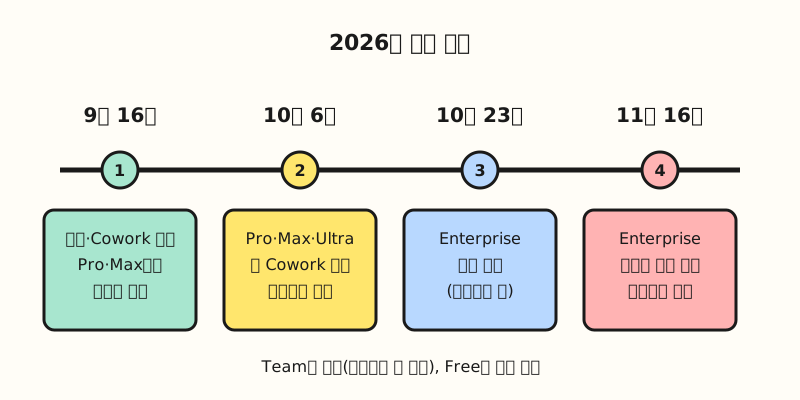 Only dates stated in the official announcements and help articles are included. Team is in beta, and Free has no date yet. (figure labels in Korean)
If you're in an Enterprise organization, you should also check the exceptions. Organizations using zero data retention (ZDR), HIPAA-ready configurations, or customer-managed encryption keys (CMEK) can't use the unified experience, and external internet access for cloud tasks is off by default on Enterprise. For cost control, the documentation also describes an Efficient mode that limits usage to Sonnet and Haiku models, along with spending limits at the organization, group, and member level. Korea is on the list of Claude supported regions, and the unification help article doesn't mention any country-specific restrictions.
To sum up, merging Claude Cowork and chat removes the step of choosing "where to send it" and lets long tasks keep running in the cloud. Just remember that work needing local files requires the desktop app to stay open, and that agent tasks use more of your usage limit. I'm also going to study how much of my weekly recurring report work I can hand off to scheduled tasks, and I'll write it up again. For the latest rollout status by plan, see the unification help article.
FAQ
- What's the difference between Claude Cowork and chat now?
- On accounts with the new experience, you don't need to choose. Write your request in the single message box, and Claude answers simple questions right away and handles file creation or multi-step work as a task, the way Cowork did. If you still see separate "Chat" and "Cowork" options in the message box, the new experience hasn't been applied to your account yet.
- Can I use the unified Claude experience on the Free plan?
- No date has been set yet. The September 2026 announcement only says the Team and Free plans will follow soon, and it's currently rolling out gradually to Pro, Max, and Ultra. Team can use it as a beta if the organization turns it on.
- Do Claude Cowork tasks keep running if I close my laptop?
- Tasks running in the cloud keep going. Starting October 6, 2026, new Cowork tasks on Pro, Max, and Ultra run in the cloud. However, steps that need connected local folders, the built-in browser, or computer use work only while the Claude desktop app is open.
- When does Claude Enterprise switch to the unified experience?
- Starting October 23, 2026, owners can turn it on in organization settings, and existing organizations that haven't made a choice will have it turned on by default on November 16, 2026. Organizations that turned it on or off themselves before then keep their choice. Organizations using zero data retention (ZDR), HIPAA-ready configurations, or customer-managed encryption keys (CMEK) can't use it.
Related posts
Here are some posts that can help you understand the unified Claude experience.
- Claude Duet explained: a Claude agent that reaches out first, and can you use it in Korea? - Another Claude agent app that works in the cloud and asks for approval
- Claude Marketplace launch: how connectors, skills, and plugins differ - The connector and skill concepts that carry over to the unified experience
- Chatbots vs. AI agents vs. automation: how to pick the right AI for the job - A from-the-basics look at the difference between chatting and handing off work