On October 22, 2026, Anthropic donated the Agent Skills standard to the Agentic AI Foundation (AAIF), which sits under the Linux Foundation. A skill is a folder that teaches an AI agent how to handle a specific task, and the same format is already read not only by Claude but by tools like ChatGPT and GitHub Copilot. With this donation, the format is now managed by a neutral foundation rather than a single company, so the path to building a skill once and using it across multiple tools has become a little more solid.
You've probably caught yourself thinking, "I'm tired of explaining our team's report format to the AI every single time." Skills are a way to bundle that explanation into files. In this post, I'll go over what changed with the Agent Skills donation, how skills work, and what to check when you use the same skill across different tools.
What Was Announced With the Agent Skills Donation?
According to Anthropic's announcement, what was handed over is the Agent Skills name and logo, the GitHub organization, and the agentskills.io domain where the specification lives. AAIF is a foundation launched under the Linux Foundation in December 2025, when Anthropic, Block, and OpenAI each donated a project, and what Anthropic contributed back then was MCP (Model Context Protocol, a standard for connecting AI tools to external services).
The Linux Foundation press release published the same day shows that Agent Skills joined AAIF as a new project alongside OpenAI's Open Responses, Hugging Face's OpenEnv, and Alibaba's OpenSandbox. That brings the number of projects under AAIF to 10, and MCP and AGENTS.md are on that list too.
Here are the upcoming changes the announcement laid out.
- Governance: Engineers from multiple companies, including Anthropic, Google, and OpenAI, will maintain the standard in a personal capacity rather than as company representatives.
- Roadmap proposals: It proposed starting with versioned releases, a formal proposal process, and security guidance for people who build and install skills.
- Terms of use: You can use or contribute to the standard without joining AAIF.
The announcement said that since the standard was published in December 2025, more than 70 agent platforms, including ChatGPT, Cursor, GitHub Copilot, and VS Code, have adopted Agent Skills, and that 1 million skills have been published and installed close to 280 million times so far. So what exactly are these widely used skills?
What Are Agent Skills, and How Do They Work?
The agentskills.io overview describes a skill as a folder containing a SKILL.md file. At the top of SKILL.md you write a name (name) and a description (description), and below that you write the task instructions in Markdown. If needed, you can put scripts, reference documents, and templates in the same folder, but for a simple skill, instructions alone without any code are enough.
The reason the AI doesn't slow down even with many skills is a method called progressive disclosure.
- Discovery: When the agent starts, it reads only the name and description of each skill.
- Activation: When a request matches a skill's description, it reads the full SKILL.md at that point.
- Execution: It follows the instructions and opens the attached scripts or reference files only when needed.
It's easy to picture as a binder of work manuals on a new hire's desk. Normally they only look at the cover and the table of contents, and only on the day they need to write the monthly report do they open that chapter and read it. Since they don't have to memorize the whole binder, it doesn't matter much how many manuals there are.
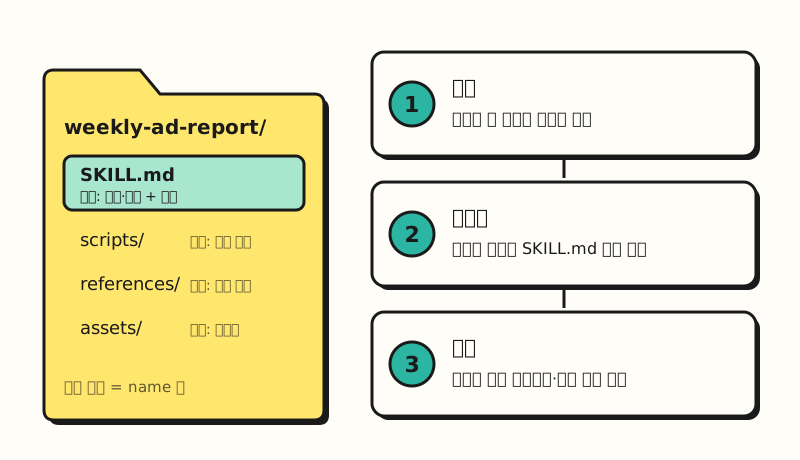 A SKILL.md alone makes a skill; the other folders are added only when needed. (figure labels in Korean)
How Are Skills Different From MCP or Custom Instructions?
There are a lot of features that look similar, so it's easy to get confused. Claude Help Center's guide to skills distinguishes the three like this.
| Type | What it does | Scope |
|---|---|---|
| MCP | Connects to external services and data | The services and data you connect |
| Skills | Teaches the procedure for a specific task | Loaded only for relevant tasks |
| Custom instructions | Default settings applied to every conversation | Every conversation |
If MCP lets the AI open an ad report in Google Drive, a skill teaches it how to summarize that report in your team's format. The Help Center guide also explains that when you use both together, MCP gives access to the tool and the skill teaches how to use that tool well. I've written more about the differences between connectors, skills, and plugins in my Claude marketplace post.
So if you move a skill you built in Claude to another tool, will it work as is?
Where Can You Use a Skill Once You've Built It?
Because Agent Skills is an open standard, multiple tools can read the same format, but each tool has a slightly different way of adding skills.
- Claude: According to the help article on using skills, skills are available on the Free, Pro, Max, Team, and Enterprise plans, and code execution must be turned on. You zip the skill folder and upload it under "Customize > Skills."
- ChatGPT and Codex: OpenAI's skills documentation says standalone skills can be used in the ChatGPT desktop app, Codex CLI, and IDE extensions, and skills bundled in a plugin can also be used on web and mobile.
- GitHub Copilot: According to the GitHub docs, skills can be used in agent mode in the Copilot app, Copilot CLI, the cloud agent on GitHub.com, VS Code, and more. Put them in the repository's
.github/skills,.claude/skills, or.agents/skillsfolder and they get picked up.
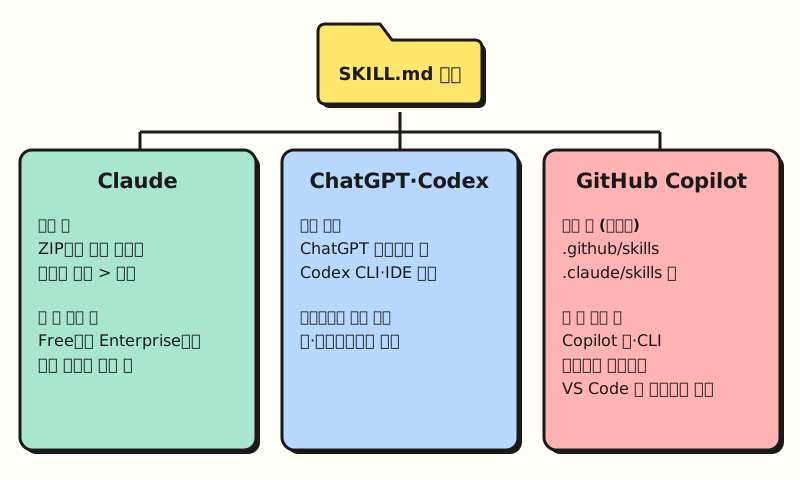 Where and how you add skills differs by tool, so please check each tool's documentation first. (figure labels in Korean)
The VS Code docs also note that skills are portable between compatible agents, but supported locations and optional features vary by agent. The format being the same doesn't mean it behaves identically in every tool.
※ Note: What to Check Before Moving a Skill to Another Tool
Even when tools follow the standard, their rules differ slightly, so there are a few things worth knowing in advance.
- Description length: The Agent Skills specification sets a maximum of 1,024 characters for
description, but Claude's help article on creating skills gives a maximum of 200 characters. If a skill will be used in multiple tools, it's safer to fit the shorter limit and put the key point first. - Naming rules: Per the specification,
namecan only use lowercase letters, numbers, and hyphens, and it must match the folder name. - Script execution environment: A skill that includes scripts works properly only if the tool can run code.
- Security: The Claude help article advises caution when including scripts, not writing API keys or passwords in the files, and reviewing downloaded skills before turning them on. Security guidance for people who build and install skills is what Anthropic proposed as the first item on the AAIF roadmap.
Installing a skill someone else made as is, in particular, is a bit like slipping a chapter written by a stranger into your manual binder. If the agent is connected to work data, I recommend opening the instructions and scripts at least once.
Which Skill Should Marketers Build First?
Examples of custom skills that the Claude help article gives include applying brand guidelines, writing communications that follow company email templates, organizing meeting notes into a format, and company-specific data analysis procedures. In marketing practice, tasks where you repeat the same explanation every week, such as summarizing the weekly ad report or drafting press releases in a set format, are a good starting point, and you can start with a single instruction-only SKILL.md like the one below.
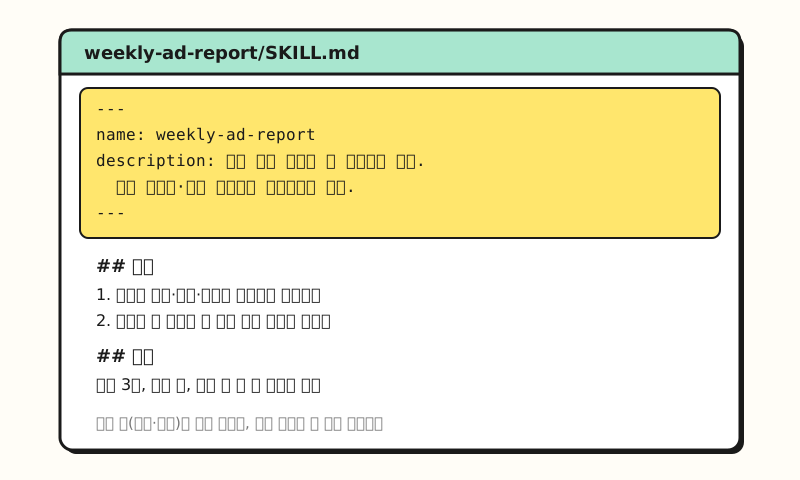 Example figure: a fictional skill I made myself, not an actual company format. (figure labels in Korean)
The specification recommends keeping SKILL.md under 500 lines and splitting detailed reference material into separate files. The Claude help article also explains that small skills split by task work together better than one big skill, and since the AI picks a skill by reading its description, it's important to state clearly in the description when to use it.
With Agent Skills moving to a neutral foundation, the skill format has become closer to a work manual that isn't tied to any one company's tools. I'll also try splitting the instructions I use for my blog work into skills and put together the differences between tools again. For the specification and examples, please refer to agentskills.io and each tool's help documentation.
FAQ
- Are Agent Skills free to use?
- The standard itself is open, so you can use or contribute to it without joining AAIF. However, the tools that run skills have their own plan requirements. For example, Claude lets you use skills on every plan from Free to Enterprise, but code execution must be turned on.
- Can I use a skill I made in Claude in ChatGPT or GitHub Copilot too?
- All three tools follow the Agent Skills standard, so they can read the same SKILL.md format. However, where you put skills, description length limits, and whether scripts can run differ by tool, so you need to check each tool's documentation and adjust.
- Should I start with skills or MCP?
- MCP is a standard for connecting to external services and data, while skills are a format for teaching task procedures, so they play different roles. If the job is repeatedly organizing materials you already have into a set format, start with skills; if the AI needs to read data from external tools, start with an MCP connector.
Related Posts
- Claude Marketplace Launch: How Connectors, Skills, and Plugins Differ - The differences between skills, connectors, and plugins
- Chatbots vs AI Agents vs Automation - Basic concepts for understanding agents
- Claude Duet Overview - A Claude agent app that uses the same account's skills and connectors