Google Ads Data Strength refers to the work of connecting first-party data to Google Ads and sending complete signals with every conversion, so that measurement and automated bidding have the material they need. Google recommends connecting sources with Data Manager, increasing signals with the Google tag gateway and enhanced conversions, and sending three or more identifier signals per event. The October 2026 Demand Gen update also put Data Strength up front as its first topic.
"Why are the ad platform's conversions so different from our order data?" It's a question you've probably heard at least once while looking at ad reports. Working in digital marketing, I've seen the number of Google feature names aimed at closing this gap keep growing, so I wanted to pin down "Data Strength," the term that ties those features together. In this post, I'll go over what Google Ads Data Strength is, what to connect and which signals to send at each step, and where to check the impact.
1. What Is Google Ads Data Strength?
The Google Ads Data Strength best practices help article divides the process of connecting first-party data, strengthening signals, and using Google AI to improve measurement accuracy and ROI into four steps. First-party data is data advertisers collect directly from their own websites, apps, and CRM (customer relationship management system). When cookies are blocked or users switch devices, the link between an ad click and a purchase easily breaks, and filling those gaps with the advertiser's own data is the starting point of Data Strength.
It's a bit like doing a jigsaw puzzle. You can guess the picture even with a few pieces missing, but the more pieces you have, the closer you get to the actual picture rather than a guess. Automated bidding works the same way: the more numerous and accurate the conversion signals, the better it can choose which clicks to spend more on.
The term got renewed attention because of announcements in fall 2026. In its September 10 measurement update announcement, Google said it would bring Data Manager into Google Analytics and Display & Video 360 (DV360), and in the October 13 Demand Gen update, it put Data Strength first and announced that a Data Strength Uplift metric is coming to Google Ads.
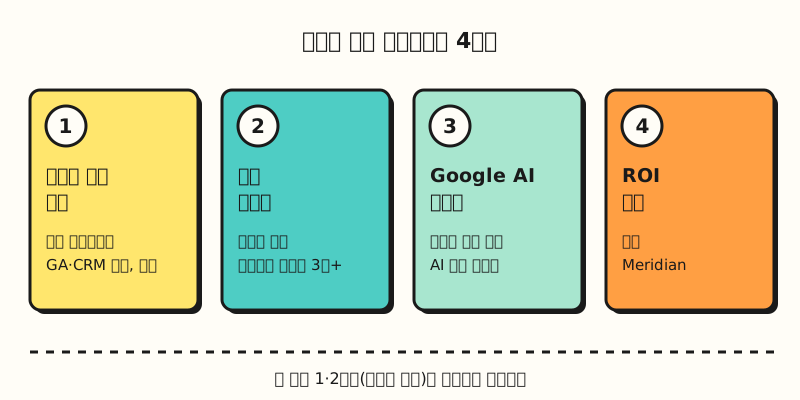 A figure laying out the four steps from the Data Strength best practices help article in a single row. (figure labels in Korean)
So what should you connect in the first step?
2. Step 1: How Do You Connect Data Sources?
The Data Strength best practices help article lists four connection tasks.
- Google tag gateway: A feature that changes the Google tag or Google Tag Manager (GTM) container on your site to load through the advertiser's own domain.
- Link Google Analytics: Link your Google Ads and GA accounts. To optimize app conversions you need the Google Analytics for Firebase SDK, and if you've already linked through Data Manager, you shouldn't create the same link again in Analytics.
- Connect offline sources: Connect CRM, cloud, and store data to Data Manager, either through the interface (UI) or with the Data Manager API.
- Run diagnostics: After connecting, use diagnostics to catch setup errors early and check that conversion signals aren't being cut off.
According to the Google tag gateway for advertisers help article, the gateway sends measurement signals through the advertiser's domain so tags work more reliably. It uses the content delivery network (CDN), load balancer, or web server you already have, and offers an integration with Cloudflare that connects in a few clicks. The Google developer documentation also separately covers how to use it with server-side tagging.
According to its help article, Data Manager is located under the Tools icon in the left menu of Google Ads. A source you connect once can be reused in multiple places, so for example, after uploading BigQuery data for enhanced conversions for leads, you can use the same connection for Customer Match targeting.
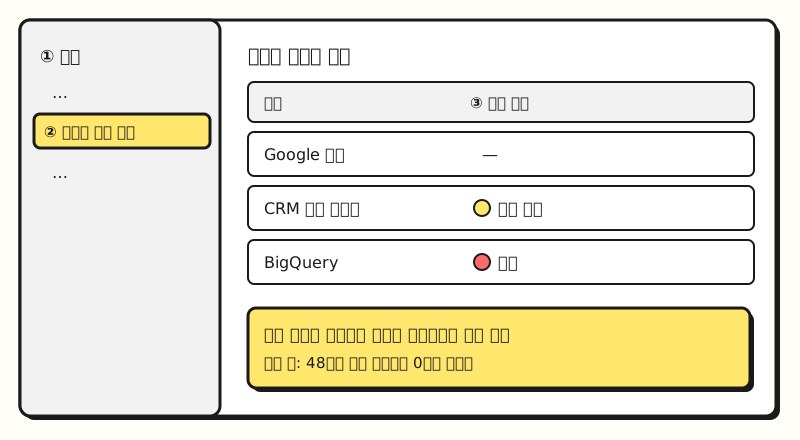 Example figure: where you go from the Tools menu into Data Manager to see connection status (not an actual screenshot). (figure labels in Korean)
Once your sources are connected, what information should you send with each conversion?
3. Step 2: Which Signals Should You Send With Each Conversion?
The core of the second step is enhanced conversions. According to the enhanced conversions help article, when a conversion happens, first-party customer data such as email address, name, home address, and phone number is converted with a one-way hashing algorithm called SHA256 and sent to Google, which matches it against signed-in Google accounts that interacted with the ads. For purchases that complete on the website you use enhanced conversions for web, and for inquiries received on the web that turn into deals off the site you use enhanced conversions for leads. In both cases, the customer data must be collected with consent.
The Data Strength best practices help article also lists identifier signals to send alongside customer data.
| Signal | What it does |
|---|---|
| GCLID | A click ID attached to every ad click that tracks the campaign that drove the sale |
| IP address | Serves as an additional matching signal when the click ID is missing or low quality |
| Transaction ID | Links orders on the website to sales records in the backend |
| Session attributes | Records session information such as campaign ID, landing page URL, and timestamp |
| GBRAID/WBRAID | URL parameters that supplement click-based conversions when the GCLID is missing; the help article gives iOS and incognito browsing as examples |
There are two recommended standards: send three or more identifier signals per event, starting with GCLID and IP address together with hashed customer data, and send all conversion events, not just some. The help article explains this helps bid optimization, since the material automated bidding learns from is ultimately these conversion events. According to the IP address help article, there's nothing extra to do for IP addresses if you use the Google tag, and when uploading offline conversions, you need to include the customer device's IP address, not the server's, unhashed.
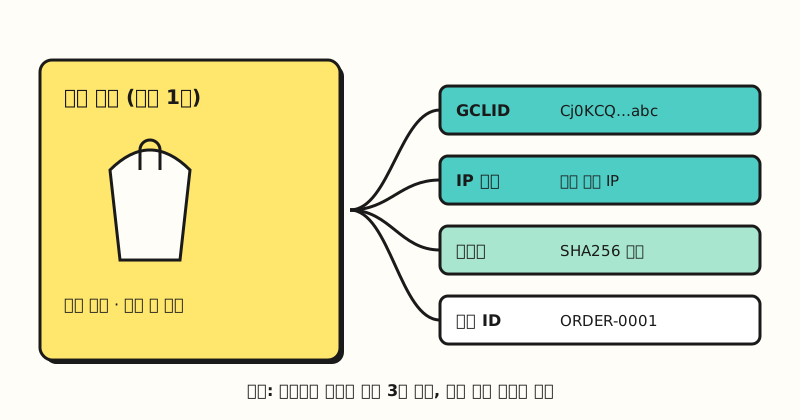 Example figure: multiple identifier signals bundled and sent with a single order (sample values). (figure labels in Korean)
So where can you see the effect of adding these signals?
4. Where Do You Check the Impact of Data Strength?
First, you check whether the connections are running properly with diagnostics. According to the data source diagnostics help article, connection quality has two statuses: Needs attention and Urgent. Needs attention means data is coming in but there's an issue to fix, while Urgent means data can't be imported and measurement is affected. For example, if data drops to 0 for 48 hours it becomes Urgent, and if the transaction ID match rate between the Google tag and an additional source has been below 10% over the last 2 days, you're alerted to "possible conversion over-counting."
The size of the impact is shown by a new metric, Data Strength Uplift. The September announcement explains that this metric shows, as a number, the additional conversions recovered thanks to your first-party data setup. However, the October Demand Gen announcement also only says it's "rolling out," and I haven't yet found a dedicated help article, so it may not be visible in every account yet.
Google has also shared impact figures. According to the Data Strength best practices help article, customers using the tag gateway saw an average 14% increase in actually measured conversions, and in Demand Gen campaigns the average increase was over 20%. Both are based on Google's internal data, which doesn't mean you'll see the same lift in your account, so it's better to compare before and after setup yourself. Step 3 (activate Google AI) and Step 4 (prove ROI) are about using the signals you've built up for Smart Bidding, experiments, and the marketing mix model Meridian.
※ Note: What Should You Know When Working on Data Strength?
- Consent and policy come first for customer data: Both enhanced conversions and IP address uploads require informing users that data is collected and getting their consent, and you must follow Google's customer data policies. You should also check that what's stated in your privacy policy matches what you actually collect.
- GA4 enhanced conversions are in public beta: The help article on enhanced conversions in Google Analytics marks the feature as public beta and notes it can take up to a month for improvements to be reflected in reports and bidding. The October Demand Gen announcement says GA and DV360 enhanced conversions are coming "soon," so the general availability date isn't clear yet.
- The tag gateway affects how tags work: The GTM and Cloudflare setup help article warns that turning on this feature affects how Google tags run, and advises that if your tags currently behave differently based on user consent, you should use consent mode and review your consent settings. I recommend checking your consent banner and tag setup together before turning it on. For how GTM tags and triggers are structured, see my GTM basics post.
To sum up, Google Ads Data Strength is a series of tasks: connecting sources with Data Manager, increasing signals with the tag gateway and enhanced conversions, and sending three or more identifiers with every conversion. When I look at ad accounts, I'm going to start by checking the connection quality status in Data Manager. For step-by-step details, please refer to the Google Ads Data Strength best practices help article.
FAQ
- Do enhanced conversions send customer emails to Google as is?
- No. According to the enhanced conversions help article, customer data such as email addresses is converted with the SHA256 one-way hashing algorithm before being sent to Google, and Google reports only conversions processed in a privacy-safe way. However, you need to get user consent before collecting it.
- Do I have to change all the tag code on my pages to use the Google tag gateway?
- It depends on how you set it up. With CDNs that support an integration, like Cloudflare, you can connect automatically from Google Tag Manager or the Google Ads interface, and the guided setup through Tag Assistant ends with a step to set up the tag on your site again. If you configure it yourself, you also need settings on the CDN, load balancer, or web server side.
- What should I send as the three identifier signals in Data Strength?
- The Data Strength best practices help article recommends sending three or more identifier signals per event, starting with GCLID and IP address together with hashed customer data (email, phone number, etc.). Transaction ID, session attributes, and GBRAID/WBRAID are also signals you can send.
Related Posts
Here are posts worth reading when reviewing conversion measurement and bidding together.
- What Is Conversion Modeling? How Google Ads and GA4 Estimate Missed Conversions - How Google fills in unobserved conversions with estimates
- Google Ads Bidding Strategy Basics: Manual CPC vs Smart Bidding - The basics of Smart Bidding, which learns from conversion signals
- GTM Tags, Triggers, and Variables: Google Tag Manager Basics - The GTM structure to know before turning on the tag gateway