Gemini Connected Apps is a feature that lets you call on Google apps like Gmail and Drive, or outside services like Adobe and monday.com, from inside a Gemini chat to find information or hand off tasks. Google announced on September 23, 2026 that it had added new apps including Adobe, Airtable, monday.com and Webflow, but the official help pages show that the countries and languages where each app works differ, so in Korea you need to check the conditions first. In this post I've summarized the concept of Connected Apps, the apps added in September, what's available in Korea, and the settings to look at before connecting.
"Can't I just ask Gemini to find a Gmail message for me?" Once you start using AI chat for work, you notice you copy and paste material far more often than you'd think. As I studied it, I found that Gemini Connected Apps is exactly the feature meant to cut down on that hassle, and in September, design and work management tools familiar to marketers joined the list. In this post I'll go through what to know before connecting the Gemini app to your work.
1. What are Gemini Connected Apps?
The Gemini Apps Help Center describes Connected Apps as a feature that lets Gemini connect to other apps to handle your requests and give more helpful responses. There are two ways to use it.
- Turn it on in settings: in Gemini, go to Settings → Connected Apps, turn on the apps you want, and follow the permission prompts on screen.
- Call it from chat: type
@in the message box and choose an app to direct your request to that app. If you don't specify an app, Gemini may pick the right one itself.
To put it in an analogy, it's like handing an assistant the keys to your drawers one at a time. For the drawers you've given keys to (the connected apps), the assistant can open them directly to find or organize material, and the drawers you haven't given keys to stay closed. And just as you can take a key back at any time, you can turn off a connection in settings whenever you like.
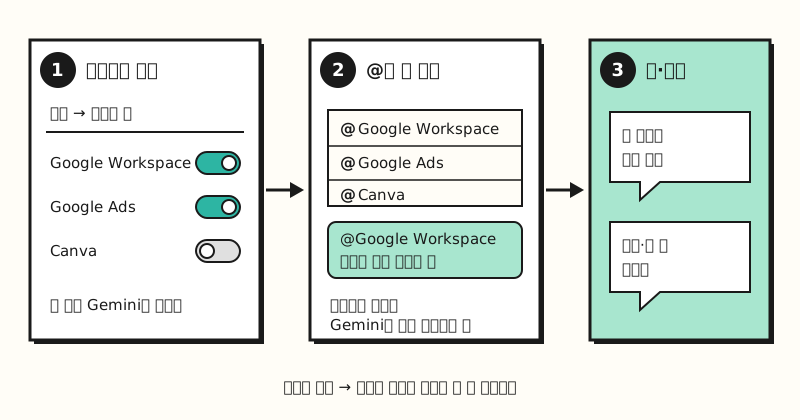 Example figure: not a real screen, but a simplified drawing of the steps described in the Help Center (figure labels in Korean).
So which apps came in this September?
2. Which Gemini apps were added in September?
In its September 23 announcement, Google introduced the new Connected Apps in three groups.
| Category | Apps added |
|---|---|
| Productivity | Airtable, Linear, monday.com, PandaDoc, Wispr AI, Zoho |
| Creative | Adobe, Picsart, Squarespace, Webflow |
| Lifestyle | apartments.com, Experian, Peloton, SeatGeek |
The announcement emphasized that you can handle project management, design work and workout plans in one place without switching tabs. In an earlier August 12 announcement, Google had also said it would roll out apps like Granola, Otter.ai and Wix, so outside services have grown two months in a row. Beyond these, Google Workspace apps like Gmail, Calendar and Drive, plus Canva, Spotify, GitHub, Dropbox and others, are already on the list.
But does being on the list mean you can use all of them in Korea?
※ Note: which Gemini Connected Apps can you use in Korea?
The Connected Apps availability table lists separate location, language, account type and age requirements for each app. Looking only at the apps added in September, the conditions vary quite a bit.
- US only: Airtable, Linear, PandaDoc, Picsart, Squarespace and Webflow list the US as their only location.
- India only: Zoho (Bigin, CRM, Desk, Mail, Projects) is available only in India.
- All supported countries, English only: Adobe, monday.com and Wispr AI are available in countries where both Gemini and the service are supported, but only in English.
On the other hand, some apps marketers use every day have more generous conditions. Google Workspace (Gmail, Calendar, Drive, Docs, Sheets and more) works in every language the Gemini web app supports, and you can connect personal, work and school accounts. Canva and Google Ads are available in all supported countries, but only in English. Also, most outside apps are limited to users 18 or older with a personal Google account, so if you use Gemini with a work account, there aren't many apps you can connect.
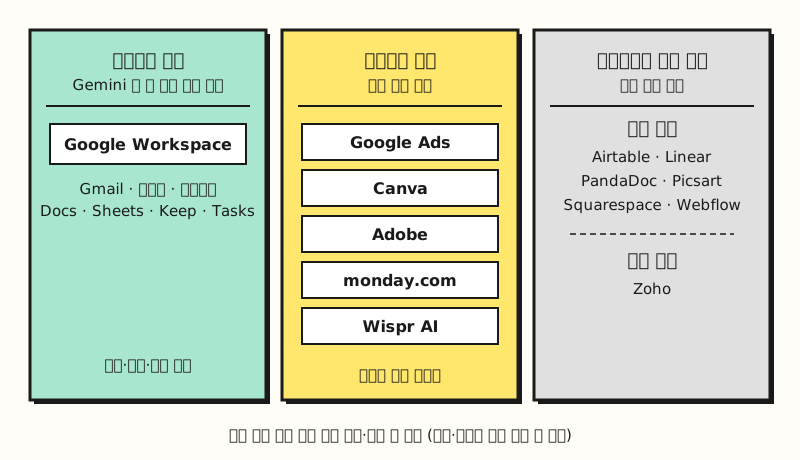 Grouped by the location and language columns in the official table; actual availability may vary by account and device (figure labels in Korean).
The help pages also note that Connected Apps availability varies by location, language, device and Gemini app, so even an app in the table may work on the web but not on mobile.
3. Which Gemini apps are worth trying first as a marketer?
Once you look at the conditions, the apps worth trying first for a marketer in Korea narrow down to two: Google Workspace, which you can use in Korean right away, and Google Ads, which you have to use in English but which lets you ask about ad performance directly.
If you connect Google Workspace, as described in the Workspace connection help page, you can find and summarize information in Gmail, Docs and Drive, add to-dos to Google Tasks, create notes in Google Keep, and create events in Calendar. For example, you could ask it to find and summarize last week's emails with your ad agency, or to add a meeting to your calendar. If the connection doesn't work, the help page says to check that Smart features in other Google products is turned on in Gmail settings, and for work accounts, your Workspace admin has to allow app connections first.
If you connect Google Ads, as described in the Google Ads connection help page, you can ask whether your ads are showing, how they're performing, and how to improve them. The example questions in the help page are all in English, like "How are my Google Ads performing?", and since English is the only supported language, you need to ask in English too. You have to sign in with a personal Google account, the Keep Activity setting has to be on, and it isn't available in Gems or Gemini Live. The help page also says that if you reopen an old chat, the ad data in it may be out of date, so I recommend starting a new chat when you ask about performance.
4. What should you check before connecting?
Before handing over the keys, it's good to know what the assistant will get to see. The Gemini Apps Privacy Hub lists the information Gemini exchanges when it works with Connected Apps.
- Information from your Gemini chats
- Device and preference information (such as language)
- Location information
- Information and content from connected apps (emails, files, events, photos, videos, etc.)
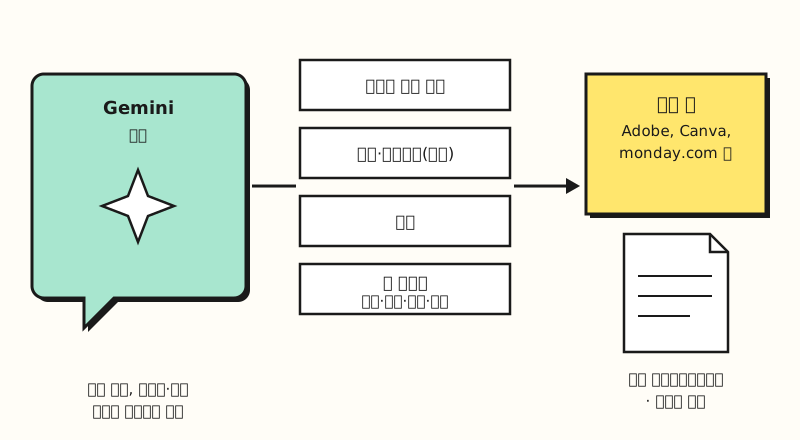 Information passed to an outside app is governed by that app's privacy policy and terms, not Google's (figure labels in Korean).
The part to note here is that outside apps use the data they receive from Gemini according to their own privacy policies and terms. Google also advises not to enter confidential information you wouldn't want a reviewer to see, and for tasks where Gemini operates a screen on your behalf, it asks you not to enter login or payment information in the chat. That's also why I recommend checking your company's security rules before connecting an account that holds work email or customer data. If you feel uneasy after trying it, you can turn off the connection at any time in Settings → Connected Apps, so starting by turning on just the one app you need is a reasonable approach.
Summary
Gemini Connected Apps lets you call on Google apps and outside services from within a chat, and with Adobe, Airtable, monday.com and others added on September 23, the options on the work-tool side have widened. However, many of the newly added apps are US only or English only, so in Korea a realistic order is to connect Google Workspace first and try Google Ads, Canva and Adobe in English. The conditions for each app change often, so please check the official availability table once more before connecting. I'll revisit this as I connect it to my own work.
FAQ
- Where do I turn Gemini Connected Apps on and off?
- Go to the Connected Apps menu in Gemini's settings and turn each app on or off. You can also type @ in the chat box and choose an app to direct your request to it. You can turn off a connected app at any time from the same menu.
- Can I use the Gemini Connected Apps added in September in Korea?
- Only some of them. According to the official availability table, Airtable, Linear, PandaDoc, Picsart, Squarespace and Webflow are US only, and Zoho is India only. Adobe, monday.com and Wispr AI are available in countries where Gemini and the service are supported, but only in English.
- What can I ask once Google Ads is connected to Gemini?
- The official help page gives examples like whether your ads are showing, how they're performing and how to improve them. It's supported only in English, you must be 18 or older and signed in with a personal Google account, and the Keep Activity setting must be on.
- What information goes to outside apps when I connect them to Gemini?
- According to the Gemini Apps Privacy Hub, information from your chats, preferences such as device and language, location, and content from connected apps such as emails, files and events can be exchanged. Outside apps use the data they receive according to their own privacy policies and terms.
Related posts
- Claude Marketplace Launch: Connectors vs Skills vs Plugins - compare how Claude connects to outside tools
- Chatbots vs AI Agents vs Automation: What's the Difference? - how AI that takes on work through connected apps differs from a chatbot
- Google Ads Bidding Strategy Basics: Manual CPC vs Smart Bidding - basics worth knowing before asking Gemini about Google Ads performance