On October 7, 2026, Google opened SynthID Detector, its tool for checking AI-generated images, to everyone. You upload an image, video, or audio file, and it checks whether it was made with AI from Google or its partners (OpenAI, NVIDIA, Kakao, and soon Apple). It's currently offered in English, and similar checking features are also built into the Gemini app and Google Search.
"Wait, was this ad image made with AI?" If you review customer review photos or collaboration content, you've probably wondered this at least once, and it's getting harder and harder to tell just by looking. Working in digital marketing, I'm using AI-made creatives more often and also more often wondering whether creatives I receive were made with AI, so I looked up this announcement in the official docs. In this post I'll go over what changed with the SynthID Detector launch, and how to check in the Gemini app and read the results.
1. What changed for checking AI-generated images with SynthID Detector?
SynthID is a digital watermarking technology Google released in 2023 that embeds a signal people can't notice into AI-generated content. Google said it has watermarked more than 180 billion images and videos and 240,000 years' worth of audio so far. The question was who could check that watermark, and how.
When the checking tool, SynthID Detector, was first introduced in May 2025, it was open only to some testers, and journalists, media professionals, and researchers had to sign up for a waitlist. In this announcement, Google said it is opening the tool to everyone, available worldwide in English starting October 7.
There are three places you can check, and each covers a slightly different scope.
- SynthID Detector (synthid.com): Checks images, videos, and audio made with AI from Google and its partners (OpenAI, NVIDIA, Kakao, and soon Apple).
- Gemini app: Upload a file and ask, and it checks for SynthID watermarks and Content Credentials. The help article says it currently only recognizes content made with Google AI tools.
- Google Search and Chrome: The May 2026 announcement said you can ask "Is this AI generated?" in Lens, AI Mode, Circle to Search, and Gemini in Chrome to check where an image came from.
Google said the checking features in Search, the Gemini app, and Chrome now handle more than 1 million requests a day.
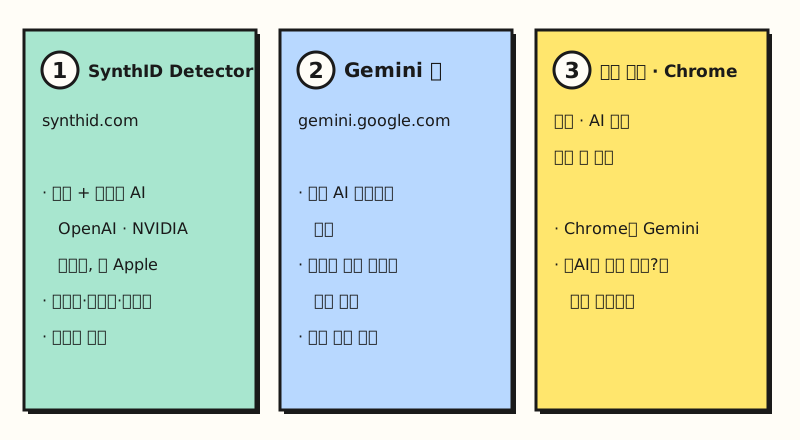 Illustration: The checking scope described in Google's announcement and the Gemini app help article, side by side (figure labels in Korean).
So how do you find a watermark you can't even see?
2. How do SynthID watermarks differ from Content Credentials?
SynthID is similar to the hidden watermark image in a banknote. Like the hidden image that's normally invisible but shows up when you hold it to the light, a SynthID watermark is invisible to the human eye and only shows up when you scan it with a checking tool. According to the help article, the watermark usually survives resizing, color changes, or compression of images, videos, and audio, but it may not be detected after multiple changes.
Along with SynthID, the Gemini app also checks Content Credentials. The help article describes them as working "like a digital passport." They're an industry standard created by the C2PA (Coalition for Content Provenance and Authenticity) that records content's origin and edit history in the file, and they're used for both AI and non-AI content.
| Category | SynthID watermark | Content Credentials (C2PA) |
|---|---|---|
| Where it lives | Embedded invisibly in the content itself | Origin and edit history attached to the file |
| What it tells you | Whether it was made or edited with Google AI | The tool used to make it, edit history, whether AI was used |
| Limitation | May not be detected after multiple changes | Doesn't tell you for certain whether it was made with AI |
In the May announcement, Google introduced Pixel 10 as the first smartphone to add Content Credentials to images from its default camera app. In other words, Google sees proving an original camera shot as just as important as finding what was made with AI.
3. How do you check in the Gemini app?
SynthID Detector is offered in English, but Google's December 2025 announcement said the Gemini app's image and video checking works in every language and country the Gemini app supports. The Gemini web app supports South Korea and Korean, so you can ask in Korean too. On a computer, you check like this.
- Sign in to gemini.google.com. You need a personal account or an eligible Workspace account.
- Click Add files and upload a file from your device, photo library, or Google Drive.
- Ask something like "Was this image generated or edited with Google AI?" or "Is this AI-generated content?"
When uploading, you need to follow the requirements in the help article.
- One file at a time, 100MB or less
- Videos under 90 seconds, audio under 1 hour
- Crop screenshots to the edges of the image as closely as possible, and don't upload a collage of multiple images
- Daily limit: Within 24 hours, about 10 image checks, about 10 video checks (5 minutes total), and about 10 audio checks (3 hours total)
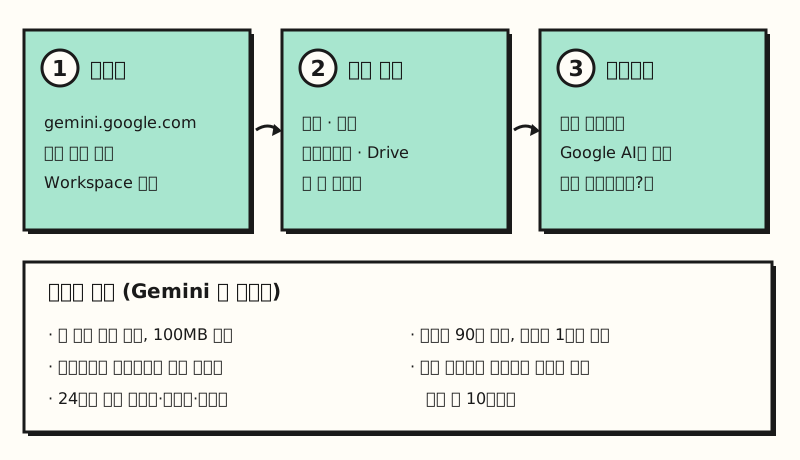 Illustration: The checking steps and upload requirements from the help article laid out as steps; not an actual Gemini screen (figure labels in Korean).
To check in Search, you select an image with Lens or Circle to Search and ask something like "Is this AI generated?" The May announcement doesn't list any specific regions or languages. So I couldn't confirm from the official docs whether you get the same answer on Korean search results. If you check through Search, I'd suggest keeping that in mind.
4. How should you read the results?
The most important thing to watch when reading results is that "not detected" doesn't mean "made by a person." Here's how the help article interprets results.
- SynthID detected: All or part of the image was generated or edited with a Google AI model.
- SynthID not detected: It wasn't made or edited with Google AI, but it could have been made with another AI system.
- Hard to determine: Very simple or abstract content may lack enough detail to hold a watermark, and very small edits may not have a detectable watermark.
- Videos: It tells you which segments the watermark was detected in, but that doesn't mean it was detected throughout that entire segment.
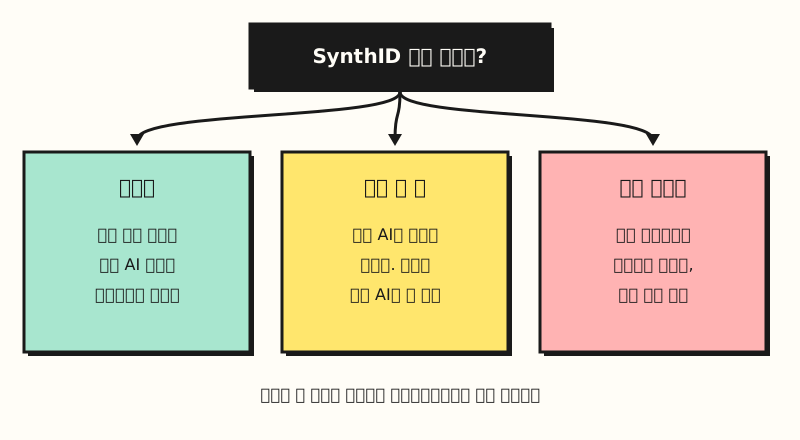 Illustration: The help article's result interpretations, split into three branches (figure labels in Korean).
For cases where the watermark alone isn't enough to reach a conclusion, the help article also suggests other checks: looking at whether text in the image is garbled or hands, teeth, or shadows look off; doing an image search to find the original; and, if it's an original file rather than a screenshot, checking the metadata (camera model, date, traces of editing software).
※ Note: Where can marketers use this?
This tool isn't a universal detector that catches all AI content. It's a tool that recognizes content from companies that embed SynthID. So in practice, I'd recommend using it with its scope in mind, as follows.
- When reviewing creatives you receive: If SynthID is detected in collaboration content or review images, that's evidence some part was made or edited with AI. On the other hand, you shouldn't conclude "they didn't use AI" just because nothing was detected.
- When using creatives you made yourself: Google said it has been adding SynthID to its generative media models and products, so it's best to assume that anyone can check the origin of images you made with Google AI using the checking tool.
- Partner content: The May announcement said OpenAI, Kakao, and ElevenLabs are expanding SynthID to their own AI content, but Google's announcement doesn't say which products' outputs get it first.
Going forward, it seems likely that disclosing AI-made creatives from the start will become a more natural approach than hiding them. I'll try adding this tool as one check step when reviewing creatives I receive at work and write it up again. For detailed upload requirements and error messages, see the Gemini app help article, and for background on the expansion to Search and Chrome, see Google's May announcement.
FAQ
- Can I use SynthID Detector in Korean?
- Google said SynthID Detector is available worldwide in English starting October 7, 2026. If you want to check in Korean, use the Gemini app. The Gemini app's image and video checking works in every language and country the Gemini app supports, and the Gemini web app supports South Korea and Korean.
- If no SynthID watermark is detected, was the image made by a person?
- No. Not detected means it wasn't made or edited with Google AI, and it could still have been made with another AI system. Files that have been changed multiple times may also not have a detectable watermark.
- Can I check whether an image made with ChatGPT is AI-generated?
- Google said SynthID Detector also checks AI content from partners including OpenAI, but Google's announcement doesn't say which OpenAI products' outputs include SynthID. According to the help article, the Gemini app's checking feature currently only recognizes content made with Google AI tools.
- How many times a day can I check in the Gemini app?
- According to the help article, within 24 hours you can check about 10 images, about 10 videos (5 minutes total), and about 10 audio files (3 hours total), and the Gemini app lets you know when you hit the limit. Files must be uploaded one at a time and be 100MB or less.
Related posts
- Search Console Multimodal Search Report: How to Track Google Lens Traffic Separately - How to check search traffic from Lens and images in Search Console
- AI Comes to Google Search: How SEO Changes in the Age of AI Overviews - How AI Overviews and AI Mode affect search traffic
- Claude Usage Policy 2026 Update: Bans on Fake Reviews and AI Search Manipulation - Rules to follow when using AI-made content in marketing