Structured data is a label that tells search engines what a page contains, written in a fixed format such as schema.org, and it's often called "schema markup." Google can read these labels to build rich results that show information like price, stock and star ratings more fully in search results, but less-used types are steadily being retired, as when FAQ rich results disappeared from Search on May 7, 2026. So today it matters more to add a few types that fit your site accurately than to "add everything."
"Those star ratings and prices in search results, can our product pages get them too?" If you run an online store or a brand site, you've probably heard this question. If you just ask the dev team to "add schema," it's easy for both sides to get stuck on what to add and how far to go. In this post, I'll go through what structured data is and which formats it uses, which types Google actually shows today, and the steps for adding schema markup to a single product page and testing it.
1. What is structured data, and how is it different from rich results?
The introduction to structured data describes structured data as a standardized format for providing information about a page and classifying the page content. On a recipe page, that means items like ingredients, cooking time and calories. For people, the visible text is enough, but for a search engine it's far more reliable to state separately whether a number is a price or a view count.
Think of a baggage tag at the airport. You could find out what's in a bag by opening it, but airport staff sort bags without opening each one, by reading the name, flight number and destination written in fixed fields on the tag. Structured data is that tag attached to a page, and the field names (types and properties) mostly come from a shared vocabulary called schema.org.
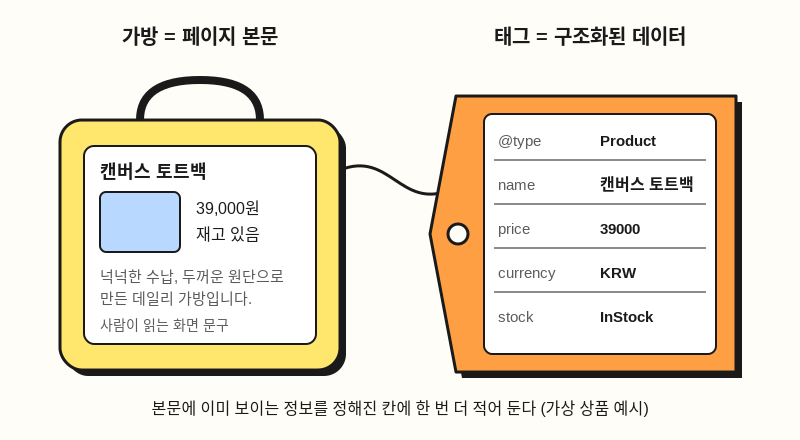 Structured data restates information already in the page content (the bag) in fixed fields (the tag). (figure labels in Korean)
Rich results are the search result display Google builds from that tag. The reason not to confuse the two is spelled out in the general structured data guidelines: even if your markup is correct enough to pass the Rich Results Test, Google does not guarantee that rich results will appear. Depending on factors like search history, location and device type, it may decide a plain text result is better.
So how do you actually attach this tag to a page?
2. JSON-LD, Microdata or RDFa: which format should you use?
Google Search supports three formats and says all three are equally fine as long as the markup is valid and implemented according to each feature's documentation. Still, it recommends JSON-LD as the easiest to implement and maintain, because site owners can apply and manage it across many pages with less chance of error.
| Criteria | JSON-LD | Microdata | RDFa |
|---|---|---|---|
| Where it goes | One <script type="application/ld+json"> block | Attributes on body HTML tags | Attributes on body and <head> HTML tags |
| Relation to visible text | Separate from visible text | Attached directly to visible text | Attached directly to visible text |
| Recommended | Supported | Supported | |
| Naver | Recommended (along with Microdata) | Recommended (along with JSON-LD) | Mentioned only |
| For marketers | Edit one block; can also be added via GTM | Requires template HTML changes | Requires template HTML changes |
Naver Search Advisor's introduction to structured data (Naver is Korea's largest search engine) also introduces schema.org's three formats and recommends Microdata or JSON-LD. Naver likewise says that even correct markup isn't guaranteed to be reflected in search results, so the basic stance of both search engines is the same.
There's one more option worth knowing when choosing a format. The Generate structured data with JavaScript guide officially describes putting a JSON-LD block in a Custom HTML tag in Google Tag Manager (GTM). It recommends filling values like the product name with variables that read from the page rather than typing them into GTM, because duplicating the values in GTM raises the risk of a mismatch between page content and markup. Product markup is an exception to keep in mind, though. The same guide warns that dynamically generated markup can make Shopping crawls less frequent and less reliable, which can be a problem for fast-changing information like price and availability, so for store product pages I recommend first looking at adding it directly to the HTML on the server. If you use a CMS like Wix, WordPress or Shopify, check first whether you can add it through a search engine settings page or a plugin, as the introduction suggests.
3. After FAQ rich results ended, which types does Google show?
FAQ and How-to markup, once staples of SEO checklists, are no longer used in Google Search. Following the Google Search documentation updates shows, in order, how rich results have been cut back.
- September 2023: How-to rich results stopped appearing on both desktop and mobile, so the documentation was removed, and FAQ rich results changed to show only for well-known, authoritative government and health websites.
- January 2025: Breadcrumbs began appearing only on desktop search results, because they get cut off on small screens and are less useful on mobile.
- September 2025: Documentation was removed for course info, estimated salary, learning video, special announcement and vehicle listing types, which no longer appear in search results.
- January 2026: Practice problem documentation was removed.
- May 7, 2026: FAQ rich results stopped appearing in Google Search, and the FAQ documentation was removed on June 15.
 The dates recorded in the Google Search documentation updates, in order. (figure labels in Korean)
So which types remain? The list of structured data features includes article, breadcrumb, event, job posting, local business, organization, product, review snippet, video, recipe and more. Picking by marketing work, it roughly looks like this.
| Site situation | Types to consider first | Notes |
|---|---|---|
| Store that sells directly | Product (merchant listing), return policy under Organization | Only pages where people can buy qualify for merchant listings |
| Review or comparison content | Product snippet, review snippet | For review pages of products you don't sell directly |
| Blog or media | Article, breadcrumb | Breadcrumbs show only on desktop results |
| Physical store | Local business | Hours, ratings and more can appear in the knowledge panel |
| Event or hiring pages | Event, job posting | Events with a set date and place, real job postings only |
The introduction to Product structured data splits product markup in two. Review pages where customers can't buy directly follow product snippets, and pages where people can buy from your site follow merchant listings. It adds that filling in the required merchant listing properties can make the page eligible for product snippets too.
So should you delete your FAQ markup right now? The updates log only says FAQ rich results are no longer shown; it doesn't tell you to remove existing markup. The introduction also notes that schema.org has many properties Google Search doesn't need but that may be useful to other search engines and services, so it's fine to decide during your next template update instead of ripping it out in a hurry. Just remember that the old explanation, "add FAQ schema and your search result gets longer," no longer holds on Google.
That doesn't mean every type has only shrunk. The same updates log also records that Google started supporting loyalty program (membership) markup in June 2025 and merchant-level shipping policy markup in November 2025 in Search. It's more accurate to read this as a trend of removing less-used displays while making heavily used areas like shopping more detailed. Note that loyalty programs are offered only in some countries, such as the US, the UK and Canada, and Korea isn't on the list.
Many people also ask whether they need new "schema for AI search" because of AI Overviews. The AI features and your website page says you don't need to add new markup or any special schema.org structured data to appear in AI features. Instead, it recommends making sure your structured data matches the visible text on the page, which is the same basic principle that has always applied. The generative AI search optimization guide also warns against overfocusing on structured data, while adding that it's still a good idea to keep using it as part of your overall SEO strategy, since it helps with rich result eligibility.
4. How do you add schema markup to a product page, step by step?
Say a fictional store sells a "canvas tote bag" for 39,000 won. The required properties in the merchant listing documentation are the product name (name), a product photo (image) and the offer (offers), and offers needs a price (price) and a three-letter currency code (priceCurrency). Also note that, unlike product snippets, merchant listings require a price greater than zero.
<script type="application/ld+json">
{
  "@context": "https://schema.org/",
  "@type": "Product",
  "name": "캔버스 토트백",
  "image": [
    "https://example.com/photos/1x1/tote.jpg",
    "https://example.com/photos/4x3/tote.jpg",
    "https://example.com/photos/16x9/tote.jpg"
  ],
  "offers": {
    "@type": "Offer",
    "price": 39000,
    "priceCurrency": "KRW",
    "availability": "https://schema.org/InStock"
  }
}
</script>
Example: minimal code built from the documented required properties and a recommended property (availability); I haven't verified the result on a live site.
After adding it, I recommend checking in this order.
- Check the code with the Rich Results Test: The Rich Results Test can test pasted code snippets as well as URLs, so you can catch errors before launch using just the code the dev team gives you. According to the help page, the tool ignores comments inside JSON-LD, but that isn't supported by the standard and may cause errors in real use, so remove comments before publishing.
- Compare against the visible text: Check by eye that the price and stock in the markup match the price and stock shown on the page. Mismatches, like a sale price on the page while the markup still says the list price, aren't caught by the test tool.
- See whether Google found it with URL Inspection: After launch, use Search Console's URL Inspection tool to confirm Google detected the structured data.
- Watch the rich result reports: According to the rich result report help, reports sit under Enhancements in the left menu, and product snippets and merchant listings are separately under Shopping.
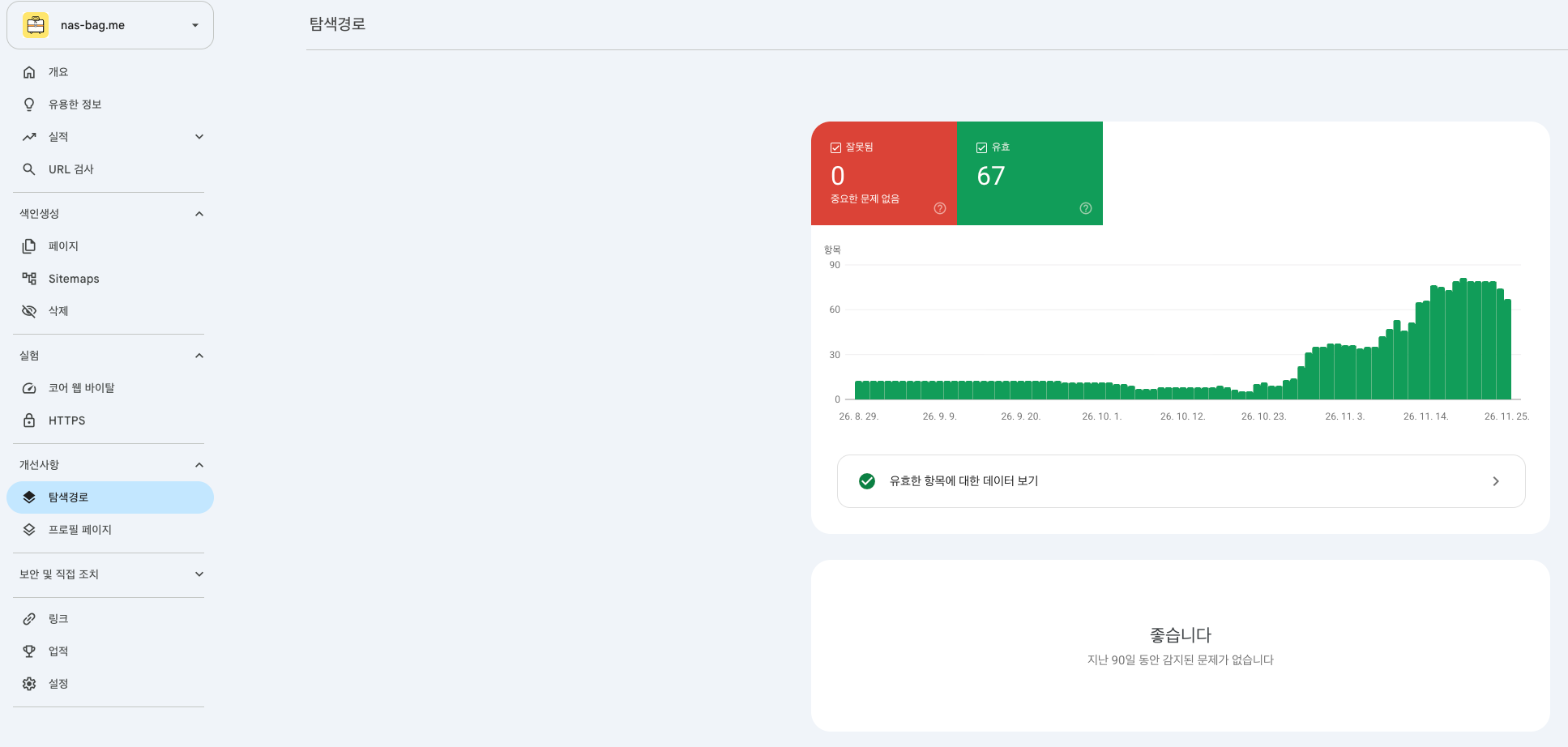 Source: Search Console for this blog (nas-bag.me). Only Breadcrumbs and Profile page, where valid markup was found, appear under Enhancements; there is no Shopping menu because the site has no product markup. (screen in Korean)
There are also things to watch when reading report numbers. The same help page explains that the numbers reflect items, not pages, and that reports show a sample of detected items rather than all of them. So URLs not in the report need to be checked separately with URL Inspection, and if no valid markup of a type is found at all, the report doesn't appear.
If you want to report the impact, the before-and-after comparison suggested in the introduction is the most realistic. Pick a few pages that aren't seasonal and are read steadily, collect a few months of Search Console data, add the markup, then compare a few more months in the Performance report filtered by URL.
5. What are the common mistakes when adding structured data?
Reading the general guidelines from a marketer's point of view, these five are where people run into trouble most often.
- Marking up content people can't see: The guidelines say not to mark up content that isn't visible to readers of the page. The introduction also says not to add structured data about information users can't see, even if it's accurate, and not to create blank pages that only hold structured data.
- Choosing a type unrelated to the page: The guidelines give the example of a woodworking site marking up instructions as a recipe as irrelevant data. In other words, you shouldn't force on a type just because it supposedly gets good visibility.
- Adding reviews or ratings not left by real users: The guidelines warn that reviews or ratings not provided by real users may be subject to a manual action.
- Leaving out required properties: Items missing required properties won't show as rich results. Conversely, filling in more recommended properties is better, but the introduction stresses that fewer complete and accurate properties matter more than lots of incomplete or inaccurate ones.
- Blocking crawling: Don't block Googlebot from structured data pages with robots.txt or
noindex, and image URLs in the markup must be crawlable and indexable.
If you receive a structured data manual action for issues like these, the page loses eligibility to appear as a rich result. The guidelines explain that this action doesn't affect ranking in Google web search, but put the other way, your ranking stays the same while only the stars and prices disappear, so you may notice late. I recommend opening Search Console's Manual actions report along with the rich result reports every so often.
If you also need to cover Naver, look through the structured data markup docs on Naver Search Advisor. There are separate guides by type, such as breadcrumbs, reviews and related site channels. For example, the review guide says to keep one review target per page, and the breadcrumb guide says to list from broad to specific. Like Google, each document notes that display in that content or format isn't guaranteed.
Wrapping up
Structured data restates information already visible on a page as a schema.org-format tag, JSON-LD is the easiest format to handle, and Google is retiring less-used rich results, as with the end of FAQ in May 2026. So the baseline today is to add the few types that fit your site (product for a store, article and breadcrumb for a blog) exactly as the visible text says, and to check them with the Rich Results Test and Search Console reports. For which types remain, see the list of structured data features and the documentation updates. I'll also review which markup fits this blog's post pages by these criteria and let you know if anything changes.
FAQ
- Does adding structured data improve search rankings?
- Structured data makes a page eligible to appear as a rich result, and Google doesn't guarantee rich results even with correct markup. Since Google explains that a structured data manual action for guideline violations only removes rich result eligibility and doesn't affect web search ranking, it's better to see structured data as a chance to show richer information in search results rather than a ranking lever.
- Does FAQ schema (FAQPage) still work?
- In Google Search, FAQ rich results haven't appeared since May 7, 2026, and the related documentation was removed on June 15. There's no instruction to remove existing markup, but you can no longer expect FAQ markup to expand questions and answers in Google search results.
- How is the Rich Results Test different from the schema.org validator?
- The Rich Results Test is Google's tool that shows which rich result types Google found on a page along with errors and warnings, and it can test a URL or a code snippet. Naver Search Advisor tells site owners to validate markup with the testing tool provided by schema.org, so if you also cover Naver, use both tools.
- Do I need special schema to appear in AI Overviews?
- Google's AI features page explains that you don't need to add new markup or any special schema.org structured data to appear in AI Overviews or AI Mode. Instead, it recommends keeping your structured data consistent with the visible text on the page.
Related posts
Basics of search visibility that pair well with structured data.
- SEO Basics: How Google Crawling, Indexing and Ranking Work - How Google finds and indexes pages before it reads structured data
- How to Write Meta Descriptions and Title Tags for Google and Naver - Polishing the title and description shown in search results
- GTM Tags, Triggers, and Variables: Google Tag Manager Basics - Concepts to know when adding JSON-LD with GTM Custom HTML tags and variables