Google's core update started rolling out on November 10, 2026, and Google said it applies globally and to all languages and may take up to two weeks to complete. A core update isn't aimed at any particular site; it's a broad recalibration of Search as a whole, so rather than rewriting pages the moment rankings wobble, the first step is to wait for it to finish and then compare the right date ranges.
"Traffic to the blog dropped this week. Did Google change something?" If you look after organic search traffic, that thought has probably crossed your mind in the second week of November. News of an update makes you want to start by changing your titles, but Google's documentation repeatedly says to avoid hasty changes. In this post, let's walk through what a Google core update is, how to tell it apart from a spam update or a manual action, and what to check in Search Console and when.
What is a Google core update, and what was announced in November?
According to the core updates documentation, several times a year Google makes significant, broad changes to its search algorithms and systems, and it calls these core updates. The same page says most sites don't need to worry about core updates and may not even realize one has happened, and it also states that these changes are broad in nature and don't target specific sites or individual web pages.
The official record of this update is on the Google Search Status Dashboard.
- Name: November 2026 core update
- Start: November 10, 2026 at 10:07 (US/Pacific), which was the early hours of November 11 in Korea.
- Scope: Applies globally and to all languages. Korean-language search is included.
- Duration: Google said the rollout may take up to two weeks, and as of November 16, when I'm writing this, the dashboard doesn't yet show it as complete.
Google's documentation explains core updates with a restaurant list analogy. If you revised a list of your 20 favorite restaurants that you first wrote in 2019, some new places would come in and a few would change spots. The point is that a restaurant that moved down isn't necessarily "bad"; there are just other restaurants that made the top 20, so it's best to read this as a reminder not to label a page that lost rankings as a problem page right away.
For reference, the guide to Google Search ranking systems notes that the "Helpful Content Update" system, announced in 2022, became part of Google's core ranking systems in March 2024. So when rankings fall, how can you tell whether the cause really is the core update?
How do core updates, spam updates and manual actions differ?
Core updates aren't the only reason search traffic drops. The guide to debugging drops in Google Search traffic lists technical issues, security issues, spam issues, seasonality and changing interests, site moves, and reporting glitches alongside algorithmic updates. Here are the four that marketers mix up most, side by side on the same criteria.
| Type | What it is | Where to check | Does fixing things help? |
|---|---|---|---|
| Core update | A broad adjustment to Search systems as a whole. Doesn't target specific sites | Search Status Dashboard | Improvements can take a few days to several months, with no guarantee |
| Spam update | An improvement to automated spam detection systems (such as SpamBrain) | Search Status Dashboard | Following the spam policies may help over a period of months. Benefits gained from link spam don't come back |
| Manual action | Action taken when a human reviewer at Google determines a site violates the spam policies | Search Console "Manual actions" report and message center | Fix the issues and request a reconsideration review; progress is sent by email |
| Data anomaly | Only the report numbers changed, for example because of a logging error | Search Console data anomalies page | Unrelated to actual search visibility |
The spam updates documentation covers spam updates, and the Manual actions report help page covers manual actions. Since Google notifies you of manual actions in the report and the Search Console message center, I'd recommend opening the Manual actions report first if your rankings have dropped sharply. If there's nothing there, you can take it that no action was taken by a person.
This time, a data anomaly actually overlaps too. According to the Search Console data anomalies page (as of November 16, the entry appears only on the English version), a logging error caused a decrease in impressions on the Generative AI performance report in Search for November 9 to 11, 2026, and the issue affected data logging only. Because those dates overlap the start of the core update, concluding from that report alone that "the update reduced our AI answer impressions" would point you at the wrong cause.
When and how should you check the Google core update's impact in Search Console?
The checking order in the core updates documentation is simpler than you might expect.
- Confirm it has finished. Check the start and end dates of the update on the Search Status Dashboard.
- Wait at least a full week after it completes. Then compare this week with the week before the update started.
- Review your top pages and queries. See how much their positions changed before and after the update.
- Analyze search types separately. Separate out whether the drop happened in Web, Images, Video or News.
Applied to this November update, the "week before it started" baseline is November 3 to 9. The completion date hasn't been announced yet. If, for example, it completed on November 24, then from December 1 onward you would put the most recent seven days next to November 3 to 9 (the completion date is just an example, so please check the dashboard for the real date).
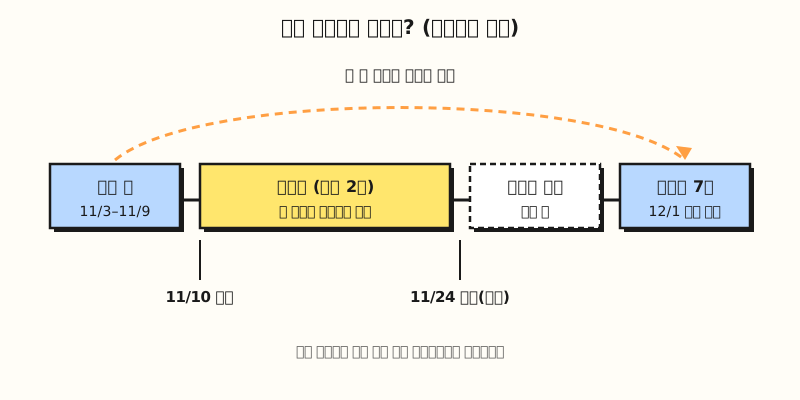 What to notice: comparing mid-rollout means looking at rankings that are still changing, so compare only once a week has passed after completion. The completion date is an assumption (figure labels in Korean).
On screen, click the Date filter at the top of the Performance report and set the two ranges yourself on the Compare tab. According to the Performance report help page, the table can be grouped by query, page, country, device, search appearance and date, and the debugging guide says that sorting the pages table by Clicks Difference shows the pages that lost the most traffic first. The same guide recommends widening the range to the last 16 months to see whether it's a drop that repeats at this time every year, so if your site sells year-end seasonal products, you can first separate whether the dip comes from the update or from the season.
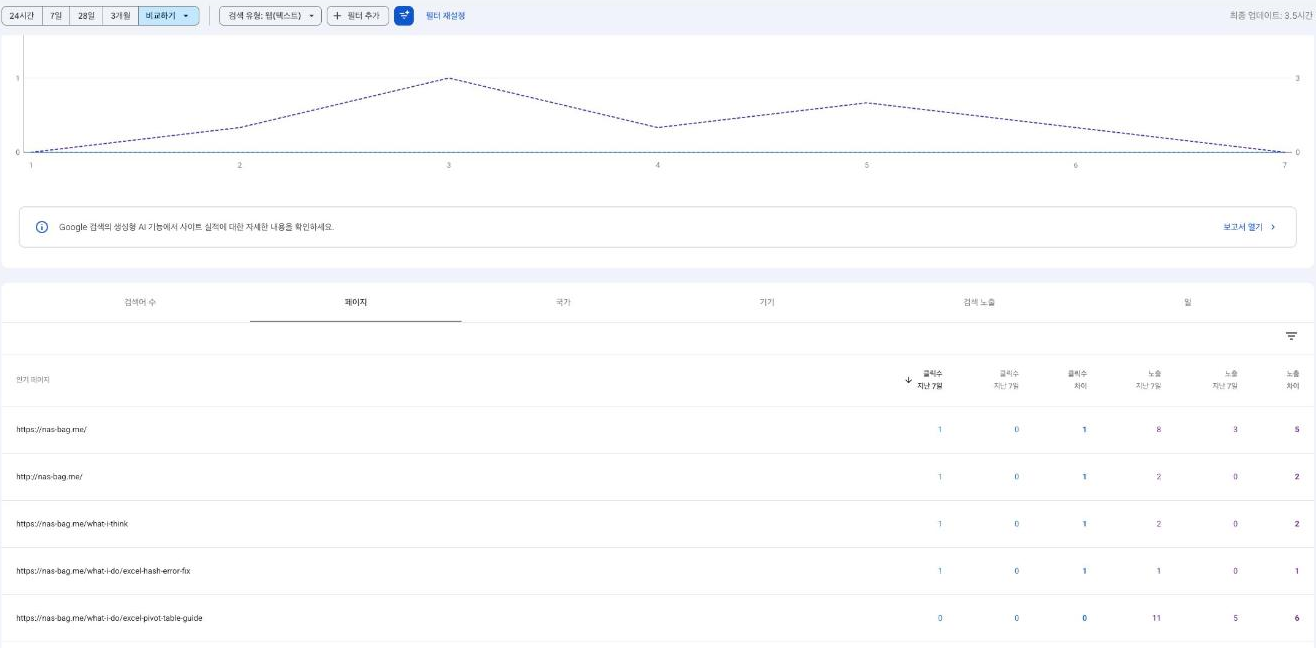 Source: the Search Console Performance report for this blog (nas-bag.me). With the date filter set to compare the last 7 days with the previous period, the pages table gains last 7 days, previous 7 days, and difference columns; when rankings drop, sort by the clicks difference column to see the pages that lost the most traffic first (screen in Korean).
How far do rankings have to drop before you act?
Google's documentation splits drops into two kinds: small drops and large drops.
- Small drop: something like falling from position 2 to 4. No drastic action is needed, and Google recommends not changing content that's already performing well. The debugging guide adds that small fluctuations like this can move back up without you doing anything.
- Large drop: like falling from position 4 to 29, dropping out of the top results for a wide range of terms. In this case, Google recommends self-assessing your whole site, not just individual pages.
The questions for that self-assessment are in the Creating helpful, reliable, people-first content documentation. If you run a blog or brand site as a marketer, these questions in particular may hit close to home.
- When you draw on other sources, did you add substantial value rather than simply copying or rewriting them?
- Does the title summarize the content, or is it exaggerated or shocking?
- Are you changing page dates to make pages seem fresh when the content hasn't substantially changed?
- Are you writing to a particular word count because you heard Google has a preferred one? (The documentation says it doesn't.)
The core updates documentation also lists what to avoid when making changes. It says to avoid "quick fix" changes, like removing some page element because you heard it was bad for SEO, and that deleting content is a last resort, only to be considered if you think the content can't be salvaged. The effect of improvements may show up in a few days or take several months, and if a few months pass with no effect, you may have to wait until the next core update. That said, the same page explains that Google also keeps making smaller core updates that aren't announced, so rankings don't only move during big updates.
In practice, in what order should you check?
Let's picture someone who runs a brand blog and is checking the impact of the November core update in early December.
- First week of December, check the dashboard: See whether the November core update is marked complete and whether a week has passed since then.
- Check the Manual actions and Security issues reports: If both are empty, the drop isn't from an action taken by a person or from a security threat Google detected.
- Check the data anomalies page: Look for logging errors that overlap your comparison periods. This time, that's the Generative AI performance report error for November 9 to 11.
- Export the two periods separately: In the Performance report, export "November 3 to 9" and "the 7 days after completion" separately, grouped by page. The help page says you can download both chart and table data.
- Classify changes by page in a sheet: Join the two periods by URL and calculate the change in position, as below.
If you paste the earlier period into a sheet named Before and the later period into a sheet named After in Google Sheets, pull the earlier position into column F of the After sheet with the XLOOKUP function.
F2: =XLOOKUP(A2, 'Before'!A:A, 'Before'!E:E, "New page")
G2: =IF(ISNUMBER(F2), E2 - F2, "")
H2: =IF(G2="", "Can't compare", IF(G2>=10, "Large drop", IF(G2>=2, "Small drop", "Steady/up")))
Here I've assumed that in both sheets column A is the page address and column E is the average position (adjust to the column order in your exported file). A higher position number means further down the results, so a positive value in column G means the page moved down. "10 or more places counts as large" is a threshold I chose as an example, not a number Google set. Use Google's examples (2 to 4, 4 to 29) as a reference and adjust to your site's size. Average position for a page mixes its positions across many queries, so it's efficient to take only the pages flagged as large drops back to the Queries tab and check which queries fell away.
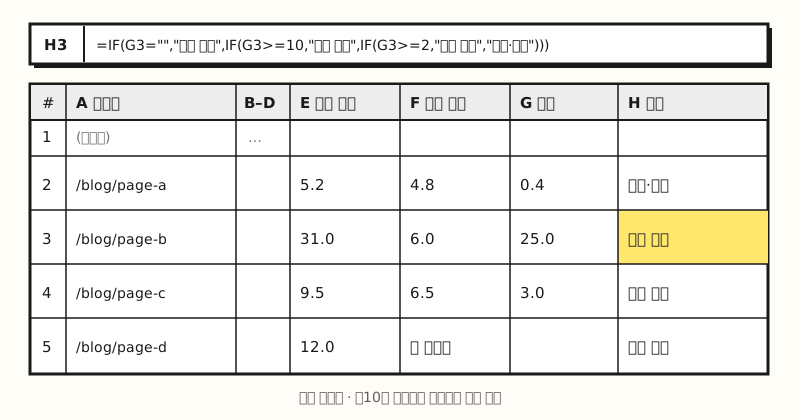 Example figure: a sheet built with made-up blog page data, not an actual screenshot. Only the rows classified as large drops get a second look at the query level (figure labels in Korean).
If you're unsure whether to use VLOOKUP or XLOOKUP in the sheet, my post on VLOOKUP vs XLOOKUP may help. One more thing worth pointing out: Search Console shows Google Search only. If, like many Korean sites, a large share of your traffic comes from Naver (Korea's largest search engine), it's more accurate to also look at organic traffic by search engine in GA4 and first confirm whether only the Google side dropped.
Wrapping up
A Google core update isn't a penalty on your site but a reordering of search results as a whole, so the least stressful approach is to wait for it to finish, rule out manual actions and data anomalies first, compare the two set periods, and then look closely only at pages with large drops. I plan to go through my own blog data in this order once the November update completes, so feel free to use the sheet formulas above when you compare.
FAQ
- When does the November 2026 Google core update finish?
- According to the Google Search Status Dashboard, the November core update started on November 10, 2026 (US/Pacific), and Google said it may take up to two weeks to complete. You can confirm the actual completion date when the dashboard marks it as complete.
- Should I rewrite my pages right away if a Google core update lowered my rankings?
- Google's documentation recommends waiting at least a full week after the update completes and then comparing with the week before it started. For a small drop, like position 2 to 4, no drastic action is needed, and it's better not to change content that's performing well. Google suggests self-assessing your whole site only when you see a large drop across a wide range of terms.
- How do I tell a core update from a manual action?
- A manual action is taken when a human reviewer at Google determines a site violates the spam policies, and Google notifies you through the Manual actions report and the message center. If that report is empty, no action was taken by a person, and you should look at automated system changes such as a core update, technical issues, seasonality and so on.
- Does a Google core update affect rankings on Naver?
- A core update is a change to Google Search systems, and Search Console only shows Google Search data. Changes in traffic from Naver (Korea's largest search engine) don't appear in Search Console, so I'd recommend splitting organic traffic by search engine in GA4.