The Search Console branded queries filter splits the Google search queries in your Performance report into "branded" and "non-branded" queries, and instead of you writing a word list as you would with regex, Google's AI-assisted system does the classifying. It first appeared in November 2025, and since March 11, 2026 it has been available to all eligible sites. Then on November 16, 2026, the same classification became available through the Search Analytics API as well.
"Search traffic went up this month, but is that thanks to SEO, or because more people know the brand?" If you write monthly reports, you have probably been asked this at least once. Someone who searched your brand name and someone who came in through a generic query like "how to make an Excel pivot table" mean completely different things even if each is one click, so if you lump them together it is hard to talk about SEO results properly. In this post, I'll go through what the branded queries filter counts as branded, how it differs from the regex filter we've used for years, and how to put it into an actual report.
1. What does the Search Console branded queries filter count as branded?
According to the Google Search Central Blog announcement, branded queries include your brand name, variations and misspellings of it, and brand-related products or services. Google's example is "Gmail" for google.com: even though the query doesn't contain the word "Google," it is a search for a product unique to that site, so it gets grouped as branded. The classification isn't done with regex or include/exclude keyword rules but by an internal AI-assisted system at Google. The biggest difference from building a list yourself is that it is designed to recognize brand names written in various languages, along with typos.
Think of a neighborhood café. A customer who asks "Where's ○○ Café?" by name and a customer who wandered in while looking for "a quiet café nearby" are both one customer, but they mean different things to the shop. The first already knew the shop, while the second is someone the shop brought in for the first time. The branded queries filter is a tool that counts these two kinds of customers separately.
※ Notes
- Only available for top-level properties. The filter doesn't appear for URL-path properties like
example.com/blog/or for subdomain properties. - Not shown for sites with few impressions. The Performance report dimensions help page says the filter isn't available for sites with a low number of impressions. The threshold isn't published.
- Queries can be misclassified. The help page also says some queries might be incorrectly identified as branded or non-branded.
- No effect on rankings. The classification is for information only and doesn't change search rankings.
So you could already split out your brand with the regex filter. Is there a reason to use the new filter?
2. How is it different from the regex filter and query groups?
There are now three ways to group queries in Search Console: the query filter in the Performance report (contains, doesn't contain, regex), the new branded queries filter, and query groups, added to the Insights report in October 2025. The names sound similar, but they differ in who sets the criteria and where you see them.
| Criterion | Query filter (regex) | Branded queries filter | Query groups |
|---|---|---|---|
| Who sets the criteria | You write the words or pattern | Google's AI-assisted system | Google's AI-assisted system |
| Where you see it | Performance report | Performance report, Insights report | Insights report, "Queries leading to your site" card |
| How it groups | Matches the pattern or not | Two buckets: branded / non-branded | Several groups of queries with the same intent |
| Typos and other-language spellings | Only caught if you add them to the list | Caught automatically | Grouped together |
| Available for | All properties | Top-level properties with enough impressions | Properties with many queries |
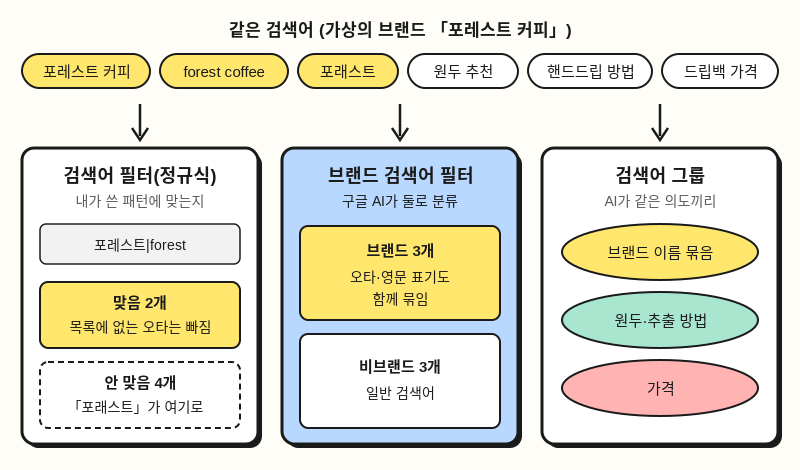 Even the same list of queries gets grouped differently depending on who sets the criteria. (figure labels in Korean)
As the Performance report advanced filtering help page explains, the regex filter uses RE2 syntax and is not case-sensitive by default. In its regex tips post, Google gave chaining several spellings and misspellings of your company name with | (OR) as an example of splitting out branded queries. For a fictional brand called "Forest Coffee," you could write the following (the Korean spellings are the brand name in Korean and a common misspelling).
포레스트|포래스트|forest ?coffee|forestcoffee
Example: a regex built for a fictional brand name.
Here is how to choose which one to use.
- If the filter appears for your site: start with the branded queries filter to see the big picture. AI classifies typos and product names for you, so you don't need to build a separate list of brand names.
- If the filter doesn't appear: if you have few impressions or a subdomain property, within Search Console the regex filter is the only way to split them.
- If you need to define the scope of your brand yourself: when your company has set its own rule, such as "the parent company name is branded, but the generic product names we sell are non-branded," regex is the right fit, because the AI classification doesn't know that rule.
- If you want a finer view of search intent: query groups show intent-level trends like "price" or "how to use" better.
3. How do you turn on the branded queries filter in the Performance report?
You apply it the same way as any other filter: open the query filter from the filter bar at the top of the Performance report and pick the branded option. Let's go step by step.
- In Search Console, choose a top-level property (for example, a Domain property) and open the Performance report (Search results).
- In the filter bar at the top of the report, click + Add filter and choose Query.
- Choose branded or non-branded queries and apply it.
- In the Queries tab of the table below, skim which queries landed on which side. If you notice misclassified ones, make a note in your report.
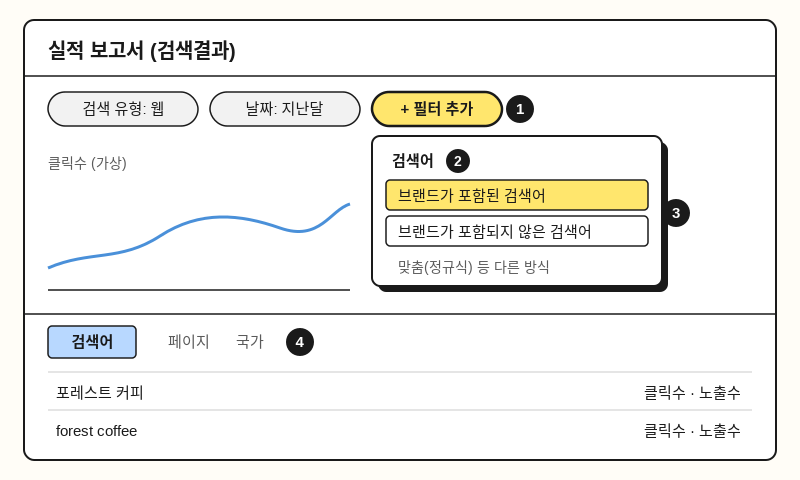 Example figure: a simplified drawing of the Performance report layout, not an actual screenshot; the numbers are fictional. (figure labels in Korean)
The filter works for web, image, video and news search types, and impressions, clicks, average position and CTR all change along with it. There is one thing to watch out for, though: to protect user privacy, some queries are left out of the report, and the help page calls these anonymized queries. Applying a query filter drops these anonymized queries, so branded clicks plus non-branded clicks may not match the total clicks you see without a filter. That's why it's safer to record the three numbers separately in your report rather than writing "total = branded + non-branded." So how should you work these numbers into an actual report?
4. How should you put it into a monthly SEO report?
Let's say you report on search traffic to a blog or online store every month. Splitting branded and non-branded divides the questions your report can answer into two: non-branded clicks show whether content and SEO brought in new people, and branded clicks show how many people who already knew the name came looking.
- Set the period: set the Performance report dates to last month, and choose the previous month or the same month last year as the comparison period.
- Look at non-branded first: filter to non-branded queries and note clicks, impressions and average position. If you published new posts this month, check in the Pages tab how many non-branded clicks they received.
- Look at branded: switch the filter to branded queries and note the same numbers. If you ran an ad campaign or got press coverage that month, look at the shape of the chart around those dates.
- Record the total separately: remove the filter and note total clicks. Add a footnote that it may differ from the sum of the two previous numbers.
- Write a one-line interpretation: state in a sentence which side moved, such as "Total clicks went up, but most of it was branded search."
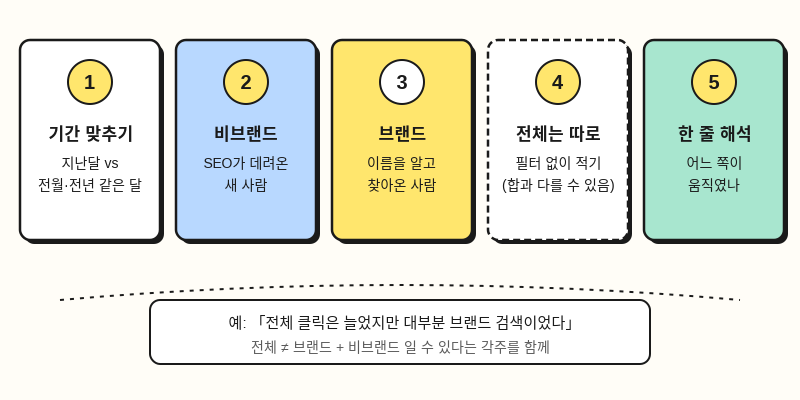 The key to this order is recording the total separately rather than as the sum of the two numbers. (figure labels in Korean)
If you're also running awareness campaigns such as YouTube ads, keep in mind that Google Ads' branded search measurement and Search Console's branded query clicks count different things. The former is the number of searches by people who saw the ad, while the latter is the searches that went on to click through to your site. I compared the two in detail in my post on 3 ways to measure branded searches.
Also, in a month when rankings shifted a lot, I recommend first checking whether only the non-branded side dropped. If you mix both together, changes in non-branded queries can be hidden in the overall average and become harder to see.
5. What changed with the November API update?
In the Search Analytics API update post on November 16, 2026, Google opened up three features that had been added to the Performance report over the past year to the API as well. If you pull Search Console data automatically into a spreadsheet or internal dashboard, this is worth a look.
| New feature | Name in the API | What it means for marketers |
|---|---|---|
| Branded classification | brandedClassification | You can get the branded/non-branded numbers automatically instead of switching the filter by hand each month |
| Web multimodal search | set type to webMultimodal | Get performance from Google Lens, Circle to Search and image-upload searches separately |
| Filtering several countries or devices at once | filterLists | Filter by several countries or device combinations in a single request |
The Search Analytics API documentation attaches a few conditions to branded classification.
- There are two values,
BRANDEDandNON_BRANDED, and only the "equals" operator can be used in filters. - Requests that filter or group by branded classification can't also use a query filter.
- Data is available from February 21, 2026, and only for top-level properties with sufficient query and impression volume. Properties that don't qualify get a response with no rows.
For example, if you want non-branded clicks by date, the request body would look like this.
{
  "startDate": "2026-10-01",
  "endDate": "2026-10-31",
  "dimensions": ["date"],
  "dimensionFilterGroups": [{
    "filters": [{
      "dimension": "brandedClassification",
      "operator": "equals",
      "expression": "NON_BRANDED"
    }]
  }]
}
Example: a request shape based on the parameter descriptions in the documentation; I haven't verified the result of running it.
If you're a marketer who doesn't do development yourself, it's enough to remember that "branded and non-branded numbers can now go into automated reports." You can pass the request, along with the conditions above, to whoever manages your internal dashboard.
Wrapping up
The Search Console branded queries filter splits queries into branded and non-branded so you can tell whether SEO brought in new people or people who already knew you came back, and since November the same classification is also available through the API. If the filter doesn't appear for your site, build a list yourself with the regex filter, and either way, make it a habit to record the total separately. For where to find it and the conditions, see the Performance report dimensions help page and the Insights report help page. I'll also add a branded/non-branded split to this blog's monthly check, and I'll share anything that changes along the way.
FAQ
- Why don't I see the branded queries filter in Search Console?
- The filter is only available for top-level properties, and only for sites with enough queries and impressions. It doesn't appear for URL-path properties, subdomain properties or sites with few impressions, so in that case build a list of your brand names yourself with the query filter's "Custom (regex)" option.
- Should branded clicks plus non-branded clicks equal total clicks?
- Not necessarily. When you apply a query filter, the anonymized queries that are left out of the report to protect privacy are excluded, so the sum of the two can come out lower than the unfiltered total.
- Does being classified as branded affect search rankings?
- No. Google says the branded/non-branded classification is for information only and doesn't affect search rankings. Because AI does the classifying, some queries may also be misclassified.
- From when can I get branded query data through the Search Analytics API?
- According to the API documentation, branded classification data is available from February 21, 2026, and only for top-level properties with sufficient query and impression volume. It can't be used together with a query filter in the same request.
Related posts
Posts worth reading alongside this one when you split up search performance.
- Branded search measurement: 3 ways to see if searches rose after YouTube ads - how Google Ads branded searches differ from the Search Console filter
- Search Console multimodal search report: tracking Google Lens traffic separately - the multimodal search data that came with this API update
- Google core update: what to check first when rankings drop in November 2026 - what to look at first in Search Console in a month when rankings shifted