The meta description and the title tag are the raw material for the snippet and the title shown in search results, but neither Google nor Naver promises to use them as written. Both look at the page content and the search query and pick the wording that fits best. That is why writing unique, accurate text for each page comes before hitting a character count, and Naver (Korea's largest search engine) says it also looks at OG (Open Graph) tags.
"I definitely wrote a description, so why does the search result show the first line of my page instead?" You see this fairly often after publishing a promotion page or a blog post and then checking how it appears in search. Marketers ask developers to "add the meta tags" all the time, yet how those tags are actually used in search results is often only vaguely understood. In this post, I'll put Google Search Central's documentation and Naver Search Advisor's guide side by side and walk through how to write titles, descriptions and OG tags.
1. Where do the meta description and title tag show up in search results?
A single search result is made up of a title and a description underneath it.
Google calls the title part a title link and the description part a snippet, and the HTML tags behind both go inside the page's <head>.
<head>
  <title>Winter Padding Sale - Brand Name</title>
  <meta name="description" content="A December-only sale featuring everything from lightweight padded jackets to long puffers.">
  <meta property="og:title" content="Winter Padding Sale">
  <meta property="og:description" content="December-only sale items in one place.">
  <meta property="og:image" content="https://www.example.com/og/winter.png">
</head>- Title tag: The page name shown in the browser tab, and the main raw material for the search result title.
- Meta description: A page summary that isn't visible on the page itself. It may be used as the search result description.
- OG tags: Originally preview information used when a link is shared on social media, but search engines refer to it too.
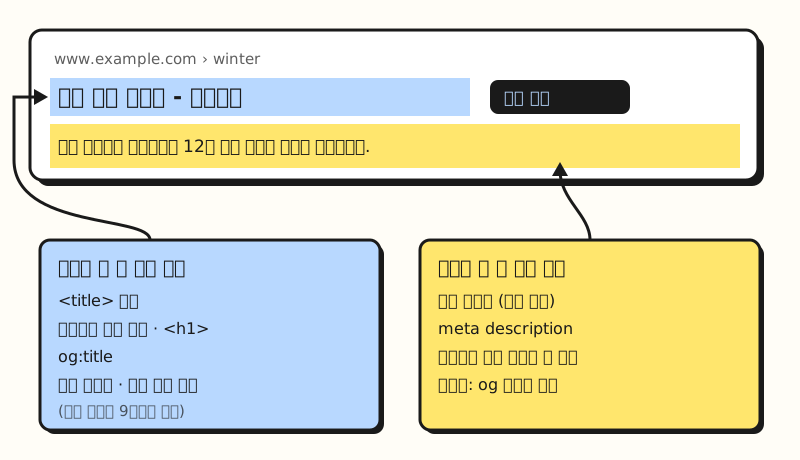 Example figure: a simplified, made-up search result, not an actual screenshot. The arrows mean "can be raw material for" (figure labels in Korean).
A book makes a handy comparison: the title tag is the title printed on the spine, and the meta description is the blurb on the back cover. The bookstore clerk (the search engine) usually shelves the book with that title and blurb, but if the blurb doesn't match the content, or every book carries the same blurb, the clerk opens the book and picks a better sentence from inside.
2. When does Google rewrite titles and descriptions?
Google's documentation says title links are generated completely automatically, and lists nine sources it draws on.
They are the <title> element, the main visual title shown on the page, heading elements such as <h1>, the og:title meta tag, other content made large and prominent through styling, other text on the page, anchor text on the page, text within links pointing to the page, and WebSite structured data.
<title> comes first on that list, but Google says it may build a different title from other sources when it spots problems like these.
| Issue | Example | What Google may do |
|---|---|---|
| Half-empty title | Only the site name, no product name | Build one from heading elements or other prominent text |
| Obsolete title | Page says 2021 but the title says 2020 | Use the correct date shown on the page |
| Inaccurate title | A list of product names that doesn't fit a dynamic page | Modify it to match the actual content |
| Micro-boilerplate | Every season page has the same title | Insert the season number from the page |
| No clear main title | Two or more headings of the same size | May use the first one |
| Language or script mismatch | English title on a Hindi page | Pick text matching the page's language |
| Site name duplicated | Site name is already shown separately | May drop the site name from the title |
Descriptions (snippets) are even more clear-cut. The snippet documentation says snippets are primarily created from the page content itself, and Google sometimes uses the meta description when it gives a more accurate description than content taken from the page. On top of that, snippets are designed to highlight the content most relevant to the query, so the same page can show different snippets for different searches. So if, as in the opening question, a sentence from the page appeared instead of your description, by this rule it means that sentence was judged a better fit for that particular query.
Google also says meta descriptions made of long keyword lists don't tell users what the page is about and are less likely to be shown as the snippet, and that it can't manually change title links or snippets for individual sites. So how does Naver handle the same tags?
3. How does Naver Search treat titles, descriptions and OG tags?
Naver Search Advisor's content markup guide takes the same general approach. It explains that the title used in search is automatically extracted and decided from various information, including what you put in the title tag and Open Graph tags as well as the page and anchors, and that descriptions and snippets are built by analyzing the user's search keywords and intent and choosing the most suitable text from the tags and the page body.
Where it differs from Google is in a few specific cautions.
- Brand name for the main page title: It recommends using proper nouns such as a business or service name in the site's main page title tag to express what the site is.
- Frequent changes can be penalized: It says frequently changing the title or main page description just for search exposure may lead to a penalty.
- No repeated keywords: Repeating the same keyword two or more times, or listing unrelated keywords or promotional phrases, may be penalized.
- One or two sentences for descriptions: It says the description can be a short paragraph of one or two sentences, and to avoid copying the entire body or making it identical to the title.
- Add OG tags too: Because the Naver search robot sometimes uses Open Graph information for page analysis and exposure, it recommends including them where possible.
In particular, og:image can be used as the thumbnail representing the page in Naver search results, and the guide recommends an image larger than 150×150, a file size of at least 5,000 bytes, and an aspect ratio no wider than 3:1. It also notes that logos or promotional banner images repeated across many pages are hard to treat as representing an individual page, so they may not be used.
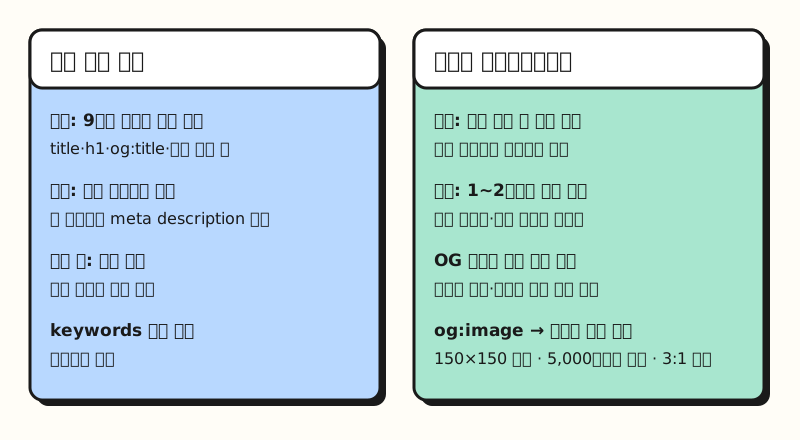 Both search engines treat tags as "raw material" and choose automatically; Naver spells out its penalty conditions in more detail (figure labels in Korean).
4. How do Google and Naver differ on title and description guidelines?
Putting the two documents on the same criteria gives the following.
| Item | Google Search Central | Naver Search Advisor |
|---|---|---|
| Title length | No limit, truncated to fit device width | No set limit, keep to a length that can display in results |
| Meta description length | No limit, truncated as needed. The SEO Starter Guide calls it typically a one- or two-sentence summary | A short paragraph of one or two sentences |
| Used as written? | Decided automatically from several sources | Extracted automatically from various information |
| og:title | One of the title link sources | Referenced when deciding the title |
| og:image | Not mentioned in these two documents | Can be used as a search result thumbnail |
| Keywords meta tag | Not used | Not mentioned in this guide |
| Site name | Briefly, at the start or end with a delimiter | Brand name for the main page |
One thing worth pausing on is character count. You'll often see numbers floating around like "titles should be X characters, descriptions Y characters," but neither document gives a fixed count. Google says there's no length limit and text is simply truncated, and Naver only says to keep it short enough to display in search results. For descriptions, Google's SEO Starter Guide describes the meta description as "typically a short, one or two sentence summary" of the page, which lines up with Naver's one-or-two-sentence guidance. So I treat numbers only as a working standard within a team, and care more about putting the key words near the front. Even when text gets cut off, the beginning survives.
For reference, Google's documentation on supported meta tags says the keywords meta tag isn't used by Google Search and has no effect on indexing and ranking at all. If you've been spending time on keywords tags instead of descriptions, you can safely flip that priority.
5. How would you apply this to a promotion page, step by step?
Let's walk through it assuming you're a marketer running several seasonal promotion pages for an online store.
- Set priorities: Google's documentation says that if you don't have time to write descriptions for every page, start with at least the important URLs, such as the home page and popular pages. Begin with the main promotion page, where ad and search traffic concentrate.
- Choose the title: Make the meaning of the most prominent heading on the page (
<h1>) and the title tag match. Put the key term first and add the site name at the end with a delimiter, as in "Winter Padding Sale - Brand Name." - Write the description: In one or two sentences, include information unique to that page, such as the product lineup, dates and audience. Google's documentation also gives the example that for product pages, a description pulling together scattered details like price and manufacturer is useful.
- Align the OG tags: Make og:title and og:description mean the same as the title and description, and set og:image to an image that represents this promotion specifically. Don't use the same logo on every page.
- Update when the period ends: A title still showing last season's wording is the kind of "obsolete title" Google may rewrite. That said, Naver warns against frequent changes made just for exposure, so only update when the content has actually changed.
It also helps to know that changes don't show up right away. Google says it needs to recrawl and reprocess the page, which can take anywhere from a few days to a few weeks, and that you can request a recrawl with Search Console's URL Inspection tool. Requesting the same URL multiple times won't get it crawled any faster.
With dozens of pages, opening each one isn't practical. In that case it's easier to paste the page list into a sheet and check it with formulas. With URLs in column A, titles in B and descriptions in C, write the following in row 2 and fill down. Because COUNTIF would also count empty cells when the description is blank, the formulas check for blanks first.
D2 Title length:          =LEN(B2)
E2 Description length:    =LEN(C2)
F2 Duplicate count:       =IF(C2="", "", COUNTIF($C$2:$C$100, C2))
G2 Check result:          =IF(C2="", "No description", IF(F2>1, "Duplicate description", IF(B2=C2, "Same as title", "OK")))
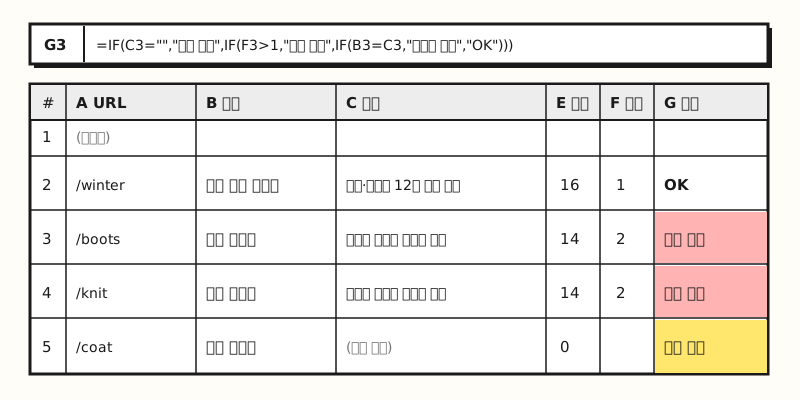 Example figure: a sheet built with made-up promotion page data, not an actual screenshot. The two pages sharing the same description are flagged as duplicates (figure labels in Korean).
Duplicate descriptions, empty descriptions and descriptions copied straight from the title are cases both Google's and Naver's documents say to avoid, so fix those first. Use the length columns just to scan for anything too short or too long, and don't feel you must cut text the moment it passes a set number. For more on counting duplicates with COUNTIF, see my post on finding duplicate values in Excel, and for examples of counting characters with LEN, see the post on masking data in Excel.
※ Notes: What should you watch out for when editing meta tags?
- Not a ranking lever: Both documents describe titles and descriptions as "raw material for presenting the page well in search results." Neither says they directly raise rankings.
- Use the settings screen if you're on a CMS: Google's documentation advises that on CMSs such as Wix, WordPress or Blogger, rather than editing HTML directly, you look for a search settings page or similar feature.
- Pages blocked by robots.txt: Google says that if it can't access the page content, it may generate a title from off-page content such as anchor text on other sites. To keep a page out of search results, it advises using noindex.
- If you want to hide the description entirely: You can block snippets with the
nosnippetmeta tag, set a maximum length withmax-snippet, or exclude specific parts with thedata-nosnippetattribute. - This is for sites you run yourself: This post assumes a site where you can edit the HTML
<head>directly or change it through CMS settings. If you're on a blogging platform where tags are hard to touch directly, I'd suggest first checking how that service lets you enter titles and summaries.
Wrapping up
The meta description and title tag are the "raw material" for search result titles and descriptions, and both Google and Naver may choose wording that better fits the page content and the query. That's why unique, accurate text for each page matters more than character count, and with Naver in mind it's worth aligning your OG tags and representative image as well. This blog also puts each post's summary into both the meta description and og:description and uses the thumbnail as og:image, so I plan to review my summaries against these guidelines going forward. For details, please refer to Google's title link documentation and Naver's content markup guide.
FAQ
- How many characters should a meta description be?
- Google's documentation says there's no limit on meta description length and that snippets are truncated as needed to fit the device width. Google's SEO Starter Guide describes it as typically a one- or two-sentence summary, and Naver Search Advisor likewise says it can be a short paragraph of one or two sentences. Since neither gives a fixed character count, putting key information first and keeping each page's description unique comes first.
- I wrote a meta description, so why does a different sentence appear in search results?
- Google creates snippets primarily from page content and sometimes uses the meta description when it's more accurate. Snippets are designed to show the part most relevant to the query, so they can vary by search. Naver also says it analyzes search keywords and intent and automatically picks the most suitable text from the tags and body to build the description.
- Do the title tag and og:title need to be the same?
- There's no rule saying they must match. However, Google uses og:title as one of the sources for title links, and Naver says it references Open Graph tags when deciding the title, so keeping the two consistent in meaning is the safer choice.
- Should I also add a keywords meta tag?
- Google says it doesn't use the keywords meta tag and that it has no effect on indexing or ranking at all. Naver's content markup guide doesn't mention the keywords tag. If your time is limited, I'd recommend spending it on writing unique titles and descriptions for each page first.
Related posts
- SEO basics: how Google crawls, indexes and shows pages - How a page gets indexed before its title and description are used
- URL structure SEO best practices - Guidelines for the URLs shown alongside search results
- Landing page optimization - Polishing the first page people see after arriving from search or ads