Branded search measurement means counting whether people who saw your YouTube ad later searched for your brand, and Google Ads has a Branded searches conversion type that shows exactly this inside your campaign reports. It counts searches for your brand on Google and YouTube within 7 days (by default) of seeing an ad from a YouTube or Demand Gen campaign, and because it is reporting-only, it isn't used for bidding. It counts differently from the similar-looking Search Lift experiment and Search Console's branded queries filter, so you need to pick the one that fits your goal.
"Our YouTube ad got hardly any clicks, but do people at least remember the brand?" Awareness-focused video ads often don't lead straight to a purchase, so when you write a report it's hard to find a number to show besides views. Working in digital marketing, I've noticed that how to count "people who saw the ad and searched for us later" is a constant question. In this post, let's look at what Google Ads branded search measurement counts, how it differs from the other two methods, and how to put it into your reports.
1. What does branded search measurement in Google Ads count?
The Measuring branded searches help article describes branded searches as a conversion type that shows how many times users searched for your brand on Google and YouTube after viewing your ads. Google's English introduction page calls it Attributed Branded Searches (ABS), and in the Google Ads interface it appears as the "Branded searches" conversion action. You've probably seen a TV ad and, a few days later, typed the brand name into a search box wondering "what was that brand again?" Think of this feature as counting that "search a few days later" and tying it back to the ad.
| Item | Details |
|---|---|
| Eligible campaigns | YouTube campaigns, Demand Gen campaigns |
| Searches counted | Brand searches on Google and YouTube by users who saw the ad |
| Conversion window | 7 days by default, advertisers can change it to anywhere from 1 to 30 days |
| Attribution | Last click, view-through attribution (the last ad viewed gets the credit) |
| Used for bidding | No, reporting only |
One thing to note about attribution is that even if you run two campaigns for the same brand, a single search is credited to only one campaign. In the help article's example, a user sees ads from both campaigns and searches within 7 days, but branded search credit goes to just one of them. In other words, the same search isn't double-counted across two campaigns.
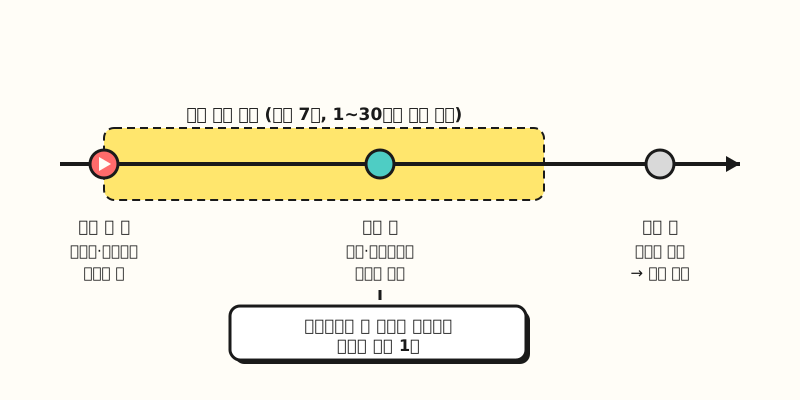 Only brand searches within the conversion window (7 days by default) from the day of the ad view are credited to the campaign of the last ad viewed. (figure labels in Korean)
※ Notes
- Setup goes through your sales representative. The help article says you first need to work with your sales representative to set up brand mapping (the setting that links which searches count as your brand) for your account. It isn't a switch you can flip on your own.
- It can take up to 7 days after setup for numbers to show up in reports.
- The English help article has "beta" in its title, while the Korean version doesn't show this label. Since it may not be available in every account right away, I recommend checking with your representative whether you can use it first.
So where on the screen can you see the numbers?
2. Where do you see branded searches, and why aren't they in "Conversions"?
You can find branded searches in three main places. According to the help article, the Summary page under the Goals menu shows it as a "Branded searches" row under the "Consideration" goal, and in campaign, ad group and asset-level reports and the report editor, it goes into the "All conv." and "Results" columns. If you want to see it separately in the Campaigns table, follow these steps.
- Add the "All conv." column to the "Campaigns" table.
- Click Segment above the table, then choose Conversion action under "Conversions."
- Check the "Branded searches" conversion action row in the "All conv." and "Results" columns.
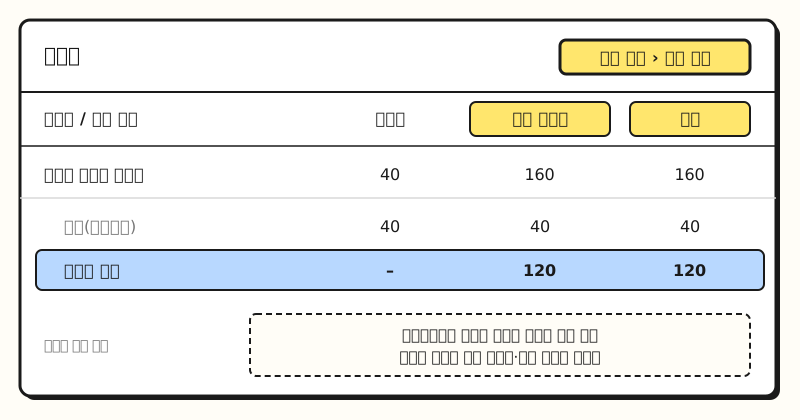 Example figure: a simplified drawing of the Campaigns table layout, not an actual screenshot, with made-up numbers. (figure labels in Korean)
The column people often get confused about is "Conversions." The help article explains that this column only shows conversions used for bidding, so branded searches don't appear there. The branded searches conversion action is set as "Primary," but the "Consideration" goal can't be added to a campaign for optimization, so your bid strategy doesn't move based on this number. So if you only look at "Conversions," branded searches may look like zero, which is why your report should include "All conv." or "Results." The help article also suggests adding the "View-through conversions" and "Results" columns if "All conv." shows zero.
If the numbers still don't show up, start with the causes the help article lists. There are four: poor ad creative quality, overly narrow audiences, low search volume, and unsupported campaign types. In particular, keep in mind that this measurement doesn't apply to Search or Performance Max campaigns.
3. How is it different from Search Lift and the Search Console branded filter?
This isn't the only way to look at brand searches. Google Ads has Search Lift, which is experiment-based, and Search Console has the branded queries filter released in November 2025. By name, all three seem to count "brand searches," but the question each one answers is different. For reference, in Korean, Search Lift is called "검색 광고효과," which sounds like "search ad performance," but it isn't about keyword search ads. It is an experiment that measures how much video ads increased searches.
| Criteria | Branded searches (Google Ads) | Search Lift | Search Console branded queries filter |
|---|---|---|---|
| Question answered | How many times did people who saw the ad search for the brand | How much more did searches increase because of the ad | How much of my site's search traffic comes from branded queries |
| Method | Always-on view-through conversion count | Experiment comparing users who can see the ads with users blocked from them | An AI-assisted system classifies queries as branded or non-branded |
| Scope | YouTube and Demand Gen campaigns | YouTube video campaigns, Demand Gen campaigns on some placements | Web, image, video and news search for top-level (domain-level) properties |
| Where it counts | Google and YouTube search | YouTube and Google search | Impressions and clicks in Google search results |
| To start | Brand mapping with a sales representative | Experiment setup, budget requirements (ask your account team) | Sites with enough queries and impressions |
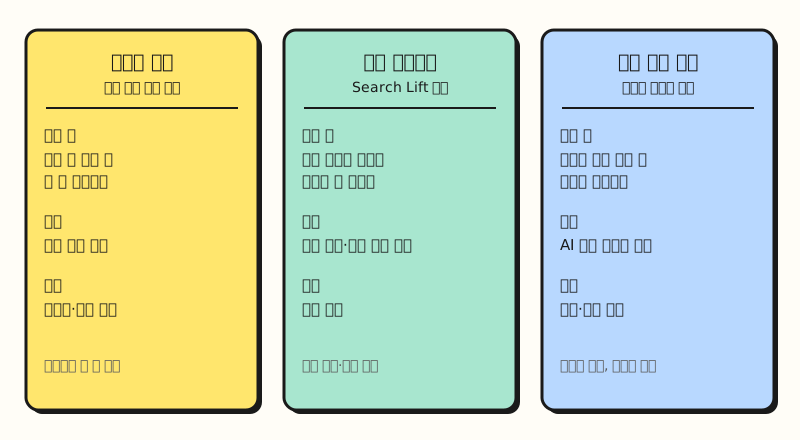 Even under the same "brand search" label, who and how they count differ, so don't add these numbers together or use one in place of another. (figure labels in Korean)
The biggest difference is whether you can talk about cause and effect. Branded searches only counts how many times people who saw the ad searched, so it doesn't tell you whether those people would have searched even without the ad. Google's branded searches introduction page also says this number is a leading indicator that only counts users who saw a YouTube ad, and that it complements lift experiments rather than replacing them. Search Lift, on the other hand, compares the search behavior of users who can see the ads with users who are blocked from seeing them, so it shows "the share added by the ads." But you have to design a separate experiment, and in some accounts you need to contact your account representative to use it.
The Search Console branded queries filter has nothing to do with ads. It splits the Google search queries that brought people to your site into branded and non-branded in the Performance report. It groups your brand name in other languages, typos, and even queries without the brand name that refer to a product unique to the site as branded. However, the announcement itself says some queries may be misclassified, and it's only available for top-level (domain-level) properties and for sites with enough queries and impressions.
4. Which one should you look at, and when?
The three methods aren't really competitors but tools with different uses, so it's easier to choose once you decide what question you're trying to answer right now.
- When you want to compare campaigns and creatives every week: Google Ads branded searches. Because it's always on, you can keep checking whether people who saw creative A or creative B searched for the brand more.
- When you need to decide whether to raise the budget significantly: a Search Lift experiment. It's a question that needs a comparison with "what if there were no ads," so an experiment fits, and you should also plan for the waiting period and budget requirements.
- When you want to see whether brand searches reached your site: the Search Console branded queries filter. It shows how often your site was shown and clicked for branded queries, but it can't tell you whether those people saw your ad.
- When you also need to look at Naver searches: all three methods only cover Google and YouTube search, so you need to check search response on Naver (Korea's largest search engine) separately with Naver's own tools.
If your target customers search a lot on Naver, I recommend noting in your report that a small Google Ads branded searches number doesn't necessarily mean "the ads failed to increase searches."
5. How would you add branded searches to a YouTube ad report?
Let's take the example of someone who runs a YouTube campaign for four weeks to support a new product launch and writes a report every Monday (this is a hypothetical scenario).
- Two weeks before launch: ask your sales representative to set up brand mapping. Bringing a list of searches that should count as your brand, such as the brand name, its English spelling and the new product name, speeds up the conversation. Since it can take up to 7 days for numbers to appear after setup, prepare ahead of the campaign start.
- Decide the conversion window: decide whether to keep the default 7 days or extend it for a product with a longer consideration period. Changing it midway makes week-over-week comparison harder, so decide before the campaign starts and note the window in your report.
- Set up the weekly report columns: put "All conv." next to impressions and views, segment by conversion action, and pull out the "Branded searches" row separately. Because it doesn't appear in "Conversions," it helps to label the table "reporting-only metric" so nobody mixes up the columns.
- Compare creatives: look at branded searches for each creative in the asset-level report. Seeing which creative's viewers searched for the brand more, over the same period and budget, is what this metric does best.
- Check the site side: turn on the branded queries filter in the Search Console Performance report for the same period and see how branded query clicks moved. The two numbers count different things, so it's normal that they don't match.
When you write the report, it's more accurate to say "N branded searches were counted from users who saw the ad" rather than "the ads increased searches by N." If you want to talk about the increase, the right next step is to plan a separate Search Lift experiment next quarter.
Wrapping up
Google Ads branded searches is a reporting-only metric that always counts Google and YouTube brand searches from people who saw YouTube or Demand Gen ads, Search Lift is an experiment that measures the increase, and the Search Console filter is a tool for seeing branded queries that reached your site. Just remembering that the three numbers answer different questions will greatly reduce misreadings in your reports. For setup steps and column names, please refer to the Measuring branded searches help article and the Comparing lift types help article. As I apply this to video campaign reports myself, I'll share any changes I notice.
FAQ
- Are Google Ads branded searches used in bid strategies?
- No. Branded searches are currently reporting-only, so they aren't used for bid optimization, and they don't appear in the "Conversions" column, which only shows bidding conversions. You can check them in the "All conv." and "Results" columns.
- Can I see branded searches in Search or Performance Max campaigns?
- According to the help article, branded search measurement covers YouTube campaigns and Demand Gen campaigns. Unsupported campaign types are listed as one of the reasons numbers may not appear.
- To measure YouTube ad impact, should I use branded searches or Search Lift?
- If you want to compare campaigns or creatives on an ongoing basis, the always-on branded searches metric fits. If you want to know how much searches increased because of the ads (the lift), a Search Lift experiment that compares split user groups fits. Google also describes branded searches as complementing lift experiments rather than replacing them.
- Are searches on Naver included in branded searches?
- No. Google Ads branded searches counts brand searches on Google and YouTube by users who saw the ads.
Related posts
Posts worth reading alongside when you interpret branded search numbers.
- What is conversion modeling? How Google Ads and GA4 estimate missed conversions - What kind of numbers go into the Google Ads conversion columns
- GA4 conversion window now set by the day: key events vs conversions - What to consider when setting a conversion window
- Ad metrics basics: how to calculate CPC, CPM, CTR, conversion rate and ROAS - Basic ad metrics to include in your reports alongside