The basic rule Google recommends for SEO URL structure is to build URLs from readable words and separate words with hyphens (-), not underscores (_). On October 23, 2026, Google refined the part of its "URL structure best practices" document that covers hyphens and underscores to make it clearer. In this post, I'll go over why, along with non-ASCII URLs (like Korean ones), managing parameters and case, and what to watch out for when changing URLs you've already created.
"Is it fine to just use the landing page address the developer gave me?"
When you publish a new campaign page or blog post, the end of the address (the slug) is often decided without much thought.
But even for the same content, how Google reads the words can differ depending on whether you write summer-clothing, summer_clothing, or summerclothing.
Since it's something marketers can decide or request themselves, I wanted to write down what I've studied along with the guidelines.
1. What's the URL structure document Google just refined?
The October 23 entry in the Google Search documentation updates log says it "clarified the guidance on word separation using hyphens and underscores in the URL structure best practices." The stated reason was to align the documentation with the content of the video series "The Non-Canonical Cabinet." Since the log says "clarify," it's best read as stating existing recommendations more clearly rather than introducing a new rule.
The URL structure best practices for Google Search document is split into two main parts.
- Requirements for crawlable URLs: Follow the standard (IETF STD 66), don't change content with URL fragments (the part after
#), and join parameters with=and&. It warns that if you don't follow these, Google is likely to crawl your site inefficiently. - Making your URL structure easy to understand: Recommendations like using descriptive words, using your audience's language, separating words with hyphens, reducing parameters, and keeping case consistent. This is the part that was refined.
The first part covers conditions that cause crawling problems if you don't meet them, while the second covers recommendations to follow when possible, so they carry somewhat different weight.
2. Why hyphens instead of underscores to separate words in URLs?
The document recommends separating words in URLs where possible, and using hyphens rather than underscores when you do. Hyphens help users and search engines better identify the concepts in the URL.
It also explains why underscores aren't recommended.
Underscores are commonly used in many programming languages to represent concepts that belong together, like function names such as format_date, while hyphens clearly show word boundaries.
It's easy to understand with spacing as an analogy: a hyphen is like a space between words, and an underscore is closer to a binder that joins two words into one unit.
Here are the document's examples as they appear.
- Recommended:
example.com/summer-clothing/filter?color-profile=dark-grey - Not recommended:
example.com/summer_clothing/filter?color_profile=dark_grey(separated by underscores) - Not recommended:
example.com/greendress(words run together)
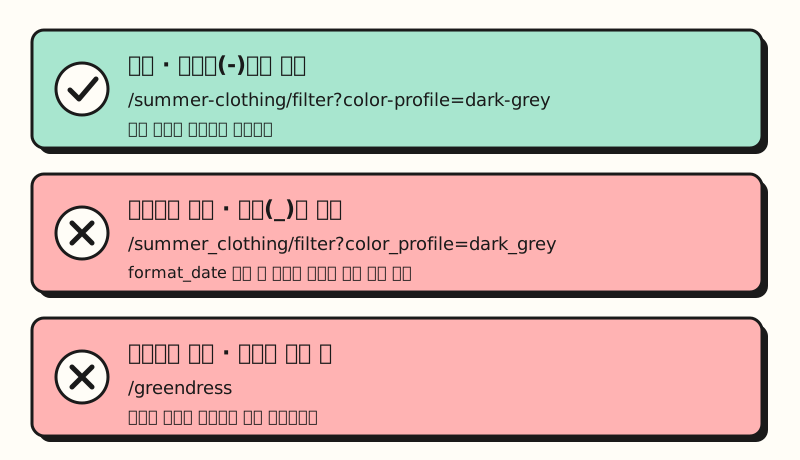 A figure based on the examples in Google's URL structure document. Running words together is also on the not-recommended side. (figure labels in Korean)
What's worth noting is that the example applies the same principle not only to the path but to parameter names and values, as in color-profile=dark-grey.
If you're designing URLs from scratch, I recommend standardizing on hyphens for both paths and parameters.
3. Can you use non-English (e.g., Korean) URLs?
The document recommends using words in your audience's language in URLs, giving German words for German-speaking audiences and Japanese words like example.com/ペパーミント for audiences searching in Japanese.
There's no Korean example, but applying the same principle, using Korean words on pages for audiences searching in Korean can be seen as falling within this recommendation.
There's one condition when linking, though.
Non-ASCII characters must be percent-encoded in a link's href attribute. Percent encoding writes characters as combinations of % and hexadecimal digits, like %E6%9D%82.
That's why when you paste a Korean-language address into a messenger or document, it often shows up as a long string of % characters.
It's best not to expect much effect on rankings. The SEO Starter Guide explains that parts of the URL can be shown as breadcrumbs in search results, which helps users choose a result, but it also says that keywords in the domain name or URL path alone have hardly any ranking effect beyond appearing in breadcrumbs. Think of the URL less as a ranking lever and more as a name tag that makes the page easy for people to read and choose.
4. How should you manage parameters and case?
The part marketers touch most often is actually not the slug but the parameters after the ?.
The document says to use the common format of separating keys and values with = and joining them with &, and to list multiple values for one key using a character that doesn't conflict with the standard, such as a comma (,).
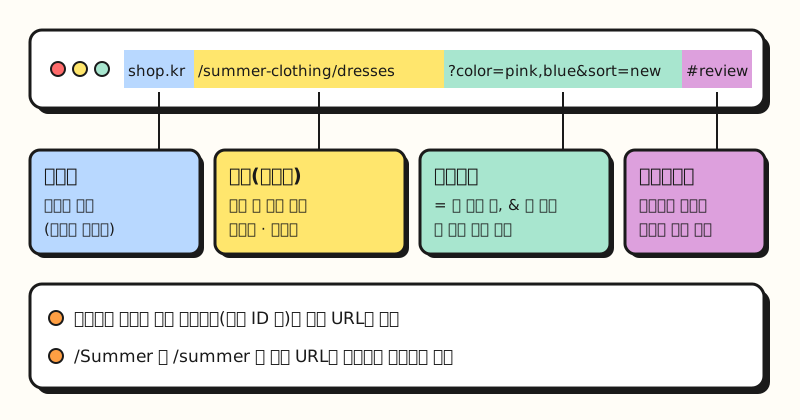 Example: a fictional shopping site address broken into parts. Not a real site. (figure labels in Korean)
Here are some recommendations worth following as well.
- Use as few parameters as possible: Remove parameters that don't change the content to keep URLs short.
- Don't put session IDs in URLs: The document recommends using cookies instead of session IDs where possible. It also points to referral parameters and sorting parameters as causes of an unnecessarily large number of URLs.
- Keep case consistent: Google treats
/APPLEand/appleas different URLs. If your server shows the same page for both, it recommends standardizing on one. - Watch out for filter combinations: It explains that if filters can be stacked, like adding "has a gym" to "beach hotels," the number of URLs can explode, and Googlebot may use more bandwidth or be unable to index all your content.
Parameters appended like ad click IDs are a situation used as an example in the document on consolidating duplicate URLs.
It explains that if you specify the clean original address as the canonical URL instead of the address with ?gclid=ABCD attached, users will see that address in search results, and link signals can be consolidated to the canonical URL.
If you often build campaign links with UTM parameters, you may also want to read my post on UTM parameters and GA4 default channel groups.
So do you need to change all the URLs you've already built with underscores or uppercase letters?
5. Should you change URLs already built with underscores?
The URL structure document only gives recommendations for creating new URLs; it doesn't tell you to change existing ones. And if you do change URLs, you need to follow the procedures in the document on site moves with URL changes, which warns up front that rankings may fluctuate temporarily during major changes.
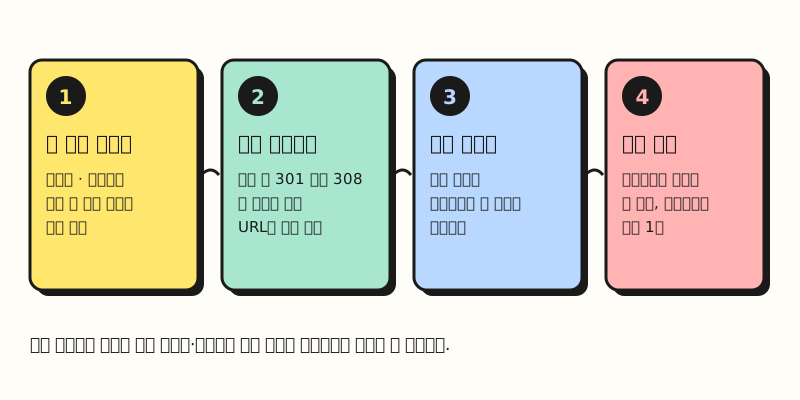 If you decide to change URLs, keeping the redirects in place for a long time is key. (figure labels in Korean)
If you decide to change them, I recommend following this order.
- Set up permanent redirects: The redirects document recommends server-side permanent redirects (301 or 308) where possible. Permanent redirects are used as a signal for Google to treat the new address as canonical.
- Update internal links and sitemaps: Point the links within your site and your sitemaps to the new addresses.
- Keep redirects for a long time: The site move document says to keep redirects for as long as possible, generally at least one year.
Putting this together with the earlier point that keywords in the URL path have hardly any ranking effect, in my view there's not much reason to move addresses that are working fine all at once just to change underscores to hyphens. It's less of a burden to standardize on hyphens and lowercase starting with new pages, and to clean up existing addresses when you have to touch them anyway, such as during a site redesign.
※ Note: What should you know when reading the URL structure best practices?
- This is based on Google Search: This post summarizes Google Search documentation. How Naver Search (Korea's largest search engine) handles URLs needs to be checked separately in the Naver Search Advisor guide.
- The documents show different last-updated dates: The updates log says October 23, the bottom of the English document says October 21 (UTC), and the bottom of the Korean document says October 26 (UTC). The content on hyphens and underscores is the same in the English and Korean versions.
- Recommendations aren't guarantees: The document itself says to apply them "where possible." Well-built URLs don't guarantee crawling, indexing, or rankings.
Summary
The core of SEO URL structure is to separate readable words with hyphens, reduce parameters, and keep case consistent, and with this update Google more clearly stated why it recommends hyphens over underscores. Changing existing addresses comes with permanent redirects and a retention period of at least a year, so I recommend starting by applying the rules to new pages. I use lowercase English letters and hyphens for the post addresses on this blog, and if pages with parameters come along, I'll review them against these guidelines again. For details, please see the URL structure best practices document.
FAQ
- What's the SEO difference between hyphens and underscores in URLs?
- Google's URL structure document recommends using hyphens (-) instead of underscores (_) to separate words. Hyphens clearly show word boundaries, while underscores are commonly used to represent concepts that belong together, like function names in programming languages (format_date). Running words together (greendress) isn't recommended either.
- Are non-English URLs, like Korean ones, a problem for Google Search?
- Google recommends using words in the language your audience searches in and gives German and Japanese URLs as examples. However, it says non-ASCII characters should be percent-encoded in a link's href attribute. It's also good to know that keywords in the URL path alone have hardly any ranking effect.
- What should I do if I change URLs built with underscores to hyphens?
- Google's documentation says to set up server-side permanent redirects (301 or 308) from the old addresses to the new ones, update internal links and sitemaps to the new addresses, and keep the redirects for at least one year. Rankings may fluctuate temporarily right after the change.
Related posts
- SEO basics: how Google crawls, indexes, and shows pages in search results - How URLs get discovered and indexed
- How to study SEO | Google Search Central's two official learning paths - What order to study technical SEO in
- UTM parameters and GA4 default channel groups - A rundown of parameters added to campaign links