On October 15, 2026, Google announced that it is changing how links appear in Google AI Mode and AI Overviews. There are five changes in total, starting with more inline links inside answers that also show up higher, plus an official-sites section, a news carousel, related-article thumbnails, and links on creator names. Two of these are still in testing.
"If AI gives people the whole answer, who's going to visit my site?" That question comes up every time AI search is mentioned, and this announcement answers it by making source links more visible inside AI answers. In this post I'll go over what changed with Google's October 15 announcement and where site owners and marketers should look.
1. What changed in the October Google AI Mode update?
The announcement lists five changes, and each one is at a different rollout stage. You need to separate "launched" from "testing" to know what you can actually expect on the search results page right now.
- More inline links: These are links attached to words or phrases inside the answer text. Google said it has been steadily and significantly increasing inline links in its AI features, and that it is now rolling out an update that shows inline links higher up in answers more often.
- Dedicated section for official sites (testing): When only one or two official sites can handle a given task, Google is testing a layout that groups those links at the very top of the answer, with an explanation of why each link is useful.
- Expanded news carousel: The carousel that collects timely articles has started expanding to more regions and languages. It also highlights the Preferred Sources the user has chosen.
- Stronger related-article links: Links that appear at the end of some answers are being redesigned with image thumbnails so they're easier to tap.
- Creator and publisher name links (testing): Google said that starting this week it is testing a feature in AI Mode video results where tapping a creator's or publisher's name takes you to their search profile.
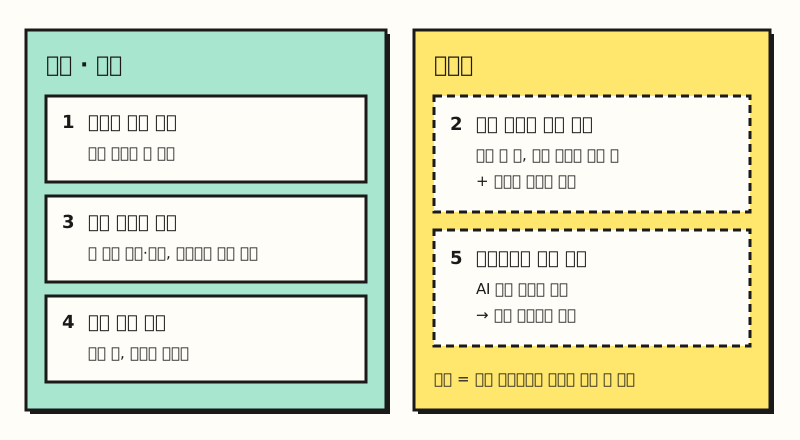 Illustration: The five changes from the October 15 announcement, grouped by rollout status (figure labels in Korean).
Google also said the number of people using the Preferred Sources feature has grown more than 7x since earlier this year. So where does each of these links actually sit inside an AI Overviews answer?
2. Where do links appear in an AI Overviews answer?
It helps to think of an AI answer as a librarian's explanation. In the past, the librarian would finish explaining and then hand you a separate list of the books they used. Inline links are more like the librarian pointing at a book mid-explanation and saying, "This part is on this page of this book." The core of this change is letting readers jump to the source at the exact moment they get curious.
Here are the positions mentioned in the announcement, in the order they appear on the answer screen.
| Position | What you see | Status |
|---|---|---|
| Top of the answer | One or two official sites and why each link is useful | Testing |
| Answer body | Inline links on words and phrases, shown higher more often | Launched |
| Below short answers | Carousel of timely articles, highlighting Preferred Sources | Expanding by region and language |
| End of the answer | Related-article links with thumbnails | Rolled out |
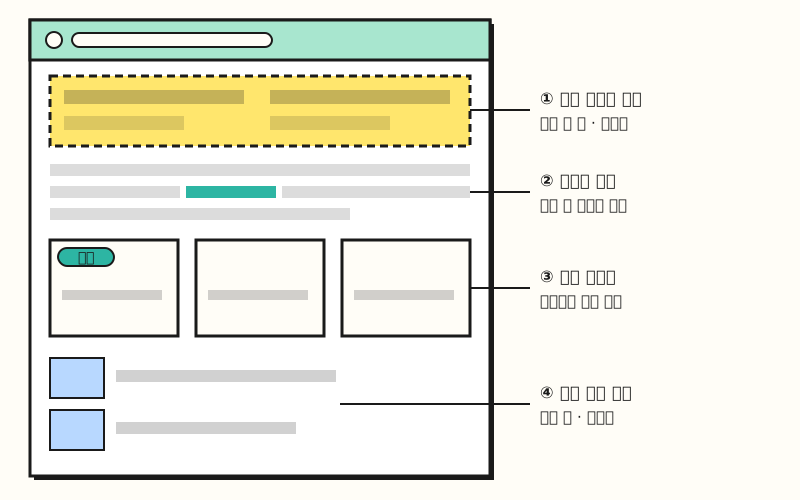 Illustration: A simplified layout based on the positions described in the announcement, not an actual Google Search screen (figure labels in Korean).
The official-sites section isn't an entirely new idea. Google explained that it's extending its existing approach of showing a link up front when someone is trying to reach a specific site, now into AI answers. The news carousel was first introduced in the May 27 announcement. When you ask about a fast-moving topic, it shows articles and Preferred Sources below a short AI answer. So how are the Preferred Sources highlighted in the carousel decided?
3. What are Preferred Sources, and can my site be one?
Preferred Sources is a setting where users pick the sites they want to see more often. On google.com, tap your profile picture, go to Search personalization > Source preferences, search for a site, and check it. The sources you pick are reflected in Top Stories as well as AI Mode and AI Overviews. In AI Mode and AI Overviews, links from the sites you picked may stand out with a "Preferred" badge.
If you run a site, I'd recommend checking the requirements in the Search Central guide first.
- Domains and subdomains only:
www.example.comorcode.example.comwork, but a subfolder likewww.example.com/blogcan't be selected. - Regularly updated sites: The help page says sources that aren't updated regularly may not be available.
- To appear in AI features: Your site must be set to "Include" under the generative AI features setting in Search Console.
Once you meet the requirements, you can invite readers to add your site as a Preferred Source. The guide covers an "Add as a preferred source" button you add with two lines of HTML, and a deep link (https://www.google.com/preferences/source?q=your-site-address) you can use in social posts or newsletters.
According to the guide, these are optional, so your site can still show up as a Preferred Source without them.
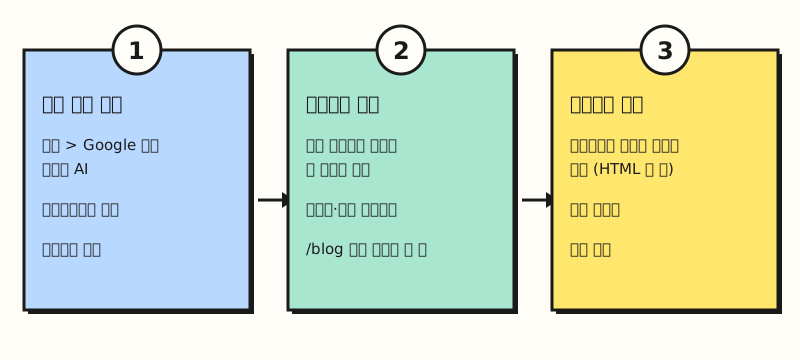 Illustration: The requirements and promotion methods from the Search Central guide, laid out as steps (figure labels in Korean).
4. What should you check in Search Console?
Even if AI Mode shows more links, you ultimately need data to confirm whether your site is in those links. There are two places to look in Search Console.
First, Settings > Generative AI in Google Search. According to the generative AI controls help page, there are three options: "Include," "Exclude," and "Inherit control from parent property," and the default for every property is Include. If you exclude, your links and content are removed from AI Overviews, AI Mode, and Discover's generative AI features, and the traffic and impressions from those features go away too. It doesn't affect your ranking in other search results, and limiting AI training is handled separately through Google-Extended. Since you need Include to appear in AI features as a Preferred Source, I'd suggest double-checking that nobody set it to Exclude by mistake.
Next is the generative AI performance report. It shows how many times your site's links were shown to users in AI Overviews and AI Mode (impressions), broken down by page, country, date, and device. Sites without enough impressions may not see the report, and Search Labs experiment data isn't included. According to the AI features guide, clicks from AI features are also counted under the "Web" search type in the Performance report. Because features roll out by region in stages or are still in testing, you may not see a difference right away, but comparing impressions in this report before and after October 15 could be a good starting point.
※ Note: Will this show up in Korean search results right away?
AI Mode has been available in Korean since September 2025, but this announcement doesn't list which countries or languages each feature covers.
- Official-sites section and creator name links: These are in testing, so not every user may see them.
- News carousel: The announcement only says it "has started expanding to more regions and languages," so I couldn't confirm when it will reach Korean search.
- Search profiles: According to the search profile help page, they're currently available only in Canada, India, and the US, and you need at least 10,000 followers or subscribers on one of YouTube, Instagram, X, or TikTok to create one.
- No numbers: The announcement doesn't give figures for how much inline links increased or how much clicks grew.
To sum up, this Google AI Mode update is about showing source links in AI answers more often, higher up, and more prominently, and some of it is still in testing. I'll keep an eye on the generative AI performance report in Search Console and write up again which features make it to Korean search results. For the original announcement, see the Google blog, and for Preferred Sources setup, see the Search Central guide.
FAQ
- What are inline links in Google AI Mode?
- They're links attached to words or phrases inside the text of an AI answer. In its October 15, 2026 announcement, Google said it has been steadily and significantly increasing inline links in its AI features and is rolling out an update that shows them higher up in answers more often. It didn't disclose numbers on how much they increased.
- How do I set up Preferred Sources?
- On google.com, tap your profile picture, go to Search personalization > Source preferences, then search for the sites you want and check them. The sources you pick are reflected in Top Stories as well as AI Mode and AI Overviews, and only domain- or subdomain-level sites can be selected.
- Can I keep my site out of AI Overviews?
- If you choose "Exclude" under Settings > Generative AI in Google Search in Search Console, your site's links and content are removed from AI Overviews, AI Mode, and Discover's generative AI features. According to the help page, this usually takes effect within 1–2 days. It doesn't affect your ranking in other search results, but you also lose the impressions and traffic from those features.
Related posts
- AI Comes to Google Search: How SEO Changes in the Age of AI Overviews - How AI Overviews and AI Mode affect SEO, and how to control your visibility
- Search Console Multimodal Search Report: How to Track Google Lens Traffic Separately - Splitting text and image search in the generative AI performance report
- SEO Basics: How Google Crawls, Indexes, and Shows Pages in Search - How indexing works, the basic requirement for appearing in AI features