If you're just starting to learn SEO, the two learning paths Google Search Central released on October 6, 2026 are a good place to begin. They bundle videos into YouTube playlists: "Search fundamentals for beginners" for website owners and marketers, and "Technical SEO fundamentals" for developers and technical SEOs. In this post, I'll go over what each path covers and the order that works best if you're a marketer.
"I really need to study SEO, but where on earth do I start?" Type SEO into a search box and you get an endless stream of blog posts and course ads, each recommending a different order, so many people get stuck right at the start. Google's own videos have been around for a long time, but they were scattered across several series, which made them hard for newcomers to follow in order. This time, Google has regrouped those videos in the order you should study them.
1. What Are the SEO Learning Paths Google Released?
According to the Google Search Central blog announcement, the Search Central YouTube channel has published hundreds of videos over the years across several series, including Search for Beginners, Ask Googlebot, Search Console Training, and Search Off the Record. Google explains that the series format works well for in-depth explanations and episodic news, but that it can be hard to find a path for learning in order from the beginning. So it reorganized the videos into two playlists, both of which you can find among the Search Central channel's playlists.
- Search fundamentals for beginners: A playlist for website owners, marketers, content creators, and people new to SEO. As of October 15, 2026, it contains 15 videos.
- Technical SEO fundamentals: A playlist for developers and technical SEOs. As of the same day, it contains 21 videos.
It's easy to understand if you compare it to learning to drive. If the Search fundamentals path is driving lessons where you learn the rules of the road and get out there and drive, the Technical SEO path is closer to a mechanics course where you open the hood and inspect the engine and wiring. Just as you don't need to learn mechanics before you can drive, it makes sense for marketers to start with the Search fundamentals path.
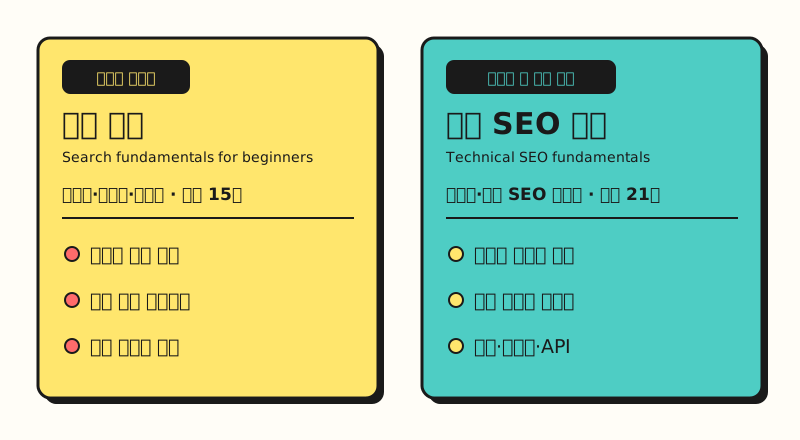 The two playlists differ right down to their audience. For marketers, "Search fundamentals" on the left is the starting point (figure labels in Korean).
2. What Do You Learn in the "Search Fundamentals" Path?
According to the announcement, the Search fundamentals path is designed to start with core concepts and carry through to measuring real results, and it's split into three main chunks.
- How Search works: Covers how Google crawls pages, indexes them, and shows them in search results, as well as the elements that make up a single search result.
- Getting started with Search Console: Covers setting up Search Console, analyzing the performance report, and the Search Console Insights report.
- Market and content insights: Covers how to use Google Trends for SEO and how to find rising topics.
The first chunk matches the How Google Search works guide, and I've also summarized the three stages of crawling, indexing, and serving search results in this blog's SEO basics post. The guide starts by pointing out that Google doesn't accept payment to crawl a site more often or rank it higher, and that meeting the Search Essentials doesn't guarantee crawling, indexing, or serving. It's worth remembering, since it gives you a benchmark when you see phrases like "guaranteed top ranking on Google" in SEO agency ads.
3. Where Should You Start with Search Console and Google Trends?
The heart of the second chunk is the Search Console performance report. According to the performance report help article, the default view shows clicks and impressions for the last three months, and there are four metrics.
- Clicks: How many times users clicked through to your site from Google search results
- Impressions: How many times your site appeared in Google search results
- CTR (click-through rate): Clicks divided by impressions
- Average position: The average of the topmost position your site's results held in search results
Using the tabs above the table, you can break the data down by query, page, country, device, search appearance, and date, and you can change the date range and search type with the filters at the top.
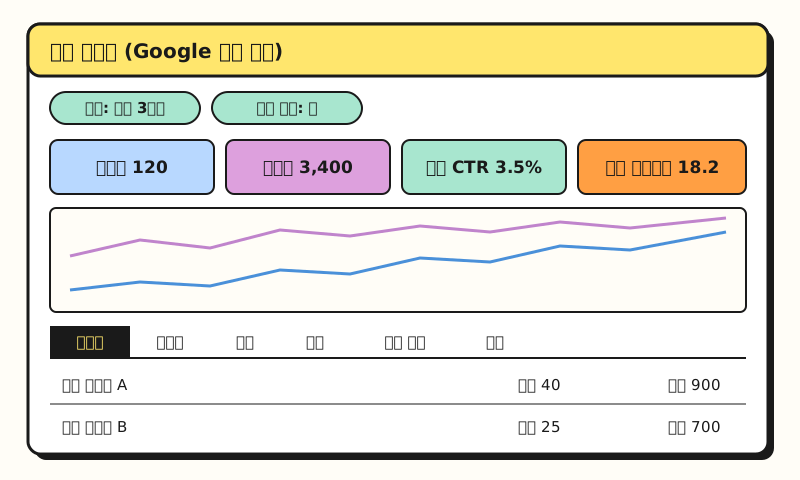 Example figure: a simplified drawing of how the performance report is laid out. It is not an actual screenshot, and the numbers are made up (figure labels in Korean).
If all the numbers feel overwhelming, you can start by opening the Insights report instead. It summarizes things in cards, such as clicks and impressions, top, trending up, and trending down content, the queries that led people to your site, and top countries, and there's also a card that separates branded from non-branded queries. However, according to the help article, the Insights report is being rolled out gradually and may only be visible to some users, and because the branded query classification is AI-based, labels may sometimes be wrong.
For the third chunk, Google Trends, it's good to read the Get started with Google Trends guide alongside the videos. There's the Explore tool for looking at interest in search terms and topics by region and time period, and the Trending now tool, which shows the search terms currently surging on Google. The guide advises not to pick a topic just because it's popular, but to first consider whether it fits your business and your users.
So does that mean marketers don't really need to watch the Technical SEO path?
4. When Should You Watch the "Technical SEO" Path?
The announcement says the Technical SEO path skips the high-level basics and focuses on site health, crawl budget optimization, rendering, and debugging at scale. It covers the three chunks below.
- Crawl directives and structure: robots.txt, the Crawl Stats report, and crawl budget management
- Indexing and debugging at scale: Troubleshooting indexing issues, using the URL Inspection tool, and managing duplicate content
- Serving, rendering, and APIs: How browsers interpret HTML, page size, and automating work with Search Console bulk data export and the API
Some of these are worth knowing even if your site is small.
The Introduction to robots.txt explains that robots.txt is a file for managing crawler traffic, not a way to hide a page from Google Search, and that to hide a page you should use noindex or password protection.
With the URL Inspection tool, you can check whether a page has been indexed and request indexing, and for duplicate pages, you can tell Google the canonical URL with a redirect or rel="canonical".
Crawl stats and crawl budget, on the other hand, are topics for large sites. The Crawl Stats report help article says you don't need to worry about this report if your site has fewer than 1,000 pages, and the crawl budget guide names its main audience as sites with more than 1 million unique pages that change about once a week, or sites with more than 10,000 pages that change daily. The guide adds that these numbers are rough estimates rather than exact thresholds, and that for other sites, keeping your sitemap up to date and checking the page indexing report regularly is enough.
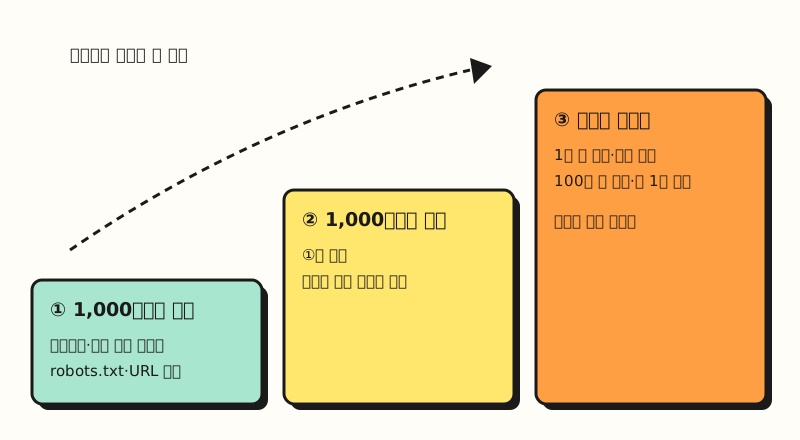 The page-count thresholds are rough estimates from Google's documentation, not exact cutoffs (figure labels in Korean).
Bulk data export is a feature that sends your Search Console performance data to BigQuery every day, and according to the setup help article, storage and queries beyond the free quota incur Google Cloud charges. When you have a reason to use it together with your data team, you can pick out the relevant video.
Note: What to Keep in Mind When Watching the Learning Paths
- Videos in English: The video titles in both playlists are all in English. If you'd like to read the same content in Korean, I recommend keeping the Korean version of the Search Central doc that pairs with each video open alongside it.
- The number of videos may change: The 15 and 21 videos are the counts I saw in the playlists on October 15, 2026. Google is asking viewers to subscribe for upcoming tutorials, so the lists may grow.
- It's all based on Google Search: Search Console covers Google Search, and Google Trends uses Google and YouTube search data, so you can't see search traffic coming from Naver (Korea's largest search engine) with these tools. You'll need to check Naver's crawling and indexing status separately in Naver Search Advisor.
Summary
Google Search Central's learning paths bundle previously scattered official videos into two tracks, "Search fundamentals" and "Technical SEO fundamentals." If you're a marketer, following the Search fundamentals path from the beginning and learning how Search works, then Search Console, then Google Trends, is a solid starting point for studying SEO. For the Technical SEO path, I recommend picking out the parts even small sites need, such as robots.txt and URL Inspection, and coming back to large-site topics like crawl budget when you need them. I'm also going to work through the Search fundamentals path in order, compare it against this blog's Search Console data, and write up anything new I learn.
FAQ
- Where should I start when learning SEO?
- I recommend starting with the "Search fundamentals for beginners" playlist that Google Search Central released on October 6, 2026. It's a playlist for website owners, marketers, content creators, and SEO beginners, organized in the order of how Search works, getting started with Search Console, and using Google Trends.
- Should marketers watch the technical SEO learning path too?
- Google introduces the Technical SEO path as being for developers and technical SEOs. That said, it includes videos that are useful even for small sites, such as the point that robots.txt isn't a way to hide pages from search results and how to check indexing status with the URL Inspection tool, so you can just pick the parts you need.
- Can I watch the Google Search Central learning path videos in Korean?
- The video titles in both playlists are all in English. Topics such as crawling and indexing, the performance report, and robots.txt have Korean versions in the Search Central documentation and Search Console help, so reading them alongside the videos makes them easier to understand.
Related Posts
- SEO basics: how Google crawling, indexing, and serving search results work - A written summary of the first chunk of the Search fundamentals path
- Search Console multimodal search report - How to use the search type filter in the performance report
- AI comes to Google Search: how SEO changes in the age of AI Overviews - How AI Overviews and AI Mode relate to SEO