Naver AI Briefing is a feature in Naver search (Naver is Korea's largest search engine) where generative AI figures out search intent, summarizes an answer, and shows the documents behind that answer as sources. Naver says AI Briefing is likely to use high-quality content that already performs well in regular search results for its summaries, so the starting point for getting cited is writing content that gets crawled well and contains real experience and evidence.
"A summary pops up at the very top of the search results. Does that push my post further down?" If you've searched for information on Naver, you've probably seen a screen where an AI-written answer and source cards appear right below the search box. Most of my blog's search traffic comes from Naver, so which posts get cited as sources in this summary didn't feel like someone else's problem. In this post, I'll cover what AI Briefing is and where it appears, how sources are chosen, and what site owners should check.
What is Naver AI Briefing, and where does it appear?
According to the AI Briefing introduction in the Naver Search Help Center, AI Briefing is a service that not only summarizes search results with generative AI but also recommends and links to content that may be helpful to users. The March 2025 press release shows that it opened to all users on March 27, 2025 in PC and mobile integrated search with no separate sign-up, and that it was split into several types from the start.
- Official / multi-source type: For informational queries that have a definite answer or require looking at multiple pieces of content, it summarizes key information at the very top of the search results and supports further exploration with follow-up questions.
- Short-content, Place, and Shopping types: Formats tailored to trending keywords, travel and places, and shopping information, appearing naturally in the middle of the search flow.
- Recent changes: In June 2026, Clip AI Briefing, which summarizes Clip videos, launched, and the health-specialized AI Briefing expanded its scope to treatment and procedure information.
It doesn't appear for every search term, though. The Help Center explains that AI Briefing is provided to all users but doesn't always appear in search results, and that there's currently no way for users to turn AI Briefing on or off. Tapping "Learn more with AI" (AI로 더 알아보기) below AI Briefing leads to the AI tab, a conversational search, and since October 22, 2026, the related questions that used to sit at the bottom of AI Briefing have been split into a separate section for some search terms.
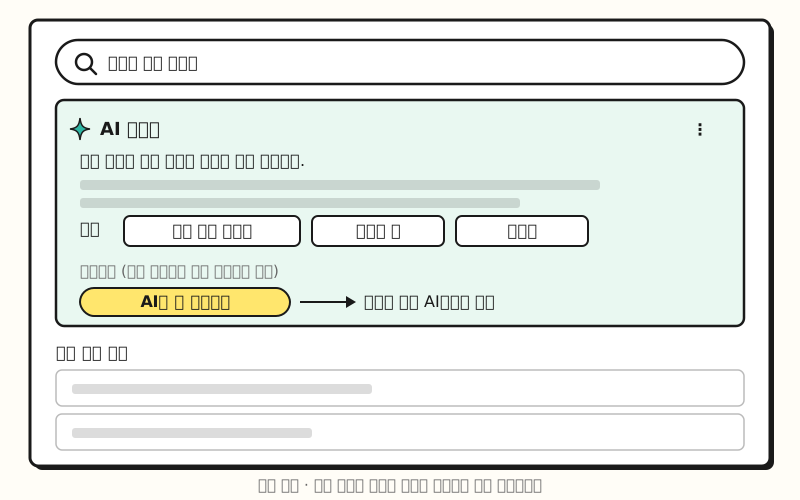 Example figure: A simplified drawing of the search results layout, not an actual capture. The summary answer and sources appear together, followed by regular search results below (figure labels in Korean).
Where do AI Briefing sources come from?
According to the official / multi-source type guide, AI Briefing has AI analyze a variety of web documents collected by Naver's search engine and summarizes the answer together with useful sources. Depending on the AI's judgment, it may use just one highly relevant document or combine content from several documents, and images may be attached in addition to source links and text. In the examples from the press release, questions with a fixed answer, like "documents needed to renew a driver's license," get a summary of government or public agency material with a link to that page, while questions that need many opinions gathered, like a movie's ending or the latest meme, draw broadly on blog, cafe, and Clip content.
Think of AI Briefing as being like the footnotes at the end of a presentation. Even when the presenter reads many sources and sums them up on one slide, they leave the supporting sources as footnotes so the audience can check them. So to earn a spot in those footnotes, shouldn't a document first be well crawled and visible in search, enough to land on the presenter's desk in the first place?
What kind of content gets cited in AI Briefing?
The Naver Search official blog's guide to writing content users choose in the AI era answers this question most directly. The FAQ in that post explains that AI Briefing is likely to use high-quality content that performs well in existing search results for its summaries, and that content currently performing well in search results is also more likely to be cited. The guide lays out five content writing principles.
| Principle | What the guide says |
|---|---|
| First-hand knowledge | Write about cases you experienced, problem-solving processes, and failures, and for specialized topics, cite statistics, research, and official agency sources |
| Consistent topic | Channels that write steadily on a specific topic are recognized as expert sources in that field |
| Honest authenticity | Disclose financial compensation such as fees or sponsorships, and credit the original author and link when quoting |
| Easy-to-read structure | Break content into titles, subheadings, and paragraphs, and also write out the key points of images and videos as text |
| Keeping it current | Update old posts when information changes and keep publishing new ones |
It also lists content likely to be filtered out. That includes repetitive keyword stuffing, clickbait, patchwork content with unclear sources, and posts mechanically generated or summarized by AI, and it says posts with excessive pop-ups or disguised ads may also be left out of citations. Using AI tools doesn't automatically mean a penalty, but the guide recommends a final review and edit so your own experience and knowledge come through. The practical edition released in June added five self-check items: reader and purpose, procedure, comparison of alternatives, actual application results, and images that fit the context.
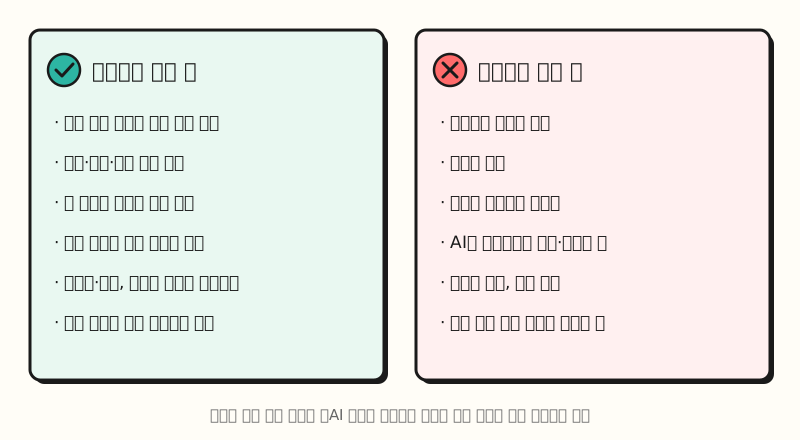 Figure: A side-by-side comparison of the traits described in the Naver Search official blog guide. Experience, evidence, and easy-to-read structure are on the cited side (figure labels in Korean).
This guide was published together with the Naver Mate program for Naver Blog creators, so it's written mainly with blogs in mind. The Search Advisor content writing recommendations for website owners lay out five principles in the same vein: expertise and experience, consistent topics, authenticity, easy-to-read structure, and keeping information up to date.
What should site owners and marketers check?
If content that performs well in search is more likely to be cited, the first step is checking whether your site is being properly crawled by Naver search. I recommend checking the following, based on the Search Advisor webmaster guide.
- Register your site and submit a sitemap: Register your site in Search Advisor's webmaster tools, verify ownership, and submit your sitemap and RSS.
- Allow crawling: Naver's search robot is named
Yeti. Make sure your robots.txt or firewall isn't blocking Yeti. - Put key information in text: The content writing recommendations say search robots have difficulty recognizing text inside images, so write important details like prices and procedures in the body text and add alt attributes to images.
- Have a person polish AI-written content: The web content spam examples list mass-publishing pages from the same template with only parts of sentences changed as a type of spam, while stating that judgments aren't made based solely on whether a particular technology was used.
- Search for yourself: Search Naver for the key questions your posts should answer, and check whether AI Briefing appears and which documents are listed as sources.
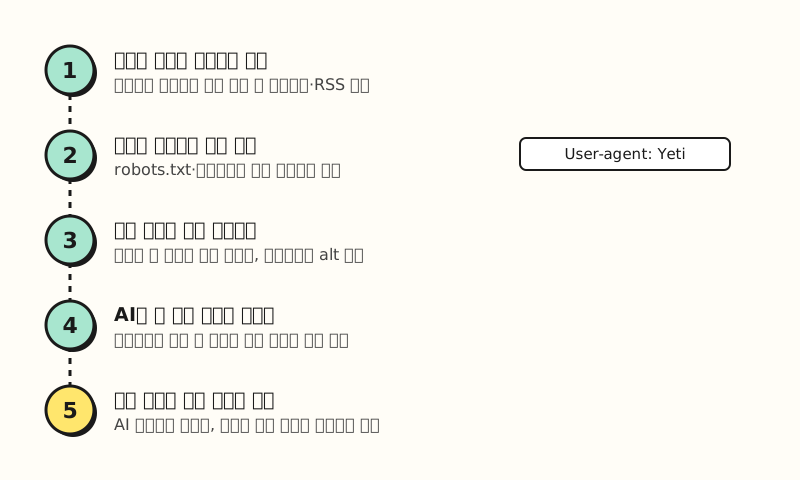 Figure: Checklist steps, from site registration to searching for yourself, grouping the Search Advisor guide in order (figure labels in Korean).
There's one setting that's easy to confuse.
According to the robots meta tag guide, adding <meta name="robots" content="nosourceinfo"> stops AI-generated source descriptions from being provided for your site. It's easy to mix up with AI Briefing sources, but the guide describes this tag only as a way to remove site source descriptions and says nothing about blocking AI Briefing citations.
I also couldn't find, in the Search Advisor guide list, any setting that excludes only AI Briefing citations or any report showing how often you're cited. So for now, the realistic approach is to check your basic status with the crawl status and exposure reports in the webmaster tools, and to search your key terms yourself.
Note: What if the AI Briefing answer is wrong?
The AI Briefing reliability guide states that, due to the nature of generative AI, inaccurate or incorrect information may appear. If you see a summary about your brand or product that isn't factual, you can leave feedback or a report from the More (⋮) menu at the top right of AI Briefing, and the report reasons are divided into untrue information, outdated information, intellectual property infringement, and more. Since May 2026, some official blogs, such as those of public and educational institutions, have also started getting AI source information, where AI explains what kind of organization the blog belongs to, but this too is only described as expanding to more blogs over time.
To sum up, Naver AI Briefing picks content that fits the query from documents collected by the search engine, summarizes it, and links to it as a source, and the criteria Naver has shared are content that performs well in search and easy-to-read content with experience and evidence. I'm also going back through this blog's posts one by one to check that key information isn't only inside images and that no source links are missing. Please refer to the Naver Search official blog's content writing guide together with the Search Advisor guide.
FAQ
- Can I turn off Naver AI Briefing?
- According to the Naver Search Help Center, there's currently no way for users to turn AI Briefing on or off. AI Briefing is provided to all users but doesn't always appear for every search term; it shows only for queries where it's needed. If you find an inappropriate answer, you can report it from the More (⋮) menu at the top right.
- Can posts on a personal website, not Naver Blog, become AI Briefing sources?
- The Help Center explains that official / multi-source AI Briefing chooses sources by analyzing a variety of web documents collected by Naver's search engine. So the starting point is registering your site in Search Advisor and allowing Naver's search robot Yeti to crawl it in robots.txt so it shows up well in web search. No method has been published that guarantees which documents get cited.
- Is AI-written content at a disadvantage for AI Briefing citations?
- The Naver Search official blog's content writing guide says it doesn't automatically penalize content just because AI tools were used. However, content mechanically generated or summarized by AI is likely to be filtered out, so it recommends a final review and edit that brings in your own experience and knowledge.
- Does adding the nosourceinfo meta tag block AI Briefing citations?
- The Search Advisor guide only explains that adding nosourceinfo stops AI-generated source descriptions from being provided for your site. There's no guidance saying it blocks AI Briefing citations. To remove a page from search results entirely, you'd use noindex, but that also removes it from regular search.
Related posts
- AI Has Arrived in Google Search: How SEO Changes in the Era of AI Overviews - A good comparison with the conditions for appearing in Google AI Overviews and AI Mode
- SEO Basics: How Google Crawling, Indexing, and Search Results Work - How search engines find and read pages
- How to Add Keywords to Product Listings | Naver Shopping Product Names, Tags, and Categories - How Naver Shopping search reads product information