Google banner ads are built in two broad ways. One is the responsive display ad, where you upload images, logos and text as ingredients and Google combines them to fit each placement, and the other is the uploaded image ad, where you upload banner files a designer has finished, one per size. The two differ in everything from image aspect ratios to file size and character rules, so you need to decide which way to go before you can write a proper design brief.
"For next month's promotion banner, how many sizes do we need to make?" When you first take on display ads, it's easy to feel stuck when a designer asks you this. In this post, I'll compare Google banner ad sizes across the two approaches, and walk through which to choose in which situation and the order for writing a brief.
1. What is the difference between Google's two banner ad approaches?
According to the responsive display ads help article, responsive display ads let you upload assets such as images, headlines, logos, videos and descriptions, and Google AI builds combinations that fit placements across websites, apps, YouTube and Gmail. A characteristic is that the same assets can run as a banner on one site and as a text-focused ad on another. The help article on common sizes introduces responsive display ads as the default ad type for the Display Network, and explains that static image ads simply serve the image the advertiser provides without changing to fit the placement or performance.
| Responsive display ads | Uploaded image ads | |
|---|---|---|
| What you upload | Ingredients such as images, logos, headlines and descriptions | A finished banner file for each size |
| Image specs | Landscape 1.91:1, square 1:1, portrait 9:16 | Fixed pixel sizes such as 300×250 and 728×90 |
| File size | Up to 5,120KB per image | Up to 150KB per file |
| Design control | Low (Google adjusts layout and size) | High (served exactly as made) |
| Production effort | Images in three ratios plus text | One file for every size you want to serve |
As an analogy, a responsive display ad is closer to ordering a meal kit where you hand over the ingredients and leave the cooking to the kitchen, while an uploaded image ad is closer to packing finished lunch boxes in each size and sending them off. So what sizes should the ingredients in that meal kit be?
2. What are the sizes and character limits for responsive display ads?
The image and logo specs in the responsive display ads best practices guide and the create a responsive display ad help article are as follows.
| Asset | Recommended size | Minimum size |
|---|---|---|
| Landscape image (1.91:1) | 1200×628 | 600×314 |
| Square image (1:1) | 1200×1200 | 300×300 |
| Portrait image (9:16) | 900×1600 | 600×1067 |
| Landscape logo (4:1) | 1200×300 | 512×128 |
| Square logo (1:1) | 1200×1200 | 128×128 |
Images and logos are all up to 5,120KB per file, and you need at least one landscape image and one square image. The best practices guide recommends 5~10 images per aspect ratio, but the maximum count is worded a little differently across documents: the guide says up to 15 per aspect ratio, while the Google Ads API documentation says 15 for landscape and square combined. So I think it's better to use the guide's 5~10 as a baseline and focus on choosing different scenes rather than filling up the count.
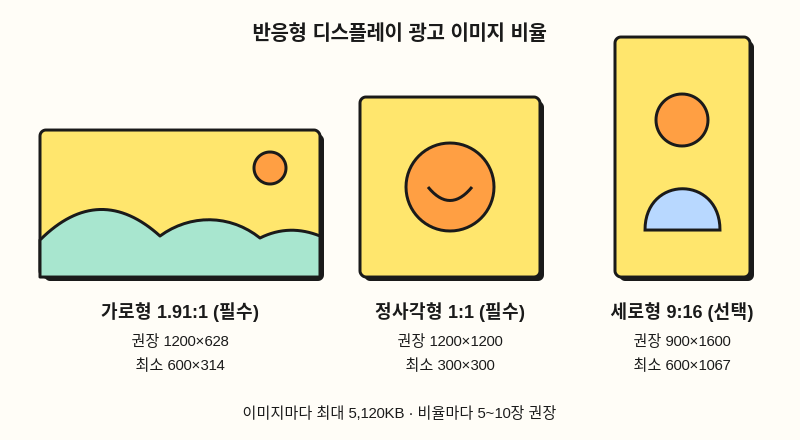 Example figure: the recommended sizes from the help articles scaled down at the same ratio and placed side by side (figure labels in Korean)
The text specs are as follows.
- Short headlines: 1~5, up to 30 characters in English
- Long headline: 1, up to 90 characters in English
- Descriptions: 1~5, up to 90 characters per the API documentation (the best practices guide says 80)
- Business name: maximum display width of 25 per the API documentation
- Videos: optional, up to 5 YouTube links per the API documentation
The phrase to note here is "in English." The text ads help article says that for double-width languages such as Korean, Japanese and Chinese, each character counts as two toward the limit, and the ad creative style and spelling policy also explains that character limits in these languages are half those of other languages. So if you write in Korean, you should treat a 30-character short headline as about 15 Korean characters and a 90-character long headline as about 45.
3. What sizes should you make if you upload image ads yourself?
According to the uploaded display ad specifications, image ad files must be GIF, JPG or PNG at up to 150KB, and the accepted sizes fall into four groups.
| Group | Sizes (pixels) |
|---|---|
| Square and rectangle | 200×200, 240×400, 250×250, 250×360, 300×250, 336×280, 580×400 |
| Vertical (skyscraper) | 120×600, 160×600, 300×600, 300×1050 |
| Horizontal (leaderboard) | 468×60, 728×90, 930×180, 970×90, 970×250, 980×120 |
| Mobile | 300×50, 320×50, 320×100 |
You don't need to make all of these sizes. The help article on common sizes lists 300×250, 336×280, 728×90, 970×90, 468×60, 300×600, 160×600, 250×250 and 200×200 as the most common sizes on computers. For high-end mobile devices it lists sizes such as 300×50 and 300×100, so if you're starting out, picking sizes that appear both in this list and in the upload specs is a safe choice.
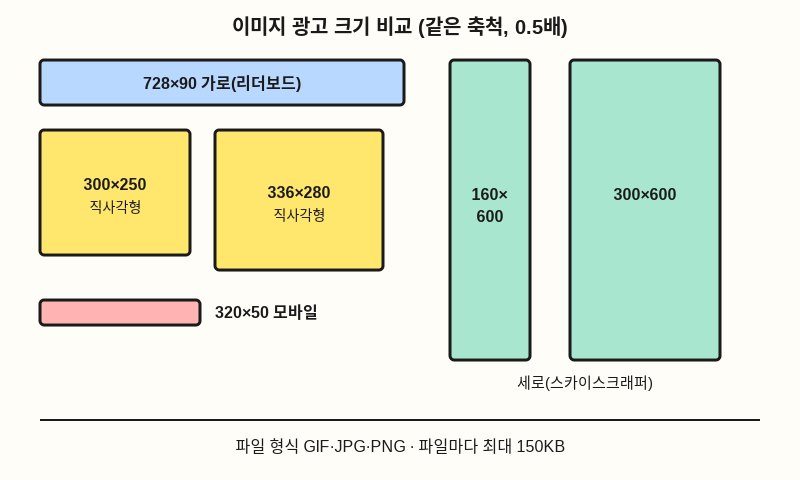 Example figure: some of the sizes from the upload specs drawn at the same scale (figure labels in Korean)
If you want moving banners, there are extra conditions. Animated GIFs may loop but must stop after 30 seconds and must be slower than 5 FPS, and according to the same specs document, HTML5 banners not only have to be a ZIP file of 600KB or smaller but also require you to meet minimum requirements such as an account open for more than 90 days, more than 9,000 USD in total lifetime spend and a good history of policy compliance, and then apply separately for approval. Meeting the requirements doesn't guarantee approval, and the document points to AMPHTML ads or responsive display ads as alternatives, so HTML5 banners are not something any account can upload right away.
4. Which approach should you choose in which situation?
Neither approach is simply better than the other; they serve different purposes, and broken down by situation it looks like this.
- When design resources are limited and you want broad placement coverage: responsive display ads fit. With images in three ratios plus text, the ad adjusts itself to many placement sizes.
- When strict brand guidelines require you to keep layout and typefaces exactly: uploaded image ads fit. Because Google changes the size and design of responsive ads, you can't decide the logo position or text line breaks yourself.
- When you need fixed copy such as a discount rate or dates inside a single image: image ads are the safer side. The best practices guide advises against putting text on top of responsive images and warns that overlaid text can be unreadable in smaller ad sizes.
- When both are possible: you could also consider a combination where responsive ads cover placements broadly first and you make only a few key, well-performing sizes as image ads. This combination is my own judgment rather than an official recommendation, so decide based on your account's situation while watching performance.
In short, the order is to first decide "do I hand over ingredients, or protect a finished product?" and then pick sizes. So in what order should you actually write the brief?
5. In what order should you write a promotion banner brief?
Let's imagine you're promoting next month's seasonal campaign on Google Display and follow along from the beginning.
- Choose the approach: if your brand guidelines aren't strict, make responsive display ads the default.
- Request images: rather than changing only the ratio of the same scene, request different scenes such as a product-only shot, a usage scene and a model shot at 1200×628, 1200×1200 and 900×1600. Note that no text should go inside the images.
- Get logos: get logos at 1200×300 (4:1) and 1200×1200 (1:1). The best practices guide says to avoid logos with unsupported aspect ratios, extra flair or colorful backgrounds.
- Write the copy: write 3~5 short headlines within 15 Korean characters, one long headline within 45, and several descriptions that each carry a different benefit.
- Create the ad: in Google Ads, choose Campaigns → Ads → plus (+) → Responsive display ad, select an ad group, add images, logos, videos and text, check the preview and save.
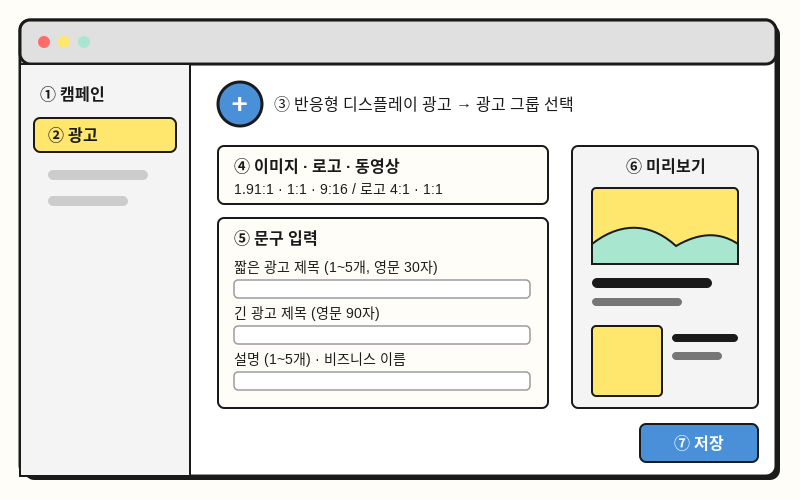 Example figure: a simplified screen structure of the creation steps in the help article, not an actual Google Ads screen (figure labels in Korean)
You can screen the Korean character count from step 4 in Google Sheets in advance: put copy candidates in column A and the formula below in column B, and it shows a rough length by counting Korean characters twice.
=LEN(A2)+LEN(REGEXREPLACE(A2,"[^가-힣]",""))
This formula is an example that counts only precomposed Hangul syllables as two characters, so it may differ slightly from Google's own count, and I recommend doing the final check with the character counter in the ad editing screen. The best practices guide also suggests creating 3~4 ads per ad group to test different messages and images, so writing plenty of copy candidates comes in handy here.
※ Note: Common mistakes
- Image ad file too large: responsive images can be up to 5,120KB, but uploaded image ads are limited to 150KB, so uploading the same file as is will be blocked.
- Below the minimum size: a responsive square image smaller than 300×300 can't be uploaded, and the API documentation says the aspect ratio must also be within ±1%. Check that the ratio stays correct when cropping.
- Text on images: large discount copy on a responsive image may be unreadable in small placements. It's better to move the copy into the headline and description fields.
- Character limits based on English: Korean characters count as two, so if you write copy with the length sense you use for English ads, most of it will exceed the limit.
Wrapping up
Google banner ads split into responsive display ads, where you hand over ingredients, and image ads, where you upload finished products, and they follow completely different specs: three ratios and 5,120KB versus fixed sizes and 150KB. If you decide the approach first and put the matching sizes and Korean character counts in your brief, the back-and-forth revisions with your designer drop a lot. I plan to write my next brief in this order too, so for detailed specs please refer to the create a responsive display ad help article and the uploaded display ad specifications.
FAQ
- How many Google banner ad sizes do I need to make?
- For responsive display ads, you don't need fixed sizes; upload at least one landscape 1.91:1 image and one square 1:1 image, and portrait 9:16 is optional. For uploaded image ads, you need a file for every size you want to serve, so starting with common sizes such as 300×250, 728×90, 300×600 and 160×600 is a safe choice.
- What is the maximum image file size for digital banner ads?
- On Google, responsive display ad images and logos are up to 5,120KB per file, and uploaded image ads (GIF, JPG, PNG) are up to 150KB per file. HTML5 banners must be a ZIP file of 600KB or smaller.
- How many Korean characters can a responsive display ad headline have?
- Short headlines are 30 characters and the long headline is 90 characters, measured in English. Google counts each character in double-width languages such as Korean as two, so in Korean think of about 15 characters for a short headline and about 45 for the long headline.
- Can I put discount copy on a banner ad image?
- Uploaded image ads serve the finished banner as is, so you can include copy. For responsive display ads, the best practices guide advises against putting text on top of images and notes it can be unreadable in small sizes, so it's better to put discount copy in the headlines and descriptions.
Related posts
These posts are helpful to read alongside for how banner ads work and how to run them.
- Display Ads Explained: How Banner Ads Seem to Read Your Mind - how banner ads work through targeting and retargeting
- Display Retargeting Setup: Google Ads Remarketing with GA4 - how to show the banners you made to site visitors again
- Naver Banner Ads Change in December: Preparing Native Banners - how banner specs are changing on the Naver side