Targeting in Google Ads comes in two main kinds. Audience targeting decides who sees your ads, and content targeting decides where your ads run. On top of that, the Targeting and Observation settings decide whether a condition is used to "narrow" your reach or just to "watch" it, and since June 2026 Display campaigns have been moving into Demand Gen campaigns, so the options you can use are gradually changing too.
"Interests, in-market, custom segments… which one am I supposed to pick?" When you first build a Google Ads campaign, it's easy to get stuck on the audience screen for a long time. Working in digital marketing, I've noticed that with so many similar-sounding options, it's tempting to slide into "let's just add everything." In this post, let's compare the Google Ads targeting types one by one, look at what to choose for each campaign type, and see what changes with the move to Demand Gen.
1. What are the main types of Google Ads targeting?
The targeting your ads help article splits targeting into audience targeting and content targeting. If you think of it as handing out flyers, choosing which people to hand them to is audience targeting, and choosing which neighborhood notice boards to pin them on is content targeting. Demographics such as age and gender, plus location, language and device conditions, are layered on top to fine-tune the reach.
| Type | What it decides | Examples | Good fit when |
|---|---|---|---|
| Audience targeting | The people who see the ad | In-market, interests, your data (site visitors) | You know clearly who is likely to buy |
| Content targeting | The places the ad runs | Topics, placements, content keywords | You want to appear next to sites or videos on a certain subject |
| Demographics | Age, gender, household income, parental status | Women aged 25~34 | The product is limited to a certain age or gender |
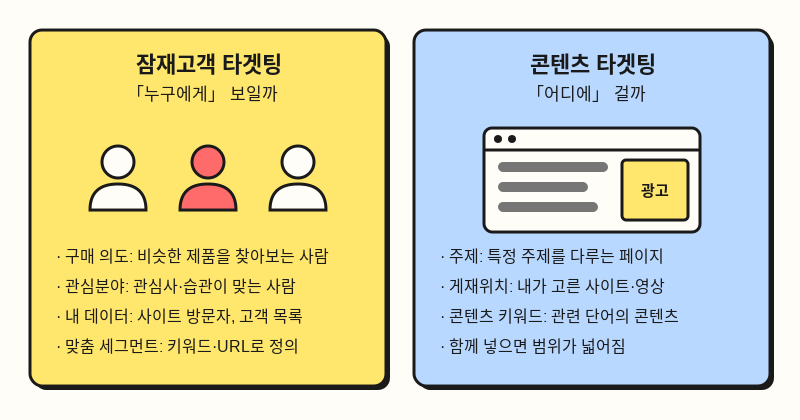 Audience targeting picks "people," while content targeting picks "places." (figure labels in Korean)
According to the same article, what used to be called "audience types" is now called audience segments, and "remarketing" has been renamed your data. If you see the term remarketing list in older posts or course materials, look for your data segments on today's screen. So what kinds of audience segments are there?
2. How do the audience segment types differ?
Here are the segments from the audience segments help article, arranged by "how close the person is to buying." The right-hand column shows whether you can also use them in Search campaigns.
| Segment | Who it reaches | Good fit when | Search campaigns |
|---|---|---|---|
| Interests (affinity) | People whose passions, habits and interests match | Building broad brand awareness | Yes |
| Detailed demographics | Groups sharing long-term traits, like college students or homeowners | Products tied to a clear life stage | Yes |
| Life events | People going through moments like graduating, moving or getting married | Products for moving or wedding preparation | No |
| In-market | People actively researching similar products recently | You need conversions quickly | Yes |
| Custom segments | People defined by keywords, URLs and apps you enter | No built-in category fits exactly | No |
| Your data | People you've already met, like site and app visitors or customer lists | Bringing visitors back, repeat purchases, excluding buyers | Yes |
The same article explains that life events segments are usually larger than in-market segments, because they involve many related purchases. So it helps to think of it as "in-market is narrow and precise, while interests and life events are broad."
There are also two things to know when using segments. First, audience data is updated weekly, so segment numbers in your reports can shift a little from week to week. Second, Google says it doesn't use sensitive information such as health, race, religion or sexual orientation for personalized ads, so you can't build segments that pick people by those criteria in the first place. Now that we've seen how to pick people, shall we move on to how to pick places?
3. How do content targeting and demographics work?
There are three kinds of content targeting. According to the targeting your ads help article, topics place ads on many pages about a given subject, placements place ads on Display Network sites the advertiser chooses, and content keywords place ads on content related to the words you pick. All three are managed together on the Content page under Audiences, keywords, and content in the Campaigns menu.
The confusing part is what happens when you add several at once. The help article on combining content targeting types explains that if you set a "bicycles" topic together with a "cycling" keyword, your ads can show on content that matches either one. In other words, adding conditions doesn't narrow your reach; it actually widens it. As in the article's running shoe store example, combining racing websites (placement), running websites (topic) and "running shoes" (keyword) means your ads can run on local race sites, running content, and even marathon training videos.
Demographics, on the other hand, are an option that narrows reach. According to the demographic targeting help article, you can choose age (six brackets from 18~24 up to 65 or older), gender, household income and parental status, and South Korea is on the list of countries where household income is available. Parental status, however, can't be used in Search or Performance Max campaigns. A common mistake here is excluding the "Unknown" group. Users whose demographics can't be estimated fall into this group, and some Display Network sites don't support demographic targeting, so the article advises excluding "Unknown" only when you truly need to narrow your reach. But haven't you ever wanted to use the same condition just to "watch" rather than to "narrow"?
4. When should you use "Targeting" versus "Observation"?
When you add an audience or content condition, as the setup help article shows, you choose between narrowing your targeting and adding it for observation. According to the Targeting and Observation settings help article, Targeting restricts the ad group's reach to that condition, while Observation leaves reach unchanged and shows performance separately for people who match the condition.
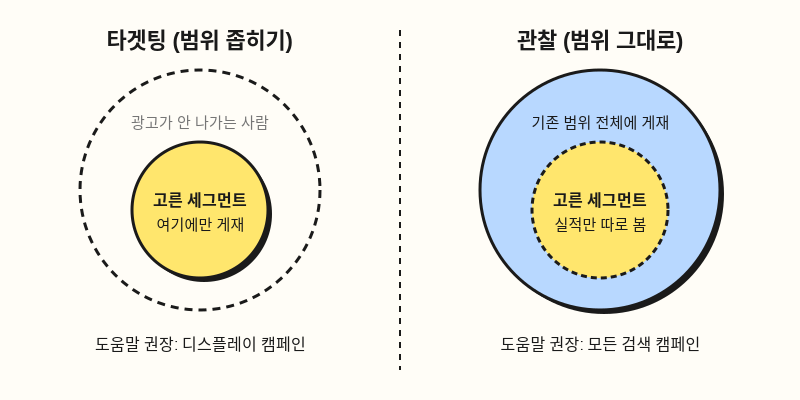 Add the same segment as Targeting and your reach shrinks; add it as Observation and your reach stays the same. (figure labels in Korean)
| Setting | Reach | Recommended by the help article for | Use it when |
|---|---|---|---|
| Targeting | Narrows to people and places matching your conditions | Display campaigns | You only want certain people to see your ads |
| Observation | Unchanged | All Search campaigns, advanced Display advertisers | You want to keep reach and see which groups perform well |
If you add an in-market segment to a Search campaign as Targeting, people who aren't in that segment won't see your ads even if they search your keyword. Search campaigns already filter intent through keywords, so adding segments as Observation and adjusting bids for the better-performing groups also matches the article's recommendation. It's also worth remembering that, according to the article, Display/Video keywords can't be used in observation mode in Display campaigns; only placements and topics can be observed.
5. What changes with optimized targeting and the move to Demand Gen?
Display and Demand Gen campaigns come with optimized targeting. According to the about optimized targeting help article, this feature looks at information like keywords on your landing page and in your ad assets, and finds people likely to convert even outside the segments the advertiser chose.
- On by default: It's turned on automatically in Display, Demand Gen, and Video campaigns with a Sales, Leads or Website traffic goal. According to the use optimized targeting help article, to turn it off you open the ad group's Settings tab, expand the Optimized targeting section and uncheck the box.
- The segments you chose become "signals": If better traffic is found, traffic from the signals you picked may decrease or stop. You can check this expanded traffic in the "Expansion and optimized targeting" row of the audiences page table, though the two help articles word the start of that row label slightly differently.
- Demand Gen also expands demographics: Ads can reach users outside the age, gender, household income and parental status you selected, and you can limit expansion to age and gender only.
- Exclusions are respected: The use article says the system respects all exclusions, and the about article states that in Demand Gen and Video campaigns, ads won't show to users you excluded with customer data segments.
There's one more big change. According to the Demand Gen migration notice, Google has been rolling out a migration tool since June 2026 in phases to move Display campaigns into Demand Gen campaigns. The timing is only listed as "later" for now, but going forward new Display campaigns can only be created within Demand Gen, and remaining eligible campaigns will be migrated automatically. The notice says your ability to serve ads on the Google Display Network stays the same. The May 26 Google Ads blog announcement said the transition is expected to complete by 2027 and that you can still serve ads exclusively on the Display Network in Demand Gen.
| What you used in Display | In Demand Gen |
|---|---|
| Combined audiences | Not supported. Define them in Audience builder |
| Hard targeting for household income and parental status | Supported only as soft targets or hints |
| Observation (monitoring) settings for non-demographic criteria | Not supported. Define them in Audience builder |
| Campaign-level content suitability exclusions | Supported only at account level |
Migrated campaigns are created as "original name #2," ads are treated as new and have to be reviewed again, and once moved they can't be reverted to Display. The original campaign is set to Removed but stays available for reporting for up to five years, so when you compare before-and-after performance, you'll need to look at both campaigns together. So in what order should you apply all this to a real campaign?
6. How would a home fitness store choose its targeting?
I made an example of the order a marketer who just opened a home fitness equipment store might follow. The situation and segment combinations are all hypothetical.
- Search campaign: Filter intent with keywords like "foam roller" and "best yoga mat," and add sports equipment in-market segments and site visitors (your data) as Observation. After a few weeks, compare conversion rates by segment and adjust bids.
- Demand Gen campaign (including the Display Network): Along with in-market segments, build a custom segment from keywords such as competitor product names and "home workout routine," and add it as Targeting. Among life events, moments like "moving," when people furnish a new home, can also be candidates.
- Exclude buyers: Add a list of recent customers as an excluded segment. This is because in Demand Gen, even with optimized targeting on, ads won't show to users excluded with customer data.
- Check placements: On the Content page, decide whether to add fitness and health topics or specific workout information sites as placements, and exclude places that don't fit. Keep in mind that adding more widens your reach.
- Check after two weeks: Look at the share and conversions in the "Expansion and optimized targeting" row, and if traffic outside your signals performs poorly, consider turning off optimized targeting in the ad group settings.
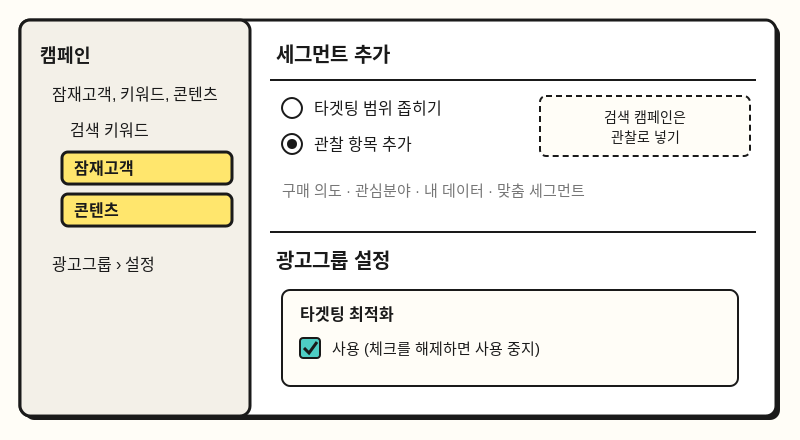 Example figure: a simplified drawing of the menu locations from the help articles, not an actual screen capture. (figure labels in Korean)
※ Notes: What to know before choosing targeting
- Available segments differ by campaign type: According to the table in the audience segments article, custom segments and life events can't be used in Search or Shopping campaigns, and Hotel campaigns can only use your data.
- Audiences in Performance Max are "signals": The same article notes that adding audience signals doesn't guarantee your ads will show only to those audiences.
- Supported languages for auto-generated custom intent segments: The article lists English, German, Japanese, Spanish, Russian, Portuguese, French and Italian, and Korean is not on the list.
- Display campaigns not yet migrated: You can keep accessing and editing them until they're fully migrated. Campaigns using shared budgets aren't supported by the migration tool, so you need to switch them to a dedicated budget first.
Wrapping up
Google Ads targeting gets much less confusing once you split it into audiences, which decide "who," and content, which decides "where," and then decide whether each condition is used as Targeting to narrow or as Observation to watch. As Display campaigns move into Demand Gen, some familiar approaches like hard demographic targeting and observation settings are changing, so I recommend writing down your current campaign settings before you migrate. I'll share again as the screens and options change with the Demand Gen migration. For details on each segment, see the Google Ads audience segments help article.
FAQ
- What's the difference between Targeting and Observation in Google Ads?
- Targeting restricts the ad group's reach to the conditions you chose, while Observation leaves reach unchanged and shows performance separately for people who match those conditions. The help article recommends Observation for Search campaigns and Targeting for Display campaigns.
- Does adding both topics and keywords narrow my reach?
- No. According to the help article on combining content targeting types, if you set topics, placements and content keywords together, your ads can show on content matching any one of them, so your reach actually widens.
- Should I turn off optimized targeting?
- It's turned on automatically in Display, Demand Gen and some Video campaigns, and you can turn it off in the ad group settings. Since ads can run outside the segments you chose, I recommend deciding based on the performance of the "Expansion and optimized targeting" row on the audiences page.
- Will my ads stop showing on the Display Network after Display campaigns move to Demand Gen?
- According to Google's migration notice, your ability to serve ads on the Display Network stays the same; what changes is that campaigns are built in Demand Gen. However, some settings, such as combined audiences and hard targeting for household income and parental status, aren't supported in Demand Gen.
Related posts
Here are posts worth reading alongside this one when choosing Google Ads targeting.
- Display Retargeting Setup: Google Ads Remarketing with GA4 - How to build your data segments from GA4 audiences
- Display Ads Explained: How Banner Ads Seem to Read Your Mind - The basics of banner (DA) ads and major platforms
- Keyword Expansion: Google Ads Keyword Planner and Match Types - How Search campaigns filter intent with keywords