Google Ads channel prioritization is a setting that lets you choose where your budget gets spent first by giving each channel in a campaign high priority or low priority. For channels set to low priority, you can also set a budget allocation cap so they spend no more than a certain percentage of your average daily budget. Google announced it on the Google Ads blog on October 14, 2026, and since October 15 it's been gradually opening up for Search, Shopping, Performance Max, and Demand Gen campaigns.
"Leaving Search partners on makes me nervous, but turning them off feels like a waste..." You may have wrestled with this in your Search campaign settings. Until now, the only options for Search partners or the Display Network were on or off, so even if you wanted to test them just a little, there wasn't a good option. In this post, I'll go over how the new channel prioritization splits your budget, what differs by campaign type and bid strategy, and what's changing in February 2027.
1. What's different about Google Ads channel prioritization?
The announcement presents this feature as a way to move away from "all-or-nothing" channel targeting. There are two new things.
- Channel prioritization: Gives a channel or group of channels high or low priority. High-priority channels get the budget first, and any remaining budget goes to low-priority channels.
- Budget allocation: An optional setting applied only to low-priority channels, capping the percentage of the campaign's average daily budget they can spend.
According to the channel prioritization and budget allocation Help article, the default is all channels at high priority. The announcement also says both features are optional, so think of it as moving some channels down to low priority only when you need to. However, Search campaigns with the Display Network turned on are a bit different, which I'll cover separately in the note below.
2. How do high and low priority split the budget?
It's easy to picture as pouring water into a champagne tower. The top glass (high priority) fills first, and only the overflow runs down to the lower glass (low priority). Budget allocation is closer to drawing a line on the lower glass and saying, "Fill it only up to here."
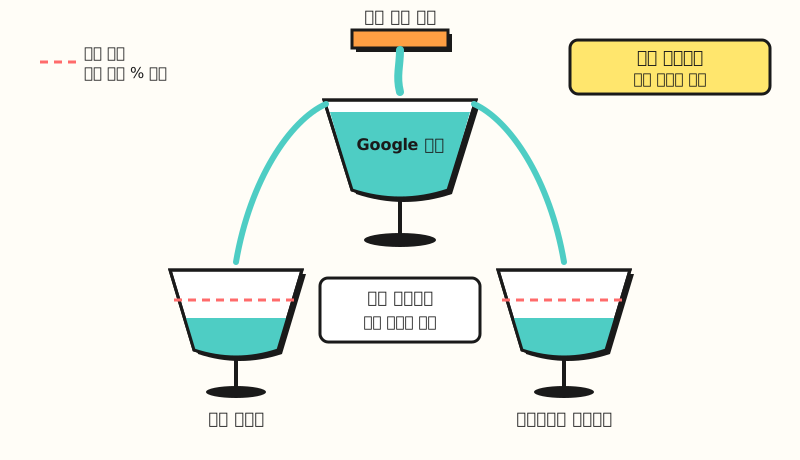 High priority fills first, and low priority can have a daily budget percentage cap (figure labels in Korean)
Here's what to remember about budget allocation.
- Based on average daily budget: The basis is the campaign's average daily budget, not actual spend. As in the Help article's example, setting 5% on a campaign with a $1,000 average daily budget makes that channel's daily spend target $50 or less.
- Best-effort: The cap isn't guaranteed; Google tries to stay within it, so there may be days when spend exceeds the allocation.
- Resets daily: The allocation starts over every day, and underspend or overspend doesn't carry over to the next day.
- Setting it to 0%: There's no spend on that low-priority channel.
The announcement explains that advertisers who had turned off Search partners or the Display Network can now test them with a clear cap instead of turning them off entirely.
3. Which channels can you split for each campaign type?
The Help article says the channels below are rolling out gradually by campaign type starting October 15, 2026, and adds that availability may vary by account.
| Campaign type | Channels you can prioritize | Budget allocation |
|---|---|---|
| Search | Google Search, Search partners, Google Display Network | Available |
| Shopping | Google Search, Search partners | Available |
| Performance Max | Google channels, Search partners, Google Display Network | Available |
| Demand Gen | Google channels, Google Display Network | Not supported |
Here, Google channels is a single unit in Performance Max and Demand Gen that groups Google Search, YouTube, Maps, Gmail, and Discover, and the whole group gets the same priority. You can't manage it more finely, like lowering only YouTube, so the Help article says to use Search or Demand Gen campaigns if you want to manage individual Google channels. For reference, according to the Google Search Network Help article, Search partners are search-related sites outside Google Search results, and ads can appear in places like site directory pages, product detail pages, and YouTube search results.
4. How does the effect differ by bid strategy?
Even with the same setting, the impact can feel quite different depending on your bid strategy. Here's a summary of how the Help article breaks it down.
| Bid strategy | When budget isn't limited | When budget is limited |
|---|---|---|
| Target CPA, Target ROAS, Target CPC | Priority doesn't change how spend works. Budget allocation for low-priority channels still applies | High-priority channels spend first within the target, and if the target can be met, remaining budget moves to low priority |
| Maximize conversions, Maximize conversion value, Maximize clicks, Manual CPC, Target impression share | Spends on high-priority channels first, and unspent budget moves to low-priority channels | (Same) |
That's why the announcement also points out that for Target CPA and Target ROAS campaigns that aren't budget-limited, priority alone usually doesn't change anything, and that's when budget allocation is especially useful. If bid strategies themselves are confusing, you may want to read my post on Google Ads bid strategy basics first.
5. Where do you set it up, and what should you watch out for?
You can set it at two levels: account and campaign.
- Account level: In account settings, find the "Channel prioritization" card, choose a campaign type, enter a priority and an optional allocation percentage for each channel, and save.
- Campaign level: On the Campaigns page, choose a campaign, go to its settings, expand the "Channel prioritization" card, and select the option to use campaign-level settings.
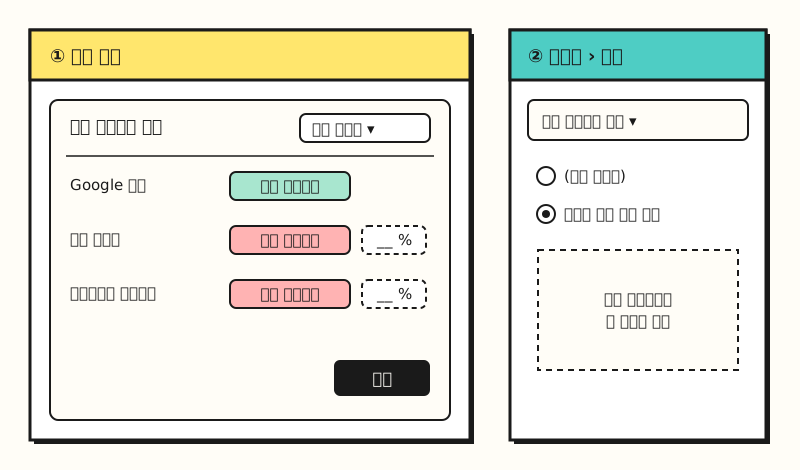 Example: not the actual Google Ads screen, just a simplified diagram of where the menus are (figure labels in Korean)
Campaign-level settings take precedence over the account default, and you can switch back to the account default at any time. It's also worth checking the other limitations the Help article lists.
- Shared budgets: Campaigns using a shared budget must be the same campaign type, and the allocation applies to the shared budget as a whole.
- Campaign total budgets: Only Demand Gen can use them together with channel prioritization; in other campaign types, using a campaign total budget means priority settings don't apply.
- Manager accounts: It can't be set from a manager account, so you have to set it in each account or campaign directly.
- API and Editor: Support in the Google Ads API and Google Ads Editor is listed as "coming soon."
※ Note: In February 2027, Search campaigns with the Display Network turned on will change automatically
According to the Help article on the Display Network in Search campaigns and the channel prioritization Help article, starting in February 2027, Search campaigns with Display Network serving turned on will automatically switch to channel prioritization. At that point, the current spend distribution method goes away, so spend across Search, Search partners, and the Display Network may change. Both Help articles recommend that if you want to keep your current setup, set the Google Display Network to low priority with a 50% allocation of your daily budget.
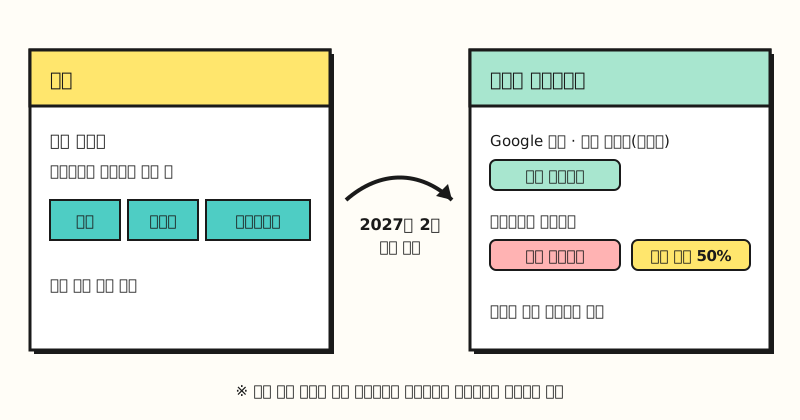 To keep your current setup, set the Display Network to low priority with a 50% daily budget allocation (figure labels in Korean)
Also, with this change, Display Network ads will no longer serve in Search campaigns using the Target impression share bid strategy. If you set priorities on a Search campaign yourself before February, they apply immediately and replace the existing Display serving method, so if you have Search campaigns with the Display Network turned on, I recommend thinking ahead about which percentage makes sense.
Summary
Channel prioritization is an optional setting that, instead of turning channels on and off, lets you decide where to spend first and where to spend later, with a daily budget percentage cap on low-priority channels. Keep in mind that for target-strategy campaigns, priority only takes effect when the budget is limited, and that Search campaigns with the Display Network turned on will change automatically in February 2027. I'll look into using it to test Search partners and the Display Network at small percentages and write it up again. For detailed conditions, please refer to the Google Ads Help articles linked in this post.
FAQ
- What happens if I don't set Google Ads channel priorities?
- It's an optional feature, so you don't have to set it. The default is all channels at high priority. However, Search campaigns with Display Network serving turned on will automatically switch to channel prioritization starting February 2027, so the Help article recommends setting the Display Network to low priority with a 50% daily budget allocation if you want to keep your current setup.
- Is setting Search partners to low priority with a 0% allocation the same as turning them off?
- The Help article explains that if you set a low-priority channel's allocation to 0%, Google won't spend on that channel. Raising the percentage little by little lets you test Search partners within a set cap without turning them off entirely, but since allocation is best-effort, daily spend may exceed the cap on some days.
- Can I set only YouTube to low priority in a Performance Max campaign?
- No. In Performance Max and Demand Gen, Google Search, YouTube, Maps, Gmail, and Discover are grouped into a single Google channels unit that gets the same priority. The Help article says to use Search or Demand Gen campaigns to manage individual Google channels separately.
- Can I use it right away in a Korean account?
- The announcement said it will roll out globally over the coming months, and the Help article says it's rolling out gradually from October 15, 2026, with availability varying by account. You can check by seeing whether the channel prioritization card appears in your account settings.
Related posts
- Google Ads bid strategy basics: Manual CPC vs Smart Bidding and how to choose - Why the effect of priority differs by bid strategy
- The DA ad that reads your mind - Display Network advertising basics
- What are the ways to optimize search ads? - Search ad operations to review alongside channel settings