Google Ads invalid traffic means ad clicks and impressions that don't come from genuine user interest, and since November 12, 2026, an Invalid traffic card that summarizes it at a glance has been rolling out gradually to the Google Ads Overview page. The card shows both the cost that was filtered out automatically before billing and never charged (estimated savings), and the credits returned for activity found after billing. It covers a different scope from the existing Invalid clicks column and the Invalid Activity Credit Report, so knowing where to look makes it much faster to build reports or judge suspected click fraud.
"Our clicks doubled overnight. Could a competitor be clicking our ads?" If you run search ads, you have probably heard this question at least once. Google has long said it doesn't charge for invalid clicks, but to see how many clicks were filtered you had to check the campaign table, and to see returned credits you had to go to the billing menu separately. In this post, let's look at what invalid traffic actually is, what you can see in the new card, and in what order to check things when your clicks feel off.
1. What is invalid traffic in Google Ads?
The invalid traffic help article describes invalid traffic as clicks and impressions on ads that aren't the result of genuine user interest, and says it includes not only intentionally fraudulent traffic but also accidental clicks and duplicate clicks. So it isn't just the malicious clicks that "fraud" brings to mind; an accidental double click lands in the same basket.
The help article gives these examples.
- Accidental clicks: clicks with no value, like the second click of a double click
- Artificial clicks to raise ad costs: clicks meant to increase another advertiser's spend
- Clicks to raise a publisher's revenue: clicks by a site owner hosting the ads, for their own profit
- Automated tools: clicks and impressions from bots, spiders and crawlers
- Abnormal sources: traffic from data centers or traffic identified as following abnormal patterns
Google says it doesn't charge for these clicks and impressions because they have "little or no value." The handling splits in two depending on timing, though. To use a supermarket checkout as an analogy, it's like the difference between removing an item that was wrongly put in your basket before you pay, and refunding that amount after checking the receipt.
- Detected before the invoice is generated: it's removed from usage and never charged in the first place.
- Detected after the invoice is generated: it's returned as an "invalid activity" credit, shown as a negative amount on the next invoice and in the transaction history. The help article adds the condition that this credit is provided "where appropriate and possible."
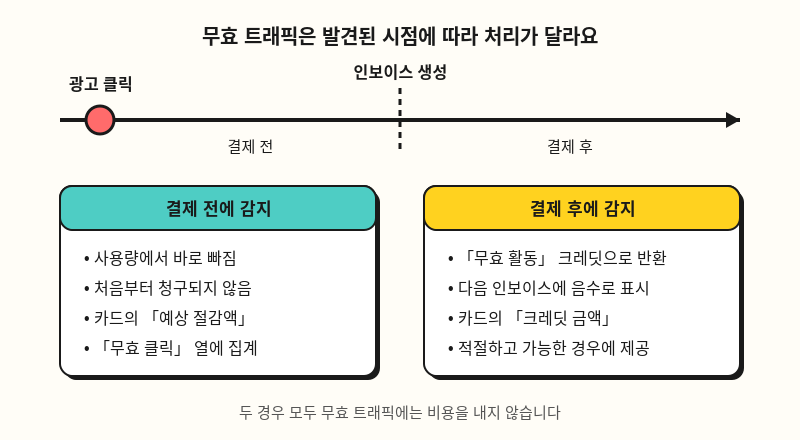 Invalid traffic is handled as either "not charged" or "credited back," depending on whether it's found before or after billing (figure labels in Korean).
※ Notes
- According to the help article, the Invalid traffic card is rolling out gradually, so it may not appear in your account yet.
- At the time of writing, the Korean help article doesn't describe the card yet, so in the Korean version of this post I translated the card's item names from the English help article and kept the English alongside. The actual Korean interface names may differ.
So what exactly does the new card show?
2. What can you see in the new Invalid traffic card?
In its November 12 announcement, Google said it was launching the Invalid Traffic Overview Card so advertisers can see how invalid traffic is handled. According to the English help article, it lives on the Overview page within the Campaigns menu and summarizes your invalid traffic protection metrics for the selected date range, with two key numbers.
| Card item | Meaning | When the money is involved |
|---|---|---|
| Estimated savings | The estimated cost saved by automated protections filtering out invalid traffic | Before billing, never charged in the first place |
| Credited cost | The amount credited back for past invalid activity detected after the billing period ended | After billing, returned as a credit |
Selecting View details on the card opens a page with daily graphs, a breakdown across all campaigns, and direct links to the invoices that include credits. Before, you had to go to the billing menu for credits and to a column in the campaign table for filtered clicks, so bringing both numbers onto one screen is the core of this change.
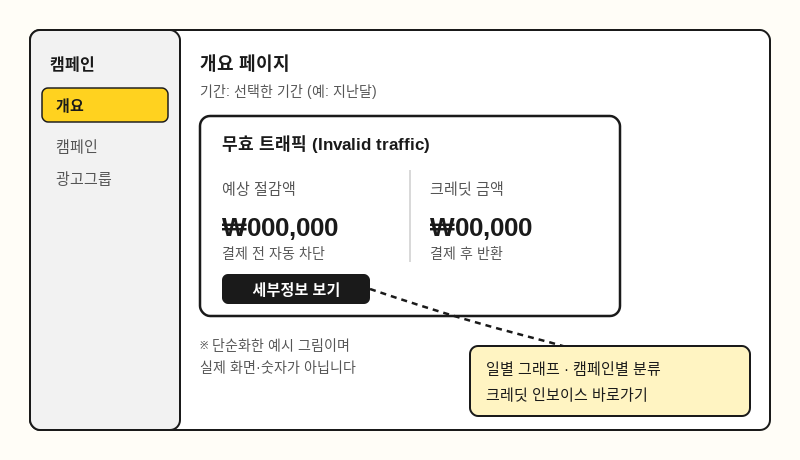 Example figure: a simplified layout of the card based on the English help article. It is not a real screenshot, and the numbers are placeholders (figure labels in Korean).
The announcement also says Google has reduced advertiser exposure to invalid leads by an average of 30% so far in 2026 through system upgrades. That is Google's own figure, and it's worth remembering that the card also shows activity Google's systems judged to be invalid. The card can't tell you how much invalid traffic wasn't caught.
Now that the card exists, do you still need the Invalid clicks column or the credit report?
3. How do the card, the Invalid clicks column and the credit report differ?
Besides the card, there are three more places in Google Ads to check invalid traffic. They all deal with invalid traffic, but the units and scope differ, so pick the one that fits the question you're trying to answer.
| Criteria | Invalid traffic card | Invalid clicks column | "Invalid activity" in billing summary | Invalid Activity Credit Report |
|---|---|---|---|---|
| Where | Campaigns › Overview | Campaign table › add column | Billing › Summary › that month's "Adjustments" | Report editor › Template gallery |
| Unit | Amount (savings, credits) | Number of clicks | Amount (monthly credits) | Clicks, interactions, amount |
| Shows | Protection before and after billing at once | Invalid clicks filtered automatically | Credits applied to that month's invoice | Credits by campaign and network, plus adjusted metrics |
| Campaigns | Whole account (campaign breakdown in details) | Campaigns shown in the table | Whole account | Search and Performance Max only |
| Use when | First page of a monthly report, checking protection | One campaign's clicks spike | Reconciling amounts with finance | Seeing real CTR and CPC after credits |
The Invalid Activity Credit Report opens when you choose "Invalid Activity Credit Report: Search & PMax" in the template gallery, and alongside columns for credited clicks and credit amounts, it shows metrics recalculated without invalid activity, such as adjusted CTR, adjusted average CPC and adjusted conversion rate. The help article explains that when invalid clicks are detected after the fact, adjusted CTR may be lower than initially reported and adjusted average CPC may be higher.
To add the Invalid clicks column, select the Columns icon above the campaign table, search for "Invalid clicks" and add it. The English help article explains that higher numbers mean Google caught and removed more invalid interactions from your campaign metrics. So a high count of invalid clicks is, in itself, a sign that you didn't pay for that many clicks.
4. What should you check first when you suspect click fraud?
When clicks suddenly rise, it's easy to jump to click fraud, but the help article first points out that clicks and impressions can rise for normal reasons too. The right order is to check whether there were recent changes such as a budget increase, a max CPC change, new keywords or expanded placements. Multiple clicks from the same IP can also happen normally because of return visits, shared IPs at companies or schools, or third-party tools. A low conversion rate doesn't prove invalid clicks either. In that case, the help article recommends adjusting bids, reviewing your site structure and refining keywords first.
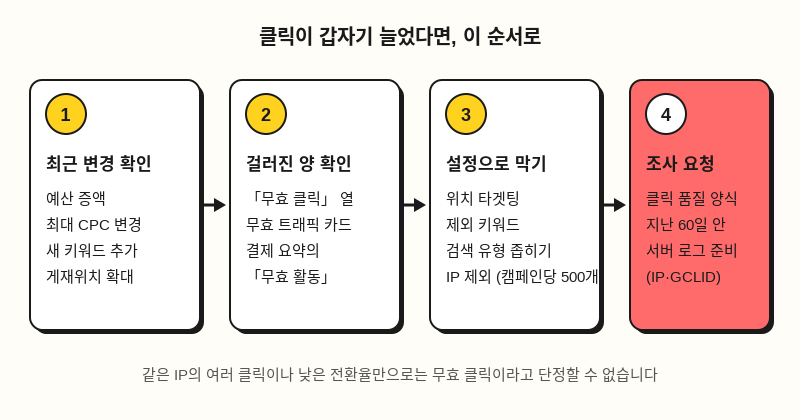 When clicks suddenly rise, it's efficient to rule out normal causes first, block what settings can block, and request an investigation only for what's left (figure labels in Korean).
If things still look off after ruling out normal causes, start with the settings the invalid clicks glossary article recommends.
- Adjust location targeting: exclude locations you don't want. If you want to exclude a specific area, location exclusions are a better fit than IP exclusions.
- Add negative keywords: review the search terms report and exclude irrelevant search terms.
- Narrow match types: if you use broad match, consider phrase match or exact match.
- IP exclusions: according to the IP exclusions help article, you can exclude up to 500 IP addresses per campaign, and to block a range you replace the last three digits with an asterisk (
*) (for example,203.0.113.*). Account-level exclusions set in account settings apply to all campaigns in the account, including Performance Max, Demand Gen, Search, Shopping and Display, but keep in mind that campaign-level IP exclusions aren't available for video, hotel, App, Performance Max and Smart Display campaigns. Because you could also block legitimate customers who share an IP at a company or school, I'd suggest being careful when you exclude a wide range.
If you still have doubts, you can request an investigation through the click quality form. According to the help article, you can only request it for activity within the last 60 days, and it helps to prepare your 10-digit customer ID, the date range, campaigns and ad groups, keywords, and web server logs with IP addresses, user agents and GCLIDs. Since requesting becomes difficult after 60 days, I'd recommend saving your logs as soon as something feels wrong.
5. How should you handle invalid traffic in a monthly ad report?
Let's take as an example someone who prepares a search campaign report for their manager at the start of each month (a hypothetical situation).
- Check the card on the Overview page: set the date range to last month and note the estimated savings and credited cost on the Invalid traffic card. You can put a line like "amount not charged this month due to invalid traffic" on the first page of the report.
- Find campaigns that spike: add the "Invalid clicks" column to the campaign table and see whether any campaign's invalid clicks rose sharply versus the previous month. You can also see the campaign breakdown under View details on the card.
- Look at metrics after credits: for Search and Performance Max campaigns, open the Invalid Activity Credit Report and check adjusted CTR and adjusted average CPC. It's not unusual if it comes out slightly lower than the CTR in last month's report.
- Reconcile amounts with finance: check the "Invalid activity" amount under that month's "Adjustments" in Billing › Summary. Leave a note that credits for clicks just before month-end may arrive the following month.
- Polish the report wording: rather than "we blocked ○○ won of click fraud," it's more accurate to write "the amount Google judged invalid and didn't charge, plus credits returned." That's because the card only shows what Google caught.
One more thing worth knowing is that conversions from clicks removed as invalid can remain in your account data. The invalid clicks glossary article explains that this is why, in rare cases, conversions can appear higher than clicks. If you see numbers like that in a report, I'd suggest checking the Invalid clicks column before concluding it's an error.
Wrapping up
The Google Ads Invalid traffic card shows estimated savings filtered before billing and credits returned after billing in one place on the Overview page, while the Invalid clicks column and the credit report are tools for breaking those numbers down by campaign. When you suspect click fraud, remember the order: check recent changes first, block with targeting, negative keywords and IP exclusions, and request an investigation within 60 days for whatever doubts remain. For details, please refer to the invalid traffic help article and the Invalid Activity Credit Report help article. Once the card reaches my account, I'll try adding it to reports and let you know if anything changes.
FAQ
- Do I pay for invalid clicks on Google Ads?
- No. Google doesn't charge for invalid clicks and impressions. If they're detected before billing, they're never charged; if they're detected after the invoice is generated, they're returned as an "invalid activity" credit on the next invoice where appropriate and possible.
- I don't see the Invalid traffic card in my account.
- According to the English help article, the Invalid traffic card is rolling out gradually and may not be available in some accounts yet. In the meantime, you can check the "Invalid clicks" column in the campaign table and the "Invalid activity" adjustment in the billing summary.
- If I suspect competitor click fraud, is excluding IPs enough?
- You can exclude up to 500 IP addresses per campaign, but shared or dynamic IPs can block legitimate customers too, and campaign-level IP exclusions aren't available for campaign types such as Performance Max and video. Also review location targeting, negative keywords and match types, and if you're still suspicious, request an investigation through the click quality form for activity within the last 60 days.
- Is the Invalid Activity Credit Report available for all campaigns?
- No. According to the help article, the Invalid Activity Credit Report is available only for Search and Performance Max campaigns.
Related posts
Posts worth reading alongside when you add invalid traffic numbers to your reports.
- CPC, CPM, CTR, ROAS: How to Calculate Core Ad Metrics - the basic metrics to know before reading adjusted CTR and CPC
- Search Ad Optimization: A Practical Process and Checklist - reviewing basics like negative keywords and match types
- What Is Conversion Modeling? How Google Ads and GA4 Fill Gaps - helps you understand the nature of the numbers in Google Ads reports