Automated promotions in Google Ads is a feature where Google finds discounts and offers on an advertiser's website, verifies them, and shows them as promotions below the ad. They apply to Search campaigns and Performance Max campaigns with location assets linked, and you can turn them on or off in the account-level automated assets settings. If you want to decide for yourself which discounts appear in your ads, you need to know this setting along with manual promotion assets.
"We never put this discount text in our ad, did we?" If this question comes up while looking at an ad preview or an assets report, it may be an automated asset Google pulled from your website. In digital marketing, ad copy often goes out through an approval process, so I wanted to sort out where the text Google adds on its own comes from. In this post, I'll cover what Google Ads automated promotions are, which campaigns they attach to, how to turn them on and off, and where to check their performance.
1. What are Google Ads automated promotions?
According to the About automated promotions help article, automated promotions is a feature where Google automatically finds deals and offers, like "buy one get one," on your website's landing pages and shows them in your ads. The account-level automated assets help article introduces it as an AI-powered feature that finds, verifies, and displays discounts and offers from your website and other sources. Automated promotions are one type of account-level automated asset, like dynamic sitelinks, dynamic callouts, and seller ratings. Google creates these assets and shows them below your ad when they're expected to improve ad performance.
Think of it like a store employee who sees a sale notice on the head office website and writes it on the sandwich board outside the shop. When the notice comes down from the website, the sign has to be wiped too, so the employee has to keep checking whether the notice is still up. Google checks the same way. According to the help article, after advanced verification it shows only offers that are active and not expired, and a single automated promotion can serve for less than 24 hours. After that, it can serve again if the offer is confirmed to still be visible on the website.
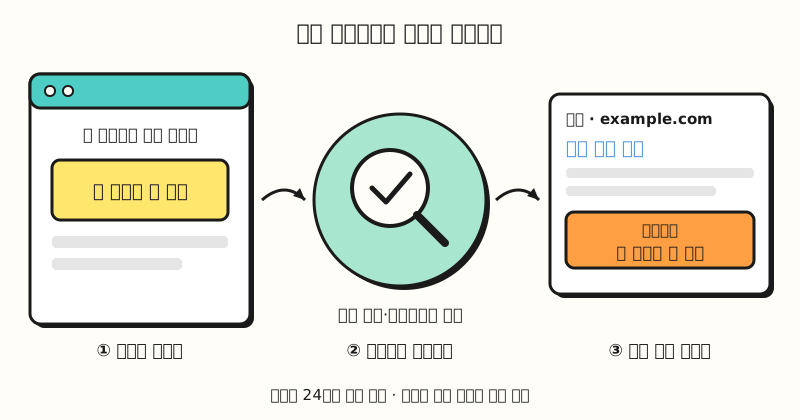 Example figure: The sequence of finding an offer on the website, checking it's valid, and attaching it to the ad (hypothetical text; figure labels in Korean).
So do these promotions attach to every campaign?
2. Which campaigns get automated promotions?
The About automated promotions help article lists three eligibility requirements.
- Campaign type: Active Search campaigns and Performance Max campaigns, including campaigns for local ads.
- Location assets: The campaign must have location assets linked.
- No manual promotions: Campaigns that already run manual promotions are excluded from automated promotions.
On top of that, promotions must comply with Google Ads policies. Location assets add information like store addresses, maps, and distance to your ads, and according to the location assets help article, the location information comes from your Google Business Profile, chain locations, or Google Maps locations. So the main audience for this feature is really advertisers who show store locations alongside their ads.
You may also be wondering about cost. According to the account-level automated assets help article, there's no cost for assets to show with your ads, and ad clicks are charged as usual. So how can you tell whether this feature is turned on in your account?
3. How do you turn Google Ads automated promotions off or on?
The setting isn't at the campaign level but on the account-level automated assets screen. Here are the steps from the About automated promotions help article.
- In the left Campaigns menu, go to Assets.
- Click the three-dot More icon and choose Account-level automated assets.
- On that screen, click the three-dot icon again and select Advanced settings.
- In the Automated promotions dropdown, choose Off to turn it off or On (recommended) to turn it on. When turning it off, enter a reason as prompted.
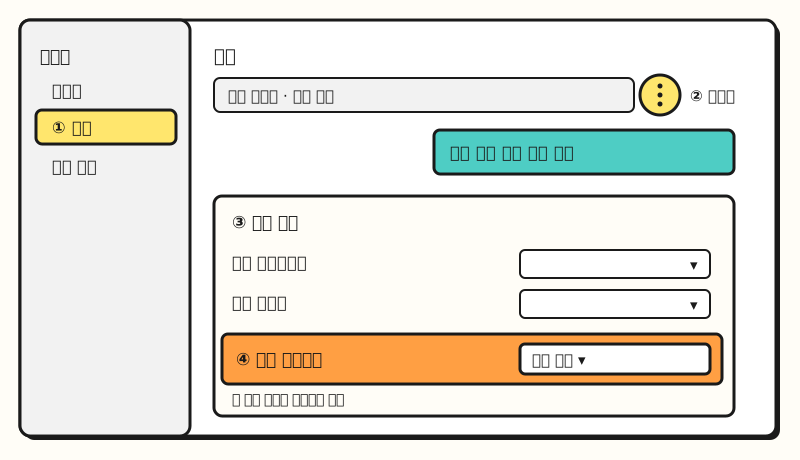 Example figure: Where to go from the Assets screen to the automated promotions dropdown in advanced settings (not an actual screen capture; figure labels in Korean).
On this advanced settings screen, you can also turn off other automated assets one by one, such as dynamic sitelinks or dynamic image assets. If you're in an industry where legal or brand teams must review discount wording in advance, I recommend opening this screen once to see which items are on. International ad industry publications, citing a notice email Google sent to advertisers, reported that automated promotions would be applied automatically to eligible campaigns starting October 12, 2026, but Google's help articles don't state the default or the start date. So rather than relying on the date, checking the setting in your own account is the sure way.
4. Where can you check automated promotion performance?
According to the About automated promotions help article, go to Campaigns > Assets and set Asset type in the filter bar to Promotion. Automated promotions are marked with a Google AI label in the source column, and hovering over the label shows details on where it came from. To see other automated assets at the same time, you can also select Google AI under Add filter > Source, as described in the account-level automated assets help article.
There's one thing to watch when reading performance. The help article notes that direct clicks on the promotion itself may be low, so it advises segmenting campaign reports by click type and looking at overall campaign impressions and conversions as well. Promotion text adds a reason to click the ad, so it's too early to conclude it has no effect based on promotion clicks alone.
How is it different from manual promotion assets?
| Item | Automated promotions | Manual promotion assets |
|---|---|---|
| Content | Offers Google finds on your website | Occasions and discounts the advertiser enters |
| Duration | Less than 24 hours each, served again if confirmed | Promotion dates set by you (optional) |
| Scope | Account-level setting | Account, campaign, or ad group level |
| Eligible | Search and Performance Max campaigns with location assets | Search ads, Shorts and in-stream video ads, and more |
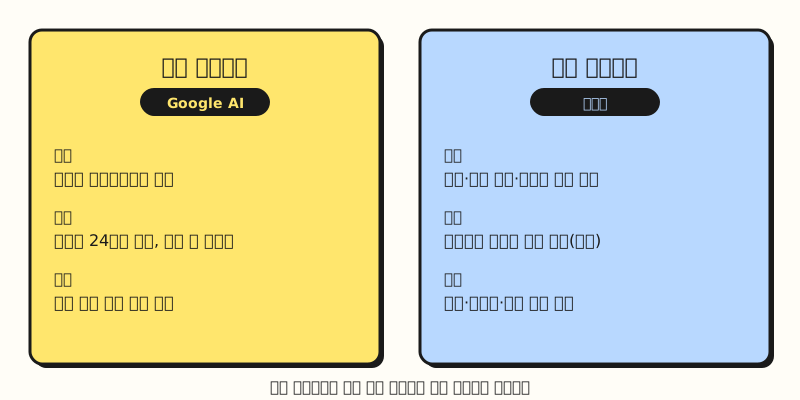 With automated, Google finds the offer; with manual, the advertiser sets the occasion, discount, and dates (figure labels in Korean).
According to the promotion assets help article, manual promotions let you enter details such as the occasion, promotion type (monetary amount or percent off), and a promo code, along with dates. The automated promotions help article also advises using manual promotions if you want to control exact details like start and end dates yourself. Campaigns running manual promotions are excluded from automated ones, so adding manual promotions to campaigns where you must control discount wording is another option.
Note: What to keep in mind about automated promotions
- Country and language coverage isn't in the help article: The automated promotions help article doesn't list supported countries or languages. You'll need to check in your own account whether the setting appears for a Korean account.
- It's a different feature from automated promotions in Merchant Center: The Merchant Center automated promotions help article describes a separate feature that shows promotions from product pages in free listings and Shopping ads. It's a closed beta for merchants in the US, France, Germany, Japan, the UK, Canada, Australia, and India, so it should be considered separately from the Google Ads setting in this post.
- Date extraction is still in the planning stage: The help article only says it will be able to extract promotion start and end dates in the future. For now, even a time-limited sale serves for less than 24 hours each time and only serves again once the offer is confirmed to still be visible on the website.
To sum up, Google Ads automated promotions automatically attach discount text from your website to Search and Performance Max campaigns with location assets, and you can turn them on or off in the advanced settings of account-level automated assets. When I look at ad accounts, I plan to start by checking for the Google AI label in the source column on the Assets screen. For detailed conditions, please see the About automated promotions help article in Google Ads.
FAQ
- If I turn off Google Ads automated promotions, do other automated assets turn off too?
- No. You just change the automated promotions dropdown to Off on the advanced settings screen of account-level automated assets, and other automated assets like dynamic sitelinks are each turned on and off separately.
- Do automated promotions attach to campaigns without location assets?
- The automated promotions help article lists active Search campaigns and Performance Max campaigns (including campaigns for local ads) with location assets linked as eligible. Campaigns without location assets, or with manual promotions running, aren't eligible.
- Do promotion assets cost money?
- Promotion assets are free to add, and when a click happens, you're charged the same amount as for a click on the headline of the same ad. Automated assets also cost nothing to show, and ad clicks are charged as usual.
Related posts
Posts worth reading when reviewing the parts of your Google Ads account that Google changes automatically.
- How to Read Google Ads AI Max Reports | Checking the Search Terms and Ad Copy AI Expanded - How to check the search terms and ad copy chosen by AI in reports
- Landing Page Optimization | Google Ads Landing Page Experience Criteria and Checks - Criteria for checking the landing pages automated promotions read from
- Getting Started with Google Ads Scripts - Basics of automating recurring account checks with scripts