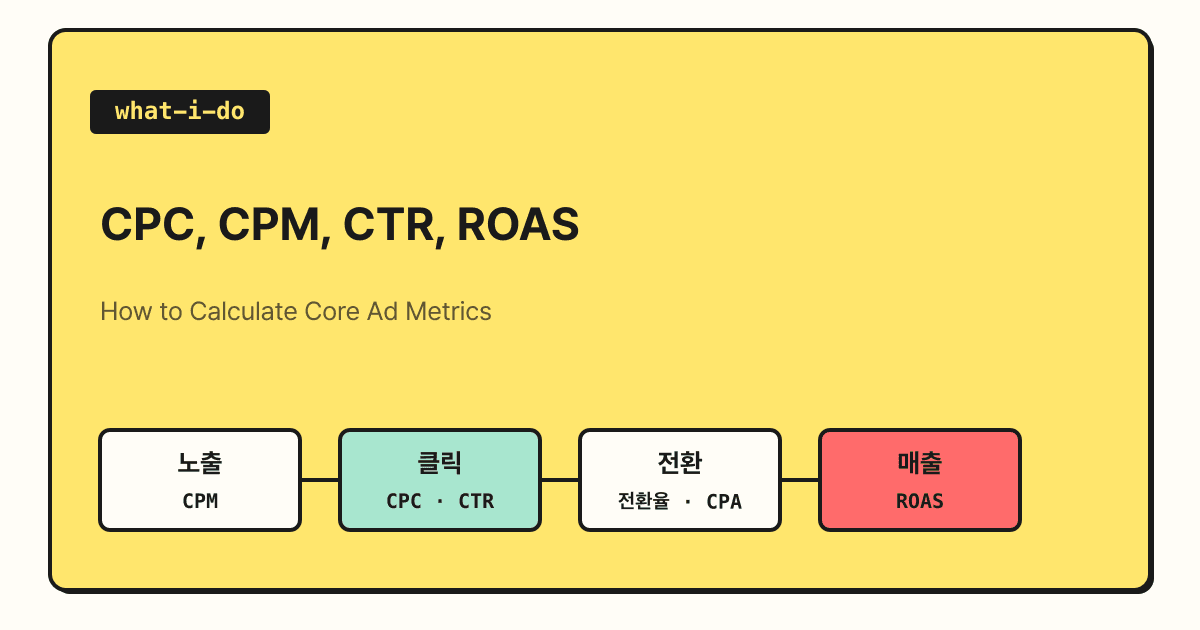
Ad performance metrics sit on a single flow: impressions, clicks, conversions, and revenue. CPM and CPC show the cost of impressions and clicks, CTR and conversion rate show the rate at which people move to the next step, and CPA and ROAS show the cost of a single conversion and the revenue earned per ad dollar. In this post, I'll go over the definitions and formulas for these six metrics, and look at which metric to check first depending on your ad goal.
Have you ever heard someone say in a meeting, "CPC went up this month, but ROAS still looks fine"? Ad reports are full of English abbreviations, and if you don't know what each one divides or multiplies, it's hard to tell whether a number going up is good or bad. Working through the formulas by hand once makes the relationships between metrics much clearer, so in this post I'll calculate each one with sample numbers.
1. Why should you read ad metrics as a flow?
Rather than memorizing each metric separately, it's easier to understand them when you line them up in the order people actually see and act on an ad. When an ad appears on screen, that's an impression; when someone clicks it, that's a click; when the person who clicked takes an action like a purchase or inquiry, that's a conversion; and when that conversion carries an amount, it becomes conversion value (revenue).
Let's compare it to a shop window. People walking past the window are impressions, people who open the door and come in are clicks, and people who buy something are conversions. CTR is the share of passersby who came in, conversion rate is the share of visitors who bought, and CPC is what it cost to bring one person into the shop.
All the calculations below use the same sample numbers. They aren't real industry averages, just simple numbers made up to show the math.
| Item | Sample value |
|---|---|
| Ad spend | KRW 1,000,000 |
| Impressions | 200,000 |
| Clicks | 2,000 |
| Conversions | 40 |
| Conversion value (revenue) | KRW 4,000,000 |
2. What's the difference between CPC and CPM?
Both are cost metrics, but they differ in what you're paying for.
- CPC (Cost Per Click): The Google Ads Help page describes CPC bidding as paying each time your ad is clicked. The maximum amount you set when bidding is your max CPC, and the amount you're actually charged is your actual CPC, which is often lower than your max CPC.
- Average CPC: According to the average CPC help page, it's the total cost of your clicks divided by the number of clicks. The formula is
ad spend ÷ clicks, which with our sample numbers is 1,000,000 ÷ 2,000 = KRW 500. - CPM (Cost-per-thousand impressions): The CPM help page describes it as a bidding method on the Display Network where you pay for every 1,000 impressions. Since it's a cost per 1,000, the formula is
ad spend ÷ impressions × 1,000, which with our sample numbers is 1,000,000 ÷ 200,000 × 1,000 = KRW 5,000. The help page on choosing a bid strategy describes CPM bidding as paying for impressions on YouTube and the Display Network.
CPM also has a variant called viewable CPM (vCPM). The viewable CPM help page explains that an impression counts as viewable when at least 50% of a display ad is on screen for one second or longer (or a video ad plays continuously for two seconds or longer), and that, in principle, you pay for impressions measured this way. That said, the same help page notes that you may be charged for some of the impressions served.
3. How do you calculate CTR and conversion rate?
If cost metrics tell you "how much did we spend," rate metrics tell you "how many moved on to the next step."
- CTR (Click-Through Rate): The formula on the CTR help page is
clicks ÷ impressions. With our sample numbers, that's 2,000 ÷ 200,000 = 1%. The same page explains that what counts as a good CTR is relative to what you're advertising and which network you're on. - Conversion rate: The conversion rate help page calculates it as
conversions ÷ ad interactions. For search ads, interactions are usually clicks, so with our sample numbers it's 40 ÷ 2,000 = 2%.
There's one thing worth noting about conversion rate. The same help page says that if you track multiple conversion actions or set conversions to count "Every," a single interaction can record multiple conversions, so conversion rate can exceed 100%. That's why, before comparing conversion rates, you need to align which conversion actions you're counting and how.
4. What do CPA and ROAS tell you?
The last two metrics tie ad spend directly to conversions and revenue.
- CPA (Cost Per Action): The conversion data help page describes Google Ads' cost per conversion (Cost / conv.) as
total cost ÷ conversions. With our sample numbers, that's 1,000,000 ÷ 40 = KRW 25,000. - ROAS (Return On Ad Spend): The Target ROAS help page gives the example that if you want $5 in sales for every $1 in ad spend, you calculate
5 ÷ 1 × 100% = 500%. In other words, it'sconversion value ÷ ad spend × 100%, which with our sample numbers is 4,000,000 ÷ 1,000,000 × 100% = 400%.
Google Ads reports don't have a ROAS column; they use a Conv. value / cost column instead. The Target ROAS help page also notes that multiplying this value by 100 gives you ROAS as a percentage.
ROAS is easy to confuse with ROI. The ROI help page describes ROI as the ratio of net profit to cost, with an example that includes the cost of goods in the cost. Because ROAS divides revenue by ad spend alone, it's worth remembering that even a ROAS above 100% can mean a loss once you subtract product costs and operating expenses.
5. Which metric should you check first in which situation?
The help page on choosing a bid strategy divides what to focus on by ad goal. Mapping that breakdown onto metrics looks like this.
| Ad goal | Focus per the help page | Metrics to check first |
|---|---|---|
| Brand awareness | Impressions | Impressions, CPM |
| Website visits | Clicks | Clicks, CPC, CTR |
| Actions like purchases or inquiries | Conversions | Conversions, conversion rate, CPA |
| Conversions with different values | Conversion value | Conversion value, ROAS |
When a metric gets worse, you can follow the same flow to find the cause.
For ads billed per click, ROAS can be rewritten as conversion rate × average value per conversion ÷ average CPC. With our sample numbers, 2% × KRW 100,000 ÷ KRW 500 = 400%, the same result.
So in my view, if ROAS drops, it helps to break it down: did CPC go up, did conversion rate fall, or did the value per conversion shrink? CTR isn't directly in this formula, but since it drives the number of clicks, check it as well when your conversion volume drops.
Summary
CPC and CPM are the costs of clicks and impressions, CTR and conversion rate are the rates between steps, and CPA and ROAS connect ad spend to conversions and revenue. I recommend deciding up front which metric fits your ad goal, and when the numbers move, following the flow from impressions to revenue to see which step changed. For detailed definitions of each metric, please refer to the official Google Ads Help pages linked throughout this post.
FAQ
- Which is cheaper, CPC or CPM?
- You can't compare them on unit price alone because they bill on different bases. CPM is the cost per 1,000 impressions and CPC is the cost per click, so even with the same ad spend, the cost per click works out differently depending on CTR.
- Can conversion rate exceed 100%?
- According to Google Ads Help, yes. If you track multiple conversion actions or set conversions to count "Every," a single interaction can record multiple conversions.
- Does a ROAS above 100% mean you're profitable?
- Not necessarily. ROAS divides revenue by ad spend only, so it leaves out product costs and operating expenses. To see actual profit, you also need to calculate ROI, which includes the cost of goods.
Related posts
- The DA ad that reads your mind - How display ads, often run on CPM, work
- What are the ways to optimize search ads? - Operational ways to improve CTR and conversion rate
- GA4 conversion lookback window, now set by the day - The attribution window that shapes conversions and ROAS