The AI campaign localization tool in Google Ads is a beta feature that uses generative AI to turn a Search campaign built in English into a campaign in another language. Not only ad copy and keywords but also text in images and landing pages are translated, and it works by creating an additional new campaign without touching the original. However, right now the only source language is English (US), so you can't translate a Korean campaign directly.
"Couldn't I just open the Search campaign that's working well in the US in Germany or France as is?" If your brand is expanding into overseas markets, you've probably thought about this at least once. Until now, the process of exporting ad copy and keywords to a spreadsheet, sending them out for translation, and uploading them again was quite long. Google introduced a beta tool that shortens this process with AI in the Google Ads Help Center, and as I studied it, it struck me as one of the AI features marketers can put their hands on right away, so I wanted to write it up separately. In this post, I'll go over what the localization tool changes for you, the order in which you use it, and what Korean marketers should check before using it.
1. What is the Google Ads AI campaign localization tool?
The Help Center describes this tool as a feature that uses generative AI to quickly localize an entire Search campaign for new languages and regions. It highlights being able to translate text, images, targeting, and landing pages without spreadsheets or extra uploads. When localization is done, a completely new, independent campaign is created, and the existing campaign isn't modified.
What gets translated falls into four groups.
- Text assets and targeting: Headlines, descriptions, sitelinks, callouts, and keywords are translated into the target language.
- Images: If text is overlaid on an image, AI removes the text to make a clean image, and the translated message is added as a supplementary text asset.
- Landing pages: You can add JavaScript code provided by Google to your site so it's automatically translated for users who click the ad, or you can change the URLs directly.
- Budget and bids: The original campaign's values are copied as is, with no currency conversion.
The image item is worth a second look. With creatives like banners where the text is baked into the image, it's hard to swap out just the text. This tool handles it by using a clean image with the text removed and attaching the translated copy separately as a text asset. So it's a good idea to check for yourself during the review step that the image doesn't look awkward after the text is removed.
As an analogy, it's like a restaurant making a new foreign-language menu. You leave the original menu as is and make one more menu with the same dishes in another language. But because the price column copies the original numbers as is, the owner has to check personally whether they fit that country's situation.
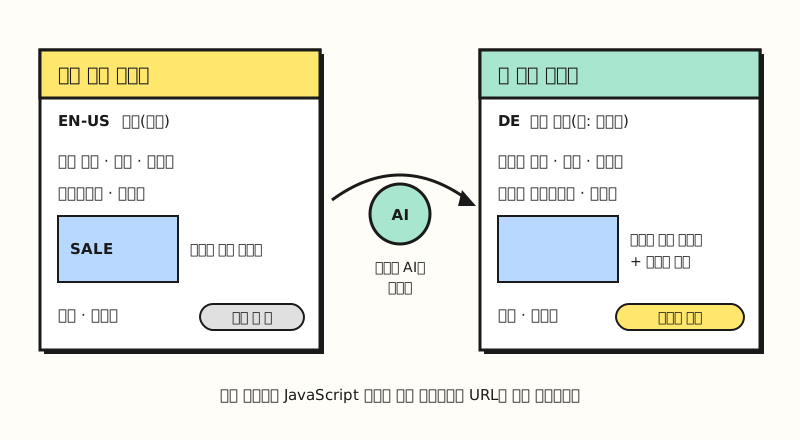 Illustration: not an actual screen, but a simplified drawing of what the Help Center says gets localized. (figure labels in Korean)
So what order would you actually use it in?
2. What are the steps to localize a Search campaign?
The Help Center walks through localization in five steps.
- Open the localization tool: Check a campaign in the campaigns table and choose localize, choose "Localize" from the Tools menu, or apply a localization recommendation from your optimization score.
- Choose goals and languages: Choose the target language and set the location and budget for the new campaign. You can write requests in a free-text field; the English help article gives examples like "Don't translate brand names" and "Keep a formal tone."
- Review translations: Look over a table with four columns, original asset, translated asset, back-translation (the translation rendered back into English), and translation notes, and edit directly with the pencil icon.
- Choose a landing page strategy: Choose between "AI translation," which adds a code snippet, and "Bulk domain update," which changes URLs with find-and-replace rules.
- Publish the campaign: The default is to publish it in "Paused" status.
The Google Ads Help Center describes the optimization score mentioned here as an estimate, from 0 to 100%, of how well your account is set to perform, which means a localization recommendation can show up in the list of recommendations next to the score. According to the English help article, this recommendation appears when Google Ads finds an opportunity to improve performance through localization.
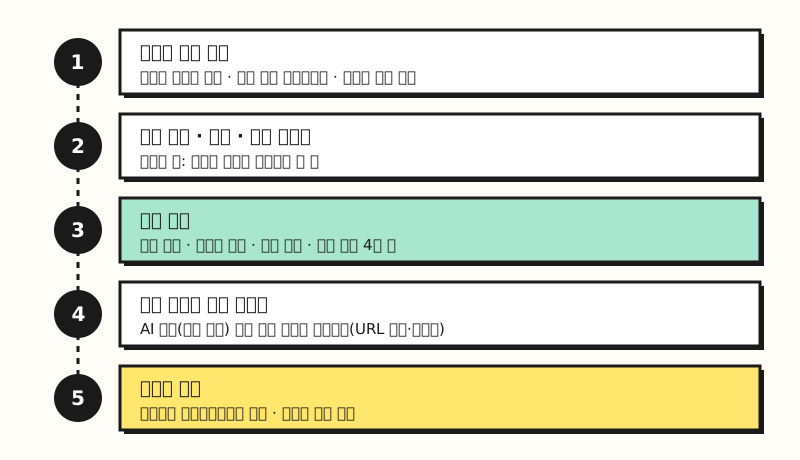 Illustration: not a copy of the Google Ads screen, but a simple summary of the Help Center's step-by-step guide. (figure labels in Korean)
What caught my eye in this sequence was the "back-translation" column in step 3. Even someone who doesn't know the target language can check whether the meaning has changed by looking at the translation rendered back into English. It's also a relief that the default is paused, so ads don't go live before you review them.
※ Note: Which languages are supported, and when can't you use it?
This tool is still in beta, and the conditions are fairly narrow.
| Item | Help Center guidance |
|---|---|
| Campaign type | Search campaigns |
| Source language | English (US) |
| Target languages | Dutch, French, French (Canada), German, Italian, Polish, Portuguese (Brazil), Portuguese (Portugal/Europe), Spanish (Castilian/Spain), Spanish (Latin America and the Caribbean) |
| Original campaign status | Active or paused. Removed, draft, experiment, and shadow campaigns aren't eligible |
| Other conditions | Must not exceed entity size limits, and all assets and keywords must be written in the source language. Customers with election verification can't use it |
The Help Center says more target languages will be added by the end of 2026, and that Performance Max campaigns will also be supported starting September 2026. However, the supported campaign table in the same help article still lists only Search campaigns, so if you run Performance Max campaigns, I recommend checking directly in your account. Also, Korean and Japanese aren't available yet as either source or target languages.
3. When is it useful for Korean marketers?
Because the source language must be English (US), you can't currently use it to turn a Korean campaign for the domestic market into English or Japanese. But for brands already running Search campaigns in English, it's a different story: you can quickly create campaigns for European or Latin American markets based on those campaigns.
What's easy to miss here is the language setting. The language targeting help article explains that Google Ads figures out which languages a user understands by looking at the language of the search query and the user's language settings and preferences, and that users who know several languages may see ads in a language different from their search query. So rather than relaxing once the translation is done, you should also check that the new campaign's location and language settings match your target market.
For the same reason, it's good to decide on landing pages early. If the ad copy is in German but the page you land on after clicking is in English, the page won't match what the ad led people to expect. If you already have country-specific pages, change the addresses with "Bulk domain update," and if you don't have separate pages, use the "AI translation" code. Pick whichever fits your situation. Depending on your site structure, you may need help from a developer to add the code, so I recommend including this task when you plan your localization schedule.
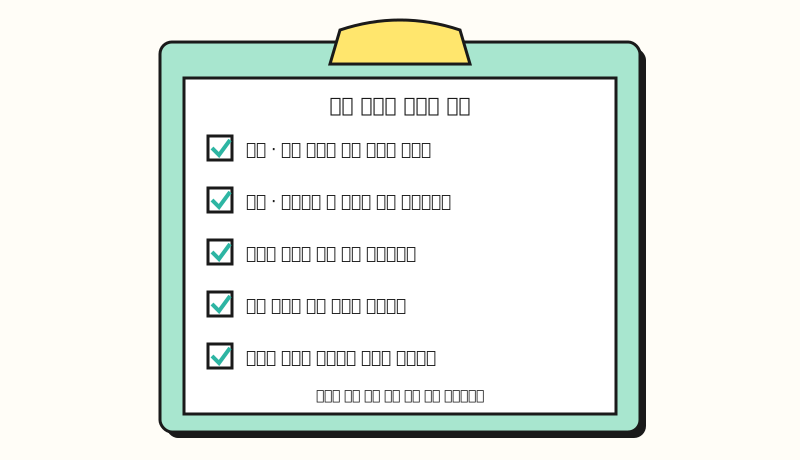 Illustration: a list of items to check before publishing, based on the Help Center guidance. (figure labels in Korean)
In short, it's a good idea to check these five things before publishing.
- Location and language: Make sure the new campaign is set to the right target country and target language.
- Budget and bids: The original values are copied as is, so adjust them yourself to fit the size of the new market.
- Translations: Use the "back-translation" column to check that nothing has changed in meaning, and fix it right away if needed.
- Landing pages: Decide whether to auto-translate with code or change URLs to existing local-language pages.
- Brand names: In the step 2 request field, note that brand names shouldn't be translated.
4. Summary: Is AI translation a draft, with the final check up to people?
The AI campaign localization tool cuts the time spent on translation requests and re-uploads, and because it creates a new campaign in paused status without touching the original, it's set up so you can try it without much risk. Still, the budget is copied without currency conversion, and who sees the ads depends on the language settings, so the check before hitting the publish button ultimately falls to the person running the account. If you'd like to understand the principles before using AI in your ads, please also see How to reduce AI hallucinations. I'll write it up again when Korean support is added.
FAQ
- Can the Google Ads AI campaign localization tool translate Korean campaigns?
- Not yet. According to the Help Center, the only source language is English (US), and the target languages are 10 variants of Dutch, French, German, Italian, Polish, Portuguese, and Spanish, so Korean and Japanese aren't on the list. Google has said it plans to add more target languages by the end of 2026.
- Does localizing change the original campaign?
- No. Localizing creates a completely new, independent campaign, and the existing campaign isn't modified. The new campaign is published in paused status by default, so you can turn it on after reviewing it.
- Does the Google Ads localization tool translate landing pages too?
- You can choose between two methods: "AI translation," which adds JavaScript code provided by Google to your site so the site is automatically translated for users who click the ad, and "Bulk domain update," which uses find-and-replace rules to change the ad URLs to local-language page addresses.
- Is the budget of a localized campaign converted automatically?
- No. Budget and bids are copied as is from the original campaign, with no currency conversion. It's best to adjust them yourself to fit the size and competition of the new market.
Related posts
Posts that are useful alongside this one for running Google Ads and using its AI features.
- Google Ads bidding strategy basics - Basic concepts to refer to when re-deciding the bidding strategy for a new campaign
- What are the ways to optimize search ads? - Strategies for improving performance at the impression, click, and conversion stages
- Gemini Connected Apps explained - How to connect Gemini so you can ask about Google Ads performance