SQL ORDER BY is the clause that sorts query results in the order you want, and CASE WHEN is an expression that changes a value depending on conditions, so you can attach band names like "10,000+ won." If last post's WHERE decided "which rows to see," today we decide in what order to show those rows and what names to group numbers under, and adding LIMIT lets you pull a top list like "the 3 largest orders" in a single query. When I started learning SQL, I assumed sorting was a one-click thing like in Excel, but there are parts where the result wobbles unless you spell them out yourself, such as the order among equal values or where NULL lands. In this post, let's follow along with ORDER BY, LIMIT and CASE WHEN one by one using a sample table. Queries are written in BigQuery (GoogleSQL) syntax. Previous post: SQL WHERE Clause: Filter Rows with Comparisons, AND/OR, IN, LIKE, NULL
SQL Basics series 8/12 · Full curriculum
Today's concept
ORDER BY does the same job as Excel's Sort feature. In an order sheet you can sort the amount column "largest to smallest" and then, when amounts are equal, sort once more by order number, so you can set several criteria. CASE WHEN is similar to nesting IF several times in Excel to write "if 10,000 won or more then A, otherwise if 5,000 won or more then B, otherwise C," and it's alike right down to checking conditions from the top and returning the first value that matches. There's one thing to know first. The BigQuery query syntax documentation says that if there's no ORDER BY, the order of the results isn't defined, which means you shouldn't expect rows to come out in the order they're stored. If order matters for a result, you always need to write ORDER BY yourself.
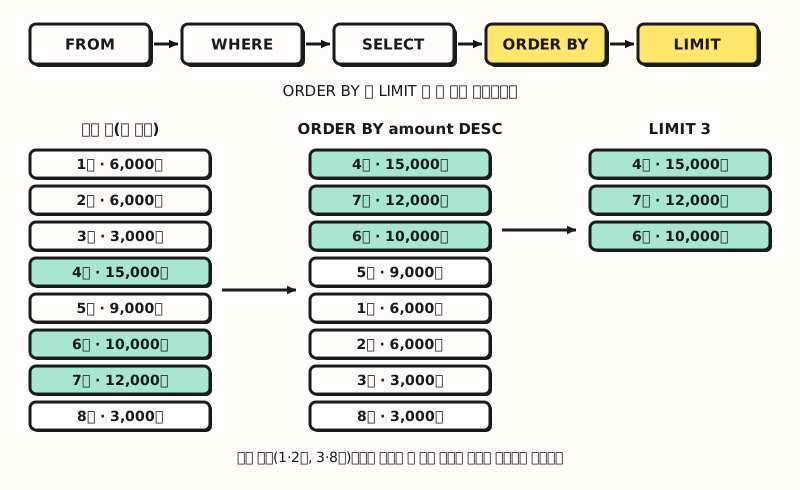 Concept diagram: ORDER BY lines rows up after SELECT, and LIMIT cuts from the top at the very end (figure labels in Korean)
Follow along: SQL ORDER BY and CASE WHEN
We'll use the same stationery shop order table shop.orders as last time (sample data). Keep in mind that there are two pairs of orders with the same amount (orders 1 and 2 at 6,000 won, orders 3 and 8 at 3,000 won).
orders
| order_id | order_date | channel | product | amount | coupon |
|---|---|---|---|---|---|
| 1 | 2026-11-02 | Search ads | Pen | 6000 | NULL |
| 2 | 2026-11-02 | SNS | Notebook | 6000 | WELCOME |
| 3 | 2026-11-03 | Search ads | Notebook | 3000 | NULL |
| 4 | 2026-11-03 | Pen | 15000 | VIP10 | |
| 5 | 2026-11-04 | SNS | Notebook set | 9000 | NULL |
| 6 | 2026-11-05 | Search ads | Highlighter | 10000 | WELCOME |
| 7 | 2026-11-06 | SNS | Highlighter set | 12000 | NULL |
| 8 | 2026-11-06 | Notebook | 3000 | NULL |
1. Descending order and sorting by multiple columns: let's line rows up from the largest amount, and when amounts are equal, show the smaller order number first. According to the query syntax documentation, ASC is ascending, DESC is descending, and if you write nothing, ASC is the default.
SELECT order_id, channel, amount
FROM shop.orders
ORDER BY amount DESC, order_id;| order_id | channel | amount |
|---|---|---|
| 4 | 15000 | |
| 7 | SNS | 12000 |
| 6 | Search ads | 10000 |
| 5 | SNS | 9000 |
| 1 | Search ads | 6000 |
| 2 | SNS | 6000 |
| 3 | Search ads | 3000 |
| 8 | 3000 |
Rows are first lined up by amount DESC, and only rows with the same amount, like orders 1 and 2 at 6,000 won and orders 3 and 8 at 3,000 won, are sorted again by the second criterion order_id. Here DESC applies only to amount right before it, and order_id uses the default ascending order; the PostgreSQL sorting documentation also explains that ordering options are applied to each column separately. Without a second criterion, the order among equal amounts isn't defined, so for a report where order matters, it's safer to add a non-repeating column like the order number at the end.
2. Seeing only the top few rows with LIMIT: if you only want the 3 largest orders, sort and then add LIMIT.
SELECT order_id, product, amount
FROM shop.orders
ORDER BY amount DESC
LIMIT 3;| order_id | product | amount |
|---|---|---|
| 4 | Pen | 15000 |
| 7 | Highlighter set | 12000 |
| 6 | Highlighter | 10000 |
According to the query syntax documentation, LIMIT is the upper bound on the number of rows returned, and with OFFSET it skips a number of rows from the front before cutting. The three amounts above don't overlap, so the result is fixed even without a second sort criterion, but if the 3rd and 4th amounts had been equal, which of the two rows got cut wouldn't have been defined. Other DBMSs use different syntax for cutting rows: according to the PostgreSQL SELECT documentation, LIMIT is syntax used by PostgreSQL and MySQL, while the SQL standard (SQL:2008) defines FETCH FIRST ... ROWS ONLY.
3. Splitting price bands with CASE WHEN: let's attach one of "10,000+ won," "5,000+ won" or "Under 5,000 won" to each order. CASE is written as CASE WHEN condition THEN value ... ELSE value END, and the result column name is attached with AS as in the last posts.
SELECT
  order_id,
  amount,
  CASE
    WHEN amount >= 10000 THEN '10,000+ won'
    WHEN amount >= 5000 THEN '5,000+ won'
    ELSE 'Under 5,000 won'
  END AS price_band
FROM shop.orders
ORDER BY order_id;| order_id | amount | price_band |
|---|---|---|
| 1 | 6000 | 5,000+ won |
| 2 | 6000 | 5,000+ won |
| 3 | 3000 | Under 5,000 won |
| 4 | 15000 | 10,000+ won |
| 5 | 9000 | 5,000+ won |
| 6 | 10000 | 10,000+ won |
| 7 | 12000 | 10,000+ won |
| 8 | 3000 | Under 5,000 won |
According to the BigQuery conditional expressions documentation, CASE evaluates the WHEN conditions in turn and returns the THEN value of the first one that is TRUE, without looking at the remaining WHENs. So order 4 at 15,000 won also matches the second condition (5,000+ won), but it's already settled as "10,000+ won" at the first condition, and that's why you don't need to write amount < 10000 separately in the second WHEN. If every condition is FALSE or NULL, it returns the ELSE value, and if there's no ELSE, it returns NULL.
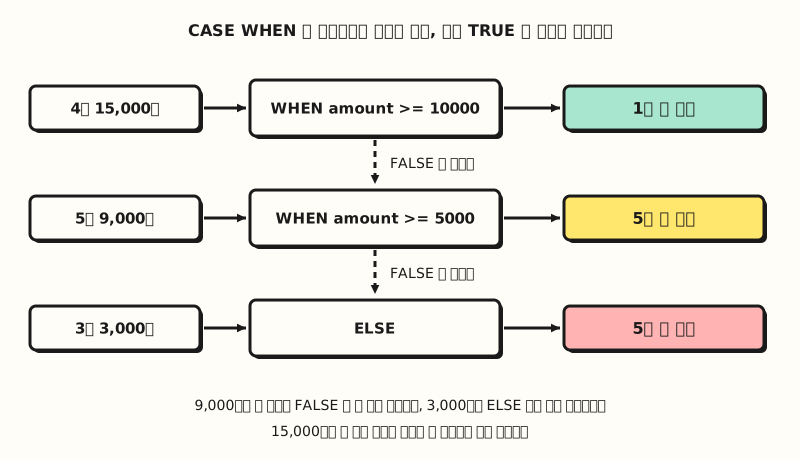 Concept diagram: CASE WHEN checks conditions from the top and settles the value at the first TRUE one (figure labels in Korean)
4. Setting your own sort order with CASE: what if you want to see channels in the order "Search ads → SNS → Email"? Writing just ORDER BY channel won't give that order. According to the BigQuery data types documentation, strings are compared by Unicode code point, so Email comes first, and SNS comes before Search ads because uppercase N has a smaller code point than lowercase e. In cases like this, you give each channel a rank number with CASE and sort by that number.
SELECT order_id, channel, amount
FROM shop.orders
ORDER BY
  CASE channel
    WHEN 'Search ads' THEN 1
    WHEN 'SNS' THEN 2
    ELSE 3
  END,
amount DESC;| order_id | channel | amount |
|---|---|---|
| 6 | Search ads | 10000 |
| 1 | Search ads | 6000 |
| 3 | Search ads | 3000 |
| 7 | SNS | 12000 |
| 5 | SNS | 9000 |
| 2 | SNS | 6000 |
| 4 | 15000 | |
| 8 | 3000 |
This time I used the form that writes a column right after CASE, like CASE channel WHEN 'Search ads' THEN 1, and the conditional expressions documentation describes it separately as "a CASE that compares the column value to each WHEN value in turn." Within the same channel, the second criterion amount DESC puts larger orders on top. All values in the result tables above were counted by hand, since the sample table is small.
Where does NULL go in ORDER BY?
If you sort by the coupon column (coupon), where do the five rows without a coupon, that is, the NULL rows, go? According to the data types documentation, in ORDER BY NULL is treated as the smallest value, so it comes first in ascending order and last in descending order. If you want to see orders that used a coupon first, add NULLS LAST, which is in the query syntax documentation; conversely, NULLS FIRST puts NULL at the top regardless of sort direction.
SELECT order_id, coupon
FROM shop.orders
ORDER BY coupon NULLS LAST, order_id;| order_id | coupon |
|---|---|
| 4 | VIP10 |
| 2 | WELCOME |
| 6 | WELCOME |
| 1 | NULL |
| 3 | NULL |
| 5 | NULL |
| 7 | NULL |
| 8 | NULL |
Without NULLS LAST, orders 1, 3, 5, 7 and 8 rise to the top and orders 4, 2 and 6 come below them. VIP10 comes before WELCOME because V has a smaller code point than W.
It's also good to know that this default differs by DBMS. According to the PostgreSQL sorting documentation, PostgreSQL does the opposite and treats NULL as if it were the largest value, putting it last in ascending order, so if NULL positions look different when you run the same query on another database, I'd suggest thinking of this difference first. Either way, writing NULLS FIRST or NULLS LAST explicitly makes the results the same.
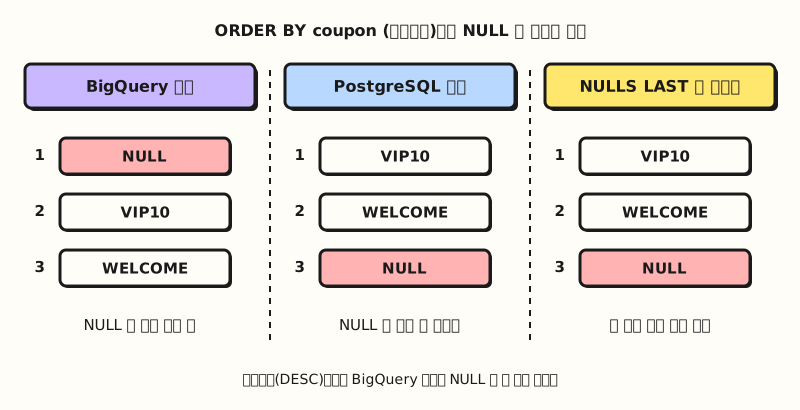 Concept diagram: with the ascending default, NULL position differs by product, and writing NULLS FIRST or LAST makes it the same (figure labels in Korean)
Here is the sorting and banding syntax so far in one table.
| What you want | How to write it | Good to know |
|---|---|---|
| Smallest first | ORDER BY amount or ASC | ASC is the default, NULL comes first |
| Largest first | ORDER BY amount DESC | NULL comes last |
| Multiple criteria | ORDER BY amount DESC, order_id | ASC and DESC are set per column |
| Fix NULL position | NULLS FIRST · NULLS LAST | Overrides each product's different default |
| Top N rows | ORDER BY ... LIMIT 3 | Without ORDER BY, which rows come out isn't defined |
| Attach band names | CASE WHEN ... THEN ... END | The first TRUE value from the top |
| Sort in a custom order | ORDER BY CASE channel WHEN ... END | Default string sorting is by code point |
How is it used in practice? A list of top orders by amount
Continuing last post's weekly report query, let's imagine someone who pulls "last week's top 5 search ad and SNS orders by amount, along with price band and coupon usage." Everything we've learned so far, WHERE, CASE, ORDER BY and LIMIT, goes in.
- Filter rows with WHERE: search ad and SNS orders are the 6 rows 1, 2, 3, 5, 6 and 7.
- Build columns with CASE: attach the price band (
price_band) and coupon usage (coupon_use). Coupons involve NULL, so use the form that writes the condition directly, likeWHEN coupon IS NULL. - Line up with ORDER BY: largest amount first, then order number when equal.
- Cut with LIMIT and check by hand: of the 6 rows, order 3 with the smallest amount (3,000 won) should drop out, leaving 5 rows.
SELECT
  order_id,
  channel,
  amount,
  CASE
    WHEN amount >= 10000 THEN '10,000+ won'
    WHEN amount >= 5000 THEN '5,000+ won'
    ELSE 'Under 5,000 won'
  END AS price_band,
  CASE WHEN coupon IS NULL THEN 'Not used' ELSE 'Used' END AS coupon_use
FROM shop.orders
WHERE channel IN ('Search ads', 'SNS')
ORDER BY amount DESC, order_id
LIMIT 5;| order_id | channel | amount | price_band | coupon_use |
|---|---|---|---|---|
| 7 | SNS | 12000 | 10,000+ won | Not used |
| 6 | Search ads | 10000 | 10,000+ won | Used |
| 5 | SNS | 9000 | 5,000+ won | Not used |
| 1 | Search ads | 6000 | 5,000+ won | Not used |
| 2 | SNS | 6000 | 5,000+ won | Used |
Orders 1 and 2, both at 6,000 won, made it into the top 5, so nothing was cut this time, but with LIMIT 4 the order_id criterion means it's settled that order 1 stays and order 2 drops. You can also use aliases set in SELECT in ORDER BY, because the query syntax documentation allows SELECT list aliases in ORDER BY. As we saw in the part 5 post on execution order, ORDER BY is evaluated after SELECT, so writing something like ORDER BY price_band is fine. That's the opposite of last post, where you couldn't use aliases in WHERE.
Practice problems
1. (Easy) From shop.orders, get the order number and date of the 2 most recent orders. If dates are equal, show the smaller order number first.
Show answer
SELECT order_id, order_date
FROM shop.orders
ORDER BY order_date DESC, order_id
LIMIT 2;
Orders 7 and 8, both from November 6, come out. The two orders have the same date, so the second criterion order_id puts order 7 first.
2. (Medium) Write a query that adds a channel_type column that says "Owned channel" if the channel is Email and "Ad channel" otherwise, and answer how many orders are "Owned channel."
Show answer
SELECT
  order_id,
  channel,
  CASE WHEN channel = 'Email' THEN 'Owned channel' ELSE 'Ad channel' END AS channel_type
FROM shop.orders
ORDER BY order_id;
The email orders 4 and 8, 2 orders, are "Owned channel," and the other 6 are "Ad channel." Writing it in the CASE channel WHEN 'Email' THEN ... form gives the same result.
3. (Medium) Show only orders that used a coupon, from the smallest amount, and attach the price band column (price_band) from query 3. Which order comes first?
Show answer
SELECT
  order_id,
  amount,
  CASE
    WHEN amount >= 10000 THEN '10,000+ won'
    WHEN amount >= 5000 THEN '5,000+ won'
    ELSE 'Under 5,000 won'
  END AS price_band
FROM shop.orders
WHERE coupon IS NOT NULL
ORDER BY amount;
The orders that used a coupon are 2, 4 and 6, and from the smallest amount they are order 2 (6,000 won, 5,000+ won), order 6 (10,000 won, 10,000+ won) and order 4 (15,000 won, 10,000+ won), so order 2 comes first.
Common mistakes
- Using LIMIT without ORDER BY:
SELECT ... LIMIT 3returns "any 3 rows." The query syntax documentation says the order of rows returned by LIMIT and OFFSET isn't defined unless they're used after ORDER BY, so unless you're just previewing a few lines, always use ORDER BY together for "top N." If there may be ties, add a second criterion too. - Not writing CASE WHEN conditions from the narrowest: if you put
WHEN amount >= 5000aboveWHEN amount >= 10000, even the 15,000 won order becomes "5,000+ won" at the first condition, and not a single order lands in "10,000+ won." CASE stops at the first TRUE value, so when splitting bands by size, write them in order starting from the largest threshold. - Looking for empty values with
CASE coupon WHEN NULL: the form that writes a column right after CASE compares likecoupon = NULL, and according to the conditional expressions documentation, a comparison between NULLs becomes NULL and falls through to ELSE, and it advises using the other form to distinguish NULL. Find empty values with the form that writes the condition directly, likeCASE WHEN coupon IS NULL THEN ....
Wrapping up
SQL ORDER BY sorts results, LIMIT cuts the sorted result from the top, and CASE WHEN attaches band names based on conditions. I'd suggest building the habits of adding one more sort criterion when there may be ties, writing NULLS LAST for columns with NULL, and writing CASE from the largest threshold.
I'm studying along with the series myself, so please refer to the full curriculum.
In the next post, I'll cover aggregate functions like COUNT and SUM, and how to build a per-channel totals table with GROUP BY and HAVING.
FAQ
- What is the default sort direction of SQL ORDER BY?
- Ascending (ASC). If you don't write a direction, as in ORDER BY amount, it sorts from the smallest value, and to see the largest first you add DESC, as in ORDER BY amount DESC. With multiple criteria, you write ASC or DESC separately for each column.
- Can I use SQL LIMIT without ORDER BY?
- There's no syntax error, but which rows come out isn't defined. The BigQuery documentation also explains that the order of rows returned by LIMIT is defined only when it's used after ORDER BY. When pulling the top few rows, write ORDER BY first and then add LIMIT.
- What happens if I leave out ELSE in CASE WHEN?
- Rows where no WHEN condition is TRUE get NULL. To make sure no row is left out when splitting bands, it's safer to set the remaining value with ELSE at the end.
More related posts
- SQL WHERE Clause: Filter Rows with Comparisons, AND/OR, IN, LIKE, NULL - SQL Basics series part 7, filtering rows with conditions
- What Is SQL? Statement Types and SQL Query Execution Order - SQL Basics series part 5, why ORDER BY comes after SELECT
- Google Sheets QUERY Function: Use Your Sheet Like a Database - SQL-like sorting and condition syntax inside a sheet