The SQL WHERE clause is a filter that keeps only the rows where a condition is TRUE. If last post's SELECT decided "which columns to see," WHERE decides "which rows to see," and with just comparison operators, AND and OR, IN, BETWEEN, LIKE and IS NULL you can write a condition like "search ad orders of 10,000 won or more from the first week of November" in a single line. When I started learning SQL, I assumed it would be like an Excel filter where you just pick conditions and you're done, but because of the rule that empty values (NULL) quietly drop out of conditions, the number of result rows can differ from what you expect. In this post, let's follow along with a sample table, from the basic form of WHERE to combining conditions and handling NULL. Queries are written in BigQuery (GoogleSQL) syntax. Previous post: SQL SELECT Basics: Pick Only the Columns You Need with SELECT and FROM
SQL Basics series 7/12 · Full curriculum
Today's concept
WHERE is similar to Excel's AutoFilter. In an order sheet, if you click the filter button on the channel column and check only "Search ads," the other rows are hidden. WHERE likewise keeps only the rows that satisfy the condition you write, and just as an Excel filter only hides the original rows, WHERE leaves the original table alone and returns a filtered result table. The BigQuery query syntax documentation describes WHERE as the clause that "filters the results of the FROM clause," and says that only rows whose condition evaluates to TRUE are included, while rows that evaluate to FALSE or NULL are discarded. That one line, "rows that evaluate to NULL are discarded too," is the heart of today's post, and we'll come back to it later.
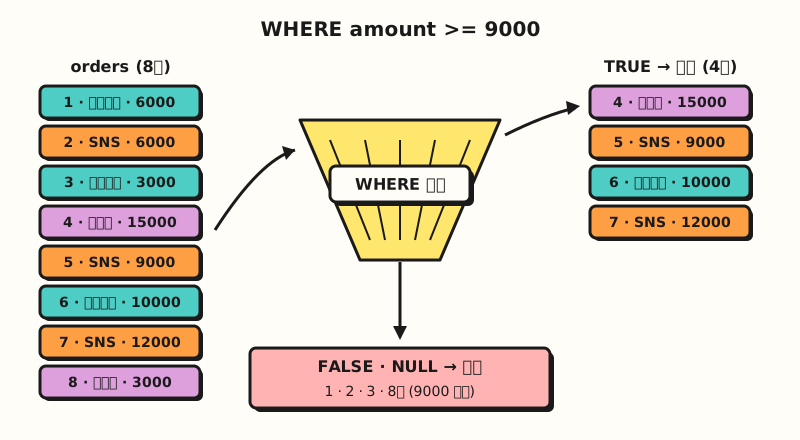 Concept diagram: WHERE lets only TRUE rows through and filters out both FALSE and NULL (figure labels in Korean)
Follow along: filtering rows with the SQL WHERE clause
We'll use the stationery shop's order table shop.orders again (sample data). I added two more rows than last time and pre-calculated the amount (amount). For orders that didn't use a coupon, coupon is empty, and that empty value is NULL.
orders
| order_id | order_date | channel | product | amount | coupon |
|---|---|---|---|---|---|
| 1 | 2026-11-02 | Search ads | Pen | 6000 | NULL |
| 2 | 2026-11-02 | SNS | Notebook | 6000 | WELCOME |
| 3 | 2026-11-03 | Search ads | Notebook | 3000 | NULL |
| 4 | 2026-11-03 | Pen | 15000 | VIP10 | |
| 5 | 2026-11-04 | SNS | Notebook set | 9000 | NULL |
| 6 | 2026-11-05 | Search ads | Highlighter | 10000 | WELCOME |
| 7 | 2026-11-06 | SNS | Highlighter set | 12000 | NULL |
| 8 | 2026-11-06 | Notebook | 3000 | NULL |
1. Comparison operators with AND and OR: let's find "orders of 9,000 won or more that came from search ads or SNS." The comparison operators are =, <, >, <=, >= and != (or <>) for "not equal," and according to the BigQuery operators documentation they all return a BOOL value such as TRUE or FALSE.
SELECT order_id, channel, amount
FROM shop.orders
WHERE (channel = 'Search ads' OR channel = 'SNS')
AND amount >= 9000;| order_id | channel | amount |
|---|---|---|
| 5 | SNS | 9000 |
| 6 | Search ads | 10000 |
| 7 | SNS | 12000 |
Of the search ad orders (1, 3, 6) and SNS orders (2, 5, 7), only 5, 6 and 7, which are 9,000 won or more, remain. String values go in single quotes, while numbers are written without quotes. We'll see why the parentheses are needed in the next section by comparing the result without them.
2. IN and BETWEEN: you can write the same kind of condition more briefly with IN and BETWEEN. This time it's "search ad and SNS orders that came in from November 3 to 5."
SELECT order_id, order_date, channel
FROM shop.orders
WHERE channel IN ('Search ads', 'SNS')
AND order_date BETWEEN DATE '2026-11-03' AND DATE '2026-11-05';| order_id | order_date | channel |
|---|---|---|
| 3 | 2026-11-03 | Search ads |
| 5 | 2026-11-04 | SNS |
| 6 | 2026-11-05 | Search ads |
The operators documentation defines x IN (y, z) as equivalent to (x = y) OR (x = z), and says X BETWEEN Y AND Z is equivalent to Y <= X AND X <= Z. So BETWEEN includes both end values, which is why orders from both November 3 and 5 are in the result. Order 4, from the same period, dropped out of the IN condition because it came from Email.
DATE '2026-11-03' is the syntax for writing a date value directly, and according to the conversion rules documentation a string value is converted to DATE when needed, so writing just '2026-11-03' still compares against a date column. Still, it's better to add DATE so readers can see at a glance that it's a date.
3. Finding text patterns with LIKE: let's find only orders whose product name ends in "set." According to the operators documentation, in a LIKE pattern % means any characters, regardless of how many, and _ means any single character.
SELECT order_id, product
FROM shop.orders
WHERE product LIKE '%set';| order_id | product |
|---|---|
| 5 | Notebook set |
| 7 | Highlighter set |
'%set' means "a value that ends in set, whatever comes before it," and if you change it to 'Notebook%', you get 2, 3, 5 and 8, which start with Notebook. As the documentation explains, to search for % or _ itself you need to put two backslashes (\\%) in front, which is easy to get confused about when searching values that contain %, like discount rates.
4. Finding empty values with IS NULL: we look for orders that didn't use a coupon, that is, rows where coupon is NULL. Here you use IS NULL, not = NULL.
SELECT order_id, coupon
FROM shop.orders
WHERE coupon IS NULL;| order_id | coupon |
|---|---|
| 1 | NULL |
| 3 | NULL |
| 5 | NULL |
| 7 | NULL |
| 8 | NULL |
According to the operators documentation, IS operators return only TRUE or FALSE even when NULL comes in, and never return NULL. Conversely, orders that used a coupon are found with IS NOT NULL, which returns three rows: 2, 4 and 6. All values in the result tables above were counted by hand, since the sample table is small.
Why do you need parentheses when mixing AND and OR?
What happens if you remove the parentheses from query 1? The precedence table in the operators documentation evaluates NOT, then AND, then OR, and as in the documentation's example, x OR y AND z is read as x OR (y AND z). Without parentheses, the query turns into "all search ad orders, or SNS orders of 9,000 won or more."
SELECT order_id, channel, amount
FROM shop.orders
WHERE channel = 'Search ads' OR channel = 'SNS'
AND amount >= 9000;| order_id | channel | amount |
|---|---|---|
| 1 | Search ads | 6000 |
| 3 | Search ads | 3000 |
| 5 | SNS | 9000 |
| 6 | Search ads | 10000 |
| 7 | SNS | 12000 |
The amount condition attached only to SNS, so the 6,000 won and 3,000 won search ad orders (1 and 3) got mixed in. Because a result comes back without any error, it's hard to notice unless you count the rows, so I'm trying to build the habit of always adding parentheses when AND and OR appear in the same WHERE. If you're curious about Excel's AND and OR functions, see the Excel TRUE and FALSE functions post as well.
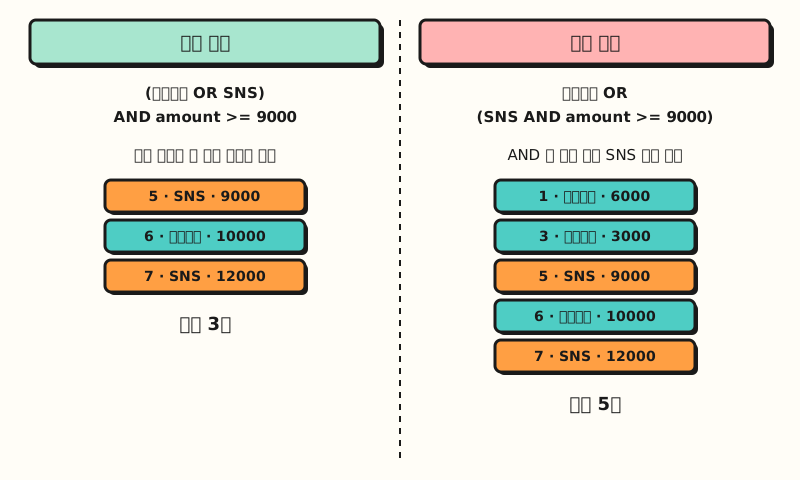 Concept diagram: AND binds before OR, so without parentheses the amount condition attaches only to SNS (figure labels in Korean)
Here are all the conditions so far in one table. When the same meaning can be written several ways, which one is easier to read is the deciding factor.
| Condition | How to write it | Equivalent alternative | When to use |
|---|---|---|---|
| Equal, greater, less | amount >= 9000 | — | Compare against a single number, date or text |
| One of several values | channel IN ('Search ads', 'SNS') | channel = 'Search ads' OR channel = 'SNS' | IN is shorter with three or more candidates |
| Range | amount BETWEEN 5000 AND 10000 | amount >= 5000 AND amount <= 10000 | A range that includes both ends |
| Text pattern | product LIKE '%set' | — | Starts with, ends with, contains |
| Empty value | coupon IS NULL | — (= NULL doesn't work) | Finding rows with no value |
Why does NULL drop out of conditions?
In part 4, the post on data types and NULL, we saw that NULL is a marker meaning "the value is unknown," so it follows three-valued logic, and in WHERE that rule actually changes the result. In the operators documentation's examples, NULL = 'a' becomes NULL, not FALSE, and NOT(NULL) is NULL again. And since WHERE keeps only TRUE rows, rows that came out NULL are discarded.
So if you look for "orders that didn't use the WELCOME coupon" like this, you get a different result than you'd expect.
SELECT order_id, coupon
FROM shop.orders
WHERE coupon != 'WELCOME';| order_id | coupon |
|---|---|
| 4 | VIP10 |
Orders 1, 3, 5, 7 and 8, which used no coupon at all, are also "orders that didn't use WELCOME," but they aren't in the result. These five rows were filtered out because NULL != 'WELCOME' becomes NULL, so to include the NULL rows you need to add one more condition.
SELECT order_id, coupon
FROM shop.orders
WHERE coupon != 'WELCOME' OR coupon IS NULL;
This time 1, 3, 5, 7 and 8 are added to 4, returning 6 rows. For the same reason, be careful when a NULL is mixed into a NOT IN list: following the rules in the operators documentation, if no equal value is found and a comparison produces NULL, the result is NULL, so channel NOT IN ('SNS', NULL) returns no rows at all.
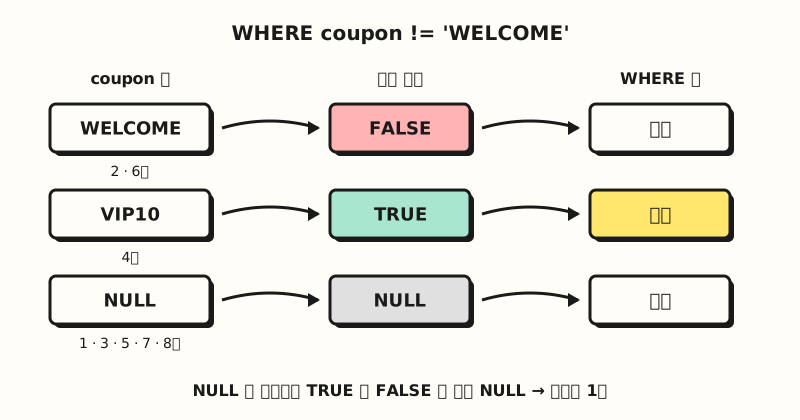 Concept diagram: comparing with NULL gives NULL, neither TRUE nor FALSE, and WHERE discards that row (figure labels in Korean)
How is it used in practice? Last week's weekly report query
Let's add WHERE to the weekly report query we built last time. Suppose you're the person who reports every Monday on "last week's (Monday, November 2 to Sunday, November 8) search ad and SNS orders that didn't use a coupon."
- Filter the period first: use
order_date BETWEEN DATE '2026-11-02' AND DATE '2026-11-08'to capture one week including both ends. - Group channels with IN: since channels may be added, adding to an
IN (...)list is easier to maintain than chaining ORs. - Find empty values with IS NULL: orders without a coupon are
coupon IS NULL. - Count the rows by hand: of the 8 rows in the sample table, all 8 fall in the period, 6 are search ads or SNS, and of those, the ones where the coupon is NULL should be 4 rows: 1, 3, 5 and 7.
SELECT
  order_date,
  channel,
  product,
  amount
FROM shop.orders
WHERE order_date BETWEEN DATE '2026-11-02' AND DATE '2026-11-08'
  AND channel IN ('Search ads', 'SNS')
  AND coupon IS NULL;  -- no coupon used
Because the conditions are joined only with AND, no parentheses are needed this time. Next week, you can reuse it as is by changing just the two dates.
One more thing: LIKE is case-sensitive. According to the BigQuery collation documentation, string comparisons with no collation specified are case-sensitive, so coupon LIKE 'vip%' won't find VIP10. Other DBMSs, like in the PostgreSQL pattern matching documentation, sometimes provide a separate case-insensitive ILIKE, and according to that documentation this is a PostgreSQL extension, not part of the standard.
Practice problems
1. (Easy) Write a query that pulls the order number and amount of Email channel orders from shop.orders.
Show answer
SELECT order_id, amount
FROM shop.orders
WHERE channel = 'Email';
You get 2 rows: order 4 (15000) and order 8 (3000). The string value 'Email' goes in single quotes.
2. (Medium) Write a query that finds orders between 5,000 and 10,000 won (inclusive) that used a coupon, and say how many rows the result has.
Show answer
SELECT order_id, amount, coupon
FROM shop.orders
WHERE amount BETWEEN 5000 AND 10000
  AND coupon IS NOT NULL;
Orders 1 (6000), 2 (6000), 5 (9000) and 6 (10000) match the amount condition, and of those the ones whose coupon isn't NULL are 2 (WELCOME) and 6 (WELCOME), so 2 rows. BETWEEN includes both ends, so order 6 at 10,000 won is included.
3. (Medium) How many orders have a product name starting with "Notebook" and came in on or after November 3? Answer with a query.
Show answer
SELECT order_id, order_date, product
FROM shop.orders
WHERE product LIKE 'Notebook%'
  AND order_date >= DATE '2026-11-03';
Orders starting with Notebook are 2, 3, 5 and 8, and order 2 from November 2 drops out, leaving 3, 5 and 8: 3 orders. Also compare: if you write product = 'Notebook', order 5, the "Notebook set," is left out.
Common mistakes
- Looking for empty values with
= NULL:coupon = NULLbecomes NULL for every row, so the result is 0 rows. Because there's no error, it's easy to misread it as "no orders without a coupon," so always find empty values withIS NULLandIS NOT NULL. When you use a!=condition, I recommend also remembering that NULL rows drop out. - Mixing AND and OR without parentheses: AND binds first, so part of the condition attaches to the wrong side. As in the example above, a query that should return 3 rows returns 5 without any error, so when both operators appear it's safer to add parentheses and count the result rows once.
- Using a SELECT alias in WHERE:
SELECT amount AS sales ... WHERE sales >= 10000throws an error. According to the query syntax documentation, WHERE can only reference columns that come in through the FROM clause and can't use SELECT list aliases, because, as we saw in part 5 on execution order, WHERE is evaluated before SELECT. In WHERE, write the original column name (amount) or the expression itself.
Wrapping up
The SQL WHERE clause is a filter that keeps only rows where the condition is TRUE, and by combining comparison operators, AND, OR, IN, BETWEEN, LIKE and IS NULL you can pick out exactly the rows a report needs. When mixing AND and OR, think of parentheses first, and for columns that may have empty values, think of IS NULL first. I'm studying along with this series myself, so please refer to the full curriculum. In the next post, we'll cover sorting results with ORDER BY and splitting amounts into ranges with CASE WHEN.
FAQ
- How do you write an SQL WHERE clause?
- Write WHERE and a condition after FROM. For example, SELECT order_id FROM shop.orders WHERE channel = 'Email'; returns only Email channel orders. Only rows where the condition is TRUE remain, and rows where it is FALSE or NULL are discarded.
- Does SQL BETWEEN include both end values?
- Yes. The BigQuery documentation defines X BETWEEN Y AND Z as equivalent to X being at least Y and at most Z. So BETWEEN DATE '2026-11-03' AND DATE '2026-11-05' includes orders from the 3rd and the 5th.
- How do you find NULL in WHERE?
- Use IS NULL, not = NULL. A comparison with NULL becomes NULL, neither TRUE nor FALSE, and is discarded by WHERE, so coupon = NULL returns no rows. Rows that have a value are found with IS NOT NULL.
More related posts
- SQL SELECT Basics: Pick Only the Columns You Need with SELECT and FROM - SQL Basics series part 6, picking columns and aliases
- SQL Data Types and NULL: Numbers, Text, Dates and Empty Values - SQL Basics series part 4, NULL and three-valued logic
- Excel TRUE and FALSE Functions: How to Use AND, OR, and NOT - Excel logical functions similar to AND and OR in WHERE