What is SQL? It's a language for describing to a database "show me this result." You don't write the order in which to search the tables, only the result you want, so once you know what kinds of statements there are and in what order a query is actually read, queries you've never seen before feel much less unfamiliar. When I started learning SQL, I assumed "SELECT comes first, so it must run first." In this post, let's go through what kind of language SQL is, what statement groups like DDL and DML are, and in what order a SELECT statement runs, one by one with a sample table. As in the last post, queries are written in BigQuery (GoogleSQL) syntax. Previous post: SQL Data Types and NULL: Numbers, Text, Dates and Empty Values
SQL Basics series 5/12 · Full curriculum
Today's concept
SQL (Structured Query Language) is the language you use to talk to relational databases. Microsoft Learn's introductory SQL course divides programming languages into procedural and declarative ones: a procedural language spells out each step the computer follows, while a declarative language describes only the output you want and leaves the steps to produce it to the execution engine. It also notes that querying data with SQL usually follows declarative semantics. A restaurant makes this easy to picture. The customer only writes "two kimchi stews, one bowl of rice" on the order slip, and the kitchen decides which pot goes on the stove first. The SQL query is the order slip and the database's query processor is the kitchen, and according to the same course, the query processor develops a query plan for retrieving the result on its own, using statistics about the data and the indexes defined on the tables. In Excel terms, it's close to the difference between a filter and a macro. With a filter you only pick a condition like "only rows where channel is SNS," while with a macro (VBA) you have to write out the process of going from the first row to the last and checking each one. SQL is on the filter side, so to speak.
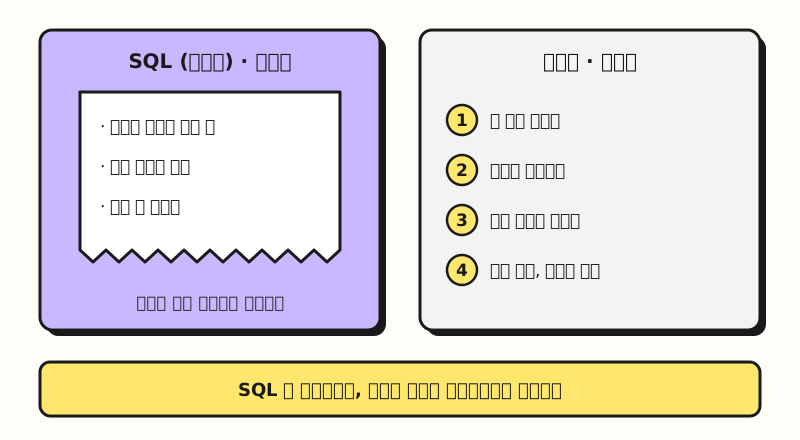 Concept figure: SQL states only "what," and the database decides "how" (figure labels in Korean)
What kinds of SQL statements are there?
SQL statements fall into a few groups depending on what they do. Using the classification in the BigQuery GoogleSQL introduction and pairing each group with an Excel task, it looks like this.
| Group | What it does | BigQuery examples | In Excel terms |
|---|---|---|---|
| DQL (Data Query Language, querying) | Reads tables and returns result rows | SELECT | Viewing with filters or pivots |
| DDL (Data Definition Language, definition) | Creates and changes objects such as datasets, tables and views | CREATE TABLE, ALTER TABLE, DROP TABLE | Making a new sheet and setting column headers |
| DML (Data Manipulation Language, manipulation) | Inserts, updates and deletes rows | INSERT, UPDATE, DELETE, MERGE | Entering, editing and deleting cell values |
| DCL (Data Control Language, control) | Manages resources such as access | GRANT, REVOKE | File sharing permissions |
| TCL (Transaction Control Language, transactions) | Commits or cancels several changes as one unit | BEGIN TRANSACTION, COMMIT TRANSACTION, ROLLBACK TRANSACTION | Saving, or closing without saving |
The CREATE TABLE shop.members (...) from part 4 was DDL, and handling the "all applied or all canceled" transactions from part 0 is TCL. According to the BigQuery transactions documentation, COMMIT TRANSACTION applies all the changes inside the transaction at once, and ROLLBACK TRANSACTION abandons all of them.
For permissions, as the DCL documentation describes, GRANT gives users roles and REVOKE takes them away, but the statement a marketer will use every day is mostly SELECT. Parts 6 through 12 of this series also dig deep into SELECT almost exclusively.
This classification varies a little from source to source. BigQuery's documentation puts SELECT in its own DQL group, while the Microsoft Learn course puts SELECT in DML and mentions that some lists narrow DML to "modification" only and split SELECT out as DQL. What matters more than the names is telling apart "is it reading, changing structure, or changing rows."
Standard SQL and dialects: why does syntax differ a bit by product?
The Microsoft Learn course explains that there's a SQL standard defined by the American National Standards Institute (ANSI), and that each vendor adds their own variations and extensions. So basic statements like SELECT, INSERT, UPDATE and DELETE are written similarly in any product, but the details differ a bit from product to product, and these product-specific branches of SQL are called dialects. BigQuery's introduction describes GoogleSQL as ANSI-compliant SQL, and says the older legacy SQL dialect is still available with some restrictions but GoogleSQL is recommended for new projects.
A good example of the differences is "show only a few rows of the result."
| Product | Dialect name | Row limit syntax |
|---|---|---|
| BigQuery | GoogleSQL | LIMIT 10 |
| PostgreSQL, MySQL | Each product's SQL | LIMIT 10 |
| SQL Server | T-SQL (Transact-SQL) | SELECT TOP (10) ... (OFFSET ... FETCH also supported) |
| SQL standard (SQL:2008) | Standard | FETCH FIRST 10 ROWS ONLY |
According to the compatibility section of the PostgreSQL SELECT documentation, LIMIT and OFFSET are PostgreSQL-specific syntax also used by MySQL, and the standard syntax for the same function is FETCH FIRST, introduced in SQL:2008. SQL Server uses TOP as described in the TOP documentation, and recommends OFFSET and FETCH for paging through results.
That's why, when you're starting out, it's less confusing to learn the "skeleton close to the standard" and then check only the differences in your product's documentation. That's also why this series is written in BigQuery syntax and adds a one-line note only where other products differ a lot. So in what order should you read that skeleton, the SELECT statement?
Learning by example: SQL query execution order
Let's look at a stationery shop's orders table, shop.orders (sample data).
orders
| order_id | member_id | channel | amount | status |
|---|---|---|---|---|
| 1 | 1 | Search ads | 12000 | completed |
| 2 | 2 | SNS | 8000 | completed |
| 3 | 1 | Search ads | 15000 | canceled |
| 4 | 3 | SNS | 22000 | completed |
| 5 | 4 | 5000 | completed | |
| 6 | 2 | Search ads | 9000 | completed |
Here's the question "using only non-canceled orders, get sales by channel, and show only channels with 10,000 won or more, largest sales first" written in SQL. You'll learn the syntax piece by piece from part 6, so for now it's enough to just look at its shape.
SELECT channel, SUM(amount) AS total
FROM shop.orders
WHERE status = 'completed'
GROUP BY channel
HAVING SUM(amount) >= 10000
ORDER BY total DESC;
SELECT is written first, but the BigQuery query syntax documentation says a query is typically evaluated in the order FROM, WHERE, GROUP BY and aggregation, HAVING, WINDOW, QUALIFY, DISTINCT, ORDER BY, LIMIT, and adds that "evaluation order doesn't always match syntax order." Leaving out WINDOW and QUALIFY, which this series doesn't cover, and placing the point where the SELECT list is computed (after HAVING) following the T-SQL documentation's processing order below, the query above flows like this.
- FROM: Takes the 6 rows of
shop.orders. - WHERE: Order 3, which isn't
status = 'completed', drops out, leaving 5 rows. - GROUP BY: Groups by channel into three groups: Search ads (orders 1 and 6) 21000, SNS (orders 2 and 4) 30000, and Email (order 5) 5000.
- HAVING: The Email group, with a total under 10000, drops out.
- SELECT: Builds the columns shown in the result,
channelandtotal. - ORDER BY: Sorts by
total, largest first.
| channel | total |
|---|---|
| SNS | 30000 |
| Search ads | 21000 |
The result starts at 6 rows, shrinks to 5 rows, then 3 groups, then 2 groups, and is then sorted, and the numbers above are values I added up by hand since the table is small. The T-SQL SELECT documentation also presents the same flow, with SELECT after FROM, WHERE, GROUP BY and HAVING, followed by ORDER BY, as the "logical processing order."
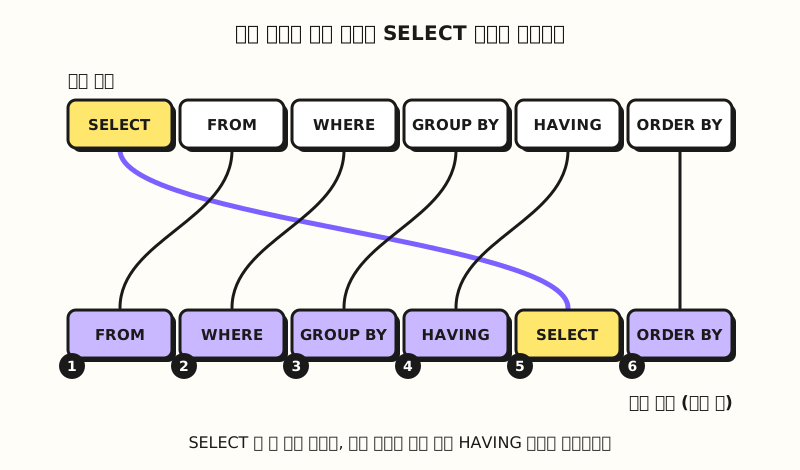 Concept figure: The place where written order and execution order differ is SELECT's position (figure labels in Korean)
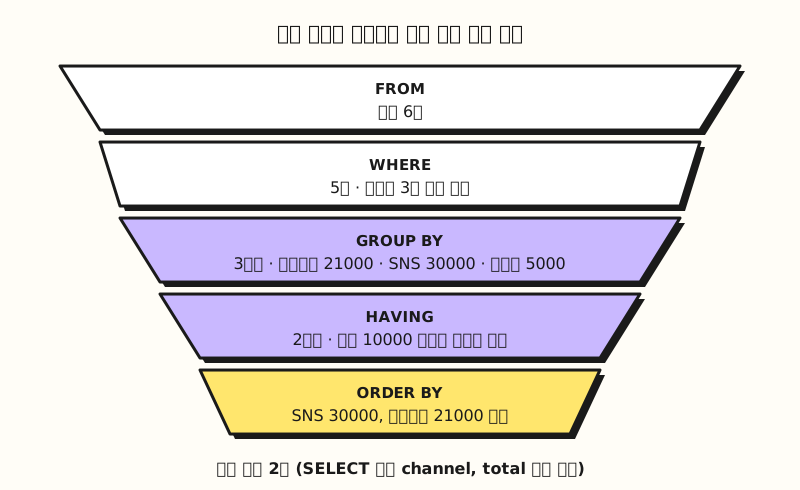 Concept figure: Rows are filtered and grouped at each step, leaving 2 final result rows (figure labels in Korean)
Practice problems
1. (Easy) Which of DQL, DDL, DML, DCL and TCL does each of these statements belong to? CREATE TABLE, INSERT, SELECT, GRANT, COMMIT TRANSACTION, DROP TABLE
Show answer
CREATE TABLE is DDL, INSERT is DML, SELECT is DQL, GRANT is DCL, COMMIT TRANSACTION is TCL, and DROP TABLE is DDL. It's less confusing if you remember that creating and removing tables is "definition" and inserting rows is "manipulation." As noted in the post, though, some sources put SELECT in DML.
2. (Medium) Put these clauses in the order they're executed. ORDER BY, FROM, HAVING, SELECT, WHERE, GROUP BY
Show answer
FROM → WHERE → GROUP BY → HAVING → SELECT → ORDER BY. The query takes the table (FROM), filters rows (WHERE), groups them (GROUP BY) and filters groups (HAVING), and only then builds the columns to show (SELECT) and finally sorts them (ORDER BY).
3. (Medium) What happens to the result if you delete the WHERE status = 'completed' line from the example query?
Show answer
The canceled order 3 (15000) gets added in. Search ads becomes 12000 + 15000 + 9000 = 36000, SNS stays at 30000, and Email is 5000, so it drops out at HAVING. Sorted, it's Search ads 36000 then SNS 30000, so the top channel changes. It's an example of how a single WHERE line decides which rows go in or out before aggregation.
Easy to confuse
- You can't use an alias from SELECT in WHERE: Because WHERE comes before SELECT in execution order, you can't write
WHERE total >= 10000using a name (total) defined in SELECT. The BigQuery query syntax documentation also says WHERE only references columns available via FROM and can't reference SELECT list aliases. On the other hand, BigQuery does let you use aliases inGROUP BY,HAVINGandORDER BY, while according to the Microsoft Learn course, SQL Server doesn't allow SELECT aliases inGROUP BYorHAVING. WritingSUM(amount)in the example's HAVING instead of the alias is meant to make it work in any product. - Logical order can differ from actual processing order: The BigQuery documentation says clauses are "typically" evaluated in that order, and the T-SQL SELECT documentation says the query processor determines the actual physical execution, and the order may differ from the list. Think of execution order as a reading order for judging "which names can be used in which clause."
- Without ORDER BY, the order of results isn't defined: According to the BigQuery query syntax documentation, the order of the results isn't defined when there's no ORDER BY. Don't expect the same query to always return rows in the same order, and if you need an order, be sure to write ORDER BY.
Wrapping up
SQL is a declarative language for describing the result you want; its statements split into querying (DQL), definition (DDL), manipulation (DML), permissions (DCL) and transactions (TCL); and a SELECT statement, unlike the way it's written, is read in an order that starts at FROM and ends at ORDER BY. When you meet an unfamiliar query, I recommend following it from FROM instead of reading from SELECT, and once you can see "which rows were filtered from which table and how they were grouped," the query will feel much shorter. I'm studying along with this series too, so please refer to the full curriculum. In the next post, I'll cover how to pull out just the columns you want with SELECT and FROM.
FAQ
- What is SQL and what is it used for?
- SQL (Structured Query Language) is a language for querying data in relational databases, creating tables, inserting and updating rows, and managing permissions. It works declaratively, where you write only the result you want and the database's query processor decides how to retrieve it, so marketers mostly use SELECT statements to aggregate data such as sales and ad performance.
- What is the difference between DDL and DML?
- DDL statements create, change and remove objects themselves, such as tables and views (CREATE, ALTER, DROP), while DML statements insert, update and delete rows inside existing tables (INSERT, UPDATE, DELETE, MERGE). In Excel terms, DDL is like creating sheets and column headers, and DML is like entering and editing cell values.
- What is the SQL execution order?
- A SELECT statement is read in the order FROM → WHERE → GROUP BY → HAVING → SELECT → ORDER BY (with LIMIT after that, per the BigQuery documentation). That's why aliases defined in SELECT can't be used in WHERE. This is a logical order, and the database decides how it's actually processed.
Related posts
- SQL Data Types and NULL: Numbers, Text, Dates and Empty Values - SQL Basics series part 4, CREATE TABLE and types
- What Is a Database? How It Differs from an Excel Sheet - SQL Basics series part 0, DBMS and transactions
- Excel PivotTable Guide: What It Is, How to Create and Refresh - An Excel feature similar to GROUP BY aggregation