The SQL SELECT statement picks the columns you want to see from a table. You write column names after SELECT and the table name after FROM, and once you add aliases (AS), duplicate removal (DISTINCT) and calculated columns, you can shape quite a lot of a report without touching the original table.
When I started learning SQL, I thought "why not just pull everything with SELECT * and look at it?" In this post, let's follow along with a sample table, from the basic SELECT and FROM form to why you should use * sparingly and how to rename and calculate columns. Queries are written in BigQuery (GoogleSQL) syntax.
Previous post: What Is SQL? Statement Types and SQL Query Execution Order
SQL Basics series 6/12 · Full curriculum
Today's concept
In the last post we saw that a SELECT statement is read starting from FROM. Today we take just those two clauses: FROM decides "which table" and SELECT decides "which columns to show." The BigQuery query syntax documentation also describes the SELECT list as what defines the columns the query will return. In Excel terms, it's similar to hiding columns. An order sheet may have ten columns, but a report often only needs three, say date, channel and amount. Excel hides or deletes the other columns, while SQL leaves the original table as it is and returns a new result table holding only the columns you picked. So there's no worry about accidentally breaking the original.
Follow along: picking columns with the SQL SELECT statement
We'll use a stationery shop's order table, shop.orders (sample data). shop is the dataset name and orders is the table name, and as in the examples in the BigQuery syntax documentation, you write the dataset before the table name as dataset.table.
orders
| order_id | order_date | channel | product | unit_price | quantity |
|---|---|---|---|---|---|
| 1 | 2026-11-02 | Search ads | Pen | 1500 | 4 |
| 2 | 2026-11-02 | SNS | Notebook | 3000 | 2 |
| 3 | 2026-11-03 | Search ads | Notebook | 3000 | 1 |
| 4 | 2026-11-03 | Pen | 1500 | 10 | |
| 5 | 2026-11-04 | SNS | Notebook | 3000 | 3 |
| 6 | 2026-11-05 | Search ads | Highlighter | 2000 | 5 |
1. Pulling only the columns you need: list column names separated by commas, then write the table after FROM.
SELECT order_id, channel, product
FROM shop.orders;| order_id | channel | product |
|---|---|---|
| 1 | Search ads | Pen |
| 2 | SNS | Notebook |
| 3 | Search ads | Notebook |
| 4 | Pen | |
| 5 | SNS | Notebook |
| 6 | Search ads | Highlighter |
There are still 6 rows; only the columns dropped to three. The column order in the result follows the order you wrote in SELECT, not the original table. I listed the rows above in the original order just for readability, and as we noted last time, without ORDER BY the row order isn't defined.
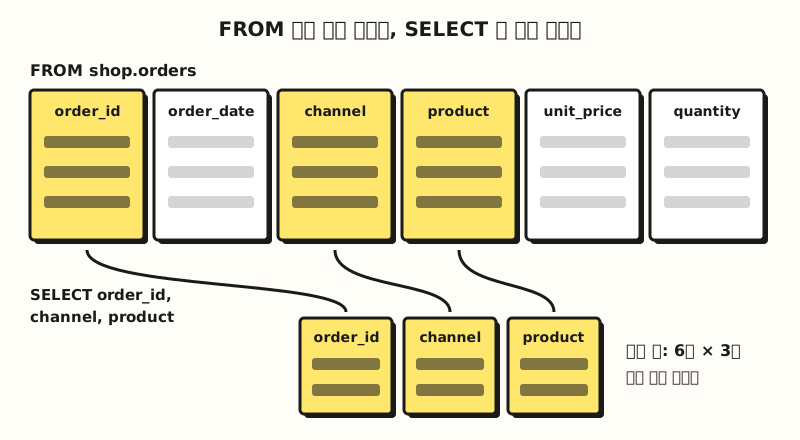 Concept diagram: FROM picks the table, and SELECT puts only the chosen columns into a new result table (figure labels in Korean)
2. Calculated columns and aliases (AS): the SELECT list can hold expressions as well as column names. Let's multiply unit price by quantity to get the order amount and name it with AS.
SELECT
  order_id,
  product,
  unit_price * quantity AS amount
FROM shop.orders;| order_id | product | amount |
|---|---|---|
| 1 | Pen | 6000 |
| 2 | Notebook | 6000 |
| 3 | Notebook | 3000 |
| 4 | Pen | 15000 |
| 5 | Notebook | 9000 |
| 6 | Highlighter | 10000 |
amount doesn't exist in the original table. It's calculated for each row and attached only to the result, so the original doesn't change. According to the result type tables in the BigQuery operators documentation, when both columns are INT64 (integers), multiplying them gives INT64 and dividing them gives FLOAT64, which is why a decimal point shows up when you divide amounts.
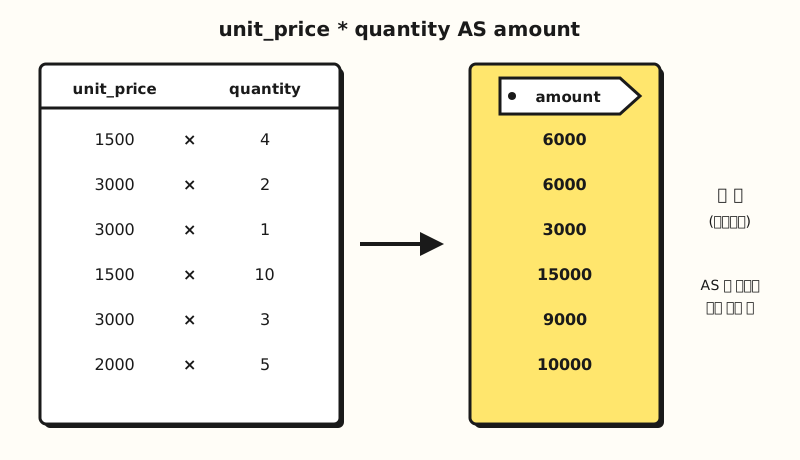 Concept diagram: a calculated column needs an AS name tag before you can call it by that name later (figure labels in Korean)
3. Removing duplicates with DISTINCT: when you only want to know "which channels did orders come from," use DISTINCT. According to the syntax documentation, SELECT DISTINCT discards duplicate rows and returns only the remaining rows.
SELECT DISTINCT channel
FROM shop.orders;| channel |
|---|
| Search ads |
| SNS |
Duplicates are judged on the combination of all columns you wrote in SELECT. If you change it to SELECT DISTINCT channel, product, only the (SNS, Notebook) combination repeats, in orders 2 and 5, so it merges into one row and the other five combinations remain.
| channel | product |
|---|---|
| Search ads | Pen |
| SNS | Notebook |
| Search ads | Notebook |
| Pen | |
| Search ads | Highlighter |
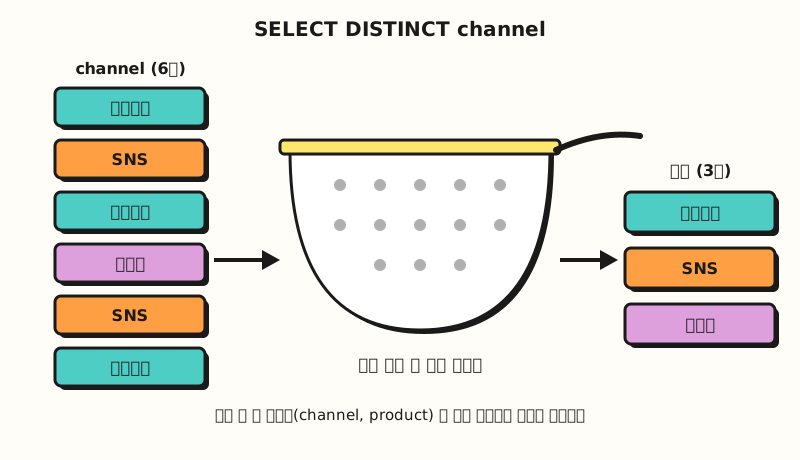 Concept diagram: DISTINCT keeps one row for each identical combination of the columns in SELECT (figure labels in Korean)
4. Calculating without FROM: in the SELECT syntax in the documentation, FROM sits in square brackets as an "optional clause," so you can also use it like a calculator without a table.
SELECT 1500 * 4 AS amount;| amount |
|---|
| 6000 |
This comes in handy for checking that an expression is right before applying it to a table. However, according to the PostgreSQL SELECT documentation, some other DBMSs can't omit FROM and need a separate one-row dummy table instead. All values in the result tables above were calculated by hand, since the sample table is small.
When is SELECT * fine, and when should you avoid it?
SELECT * is the star (select star) syntax that pulls "all visible columns." It's handy for checking the shape of a table you've never seen, but for a query that feeds a report, writing out the columns is safer, and two documents explain why.
- When the table changes, the result changes too: Microsoft Learn's introductory SQL course explains that
SELECT *is fine for a quick test, but if columns are added to or rearranged in the table, that shows up directly in the results, so reports using the query may get unexpected output. - It reads columns you don't need: the same course notes that returning data you don't need can slow your queries down, and the BigQuery performance best practices documentation also advises "query only the columns that you need," explaining that reading excess columns wastes I/O. According to the same document, adding LIMIT to
SELECT *doesn't reduce the amount of data read.
BigQuery also has SELECT * EXCEPT for when "I need almost everything except a few columns." As the syntax documentation describes, only the columns in the parentheses are left out of the result, so the query below returns five columns without order_date.
SELECT * EXCEPT (order_date)
FROM shop.orders;
Here are the three approaches side by side.
| Approach | Result columns | When the table gains a column | Use it when |
|---|---|---|---|
| Write column names | Only those columns, in that order | Result stays the same | Queries for reports and dashboards |
SELECT * | All columns | The new column slips into the result | Checking the shape of an unfamiliar table |
SELECT * EXCEPT (...) | Everything except the excluded ones | The new column slips into the result | Many columns, and you only need to drop a few |
EXCEPT still uses the star, so like *, its result changes when the table changes. That's why my rule of thumb is "star for a query I'll look at once and throw away, column names for a query I'll reuse." So, in a real query, in what order should you pick and write the columns?
How is it used in practice? Pulling columns for a weekly report
Picture someone who reports orders by channel every Monday. The report only needs four fields: order date, channel, product and amount, but the original table has unit price and quantity separately and no amount column.
- Decide FROM first: check which table holds the values you want and write
FROM shop.orders. - Write SELECT in report column order: list
order_date, channel, productin the order of the report's columns. - Calculate the missing column: add the amount column with
unit_price * quantity AS amount. - Match names to the report: choose aliases the reader will recognize. According to the lexical structure documentation, names containing spaces or hyphens must be wrapped in backtick characters, so naming them with letters, digits and underscores is less hassle.
SELECT
  order_date,
  channel,
  product,
  unit_price * quantity AS amount  -- amount = unit price × quantity
FROM shop.orders;
Everything after -- is a comment the query ignores, and according to the lexical structure documentation, you can use --, # and /* */ for comments. Writing the basis of a calculation next to a calculated column means less confusion for next week's me. In the next post, once we add a WHERE condition that keeps "only last week's orders," this query becomes the weekly report query as is.
Other DBMSs join strings differently. BigQuery uses the || operator (or the CONCAT function), while according to the T-SQL string concatenation documentation, SQL Server joins strings with +.
Practice problems
1. (Easy) Write a query that pulls only the order number and order date from shop.orders.
Show answer
SELECT order_id, order_date
FROM shop.orders;
You get 6 rows and 2 columns (order_id, order_date). All you need is the comma between the columns and the table name after FROM.
2. (Medium) Write a query that shows only the kinds of products sold in this table without duplicates, and say how many rows the result has.
Show answer
SELECT DISTINCT product
FROM shop.orders;
It's 3 rows: Pen (orders 1 and 4), Notebook (orders 2, 3 and 5) and Highlighter (order 6). Without DISTINCT, all 6 rows come back.
3. (Medium) If you run the query below, how many columns does the result have, and what are they called?
SELECT order_id product, quantity
FROM shop.orders;
Show answer
There are 2 columns, named product and quantity. Because there's no comma between order_id and product, it's read as an alias with AS omitted, meaning "show the order_id values under the name product." So the product column holds order numbers 1 to 6, not product names.
Common mistakes
- A missing comma turns a column into an alias: the syntax for a SELECT item in the documentation is
expression [ [ AS ] alias ], so it becomes an alias even withoutAS. As in practice problem 3, you get a wrong result with no error, which makes it harder to notice. Always writingASfor aliases and putting one column per line makes a missing comma easy to spot. - Not naming a calculated column: according to the syntax documentation, writing just a column name like
channelmakes that name the alias, but an expression likeunit_price * quantitywithout an alias becomes an anonymous column that can't be referenced by name in the query. Even if the results screen shows a temporary label, the documentation says that label can't be used like an alias. - Wrapping column names in quotes: in BigQuery, single and double quotes make string values, and names are wrapped in backticks.
SELECT 'channel'returns the text "channel" on every row instead of the channel column, and according to the lexical structure documentation, names that match reserved keywords likeFROMor start with a digit also need backticks.
Keywords and column names aren't case-sensitive, so select channel from shop.orders also runs, but according to the same documentation, dataset and table names are case-sensitive (unless set otherwise). Writing keywords in uppercase in this series is a convention for readability.
Wrapping up
The SQL SELECT statement starts with picking a table in FROM and columns in SELECT, and by adding names with AS, removing duplicates with DISTINCT and adding calculated columns, you can shape a report without touching the original. I'd recommend using SELECT * only when you first look at a table, and writing out the columns you need in queries you'll reuse.
I'm studying along with the series myself, so please refer to the full curriculum.
In the next post, we'll cover how to filter rows that match a condition with WHERE.
FAQ
- How do I write a SQL SELECT statement?
- List the column names you want after SELECT, separated by commas, and write the table name after FROM. For example, SELECT order_id, channel FROM shop.orders; pulls only two columns from the orders table. The result comes back as a new table and the original table doesn't change.
- Should I never use SELECT *?
- It's fine for checking the shape of an unfamiliar table. But if columns are added to or rearranged in the table, the result changes along with it, and reading columns you don't need can slow the query, so writing out column names is safer for queries you'll reuse, like reports. In BigQuery, adding LIMIT to SELECT * doesn't reduce the amount of data read.
- How does SQL DISTINCT decide what counts as a duplicate?
- It treats rows with the same combination of all columns written in SELECT as duplicates and keeps one row. SELECT DISTINCT channel returns the kinds of channels, and SELECT DISTINCT channel, product returns the kinds of channel and product combinations.
More related posts
- What Is SQL? Statement Types and SQL Query Execution Order - SQL Basics series part 5, the execution order that starts from FROM
- Relational Database Structure: Tables, Rows, Columns, Schema - SQL Basics series part 1, what rows and columns mean
- Excel Remove Duplicates: Find, Highlight, and Remove Safely - an Excel feature similar to DISTINCT