SQL data types are the rules that set what kind of value goes into each column. If the points column accepts only integers and the sign-up date column accepts only dates, wrong values can't get in from the start, and once you also understand NULL, which means "no value," reading tables gets much less confusing. When I started learning SQL, I thought "an empty cell is just 0, right?" In this post, let's go through how to choose number, text, date and boolean types and how NULL differs from 0 and an empty string, one by one with a sample table. Type names and queries are written in BigQuery (GoogleSQL) syntax. Previous post: Database Normalization: Why Split Data into Multiple Tables?
SQL Basics series 4/12 · Full curriculum
Today's concept
In part 1, I compared a schema to a blank order form, and a data type is the input format set for each field on that form. The order date field takes only a date, the quantity field only a number, and the gift-wrap field only a yes or no check. Excel lets you put anything in a cell, so numbers sometimes get stored as text and drop out of a total, but most databases, BigQuery included, set a type for each column and don't accept values that don't fit (some products, like SQLite, treat types more loosely). Some fields on a form can be left blank, and SQL represents this "not known yet, not applicable" state with a special marker called NULL.
Numbers, text, dates, booleans: what types are there?
The BigQuery data types documentation lists quite a few types, but these six groups are enough to start with.
| Group | BigQuery type | What goes in | Marketing data example |
|---|---|---|---|
| Integer | INT64 | Numbers with no decimal point | Clicks, order quantity |
| Exact decimal | NUMERIC, BIGNUMERIC | Decimals with fixed digits, exact arithmetic | Ad spend, payment amount |
| Approximate decimal | FLOAT64 | Very large or small numbers, arithmetic may have errors | Measurements, ratios |
| Text | STRING, STRING(L) | Characters. L is the maximum length | Campaign name, phone number |
| Date and time | DATE, DATETIME, TIMESTAMP | A date, a date plus time | Sign-up date, order time |
| Boolean | BOOL | True or false | SMS consent |
Here's how the official documentation helps you choose.
- Integers: BigQuery has a single integer type,
INT64, and the documentation says names likeINT,INTEGERandBIGINTare all aliases forINT64. Its range is about ±9.2 quintillion, so clicks will hardly ever outgrow it. - Decimals:
NUMERICholds 38 digits in total with up to 9 after the decimal point exactly, and you can set the digits likeNUMERIC(12, 2).FLOAT64, on the other hand, holds "approximations," in the documentation's words, so it doesn't suit values that must be exact, like money. - Text: You can use
STRINGwithout a length, and if you set a maximum likeSTRING(13), a longer value raises an error (OUT_OF_RANGE). Length is counted in characters, not bytes. TheVARCHAR(n)andCHAR(n)you see in other products are written asSTRINGin BigQuery. - Date and time:
DATEis a date with no time zone,DATETIMEis a date and time with no time zone, andTIMESTAMPis an absolute point in time. You write a date likeDATE '2026-11-10'.
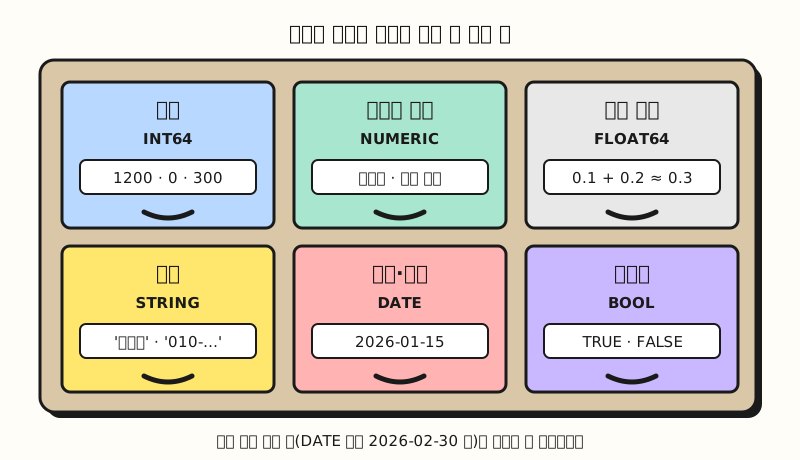 Concept figure: each column only takes values that fit its compartment (figure labels in Korean)
Learning by example: why do types matter?
Let's add points, phone number and SMS consent columns to the stationery shop members table from earlier posts (sample data). When you create a table, you write a type for each column like this.
CREATE TABLE shop.members (
  member_id  INT64 NOT NULL,
  name       STRING(20) NOT NULL,
  joined_on  DATE NOT NULL,
  points     INT64,
  phone      STRING(13),
  sms_ok     BOOL,
  PRIMARY KEY (member_id) NOT ENFORCED
);
In BigQuery you put the dataset name (shop) in front of the table name. According to the DDL documentation, a column with NOT NULL becomes a column that can't be left empty (REQUIRED), and the primary key is only declared, with NOT ENFORCED. That means BigQuery won't enforce the primary key rules from part 2 for you, so you need to check for duplicates yourself.
members
| member_id | name | joined_on | points | phone | sms_ok |
|---|---|---|---|---|---|
| 1 | Haneul Kim | 2026-01-15 | 1200 | 010-0000-0001 | TRUE |
| 2 | Doyun Lee | 2026-03-02 | 0 | (empty string '') | FALSE |
| 3 | Seoyeon Park | 2026-05-20 | NULL | NULL | TRUE |
| 4 | Jiwoo Choi | 2026-07-08 | 300 | 010-0000-0004 | NULL |
| 5 | Minjun Jung | 2026-09-11 | NULL | 010-0000-0005 | FALSE |
I put this table straight into a BigQuery query and ran it to see what changes when types are set.
- Numbers stored as text sort wrong: If you sort points converted to text, they come out as
0,1200,300, and'300' > '1200'returnstrue. That's because text is compared from the first character, while withINT64it correctly judges 300 to be smaller than 1200. - Impossible dates are blocked:
DATE '2026-02-30'was rejected with an "Invalid DATE literal" error, and the number of days between two dates,DATE_DIFF(DATE '2026-11-10', DATE '2026-09-11', DAY), came out as 60. In BigQuery you use the DATE_DIFF function instead of subtracting dates. - Don't keep money in approximate decimals: Adding 0.1 and 0.2 as
FLOAT64gives0.30000000000000004, which is not equal to 0.3, butNUMERIC '0.1' + NUMERIC '0.2'comes out exactly equal toNUMERIC '0.3'. - Length limits catch mistakes: Putting 17 characters into a variable declared as
STRING(13)raised a "STRING(13) has maximum length 13 but got a value with length 17" error.
How is NULL different from 0 and an empty string?
In the table above, Doyun Lee's points are 0 and Seoyeon Park's points are NULL. Both look like "nothing," but they mean different things: the MySQL documentation uses a phone column as an example and explains that NULL can be read as "the phone number is not known," while an empty string '' means "the person is known to have no phone."
| Value | Meaning | IS NULL | In calculations |
|---|---|---|---|
0 | There is a value, 0 | False | Calculated as 0 |
'' (empty string) | There is a value with 0 characters | False | Calculated as empty text |
NULL | No value, unknown | True | Result is mostly NULL too |
The BigQuery data types documentation says all data types are currently nullable, so any column without NOT NULL can be empty, whatever its type, and you see NULL more often than you might expect.
When NULL gets into a calculation, the result changes too: adding 100 to Seoyeon Park's points gives NULL, and aggregate functions skip NULL. According to the BigQuery aggregate functions documentation, COUNT(*) counts all rows, COUNT(column) counts rows where the value is not NULL, and SUM and AVG leave NULL out.
SELECT COUNT(*), COUNT(points), SUM(points), AVG(points)
FROM shop.members;| COUNT(*) | COUNT(points) | SUM(points) | AVG(points) |
|---|---|---|---|
| 5 | 3 | 1500 | 500.0 |
The average is 1500 divided by the 3 members who have points, not by 5, giving 500 (BigQuery returns AVG as a decimal type, so it shows as 500.0). If you want NULL treated as 0, AVG(COALESCE(points, 0)) gives 300, and the conditional expressions documentation explains that COALESCE returns the first value that is not NULL.
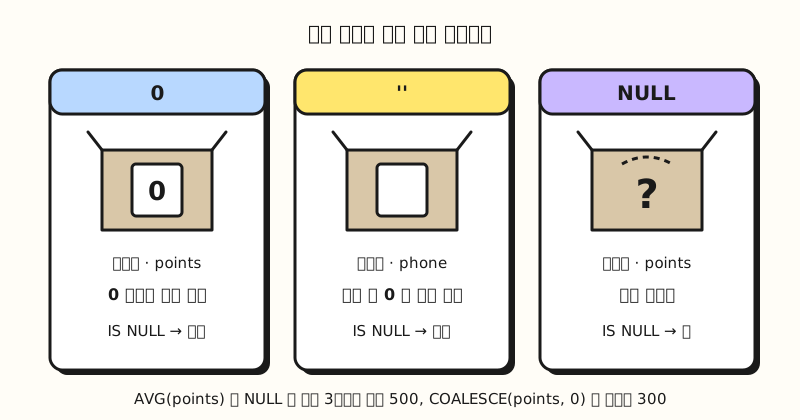 Concept figure: 0 and an empty string are "values that exist," while NULL is "an unknown value" (figure labels in Korean)
Three-valued logic: why do conditions involving NULL drop rows?
When you test a condition in Excel, you get either TRUE or FALSE. But the BigQuery operators documentation explains that logical operators use three-valued logic, adding NULL (unknown) to true and false.
| a | b | a AND b | a OR b |
|---|---|---|---|
| TRUE | NULL | NULL | TRUE |
| FALSE | NULL | FALSE | NULL |
| NULL | NULL | NULL | NULL |
According to the same documentation, comparison operators return NULL if any input is NULL, so both 7 = NULL and 7 <> NULL yield NULL. And the query syntax documentation says the WHERE clause discards rows whose condition evaluates to NULL or FALSE.
So if you ask the members table for "members who agreed to SMS" (sms_ok = TRUE) you get 2, Haneul Kim and Seoyeon Park, and for "members who didn't agree" (sms_ok = FALSE) you get 2, Doyun Lee and Minjun Jung, while Jiwoo Choi, whose consent is NULL, appears in neither.
To find NULL, use IS NULL, not = NULL. When I ran phone = NULL in BigQuery, it raised an "Operands of = cannot be literal NULL" error right away, which points out the mistake. According to the operators documentation, IS operators like IS NULL and IS TRUE never return NULL, only true or false, even for NULL inputs.
SELECT name FROM shop.members WHERE phone = NULL; -- error
SELECT name FROM shop.members WHERE phone IS NULL; -- Seoyeon Park
SELECT name FROM shop.members WHERE phone = ''; -- Doyun Lee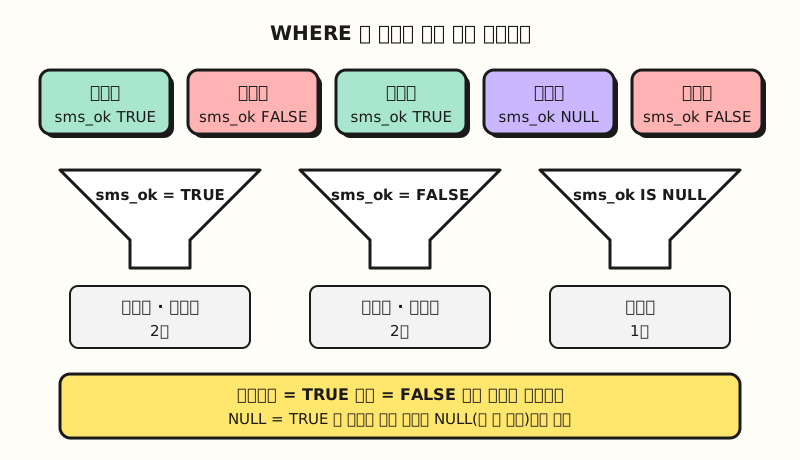 Concept figure: rows where the condition evaluates to NULL are neither true nor false, so they drop out of the result (figure labels in Korean)
Practice problems
1. (Easy) You want to create the following columns in an ad performance table. Which type fits each one? Campaign name, run date, clicks, ad spend (in won, to two decimal places), whether it's active
Show answer
Campaign name is STRING (or STRING(100) if you want a maximum length), run date is DATE, clicks is INT64, ad spend is a NUMERIC with set digits like NUMERIC(12, 2), and whether it's active is BOOL. Avoid putting ad spend in FLOAT64, because arithmetic errors can creep in.
2. (Medium) In the members table above, what does SELECT COUNT(phone) FROM shop.members; return? Is Doyun Lee's empty string counted?
Show answer
COUNT(column)counts only non-null values, and the only person whose phone is NULL is Seoyeon Park. Doyun Lee's''isn't NULL but "a value with 0 characters," so it's counted.
3. (Medium) If you look for "members with fewer than 500 points" using WHERE points < 500, who comes out? How would you change the condition to also see members whose points are unknown?
Show answer
Only 2 come out: Doyun Lee (0) and Jiwoo Choi (300). Seoyeon Park and Minjun Jung have NULL points, so NULL < 500 evaluates to NULL and they drop out. To include them, write WHERE points < 500 OR points IS NULL, and the result is 4 people: Doyun Lee, Seoyeon Park, Jiwoo Choi and Minjun Jung.
Common points of confusion
- Adding
NOTdoesn't bring NULL back:WHERE NOT sms_okalso returns only Doyun Lee and Minjun Jung, and Jiwoo Choi is left out. That's because, as in the operators documentation's table,NOT NULLis also NULL, and to see everyone "whose consent isn't confirmed,"WHERE sms_ok IS NOT TRUEreturns 3.IS NOT TRUEreturns only true or false even when the input is NULL. - Some products treat empty strings as NULL: The Oracle documentation says it currently treats a character value with a length of zero as null, but recommends not treating empty strings the same as nulls because this may change in the future. Where NULL sorts also differs by product: BigQuery puts NULL first in ascending order and last in descending order, and you can change this with
NULLS FIRSTandNULLS LAST(query syntax documentation). Just keep in mind the order may differ if you move to another product. - A total can come out as NULL instead of 0: According to the aggregate functions documentation,
SUMandAVGreturn NULL rather than 0 when no rows match or every value is NULL. Sure enough, totaling points for members with more than 99999 points returned NULL. If you want a report to show 0 instead of a blank, wrap it likeCOALESCE(SUM(...), 0).
Wrapping up
SQL data types set what kind of value each column holds and keep wrong values out, while NULL, unlike 0 or an empty string, is "an unknown value" that behaves differently in calculations and conditions. When you look at a table, try asking first, "What type is this column, and if it's blank, is it NULL?" and you'll find it much easier to read why the queries we learn next return what they do. I'm learning along with this series too, so please refer to the full curriculum. In the next post, we'll cover what kind of language SQL is, its command types, and the order in which a query runs.
FAQ
- Why do you need to set SQL data types?
- Setting the kind of value each column holds lets the database reject values that don't fit when they're stored, and lets numbers be compared and calculated as numbers and dates as dates. Just as points stored as text make "300" come out larger than "1200," the wrong type changes sorting and comparison results.
- How is NULL different from 0 and an empty string?
- 0 and an empty string are actual values, "0" and "0 characters," while NULL is a marker meaning there is no value or it's unknown. So searching with IS NULL won't return 0 or empty strings, and when NULL gets into a calculation the result is mostly NULL too. Some products, like Oracle, do treat empty strings as NULL.
- Why shouldn't you write WHERE column = NULL?
- In SQL, comparing with NULL yields NULL (unknown), neither true nor false, and the WHERE clause keeps only rows where the condition is true, so you don't get the rows you want. BigQuery even raises an error when you compare directly with NULL, like
= NULL. To find rows that are NULL use IS NULL, and to find rows that aren't use IS NOT NULL.
Related posts
- Database Normalization: Why Split Data into Multiple Tables? - SQL Basics part 3
- Relational Database Structure: Tables, Rows, Columns, Schema - SQL Basics part 1, schemas and columns
- Excel Numbers Stored as Text: How to Convert Them to Numbers - What goes wrong when types don't match in Excel