A database is a collection of data gathered in a defined structure, and the program that stores, retrieves and protects that data is called a DBMS (database management system). When I started learning SQL, my first question was "If I keep things neatly in Excel, isn't that already a database?" In this post, let's look at where an Excel sheet and a database part ways, using a sample table.
SQL Basics series 0/12 · Full curriculum
Today's concept
Let's start by separating three words.
- Data: a recorded value, such as one order or one member's name.
- Database: the MySQL manual describes it as "a structured collection of data," and says size doesn't matter, from a simple shopping list to an entire company's information.
- DBMS (Database Management System): the program you need to add, access and process data in a database. Names like PostgreSQL and MySQL belong here.
As an analogy, the database is a library's stacks and the DBMS is the librarian who looks after them. An Excel file is closer to a notebook on my desk: I open it and write in it myself, but with the stacks, visitors ask the librarian, who takes books out and puts them back according to set rules. The PostgreSQL tutorial describes the same structure: a separate server program manages the database files, the user's program (the client) connects to this server to request actions, and the server can handle multiple concurrent connections from clients.
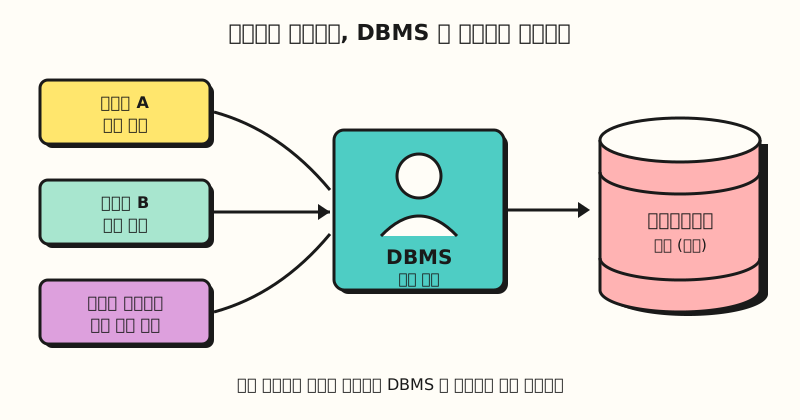 Concept figure: users don't open the files directly; they send requests to the DBMS (figure labels in Korean)
If a notebook seems good enough, why do we need a librarian at all?
Understanding it with an example
Suppose a small online stationery shop has been piling its orders onto a single Excel sheet (sample data).
| Order No. | Order date | Member name | Member phone | Product | Amount |
|---|---|---|---|---|---|
| 1001 | 2026-10-01 | Haneul Kim | 010-1111-2222 | Mug | 12000 |
| 1002 | 2026-10-01 | Doyun Lee | 010-3333-4444 | Tumbler | 18000 |
| 1003 | 2026-10-02 | Haneul Kim | 010-1111-2222 | Tumbler | 18000 |
| 1004 | 2026-10-03 | Seoyeon Park | 010-5555-6666 | Mug | 12000 |
| 1005 | 2026-10-03 | Haneul Kim | 010-9999-2222 | Coaster | 5000 |
| 1006 | 2026-10-04 | Doyun Lee | 010-3333-4444 | Mug | 12 thousand |
Even with six rows, three problems already show.
- The same information repeats. Haneul Kim's phone number appears three times, so if it changes, all three places must be fixed.
- You can't tell which value is right. Only order 1005 has a different number, and the sheet alone can't tell you whether the number changed or was mistyped.
- There are no rules. The amount for order 1006 is the text "12 thousand," and because the SUM function skips text and adds only numbers, this order drops out of the total. I covered a similar problem in the post on numbers stored as text.
In a relational database, a sheet like this is designed to be stored split into a members table and an orders table. The phone number is written once in the members table, and the orders table keeps only the member number pointing to who placed the order, so when a number changes you only fix one place.
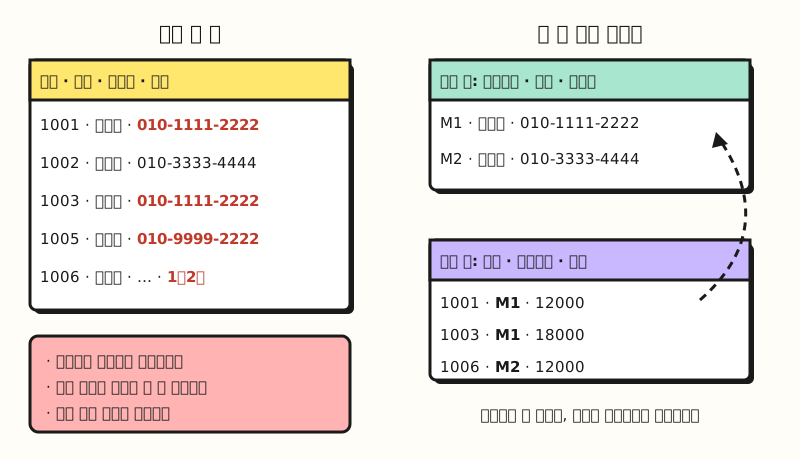 Concept figure: the phone number lives once in the members table; the orders table keeps only the member number (figure labels in Korean)
You can also set rules so the amount column accepts only numbers and the member number accepts only members that actually exist. The PostgreSQL constraints documentation gives the example that a product price column should accept only positive values, and that a product table should have only one row per product number; rules like these are enforced by the database itself. The columns that link tables (keys) come in part 2, and the criteria for splitting them (normalization) in part 3.
How is a database different from an Excel sheet?
This doesn't mean Excel falls short; the two are good at different things.
| Criterion | Excel sheet | Relational database |
|---|---|---|
| How data is held | Freely, on one sheet | Split into tables by subject, each column with a set data type |
| Size | 1,048,576 rows × 16,384 columns per worksheet | Stored across tables, with the server managing the files |
| Rules | Kept by people, or partly by data validation | Constraints enforced by the database |
| Many people at once | In co-authoring, the last saved change to the same cell wins | Transactions apply or cancel the work as a whole |
| How you get data out | Filters, pivots and functions by hand | Request the conditions you want in sentence-like SQL |
Simultaneous editing is worth a closer look: the Excel co-authoring help says it requires a Microsoft 365 subscription and a file saved to OneDrive or SharePoint, and that when two people change the same cell, the last saved change wins, with some exceptions.
Databases handle this problem with transactions. The PostgreSQL transactions tutorial uses the example of moving $100 from account A to account B: multiple steps are bundled into a single all-or-nothing operation, so if something fails partway, none of the steps take effect, and the intermediate states are not visible to other concurrent transactions until it finishes.
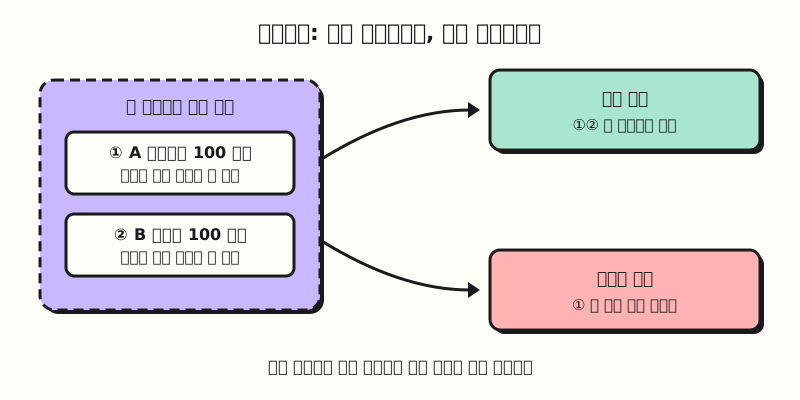 Concept figure: the debit and the credit are bundled so that neither is ever applied on its own (figure labels in Korean)
So here is how I plan to choose, by my own criteria.
- When Excel is enough: reports viewed by you alone or a few people, data you analyze once and are done with
- When to consider a database: when the same information repeats across sheets, when several people or programs write and edit at the same time, or for order and payment records that must not be wrong
Why start with relational databases?
The PostgreSQL tutorial introduces PostgreSQL as a relational database management system (RDBMS) and explains that a relation is essentially a mathematical term for a table. It adds that storing data in tables is so common it may seem obvious, but there are a number of other ways to organize databases; there are three reasons I see for learning the relational approach first.
- Tables are easy to read: each table is a named collection of rows, every row has the same set of named columns, and each column has a specific data type. If you've used Excel tables, the shape is familiar.
- The database keeps the rules: the MySQL manual explains that if you set rules such as one-to-one or one-to-many relationships, unique, or required, the database enforces them, and with a well-designed database your application never sees duplicate or missing data.
- SQL is a shared language: the MySQL manual calls SQL the most common standardized language used to access databases and says it is defined by the ANSI/ISO SQL Standard. However, the PostgreSQL documentation notes that, at the time of writing, no DBMS claims full conformance to the core of the latest standard (SQL:2023), so this series learns standard SQL and points out product differences as they come up.
Practice questions
1. (Easy) Explain data, a database and a DBMS in one line each.
Show answer
Data is each recorded value, a database is those values collected in a defined structure, and a DBMS is the program that stores, retrieves and protects data in a database. In library terms: books, stacks and librarian.
2. (Medium) In the sample table above, how would you change the table so Haneul Kim's phone number can't be written differently for each order?
Show answer
Move member information (member number, name, phone) into a separate members table with one row per member, and keep only the member number in the orders table. Since the phone number lives in one place, a change needs only one fix, and no order can carry a different number.
3. (Medium) In Excel co-authoring, what happens if two people edit the same cell at the same time? How is a database transaction different?
Show answer
According to the Excel co-authoring help, the last saved change wins, with some exceptions. A transaction bundles several steps into one unit that is applied entirely or cancelled entirely, and other transactions can't see its intermediate states before it finishes.
Easy things to mix up
- A database and a DBMS are different things: people use them interchangeably, but a database is the collection of data, and PostgreSQL or MySQL is the program that manages it (the DBMS).
- Several sheets are not a relational database: you can split sheets in Excel too, but the difference is that the program enforces the rules linking tables and the rules for values.
- Row order in a table is not guaranteed: the PostgreSQL tutorial explains that while columns have a fixed order, SQL does not guarantee the order of rows within a table. To see rows in a particular order you have to request sorting when you query, which we'll cover in part 8.
Wrapping up
A database is data collected in a defined structure, and a DBMS is the program that lets many people use that data safely and by the rules. Writing everything on one Excel sheet repeats the same information and blurs which value is correct, and relational databases reduce this by splitting tables and setting rules. I'll be studying step by step through this series myself, so please refer to the full curriculum. In the next post, we'll cover the basic structure of a relational database: tables, rows, columns and schemas.
FAQ
- What is a database?
- A database is a collection of data gathered in a defined structure. The MySQL manual describes any structured collection of data as a database, regardless of size, from a simple shopping list to an entire company's information. The program that stores and retrieves this data is called a DBMS.
- What is the difference between Excel and a database?
- Excel is a tool where you write freely on a sheet and people edit it directly, while a relational database stores data split into tables by subject and the DBMS manages value rules and simultaneous work. Excel is enough for reports you view alone or one-off analysis; if many people keep writing and editing the same data, a database is worth considering.
- Do I need to be good at Excel to learn SQL?
- Not necessarily. But if you're comfortable with rows and columns, filters and pivot tables in Excel, SQL's ideas of tables, conditions and aggregation may feel similar and come more quickly.
Related posts
- What Is an Excel Pivot Table? From Creating to Refreshing - how to summarize a table by different criteria inside Excel
- Excel Remove Duplicates: Find and Remove Safely - finding and cleaning up repeated data in a sheet
- Google Sheets QUERY Function Basics - a function that pulls data inside a sheet with SQL-like statements