A relational database stores data in tables, and each table is made of named columns and the rows that fill them. The blueprint that says which columns a table has, and of what type, is called a schema. When I started learning SQL, I thought "Isn't a table just an Excel sheet?" In this post, let's look at what tables, rows, columns and schemas are, and where they differ from an Excel sheet, using a single members table. Previous post: What Is a Database? How It Differs from an Excel Sheet
SQL Basics series 1/12 · Full curriculum
Today's concept
The PostgreSQL tutorial describes a relational database management system as "a system for managing data stored in relations," and adds that relation is essentially a mathematical term for table. According to the same page, a table is a named collection of rows, every row of a given table has the same set of named columns, and each column is of a specific data type. Mapped to Excel, it looks like this.
| Relational model term | Common SQL term | In Excel terms |
|---|---|---|
| Relation | Table | The table on one sheet |
| Tuple | Row, record | One line |
| Attribute | Column | One column (including its header) |
| - | Schema | The header row plus promises like "only dates in this column" |
The PostgreSQL glossary defines an attribute as "an element with a certain name and data type" and a tuple as "a collection of attributes in a fixed order," noting that a tuple inside a table is often called a row. Here's an analogy: a schema is a blank order form, and a row is one filled-in copy of that form. Because the form has fixed fields, whoever fills it in puts the same kind of value in the same field.
Understanding it with an example
Let's look at a members table, members, for a small online stationery shop (sample data).
| member_id | name | joined_on | city |
|---|---|---|---|
| 1 | Kim Haneul | 2026-09-03 | Seoul |
| 2 | Lee Doyun | 2026-09-10 | Busan |
| 3 | Park Seoyeon | 2026-09-21 | Seoul |
| 4 | Choi Jiwoo | 2026-10-02 | Daejeon |
| 5 | Jung Minjun | 2026-10-15 | Gwangju |
- Table: one table named
members. - Columns: four of them,
member_id,name,joined_onandcity. The PostgreSQL table basics page explains that the number and order of columns is fixed and each column has a name. - Rows: one member is one row, and there are five right now. The same page says the number of rows varies with how much data is stored at a given moment. When a member signs up, a row is added, but the columns stay the same.
- Value: one cell where a row and a column meet. "Lee Doyun" is the
namevalue in the row whosemember_idis 2.
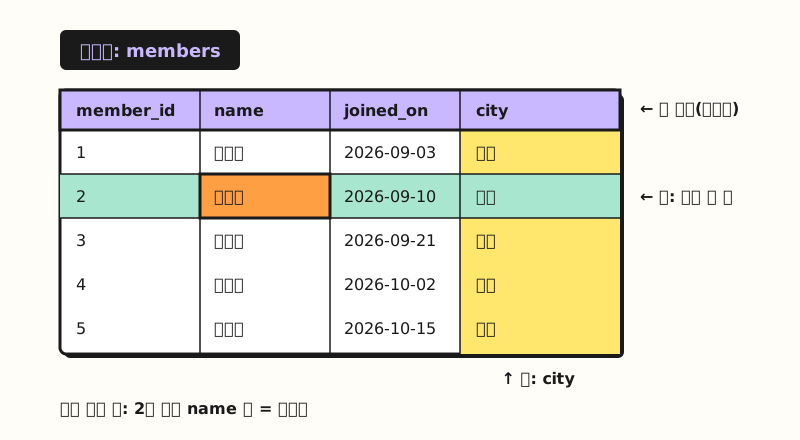 Concept diagram: columns hold a name and type vertically, and a row holds one member horizontally (figure labels in Korean)
In SQL, this table's schema is written like this. We'll learn the syntax from part 6, so for now just note that it's "a statement that lists the table name, column names and column types."
CREATE TABLE members (
    member_id  INTEGER,      -- whole number
    name       VARCHAR(50),  -- text up to 50 characters
    joined_on  DATE,         -- date
    city       VARCHAR(20)
);
According to the PostgreSQL docs, CREATE TABLE specifies at least a table name, the column names and each column's data type, and a column declared as a numeric type will not accept arbitrary text strings.
So if you try to put text like "one" into member_id, PostgreSQL won't accept it, whereas in an Excel sheet it would simply be typed into the cell.
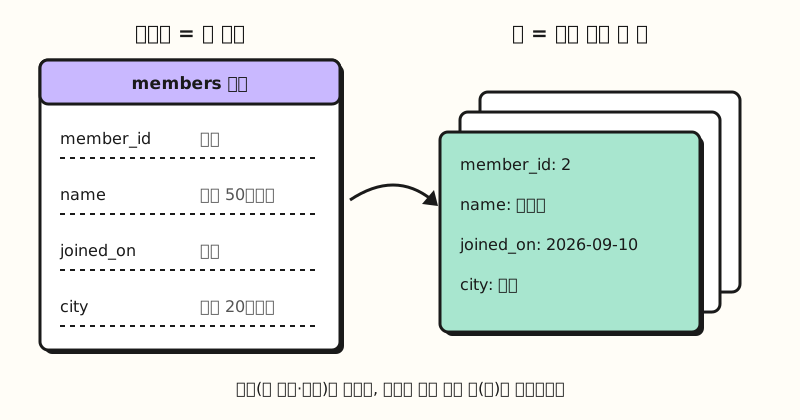 Concept diagram: the schema is a form with fixed fields, and a row is one filled-in copy (figure labels in Korean)
How does a table differ from an Excel sheet?
They look alike, but they keep different promises.
| Criterion | Excel sheet | Relational table |
|---|---|---|
| How you point to data | A cell address (B3) points to a position | Table name and column name |
| Columns | Headers are optional, values can go in any cell | Fixed number and order of columns, each with a name |
| Kinds of values | Numbers and text can mix in one column, can be limited with data validation | Each column has a set data type |
| Row order | The row number is the order | Order isn't guaranteed, you request the order when querying |
| Identical rows | As many as you like | By default, identical rows can also go in |
The last two rows surprised me at first. The PostgreSQL docs explain that SQL makes no guarantees about the order of rows in a table, so unless sorting is explicitly requested, rows come back in an unspecified order. They add that SQL doesn't assign unique identifiers to rows, so several completely identical rows can exist, which is usually not desirable. The way to prevent this is the primary key in the next post.
Excel also has a "table" feature, which makes this easy to mix up. According to the Excel tables overview, an Excel table has a header row by default, supports calculated columns where a formula entered in one cell is applied to the whole column, and lets you use structured references that refer to the table name instead of cell addresses. Pointing to data by name rather than cell address is similar to a database table, but the difference is that limiting what kind of value a column takes requires setting up data validation separately.
If you moved an Excel sheet into a table, what would you decide first?
Imagine moving the weekly ad performance sheet you use at work into a database someday. Before writing any SQL, I'd try writing down these four things first.
- What one row is: You should be able to say it in one sentence, like "one day of performance for one campaign," before you can choose columns. A total row stuck at the bottom of the sheet doesn't fit that sentence, so it doesn't go into the table.
- Column names: According to the PostgreSQL docs, names start with a letter or underscore, and characters like spaces can only be used inside double quotes. So I'd name them with lowercase English letters and underscores, like
ad_cost. - A type for each column: Set dates as dates and costs as numbers. Cells that had text like "12k" mixed in need to be converted to numbers before moving.
- Where to split tables: If the campaign name and owner repeat on every row, they're candidates to pull out. We'll cover the criteria for splitting in part 3, normalization.
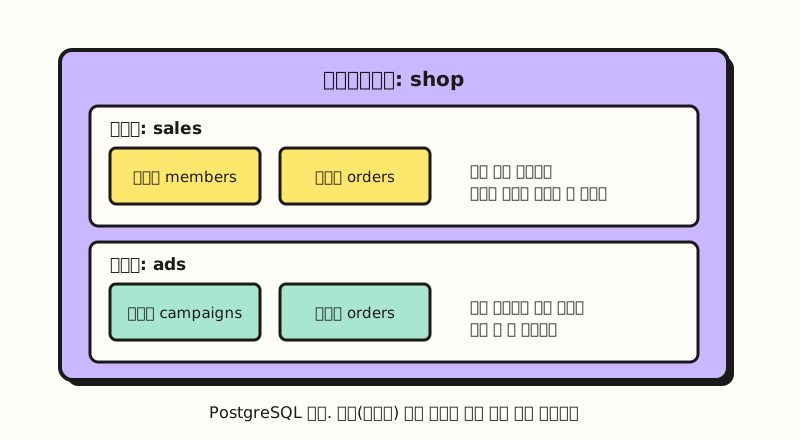 Concept diagram: in PostgreSQL, schemas sit inside a database and tables sit inside a schema (figure labels in Korean)
One thing worth pointing out here: "schema" is used in two senses. The PostgreSQL glossary describes schema in the broad sense as all the data descriptions such as table definitions and constraints, and in the narrow sense as a namespace that groups objects such as tables within the same database. The PostgreSQL schemas page compares this namespace to directories in an operating system, except that schemas cannot be nested. Within one schema, two tables can't share a name, but different schemas can each hold a table with the same name. In this post, "schema" means the broad sense, the blueprint.
Practice problems
1. (Easy) How many rows and columns does the members table above have? Which row and column hold the value "Busan"?
Show answer
5 rows and 4 columns. "Busan" is the city value in the row whose member_id is 2 (Lee Doyun). It helps to think of a row as one member and a column as one attribute of a member.
2. (Medium) You've been logging orders in Excel under the headers "Order No. · Order Date · Product Name · Quantity · Amount." If you moved this sheet into an orders table, how would you write its schema? Just decide the column names and types.
Show answer
Here's a sample answer: order_id INTEGER, ordered_on DATE, product_name VARCHAR(100), quantity INTEGER, amount INTEGER. If the amount needs decimals, pick a decimal type such as NUMERIC. Column names use lowercase English letters and underscores with no spaces, and data types are covered in detail in part 4.
3. (Medium) Choose everything below that you can do in an Excel sheet but not in a relational table. (A) Mixing dates and a "needs checking" note in one column (B) Using one extra column for just one row (C) Entering a member with the same name twice
Show answer
(A) and (B). Each table column has a set type, so you can't put note text into a date column, and the number of columns is fixed, so you can't add a column to just one row. (C) works in a table too, because by default SQL doesn't block even identical rows. To prevent that, you need the primary key from the next post.
Things that are easy to confuse
- What "schema" covers differs by product: Besides the broad sense used in this post (the blueprint), in PostgreSQL it means a namespace inside a database, and the MySQL glossary explains that in MySQL, physically, a schema is synonymous with a database. When reading docs, I recommend checking which sense is meant first.
- How strictly column types are enforced also differs by product: The SQLite docs state that most SQL database engines use rigid typing where the column determines a value's type, while SQLite uses flexible typing where the type is attached to each value. From version 3.37.0, you can also choose STRICT tables that enforce types strictly.
- Column order and row order are different things: Columns have a fixed order, but rows have no guaranteed order. How to see rows in the order you want is covered in part 8.
Wrapping up
A relational database stores data in tables, a table is made of columns with set names and types plus the rows that fill them, and the blueprint describing that structure is the schema. It resembles an Excel sheet, but you decide the number and types of columns up front and don't rely on row order, so when you look at a sheet, asking "what is one row?" first will help it click quickly. I'm studying along with this series one step at a time, so please refer to the full curriculum. In the next post, we'll cover primary keys and foreign keys, which connect one table to another.
FAQ
- What is the basic structure of a relational database?
- Data is stored in tables, and tables are made of columns and rows. The PostgreSQL tutorial describes a table as a named collection of rows, where every row has the same set of named columns and each column has a specific data type. The description of which columns a table has, and of what type, is the schema.
- What is a database schema?
- In the broad sense, it means the whole description of the data structure, such as table definitions and constraints. In PostgreSQL it can also mean a namespace that groups objects such as tables inside a database, and in MySQL it's used as a synonym for database.
- Is an Excel table the same as a database table?
- They have things in common, but they aren't the same. An Excel table also has a header row and structured references that refer to the table by name, but to limit what kind of value a column takes you have to set up data validation separately. A database table sets a data type for each column, and its number and order of columns is fixed.
Related posts
- What Is a Database? How It Differs from an Excel Sheet - SQL Basics part 0, databases and DBMSs
- Excel PivotTable Guide: What It Is, How to Create and Refresh - Summarizing a table with headers by different criteria
- Excel Numbers Stored as Text: How to Convert Them to Numbers - Problems that arise when text mixes into number cells