Database normalization is a design method that splits tables so each fact is written in only one place. If you write a member's city on every order, you have to fix several rows when that member moves, and normalization removes that repetition so there is only one place to fix. When I started learning SQL, my biggest question was "It's convenient to have everything on one sheet, so why split it?" In this post, let's see where a one-sheet orders table runs into trouble, then split it ourselves step by step through the first, second and third normal forms. Previous post: Primary Key vs Foreign Key: How Tables Connect
SQL Basics series 3/12 · Full curriculum
Today's concept
When you manage orders in Excel, you often end up writing the member name, city, product name and price all on one orders sheet. It's easy to read, but if the same member orders ten times, that member's city is written ten times too. As an analogy, normalization is like organizing drawers. If you mix socks, underwear and T-shirts in one drawer you have to dig through it every time, and in the same way, if you mix different kinds of information in one table, every fix or deletion ends up touching other information too.
The Oracle data warehouse design documentation describes normalization as a design process aimed at "keeping each fact in just one place" to avoid data redundancy and insert, update and delete anomalies. The MySQL glossary likewise describes it as a strategy where data is split into multiple tables and duplicate values are condensed into single rows represented by an ID, so the same values aren't stored and updated over and over.
Learning by example: where does a one-sheet orders table break down?
Let's write the stationery shop orders from the last post into a single table, Excel style (sample data). The order ID and product ID together form the primary key.
order_sheet (one-sheet orders table)
| order_id | product_id | ordered_on | member_id | name | city | product_name | price | quantity |
|---|---|---|---|---|---|---|---|---|
| 101 | 1 | 2026-10-01 | 1 | Haneul Kim | Seoul | Pen | 1500 | 2 |
| 101 | 2 | 2026-10-01 | 1 | Haneul Kim | Seoul | Notebook | 3000 | 1 |
| 102 | 3 | 2026-10-03 | 2 | Doyun Lee | Busan | Highlighter | 1200 | 3 |
| 103 | 1 | 2026-10-07 | 1 | Haneul Kim | Seoul | Pen | 1500 | 1 |
| 104 | 2 | 2026-10-12 | 3 | Seoyeon Park | Seoul | Notebook | 3000 | 2 |
| 105 | 3 | 2026-10-20 | 1 | Haneul Kim | Seoul | Highlighter | 1200 | 1 |
Haneul Kim's "Seoul" appears four times and each product's price appears twice, and this repetition causes three problems.
- Update anomaly: If Haneul Kim moves to Incheon and you fix only row 105, the table says the same member lives in both Seoul and Incheon. The Microsoft normalization description also points out that data stored in more than one place must be changed in exactly the same way everywhere.
- Insertion anomaly: You can't register an eraser that nobody has bought yet. That's because the order ID is part of the primary key and can't be left empty, and for the same reason you can't add a new member who has no orders.
- Deletion anomaly: If order 102 is cancelled and you delete that row, the fact that Doyun Lee lives in Busan disappears with it. That's because that row was Doyun Lee's only order.
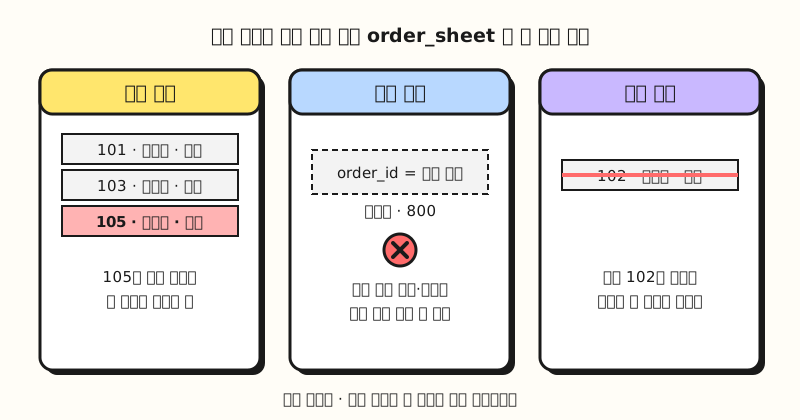 Concept figure: writing the same fact on several rows causes problems when you update, insert and delete (figure labels in Korean)
When I built this table in a local PostgreSQL, the eraser row was rejected with an error saying order_id was NULL, and after deleting order 102, member 2 had zero rows left. So by what rule should we split the table to make these problems go away?
1NF, 2NF, 3NF: in what order do you split?
A normal form is the name for each individual normalization rule. The Oracle documentation describes the first three levels like this.
| Level | Rule | What to do with the table above |
|---|---|---|
| First normal form (1NF) | No repeating groups of data and no duplicate rows | Don't write several values like "Pen 2, Notebook 1" in one cell; use one row per product |
| Second normal form (2NF) | In 1NF, and every non-key column depends on the complete primary key | Pull out columns that depend only on the order ID or only on the product ID |
| Third normal form (3NF) | No non-key column depends on another non-key column | Pull out the name and city that depend on the member ID |
Here, depends on means "once A's value is set, B's value is determined." The PostgreSQL GROUP BY documentation also explains that if the product ID is the primary key, the product name and price are functionally dependent on the product ID.
1NF: The table above already has one row per product, so it's in first normal form. In Excel it's tempting to add Product 1 and Product 2 columns sideways, but the Microsoft document says not to use multiple fields like Vendor Code 1 and Vendor Code 2 to store similar data, and the PostgreSQL arrays documentation also recommends considering a separate table with a row for each item if you find yourself searching inside arrays.
2NF: The primary key is (order_id, product_id), but ordered_on, member_id, name and city are determined by the order ID alone, and product_name and price by the product ID alone. Only quantity needs the whole key, so we split the table into three: orders, products and order items (order_items).
3NF: The new orders table still has name and city, and these two belong to member_id, not to the order ID. Just as the Microsoft example moves the advisor's room number to a faculty table, we move name and city to a members table and keep only member_id in orders.
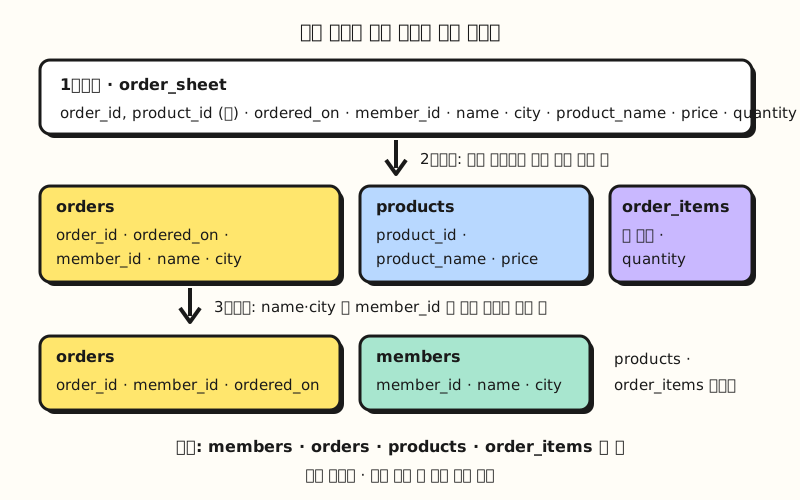 Concept figure: splitting by what each column depends on gives you the four tables from the last post (figure labels in Korean)
The result has the same structure as the four tables from the last post: 3 rows in members, 5 in orders, 3 in products and 6 in order_items. Now Haneul Kim's city only needs fixing in one row of members, and Jiwoo Choi, who has no orders, and the unsold eraser can each go into their own tables. There are higher levels such as the fourth and fifth normal forms, but the Microsoft document considers third normal form enough for most applications.
When do you deliberately combine tables with denormalization?
Normalization isn't always the right answer. The MySQL glossary notes that normalization is not always recommended, and says data that is mainly queried and only updated by deleting it entirely and reloading is often kept in fewer, larger tables with duplicated values. This is called denormalization.
| Criterion | Normalized tables | Denormalized tables |
|---|---|---|
| Good fit | Systems with frequent inserts and updates, like orders and reservations (OLTP) | Data warehouses for reporting and analysis |
| Benefit | One place to fix, so values don't drift apart | Query right away without joining tables |
| Cost | Need to JOIN several tables when querying | Values repeat, and may drift apart when updated |
The Oracle documentation points out that a 3NF design uses many tables, so it needs complex queries with many joins and query performance can be slow, and explains that analytical star schemas accept data redundancy for easier understanding and faster retrieval. As a marketer, here's how I plan to decide.
- Is the source data edited continually? If it changes every day, like member information and orders, keep it in normalized tables.
- Do you only query it and pull a fresh copy each time? If it's data you replace wholesale instead of editing, like an ad performance table you download every week, one wide table is fine.
- Do you write the same JOIN every time? Keep the source split, and give the combined shape you use often a name as a view. The PostgreSQL views documentation says that making liberal use of views is a key aspect of good SQL database design.
Practice problems
1. (Easy) In the order_sheet above, the pen's price went up from 1,500 won to 1,700 won, but only row 101 was updated. Which anomaly is this, and after normalization, where would you make the fix?
Show answer
It's an update anomaly. The pen's price now differs between row 101 (1,700 won) and row 103 (1,500 won). After normalization, you only need to fix the pen's single row in the products table.
2. (Medium) You added an "interests" column to the members table and wrote values joined with commas, like stationery, home, books. Which normal form does this break, and how would you split it?
Show answer
Putting a repeating group of values into one cell breaks first normal form. Create a separate table such as member_interests(member_id, interest), add one row per interest, and use the two columns together as the primary key. Then you can find "members interested in stationery" without digging through commas.
3. (Medium) A course registration table has (student_id, course_id, student_name, course_title, instructor, instructor_room), and the primary key is (student_id, course_id). Find the columns that break second normal form and the column that breaks third normal form.
Show answer
student_name depends only on student_id, and course_title and instructor depend only on course_id, so they break second normal form. Move them into a students table and a courses table, and keep only the two IDs in the registration table. Next, instructor_room in the courses table belongs to the instructor, not the course, so it breaks third normal form and moves to an instructors table.
Common points of confusion
- Normalization doesn't throw data away: If you JOIN the four split tables back together, you get the same six rows as the original order_sheet. I confirmed this in a local PostgreSQL, and JOIN syntax is covered in part 10.
- Not every repeated value is duplication: Order ID 101 appearing twice in order_items is a necessary repetition because it's a foreign key. What you should remove is writing values like name and city over and over when a single ID could stand in for them.
- A changing value and its value at the time can be different facts: If the price lives only in products, raising the price makes past order amounts look different too. If you need to keep the amount at the time of the order, you might consider storing the unit price at that time separately in order_items, and that's a different fact, the "price at order time."
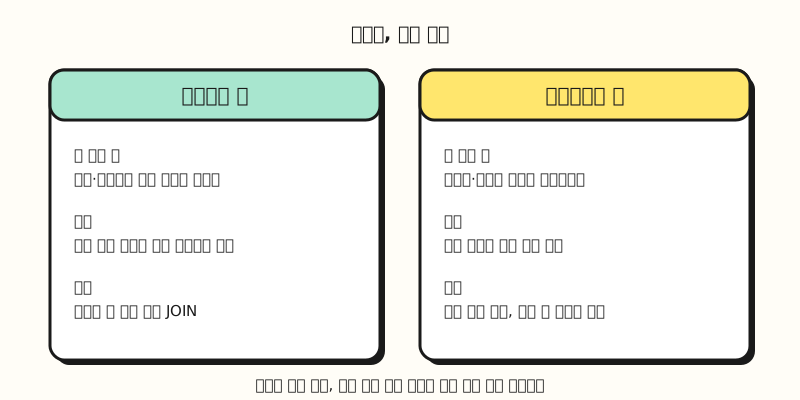 Concept figure: split source data you edit often, and combine tables meant for querying (figure labels in Korean)
Wrapping up
Database normalization means looking at what each column depends on and splitting tables so each fact lives in one place, moving in order from 1NF (remove repeating groups) to 2NF (depend on the whole key) to 3NF (no dependencies between non-key columns). If you swap the habit of writing everything on one Excel sheet for the question "what does this column belong to?", it becomes much easier to understand. I'm studying along with this series too, so please refer to the full curriculum. In the next post, we'll cover data types like numbers, text and dates, and the empty value NULL.
FAQ
- Why do we normalize a database?
- When the same fact is written in several places, an update can change only some of them, you can't insert new data because other information is missing, or deleting one row wipes out information you still need. Normalization is a design method that splits tables so each fact lives in one place, avoiding these insert, update and delete anomalies.
- What is the difference between 1NF, 2NF and 3NF?
- First normal form means one row per item with no repeating groups of data and no duplicate rows. Second normal form adds that every non-key column depends on the complete primary key, and third normal form adds that no non-key column depends on another non-key column.
- When should you use denormalization?
- It's mainly used for reporting and analysis data that is mostly queried and, when it changes, reloaded wholesale. Values repeat, but you can query right away without joining tables. You can also keep frequently edited source data normalized and create a view when you need the combined shape.
Related posts
- Primary Key vs Foreign Key: How Tables Connect - SQL Basics part 2, the keys that link split tables
- Relational Database Structure: Tables, Rows, Columns, Schema - SQL Basics part 1
- Excel Remove Duplicates: Find, Highlight, and Remove Safely - How to handle repeated values on an Excel sheet