This week's AI news piled up on Tuesday, November 17. Microsoft made Office in Copilot generally available at Ignite, OpenAI released GPT-6.2 Astra and Sol and Perplexity added Multiagent on the same day, and Gemini Gems on personal accounts turned read-only as they moved to skills. In one line for marketers: tools that let you finish a document inside the chat and tools where several AIs split up the work both grew at once, and if you use Gems, you now have something to move before December 17. In this post, let's walk through six updates with official announcements between Monday, November 16 and Sunday, November 22, in order of impact.
"I just want to see what came out this week in one place, but every company announced so much."
When you try to keep up with announcements every day, it's easy to miss what actually changed in the tools you use. So I first gathered the posts I wrote in detail on this blog this week, then added only the other updates I could confirm on company blogs, help centers and press releases. I included at most two updates per company, and Claude Meetings and Gemini 4 Hydrogen, announced on November 12, fall outside this week, so I linked them only under "Related posts" below.
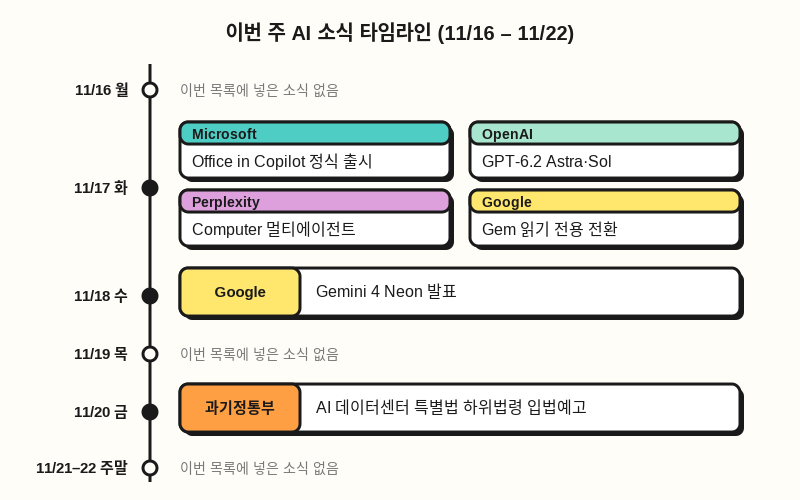 Four updates landed on November 17 alone. Dates follow each company's local announcement date. (figure labels in Korean)
When news piles up like this, I tend to read with just three questions in mind. First, can I see it on my plan and account right now? Second, is there a deadline where missing it costs me something? Third, does it actually change how I work this week? If any of the three is a "yes," read that item closely below; if all three are "no," it's enough to just remember the name.
1. Office in Copilot: finish Word, Excel and PowerPoint files inside the Copilot app
On November 17 at Ignite, Microsoft announced that Office in Copilot and Home are now generally available (GA). When you ask the Copilot app to create a document, a Word document opens beside the conversation, and after refining it with follow-up prompts or direct edits you can move into the Word, Excel or PowerPoint apps to keep working. Files are stored in OneDrive and inherit Microsoft 365 permissions and sensitivity labels from the start. Home is the new starting screen where Chat and Cowork come together, and the Book of News says Home is rolling out worldwide. The announcement only says it's "already included in your Copilot subscription license," so I couldn't confirm which subscriptions that covers, and it doesn't mention country schedules or Korean language support. In practice, the order of opening the app first and then calling Copilot may flip to drafting in a Copilot conversation and opening the app only to finish. More details: Excel Copilot Moves into the Copilot App | Office in Copilot GA and What Changed
2. Gemini Gems to skills: Gems disappear from personal accounts on December 17
On September 30, Google announced that skills will replace Gems, starting in November for personal accounts. According to the transition help article, for personal accounts of users 18 or older, Gems moved to skills and became read-only on November 17, and Gems will be removed from the Gemini app on December 17. Read-only Gems can still be viewed, but you can't use or edit them, and you can't create new ones. Skills have a 100 MB limit, and audio, video, legacy .doc/.xls/.ppt files, archives and GitHub files don't transfer, so you should download the knowledge files you added to your Gems before the removal date. Accounts of users under 18 will transition later, and Workspace accounts have a separate schedule. If you kept report templates or tone guides in a Gem, it's safer to recreate them as skills this month. More details: Gemini Gems to Skills | How to Move Your Gems Before the December 17 Removal
3. GPT-6.2 Astra and Sol: new models you pick in Work and Codex, not Chat
On November 17, OpenAI announced GPT-6.2 Astra and Sol. Astra is the top model for the hardest projects and Sol is the efficient model for everyday work, and the announcement says Plus, Pro, Enterprise and Edu users can use them in ChatGPT Work and Codex. The release notes say both models are available in preview in Work and Codex desktop, and that regular Chat keeps its existing model choices, so there's no need to worry if you don't see them in the chat box. API prices per 1M tokens are $8 input and $40 output for Astra, and $2 input and $10 output for Sol. The announcement says Astra is OpenAI's best model yet at designing slides and following templates, which is OpenAI's own assessment. If you already hand decks or reports to AI, it's worth trying a split in Work: draft with Sol, then rerun only the important deliverables with Astra. More details: GPT-6.2 Astra vs Sol: Differences and How to Choose in ChatGPT Work
4. Perplexity Multiagent: models from several companies working as one team
On November 17, Perplexity added a new effort level to Computer called Multiagent. It sits one step above Ultra: a lead agent (Claude Fable 5.2) splits up the work and assigns up to 16 agents. The default team is Opus 5.5, GPT 6.1 Sol and Gemini 4 Carbon, and the agents share findings and check each other's work. The difference is that in Ultra the supporting agents report only to the lead, while Model Council has several models research the same question separately and shows where they agree and disagree. It's exclusive to Perplexity Max subscribers. The announcement says it's on the web, but the effort mode help article also lists the iOS app, version 26.46.0 or later. The help article notes that Multiagent uses more credits than Ultra, so you should save it for work that needs it. It suits work that breaks into several parts that need to be checked against each other, like reviewing a budget plan, while a lower level is enough for quick research. More details: Perplexity Multiagent Launch | How It Differs from Computer Ultra and Model Council
5. Gemini 4 Neon: the balanced model between Carbon and Hydrogen
On November 18, Google announced Gemini 4 Neon. The announcement says that if Carbon handles the hardest, longest projects and Hydrogen handles fast everyday tasks, Neon balances depth and efficiency. It has a 1M-token context window and handles spreadsheets, PDFs, charts, audio and video together. In the Gemini app, Google AI Pro and Ultra subscribers can choose it from the model menu. In the API it's available only on the paid tier, and per the pricing page it costs $3 input and $15 output per 1M tokens. Google says that at the default thinking level, Neon's cost per task is 32% lower than Carbon's, which is a figure Google published itself. The announcement doesn't list any country restrictions. If you analyze long reports or several files at once on the Pro plan, you could try Neon first instead of Carbon and compare the results.
6. Korea's AI data center act enforcement rules: a domestic policy update
On November 20, Korea's Ministry of Science and ICT published draft enforcement decree and rules for the AI Data Center Act for public comment. The drafts include the criteria for recognizing an AI data center (scale of AI accelerators, power and cooling facilities, and a design power ratio of 1.5 or lower), a notification system for construction, operation and changes, the procedure and deadlines for bundled permit processing, and an exemption from grid impact assessments for data centers outside the Seoul metropolitan area (contracted power of 50 MW or less). Comments can be submitted by email or mail until December 30, a public hearing is scheduled for December 9, and the act takes effect on March 10, 2027. It doesn't change the features of the AI tools marketers use right away, but these are the rules that decide how Korea grows its AI infrastructure, so it's good to know the direction.
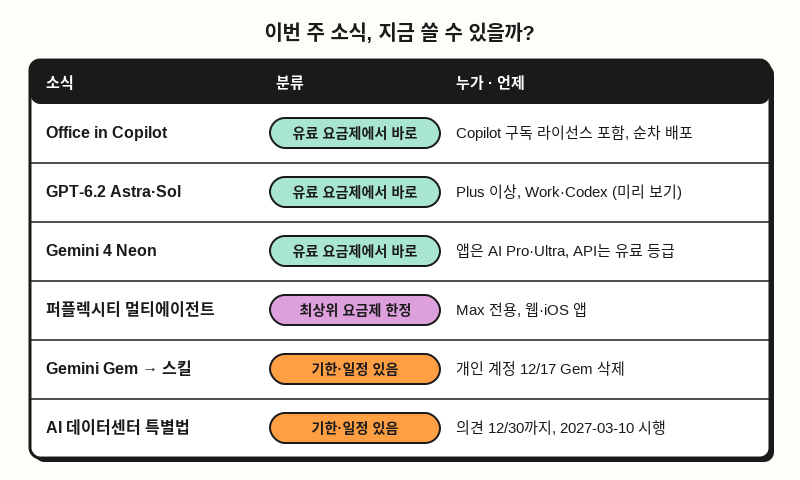 Even in the same week, some updates are usable right now and others just need you to watch a deadline. (figure labels in Korean)
Worth trying this week
It's hard to act on all six, so I picked only the steps described in official documents that you can try this week.
| If you are | Try this | Source |
|---|---|---|
| A personal-account Gemini Gem user | Download each Gem's knowledge files, then recreate it under Customize → Skills by copying the name, description and instructions | Gem transition help |
| On ChatGPT Plus or higher | Check whether GPT-6.2 Astra and Sol appear in Work's model menu, and run the same request with both to compare | Release notes |
| Using Microsoft 365 Copilot at work | Ask the Copilot app for a Word draft, refine the document that opens beside the conversation, and reopen it from OneDrive | Office in Copilot introduction |
Of these, only the Gem step has a deadline, so if you use Gems, I recommend starting there. The other two may not show up in your account yet, because Home is still rolling out, and for GPT-6.2 the help center says the models you see in a managed workspace depend on your seat and settings.
Wrapping up
The third week of November saw Microsoft, OpenAI and Perplexity announcements land on the same day, while Google shipped both the Gem transition and a new model. Most of the new features come with paid-plan or gradual-rollout conditions, so start by checking whether they actually appear in your account, and use the to-do table above as a reference. I'll gather another week of news next Sunday.
FAQ
- Which of this week's AI updates should I handle first?
- The Gemini Gem transition, because it has a deadline. For personal accounts of users 18 or older, Gems became read-only on November 17 and will be removed from the Gemini app on December 17, so it's best to download your knowledge files and recreate them as skills before then.
- Is GPT-6.2 free to use?
- The announcement names Plus, Pro, Enterprise and Edu and doesn't mention the free plan. You also choose it in ChatGPT Work and Codex, not in regular Chat.
- Can I use Office in Copilot in Korea?
- Microsoft's announcement and the Book of News don't list country schedules or Korean language support. Home is said to be rolling out worldwide, so if it doesn't appear in your work account yet, it's worth asking your admin about the rollout status.
Related posts
- Gemini Gems to Skills | How to Move Your Gems Before the December 17 Removal - steps to move a Gem to a skill yourself
- Excel Copilot Moves into the Copilot App | Office in Copilot GA - in-app Copilot vs Office in Copilot
- GPT-6.2 Astra vs Sol: How to Choose in ChatGPT Work - choosing between Astra and Sol by task
- Perplexity Multiagent Launch | Ultra and Model Council Compared - credits and use cases by effort level
- What Is a Reasoning Model? When to Raise or Lower AI Thinking Mode - how to pick a thinking level for new models