ChatGPT Business Hub is where you claim your business inside ChatGPT, edit information like your website, description, and return policy yourself, and see how often your business was mentioned and clicked in ChatGPT answers. OpenAI launched it in beta on November 10, 2026 under the name "Businesses in ChatGPT," and some online businesses in the U.S. can go further and build a Business Agent there that answers customer questions. Claiming your business doesn't make ChatGPT recommend you more often, so it's worth starting by separating what you can manage from what you can't.
"They say customers are finding our online store by asking ChatGPT these days, so how do we know how our company is being described there?" This has been the most frustrating question for marketers every time AI search comes up. Google and Naver (Korea's largest search engine) had a place where you could edit your business information and see stats, but ChatGPT had nothing like that. In this post, let's look at what ChatGPT Business Hub is and the order you register in, how it differs from the familiar Google Business Profile, and what marketers should prepare first.
What is ChatGPT Business Hub, and what can you do with it?
According to OpenAI's announcement, Businesses in ChatGPT was introduced as a new way to connect businesses with the 1.2 billion people who use ChatGPT each week, and Business Hub is where you manage it. The November 10 entry in the ChatGPT release notes says you get started by opening Business Hub from the sidebar in ChatGPT on the web, and what you can do there falls into four main areas.
- Claim: Find your business that already exists in ChatGPT and verify that it's yours. Only owners or people authorized to represent the business can do this.
- Manage information: Edit your website, business description, product or service category, logo, delivery policy, return policy, cover photo, and similar details.
- Connect a product feed: If you sell products, connect a product feed with prices and availability as a CSV file or a feed URL.
- View insights: See mentions, website clicks, and the common themes across answers that mentioned your business (discovery topics) over the past 28 days.
On top of that, eligible ecommerce and online service businesses in the U.S. can build a Business Agent. When your business shows up in an answer and a user opens its profile, it's a support channel that explains your products and policies, using the information you've provided, in a separate conversation from the user's original ChatGPT chat.
As an analogy, Business Hub is a bit like writing your own publisher's introduction card and placing it at the information desk of a big bookstore. You decide what the card says, but which book the staff recommends to a customer first is still up to the staff. The FAQ in the setup help article also makes it clear that claiming only lets you manage the information you provide; it doesn't guarantee more visibility or give you direct control over ChatGPT's independent recommendations, and advertising doesn't influence ChatGPT's independent answers either. So what does the actual registration process look like?
How do you register your business on ChatGPT?
If you follow the setup help article, registration goes through two reviews. The first is a claim verification that checks "Is this person connected to the business?", and the second is an identity verification that checks "Who is the person applying?"
- Find your business: Sign in to ChatGPT, open Business Hub from the sidebar, search for your business by name, and select the matching listing.
- Verify your claim: Use one of the methods shown on screen. Options include business phone (text or automated call), business email, website domain (adding a TXT record to your DNS), and connecting a Shopify store, and the methods available vary by listing.
- Wait for approval: OpenAI reviews the claim and emails you its decision or a request for more information.
- Persona identity verification: Even after your claim is approved, you need approval from the identity verification service Persona before you can edit information, view insights, connect a product feed, or create an agent. You may need a government-issued ID, business registration information, and proof that you're authorized to represent the business, and once approved, a blue check badge appears on the profile.
- Edit info, connect a feed, and build an agent (optional): OpenAI reviews changes before publishing them, and an agent only becomes visible to customers after you test it with sample questions and select "Publish" yourself.
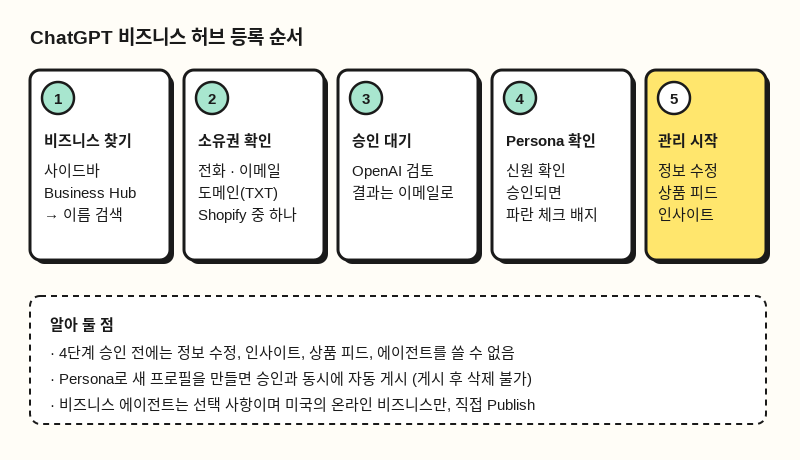 Example figure: a simplified flow of the steps in OpenAI's setup help article, not an actual screenshot. (figure labels in Korean)
There are a few things here that are easy to miss in practice. If you create a new profile through Persona verification, the profile is published automatically the moment OpenAI approves it, with no separate publishing step, so the help article advises continuing only when you're ready. Also, only unpublished drafts can be deleted, and OpenAI Support won't delete or hide a profile that's already published, so I recommend double-checking your company name and website. There's also guidance to put the legal name from your official registration in the legal-name field and your store name in a separate field, so keeping your registration certificate's name and address open next to you can help reduce rejections.
How is it different from Google Business Profile?
When you hear "manage your own business information," Google Business Profile probably comes to mind first. Both share the same broad framework of claiming, editing information, and viewing stats, but who they're built for is quite different. Google's help article states that only businesses that make in-person contact with customers, like stores or service-area businesses, can create a Business Profile, and online-only businesses without a physical location can't use it. ChatGPT Business Hub, on the other hand, has opened mainly to ecommerce and online service businesses for now, and local stores and restaurants can only claim an existing U.S. listing.
| Criteria | ChatGPT Business Hub | ChatGPT Business Agent | Google Business Profile |
|---|---|---|---|
| What it does | Manage business info in ChatGPT, product feed, insights | A separate chat that answers customer questions with your info | Manage business info on Google Search and Maps, reply to reviews, photos |
| Best fit | Ecommerce and online services (local stores: existing U.S. listings only) | Eligible ecommerce and online services in the U.S. | In-person stores and service-area businesses (no online-only) |
| Verification | Claim verification + Persona identity verification | Both approvals above + meets the agent policy | Google business verification |
| Numbers you see | Mentions, website clicks, mention themes over 28 days | Chats aren't shared with the business | Views, searches, website clicks, calls, direction requests, and more |
| Stage | Beta | Beta (U.S.) | Generally available |
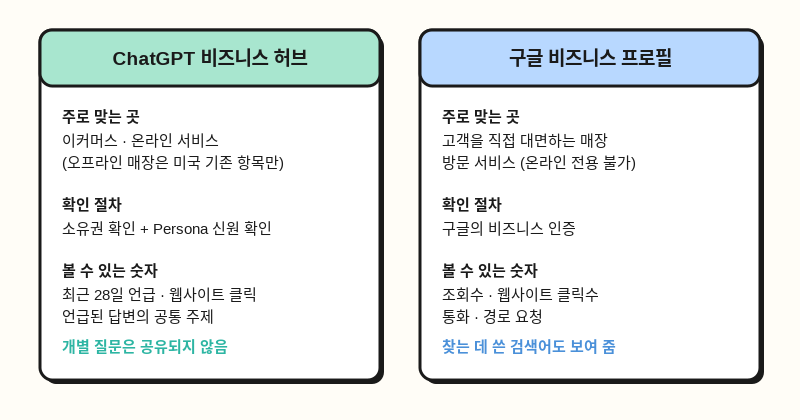 Figure: both let you manage your information directly, but Google centers on in-person businesses while ChatGPT has opened mainly to online businesses for now. (figure labels in Korean)
It's also important to note that the numbers are read differently. The Google Business Profile performance help article shows the search terms people used to find your business, but ChatGPT Business Hub doesn't share individual prompts or conversations with businesses and only groups the common themes across answers that mentioned you. And for an online business, a "mention" only counts when ChatGPT references the business's website; the brand name alone appearing in an answer doesn't count. So keep in mind that this setup can leave you wondering, "I've seen our brand in answers, so why is our mention count so low?"
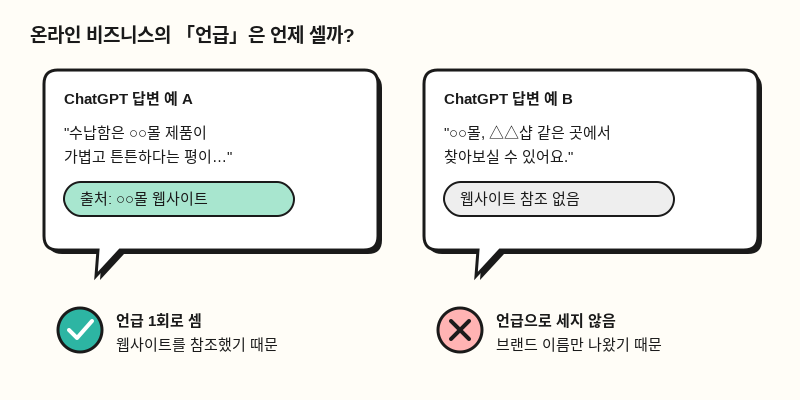 Figure: the mention rule from the setup help article, shown with two hypothetical answers. Even when the same brand appears, it only counts as one mention when the website is referenced. (figure labels in Korean)
※ Note: Can Korean businesses use it right now?
This is probably what marketers in Korea want to know most, and the official documents alone didn't let me confirm whether Korean businesses can claim a listing right now.
- Scope of claiming: The announcement says any eligible business located where ChatGPT is available can claim its business, but the setup help article notes that the required verification has to be supported and availability depends on the business's location and type. No list of supported countries has been published.
- Business Agents are U.S.-only: Both the announcement and the release notes say agents are starting with eligible ecommerce and online service businesses in the U.S., and OpenAI said it plans to expand to more markets and business categories.
- Local stores and restaurants: For now, they can only claim an existing U.S. listing.
- A blank insight isn't zero: The help article explains that a metric can appear blank if activity hasn't reached the reporting threshold or data is still being collected.
- What agents can't do: Today's agents explain products and policies and link to your website, but they can't complete purchases, make bookings, or check orders.
- Policy limits: The Business Agents Policy requires agents to be clear that they're AI, prohibits creating false urgency or pushing a sale after someone declines, and bans asking for high-risk personal information like government IDs or health details.
If you're a Korean business, it's enough to start by opening Business Hub from the sidebar and checking whether your business shows up and which verification methods appear. That's because the options you see on screen are exactly what's open to your company right now.
So what should marketers change?
It's still a beta and the core agent feature is limited to the U.S., so this isn't the stage where traffic in Korea will change right away. But since this is the first channel for where ChatGPT gets business information, there are clear things to prepare depending on your situation.
1. Decision criteria by situation
| If you are | Do now | No need to rush |
|---|---|---|
| Ecommerce with your own online store | Check whether you appear in Business Hub, tidy up return and delivery policy wording, review your product feed format | Preparing an agent (U.S. businesses only) |
| Online service (subscription, SaaS, etc.) | Update your website description and pricing pages | Product feed |
| Mainly in-person stores | Manage Google Business Profile and Naver Place info first | Claiming on ChatGPT (existing U.S. listings only for now) |
| Agency staff | Explain the setup where the advertiser claims the business and invites the agency | Applying on the client's behalf from an agency account |
The last row is based on the help article FAQ. It says the admin who claimed the business can add teammates and grant an agency access, everyone should use their own ChatGPT account, and you shouldn't forward a personal claim invitation to someone else.
2. Try it: a first-week checklist for an online store marketer (hypothetical scenario)
Let's assume a marketer at a Korean household goods online store is opening Business Hub for the first time.
- In ChatGPT on the web, open Business Hub from the sidebar and search for the company name. Take a screenshot of whether your business shows up and which verification methods appear.
- If website domain is one of the methods, ask the developer who manages your DNS to add the TXT record ahead of time. The help article also presents it as a good option when you can't receive a code at the public phone number.
- Decide who will do the Persona identity verification. Since proof of authorization may be required, talk to your CEO or legal team in advance rather than having a staff member handle it alone.
- Open your store's return and delivery policy pages and check that they don't conflict with the wording you'll enter in Business Hub. The agent policy says not to hide fees or conditions, so the wording on your site needs to be accurate first.
- If you sell products, check whether you already have a product feed built for other channels, and make a comparison list against OpenAI's product feed specification and its required fields.
Seen this way, preparing for Business Hub is less about opening a new channel and more about getting your website's basic information into a state that AI can read well. In the Google AI search post, we looked at how Google said there's no special optimization needed to appear in AI features and that existing SEO fundamentals matter, and in my view, accurate basic information being the starting point doesn't seem much different on ChatGPT.
Wrapping up
ChatGPT Business Hub is a beta feature for editing your business information in ChatGPT and seeing mentions and website clicks, and Business Agents that answer customer questions are currently open only to online businesses in the U.S. Claiming doesn't guarantee recommendations, so if you're a Korean business, I recommend checking whether your business appears in Business Hub and getting your website's policy and description wording accurate first. I'll take another look at what changes once support in Korea expands. For the detailed steps, please refer to OpenAI's business setup help article.
FAQ
- Will registering on ChatGPT Business Hub make ChatGPT recommend my company more often?
- No. OpenAI's help article says claiming only lets you manage the information you provide and doesn't guarantee increased visibility or give you direct control over ChatGPT's independent recommendations. It also states that advertising doesn't influence ChatGPT's independent answers.
- Can I build a ChatGPT Business Agent in Korea?
- Not right now. Business Agents are starting with eligible ecommerce and online service businesses in the U.S. Claiming itself is described as depending on the business's location and type and whether the required verification is supported, so the most accurate way for a Korean business to check is to search for it directly in Business Hub and see the options.
- Can I see what questions customers asked in Business Hub insights?
- No. Insights group mentions, website clicks, and the common themes across answers that mentioned you over the past 28 days, and individual prompts, conversations, and chats with your Business Agent aren't shared with businesses.
- If I have a Google Business Profile, do I need to register separately on ChatGPT?
- The two services are separate, so to manage your information in ChatGPT you need to claim your business separately in Business Hub. Google Business Profile centers on in-person stores and can't be created for online-only businesses, while ChatGPT Business Hub has opened mainly to ecommerce and online services for now.
Related posts
- AI Overviews and SEO: How Google's AI Search Changes Things - The basic conditions for sites that show up in AI search
- What Is Naver AI Briefing? How Content Gets Cited as a Source - Posts cited in AI answers in Korean search
- AI Agent vs Chatbot vs Automation: How to Choose for Work - How to tell apart tools labeled "agent"