RAG is a method where, before AI generates an answer, it first finds content related to the question in external sources such as company documents, and then answers based on that content. It lets AI handle internal materials or recent information the model wasn't trained on, and makes it easier to show which document an answer came from. In this post, I cover what RAG is and why it's used, the steps it works through, and what to check before adopting it.
"I wish AI could read our company's guide documents and answer questions. Is that possible?" It's a question that comes up at some point once you start using AI at work. AI like ChatGPT or Claude may seem smart, but it doesn't know your company's price list or last month's meeting notes. RAG is the most common way to bridge this gap, and some of the "file search" or "project knowledge" features in today's AI tools use this approach too. In this post, I'll explain the basics of RAG so you can understand it even without a development background.
1. What Is RAG?
RAG stands for Retrieval-Augmented Generation. Google Cloud's introduction to RAG describes it as an AI framework that combines the strengths of traditional information retrieval systems, like search and databases, with the generative capabilities of large language models (LLMs). Anthropic's Contextual Retrieval post also sums it up as a method that retrieves relevant information from a knowledge base and appends it to the user's prompt.
A filing cabinet analogy makes it easier to understand. The knowledge AI gained through training is the memory in its head, and company materials are the documents in the office filing cabinet. When RAG gets a question, it pulls a few relevant documents out of the cabinet, spreads them on the desk, and answers while looking at them. The key point is that it answers based on the documents it pulled out, rather than relying on memory alone.
2. Why Use RAG?
Microsoft Foundry's RAG documentation explains that because LLMs are trained on data publicly available at training time, that alone may not be enough when you need private documents or frequently changing information. Here are the reasons commonly cited across several companies' documents.
- Up-to-date information: Google Cloud's documentation explains that LLMs are confined to their training data and can give outdated or inaccurate answers, and that RAG compensates by providing current information.
- Internal materials: As the Microsoft documentation's examples show, you can have AI answer based on private documents that aren't on the public web.
- Reducing hallucinations: Google Cloud's documentation notes that including facts relevant to the question in the prompt helps reduce plausible-sounding fabricated answers.
- Showing sources: Microsoft's documentation explains that answers produced with RAG can include citations that lead back to the source.
It's easy to confuse RAG with fine-tuning, which retrains the model. The same Microsoft documentation distinguishes them: use RAG when you need to answer with private or frequently changing data, and use fine-tuning when you want to change the model's tone or way of working itself. Not having to retrain the model every time your materials change, and just swapping the documents in the cabinet, is also why RAG is used so much in practice.
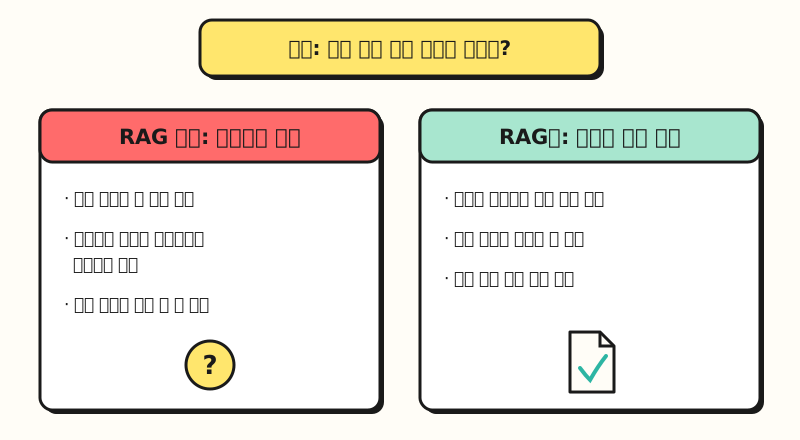 With RAG, you can check the source documents along with the answer. (figure labels in Korean)
3. What Steps Does RAG Work Through?
Microsoft's documentation describes the RAG flow in three stages: Retrieve, Augment, and Generate. Before that, there's a stage of preparing the materials so they're easy to search, so from a marketer's point of view, it's easier to understand as the four steps below.
- Splitting materials (chunking): Divide long documents into small pieces that are easy to search. For example, OpenAI's Retrieval documentation says the default setting for file search splits files into 800-token chunks, with consecutive chunks overlapping by 400 tokens.
- Embedding: Convert the meaning of each chunk into a list of numbers and store it. Anthropic's embeddings documentation describes text embeddings as numerical representations of text that make it possible to measure how similar meanings are.
- Retrieval: Convert the question into numbers the same way, then find chunks with close meanings. The advantage is that it can find content with similar meaning even if the words don't match exactly, and both the Google Cloud and Microsoft documentation introduce hybrid search, which combines semantic search with keyword search so exact word matches aren't missed either.
- Answer generation: Feed the retrieved chunks into the model along with the question, and have it write an answer based on that content.
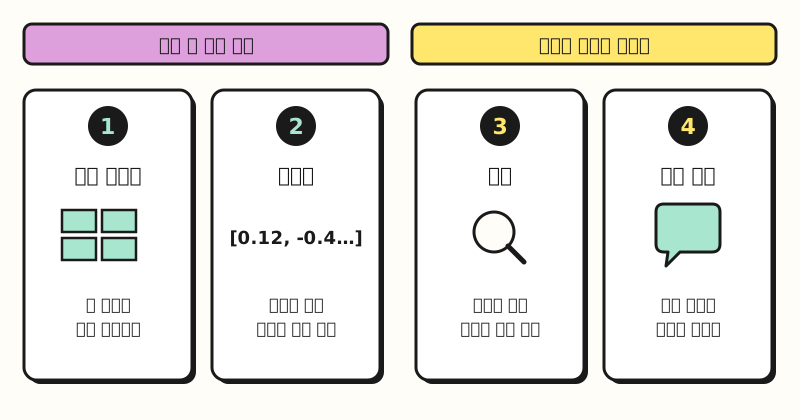 The first two steps are done in advance, and the last two run every time a question comes in. (figure labels in Korean)
The splitting process can also cause problems. Anthropic's post gives the example that if you take the chunk "The company's revenue grew by 3% over the previous quarter" on its own, you can't tell which company or what period it's about. So it introduces a method of adding brief context from the whole document to each chunk, and shared internal experiment results showing that using this method together with keyword search and reranking reduced failures to retrieve relevant chunks by 67%.
4. Where Will Marketers Encounter RAG?
Even if you never build a RAG system yourself, you'll often encounter this approach inside the AI tools you already use.
| Form | Example |
|---|---|
| Knowledge files in AI projects | In Claude Projects, RAG mode turns on automatically when project knowledge approaches the context window limit, so it finds and uses only the relevant content. It's a feature of paid plans (Pro, Max, Team, Enterprise) |
| File search features | The OpenAI API's file search finds information in uploaded files using semantic and keyword search, and shows which files it cited in the answer |
| Tools that connect internal documents | Microsoft 365 Copilot generates answers grounded in organizational data like emails, documents, and chats through Microsoft Graph |
That said, if you don't have much material, you may not need RAG at all. Anthropic's post advises that if your knowledge base is smaller than 200,000 tokens (about 500 pages), you can put all of it in the prompt without RAG, and Google Cloud's documentation also introduces putting materials into a long context window alongside using RAG to cut tokens when you have more than that. For a few guide documents, attaching them directly in the chat window is enough, and you can consider RAG once the documents grow into the hundreds.
5. What Should You Check Before Adopting It?
The Microsoft Foundry documentation states that RAG quality depends on data preparation, retrieval configuration, and prompt design. Before choosing a tool, I recommend looking at these four things first.
- Organizing materials: Both the Microsoft and Google Cloud documentation warn that if retrieval picks up the wrong chunks, you can get a wrong answer even with sources. Cleaning up outdated document versions and duplicate files is the starting point.
- Permissions: Microsoft's documentation warns that if you don't manage access permissions, sensitive information can leak through answers, and recommends applying permissions at the retrieval stage. Microsoft 365 Copilot also explains that it only shows data the user has at least view permission for, so the sharing settings of your source folders effectively become the scope of the AI's answers.
- Showing sources: Choosing a tool that shows which part of which document each answer used makes review much faster.
- Reviewing results: Microsoft's documentation states that the model can produce inaccurate answers even with source materials. For content where mistakes are costly, like prices, schedules, and contract terms, keep a step where you double-check the original.
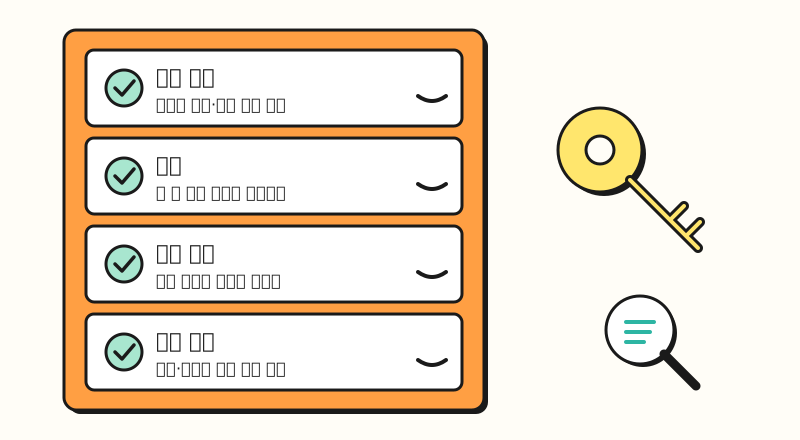 Organizing the filing cabinet and managing the keys come before the tool. (figure labels in Korean)
Summary
RAG is a method that has AI answer based on relevant content it finds in company materials instead of relying only on memory, and it works in the order of chunking, embedding, retrieval, and answer generation. It has the advantages of handling up-to-date information and internal materials and making it easy to show sources, but in the end, answer quality depends on what you've put in the filing cabinet and how. As I connect my own work materials to AI, I'll write up more on organizing materials and setting permissions. When you connect internal documents to AI, I hope the four checklist items above help.
FAQ
- What's the difference between RAG and fine-tuning?
- RAG finds external materials and adds them to the prompt each time it answers, while fine-tuning trains the model itself further. The Microsoft Foundry documentation distinguishes them: use RAG when you need to answer with private or frequently changing data, and fine-tuning when you want to change the model's tone or way of working.
- Does RAG eliminate hallucinations?
- It can reduce them, but it doesn't eliminate them. Microsoft's documentation notes that the model can give inaccurate answers even with source materials, and recommends turning on citations and instructing the model to answer only from the retrieved content. If retrieval brings back the wrong chunks, the answer can be wrong too.
- Do I need development work to use retrieval-augmented generation?
- Not necessarily. Some tools, like Claude Projects, automatically turn on RAG mode when you upload knowledge files and the materials grow large. If you build a system yourself, you'll use services like OpenAI file search or Azure AI Search.
Related Posts
- Why Does AI Hallucinate? How to Reduce It, According to Official Guides - Giving AI the materials directly and asking for sources
- What Are Tokens and Context Windows? Basics Before Feeding Long Documents to AI - Basics to know when deciding whether you need RAG
- AI Agent vs Chatbot vs Automation - Criteria for choosing the right AI approach for your work