Perplexity Multiagent is the highest effort level added to Computer, Perplexity's agent tool, on November 17, 2026. A lead agent splits up the work, AI models from several companies handle their parts at the same time, and they review each other's results before combining them into one answer. Right now only Perplexity Max subscribers can use it, and it uses more credits than Ultra. In this post, let's look at how Multiagent differs from the existing Ultra and Model Council, how its cost is counted, and what kinds of work a marketer might use it for.
"Is several AIs working together really better than using just one?"
AI services keep announcing ways to run several agents at once. Perplexity already had Model Council, which compares the answers of several models side by side, and now it has released a separate mode where models divide the work and review each other. With three features that look alike, it's easy to get confused about which one to pick in which situation. Working in digital marketing, I wondered which one fits when I hand off a big analysis, so I read through the announcement and the help articles one by one.
What is Perplexity Multiagent?
Let's start with Computer, Perplexity's agent platform. In September 2026 it got an effort slider, so instead of choosing a model yourself, you choose how hard the task is from Light, Standard, High and Ultra, and Perplexity picks the matching model and reasoning level. According to the Multiagent announcement, Multiagent is a fifth level that sits one step above Ultra on that slider.
Here is the structure the announcement describes.
- Lead agent: Claude Fable 5.2 plans the task and divides the work. The lead can also handle part of it itself.
- Default team: Claude Opus 5.5, GPT 6.1 Sol and Gemini 4 Carbon work in parallel. Fable 5.2 and GPT 6 Astra join only when the user asks for them or the task needs them.
- Team size: The lead can assign up to 16 agents.
- How they collaborate: Agents share what they find directly, check each other's work, and coordinate edits when they work on the same files.
- Point of contact: The lead stays your conversation partner throughout and combines the team's results into one answer. When you ask a follow-up, the lead tells the affected agents what changed, you can see which agents and models are running, and stopping the thread stops the whole team.
Keep in mind that the model names are as of the announcement. The effort mode help article says Perplexity pairs each level with a model based on evaluation results and shows that model name in the effort selector, so the most accurate way to see which models are running is to check the menu when you use it.
Ultra, Model Council and Multiagent: what's the difference?
All three have "several models working together" in common, but they differ in who reports to whom. A workplace comparison makes this easier to picture.
- Ultra is like a team lead who splits up a job and outsources the pieces. According to the announcement, the lead delegates parts of the task, and the supporting agents report only to the lead.
- Model Council is like hiring several consultants separately for the same problem and reading their reports side by side. Several models investigate the same question independently, and Computer shows where they agree and where they disagree.
- Multiagent is a task force gathered in one meeting room. Each member works on their own part while sharing interim results and cross-checking one another.
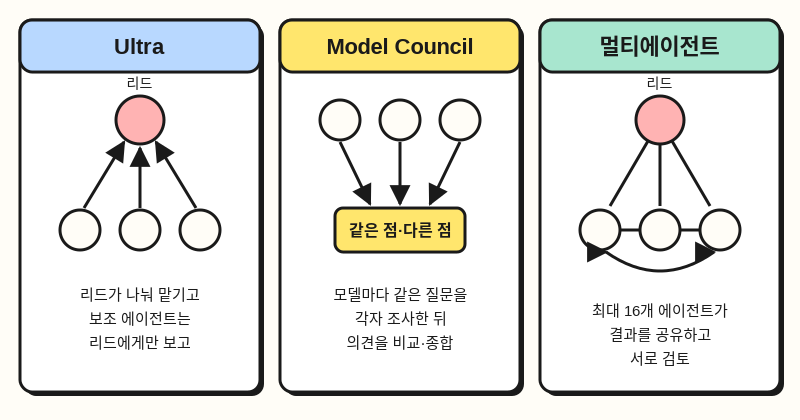 Ultra reports only to the lead, Model Council researches separately, and Multiagent agents pass results back and forth. (figure labels in Korean)
Side by side on the same criteria, it looks like this.
| Criterion | Ultra | Model Council (inside Computer) | Multiagent |
|---|---|---|---|
| How it works | The lead delegates, and supporting agents report only to the lead | Each model researches the same question independently, then results are compared and combined | The lead assigns up to 16 agents, and agents share and review each other's work |
| Good fit | Open-ended problems where several approaches need testing | Questions where it matters whether models disagree | Large, important work with distinct parts that needs cross-checking |
| Number of models | Chosen by Perplexity | Pick 2 to 8 yourself, or use the default lineup | Default team of 3 models, plus more when needed |
| Plans | The help article names Enterprise Pro and Enterprise Max (consumer plans not mentioned) | All paid plans | Perplexity Max |
| Credits | For the same task, usually more than lower levels | More than a single model, and more with each added model | More than Ultra |
※ Model Council is also available outside Computer, in regular search on the web and iOS. According to the Model Council help article, that version always runs three models and is included only with Max and Enterprise Max. The table is based on using it inside Computer.
The biggest difference in the table is who reconciles the results. In Model Council the models reach conclusions without seeing each other's answers, so it's strong at finding "where opinions split", while Multiagent works with each other's interim results in view, so it's built for producing "output where many parts fit together." So how much does it cost to run this many models?
How many credits does it use, and who can use it?
Computer runs on credits. According to the credits help article, today 100 credits equal $1, regular searches (Ask) don't use credits, and only Computer tasks do.
- Plan: Only Perplexity Max subscribers can use Multiagent. The price listed in the Max help article is $200 a month or $2,000 a year.
- Included credits: Consumer Max starts with 10,000 credits a month, while consumer Pro includes a weekly amount of Computer usage instead of a set monthly credit amount.
- Usage by level: The help article explains that credits reflect the work Computer actually does, not a fixed price per level. For the same task, lower levels usually use fewer, and Multiagent uses more than Ultra because a team of agents works together.
- Effort levels are not spending caps: Choosing Light doesn't guarantee your credits stay under a certain amount. To control spending you need the separate monthly cap; for Max, the monthly credit charge cap defaults to $200 and can be raised to $5,000.
- When credits run out: Active tasks aren't canceled. They pause with their work intact and resume once you add credits or your monthly credits reset.
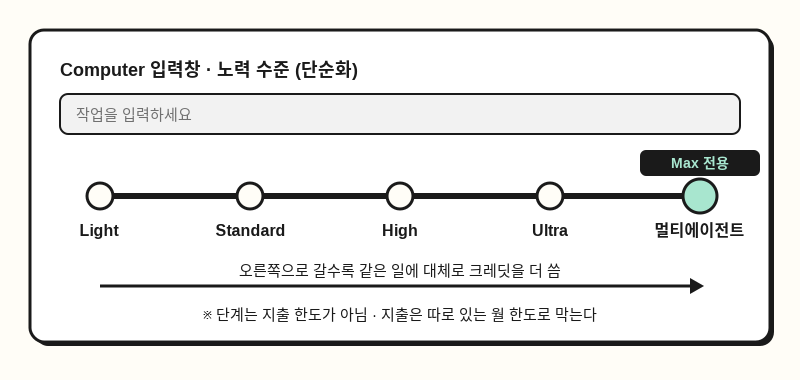 Example figure: a simplified drawing of the Computer effort slider (not an actual screenshot). Levels further right usually use more credits, but a level is not a spending cap. (figure labels in Korean)
What marketers should watch out for here is that if you rerun a task because you didn't like the result, you pay credits again. The more expensive the level, like Multiagent, the more it pays to write the first instruction carefully to save credits. The help article also notes that a clearly specified task can produce just as good results on Light or Standard.
So what should marketers change?
The examples the announcement gives for Multiagent are forecasting and finance, annual report review, analysis that tests competing explanations against sources, deal data room diligence, and preparing complex tax returns: work that splits into several interlocking parts. The help article likewise describes Multiagent as the level for "hard, high-stakes problems where several models should split up the work and check each other's findings." Applying that to marketing work gives a breakdown like the one below, which is my own set of criteria based on the official descriptions.
| Task | Suggested level | Why |
|---|---|---|
| Combining channel report files into one sheet | Light | Clear instructions and a fixed output format |
| A short briefing on this month's industry news | Standard | Everyday work of gathering and summarizing information |
| Finding why conversions dropped | High | Requires explaining causes and weighing priorities |
| Comparing scenarios for entering a new market | Ultra | An open-ended problem where several approaches need testing |
| A question where sources disagree, like "when will this feature reach Korea?" | Model Council | The point is to see whether models disagree |
| Reviewing an annual plan that ties together channel performance, competitors and budget scenarios | Multiagent | Distinct parts whose numbers need to be checked against each other |
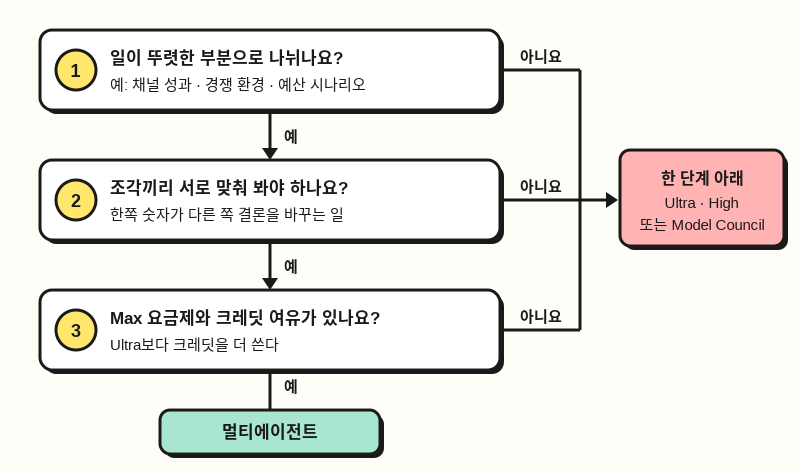 Choose Multiagent only when all three answers are "yes"; if any is "no", start one level lower. (figure labels in Korean)
When I'm unsure, I look at two things. First, whether the pieces have something to check against each other once the work is split. If one side's numbers change the other side's conclusion, as with channel performance and a budget plan, a structure where agents share findings makes sense. Second, the cost of being wrong. A briefing sentence can simply be redone, but if the reasoning behind an annual budget is wrong, every decision after it is shaken. On the other hand, running a daily report cleanup on Multiagent is like calling a taxi to go to the building next door; a lower level plus a human check is enough.
Practical scenario: reviewing next year's ad budget
Imagine you're putting together next year's digital ad budget at year-end and need its reasoning reviewed. The steps below are hypothetical, and I haven't verified the results myself.
- Gather data (Light): Merge this year's monthly cost and conversion files by channel into one table. It's formatting work, so an expensive level isn't needed.
- Check the contested points (Model Council): Put a question likely to split opinions, such as "Which should get a bigger share next year, search ads or video ads?", to several models, and first see where they disagree.
- Review the budget plan (Multiagent): Split the work into channel performance analysis, competitive landscape research and three budget scenarios, and have them cross-check whether the results fit together.
- Report sentences (Standard): Turn the agreed conclusions into sentences your manager can read easily.
Here's a prompt template you can use for step 3. In Multiagent the lead divides the work, but if you write down in advance which pieces to split it into and what needs to be checked against what, you can cut down on credits spent going in the wrong direction.
## Role
You are the lead of a marketing analytics team reviewing a digital ad budget plan.

## Instructions
Review next year's ad budget plan using the data below. Split the work into three parts.
1. This year's cost and conversion trends by channel, and channels whose efficiency dropped
2. Changes in the industry ad environment that can be confirmed from public sources (source links required)
3. Three budget scenarios (keep current split, expand search, expand video)
Flag separately any place where the numbers in part 1 and the assumptions in part 3 don't match.
Separate confirmed facts from assumptions.

## Format
- A table per scenario (assumptions, expected effect, risks, evidence)
- Below the table, five items a person needs to check directly

## Data
<data>
(Paste the monthly performance table by channel and next year's targets)
</data>
Several agents reviewing each other doesn't automatically make the result correct. Just as the announcement presents its tax example as a way to prepare questions for a tax professional, the final judgment and number checks are still a person's job; for the habit of checking sources, see how to reduce hallucinations.
※ Notes
- It's Max-only and limited to certain places. According to the help article, Multiagent is available in Computer on the web and in the iOS app (26.46.0 or later). The November 17 announcement mentioned only the web, but the help article adds iOS, so I followed the help article, which appears to be the more recent source. The macOS and Windows desktop apps don't have the effort menu and show the older model picker instead.
- Company accounts follow admin settings. Enterprise admins can set Multiagent as a role's maximum effort, but not as its default. Models the organization has disabled stay disabled even when you use effort mode.
- Choose it on a new task. The announcement says to select Multiagent on the effort slider when starting a new task, and the help article says follow-ups keep the level the conversation is already using, with changes applying from the next message.
Wrapping up
Unlike Model Council, where several models answer separately, and Ultra, where helpers report only to the lead, Perplexity Multiagent is a task-force-style effort level where agents pass results to each other and review one another. Since it needs the Max plan and plenty of credits, the practical approach is to save it for work with clearly separate parts where mistakes are costly, and to start everything else at a lower level. When you're unsure which level to choose, refer to the task-by-task table above.
FAQ
- Can I use Perplexity Multiagent on the Pro plan?
- No. Both the announcement and the help article describe Multiagent as being for Perplexity Max subscribers. However, according to the Model Council help article, Model Council inside Computer is available on all paid plans.
- What's the difference between Model Council and Multiagent?
- In Model Council, several models research the same question independently, and Computer shows where they agree and disagree. In Multiagent, a lead agent divides the work, and the agents share findings and review each other's work before combining it into one result.
- How many credits does Multiagent use?
- There is no fixed price. The credits help article says credits reflect the work Computer actually does, and the effort mode help article says Multiagent uses more credits than Ultra. Today 100 credits equal $1, and consumer Max starts with 10,000 credits a month.
- Can I choose Multiagent in the Perplexity Computer desktop app?
- Not according to the help article. The macOS and Windows desktop apps don't have the effort menu, and Multiagent is available on the web and in the iOS app version 26.46.0 or later.
Related posts
- Chatbots, AI agents and automation: what's the difference? - if you want to start with what an agent is
- What is a reasoning model? When to raise or lower AI thinking - criteria for choosing effort within a single model
- Claude Fable 5.2 vs Opus 5.5 - what kind of model Fable 5.2, Multiagent's lead, is