A reasoning model is an AI that doesn't write its answer right away: it first goes through a thinking process of breaking the problem down and making a plan, and then answers. Claude and Gemini let you adjust how much thinking happens through an effort level or a thinking level, and the more thinking you ask for, the better the model handles complex problems, but the slower the answer and the more tokens it uses. In this post, let's look at what a reasoning model is, how each of the two services lets you adjust thinking, and when marketers should raise or lower it for different tasks.
"When exactly am I supposed to change those Thinking and Effort settings next to the model name?"
If you open the model menu in an AI chat screen, you'll see levels like low, medium and high in addition to the model name. Have you ever felt torn, worried that leaving the default costs you on important analysis, but that setting it to the highest every time makes answers come back far too slowly? Working in digital marketing, I started wondering whether it made sense to use the same setting for polishing a single sentence and for digging into campaign performance, so I read each company's official documentation one by one.
What is a reasoning model? How AI thinks before it answers
A reasoning model (추론 모델) is a broad term for AI models built to go through an internal thinking step before writing a response. Each company names it a little differently: Anthropic calls the feature Thinking (the older approach was called extended thinking), and Google also calls it thinking in its Gemini documentation. Google explains that this internal reasoning process significantly improves reasoning and multi-step planning abilities, which helps with tasks like coding, math and data analysis.
The explanation in the Claude Help Center is similar. With Thinking, Claude breaks down problems, plans solutions and explores different approaches before responding.
As an analogy, it's like using scratch paper when you solve a test question. For an easy question you do the math in your head and write the answer straight away, but for a hard one you work it out on scratch paper and check it before copying the answer over. A reasoning model's thinking process is that scratch paper, and the effort level or thinking level is the dial that decides how much of it the model gets to use.
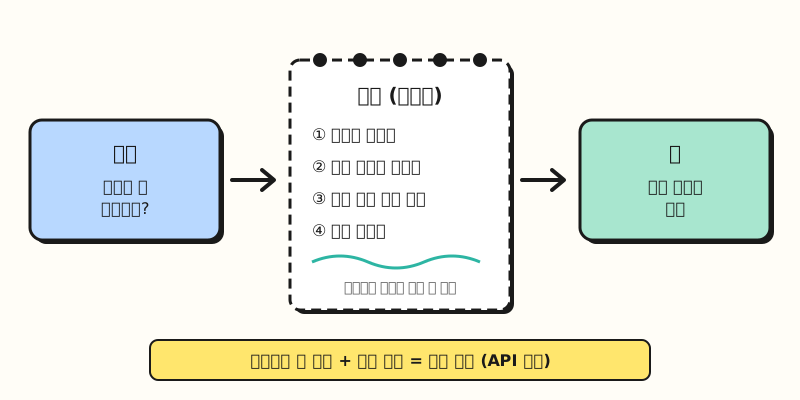 There's an invisible sheet of scratch paper between the question and the answer, and what's written on it is also counted as output tokens. (figure labels in Korean)
Today's models also decide for themselves whether to use that scratch paper. According to Claude's steering thinking documentation, Claude evaluates the complexity of each request to decide whether to think and how much, and it may answer a simple factual question directly with no thinking at all. Gemini's documentation also says it adjusts the amount of reasoning to the complexity of the request by default, so why would a user need to turn the dial at all?
How do you adjust thinking in Claude and Gemini?
Even though the model decides on its own, the effort level and thinking level let you point it in a direction: "go deeper on this one" or "be quick on this one." Here's how the two services' chat apps compare side by side.
| Item | Claude (claude.ai app) | Gemini (Gemini app) |
|---|---|---|
| Where you adjust it | Model menu next to the send button | Model picker below the chat box |
| Unit of control | Effort Low·Medium·High·Extra high·Max, Thinking on·off | Thinking level Low·Medium·High (when you pick a model manually) |
| Can you turn thinking off? | Not on Opus 5.5·Sonnet 5.5·Haiku 5.5·Fable 5.2 and others; you reduce it by lowering effort | The app help page doesn't describe a way to turn it off |
| Default | The Help Center says the defaults are enough for everyday tasks | If you pick a model manually and don't choose a level, it's Low |
| Seeing the thinking | Expand the "Thinking" section above the response to see a summary | Not mentioned in the app help page |
※ Menu names follow the English help pages. The Korean Gemini help page calls this setting 「사고 수준」 (thinking level), but the level names are written inconsistently even within that page, so I've used the English labels.
According to the Claude help article on model, effort and thinking settings, effort and Thinking are separate settings, so you can use any combination of the two. Extra high is available on Opus 4.7 and newer models, and on Enterprise plans an administrator may have turned off some models or levels. Since Claude's main models can't turn thinking off, effort is effectively the dial that sets how much thinking happens.
The Gemini models help page shows that in Gemini you can set a thinking level only when you pick a model manually, and once you do, Gemini keeps using that model and thinking level for the rest of the conversation. If you leave it on Auto, Gemini picks either the Hydrogen model or a fast, lightweight model, and the page says the models and thinking levels you can choose vary by plan. The help page says you can switch models manually if you have a Google AI plan, so without a plan you may not see the menu for choosing a thinking level yourself.
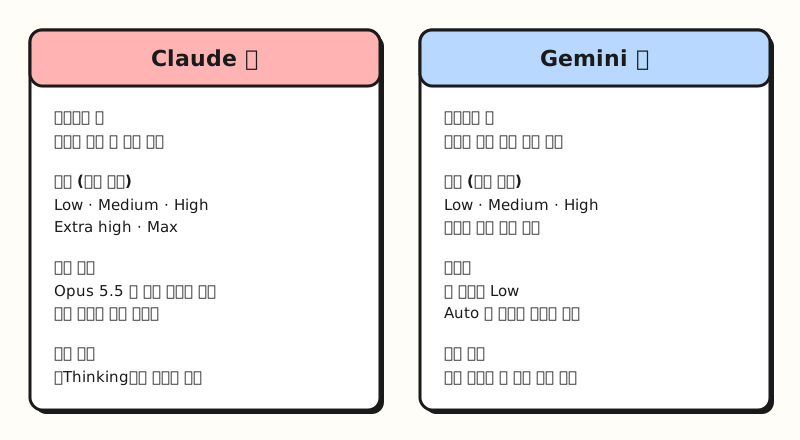 Claude sets the amount of thinking with effort, while Gemini sets it with a thinking level after you pick a model manually. (figure labels in Korean)
How do cost, speed and usage change when the model thinks more?
Using plenty of scratch paper takes more time and more paper. Reasoning models are the same: more thinking means slower answers and more tokens used.
- Usage limits: The Claude Help Center says higher effort gives more thorough responses but uses more tokens, so you reach your usage limits faster. Low and Medium, on the other hand, stretch your usage further.
- Response time: Higher effort takes longer, and giving the hardest work to Max means longer response times.
- API pricing: In the developer API, tokens spent on thinking are billed as output tokens. Claude's documentation warns that even if what you see is a summary of the thinking, you're billed for the full thinking tokens, and Gemini's documentation likewise says pricing is based on the full thought tokens the model generates even when only the summary is returned.
That last point is especially easy to get wrong. Even if the expanded thinking is only a few lines, it's just a summary, and the model may actually have used many more tokens. If tokens and pricing are unfamiliar, it helps to read my post on tokens and context windows first.
That doesn't mean more thinking keeps getting better forever. Claude's extended thinking documentation explains that a larger thinking budget allows more thorough reasoning, but with diminishing returns that depend on the task and at the cost of increased latency, and Gemini's documentation also notes that the highest level adds latency and token use and can overthink simple prompts.
When should marketers raise or lower thinking for each task?
The examples in the official documentation point the same way. Gemini's documentation says to use minimal thinking for simple tasks like fact retrieval or classification, the default for comparing concepts or creative reasoning, and maximum thinking for complex tasks like coding, math and multi-step planning. The Claude Help Center says the defaults are enough for everyday tasks and recommends raising effort for complex work like math proofs, comprehensive project planning and detailed document analysis.
Applying those guidelines to work marketers do often, you could split it up like this. These are criteria I put together myself, based on the examples in the official documentation.
| Task | Suggested level | Why |
|---|---|---|
| Fixing typos, polishing sentences, first-draft translations | Low | The answer is fairly fixed, and quick repeated edits work better |
| Sorting inquiries or reviews into predefined types | Low | This is the "classification" the documentation mentions |
| Multiple ad copy versions, campaign ideas | Default | Creative reasoning, so start from the default |
| Comparing the selling points of two or three competitors | Default | This counts as comparing concepts |
| Finding why performance dropped, planning a budget reallocation | High | You have to weave several metrics together and reason step by step |
| Reviewing long contracts, terms or policy documents | High | This counts as detailed document analysis |
| Writing SQL, scripts or formulas | High | The coding and math area the documentation names |
When it's a close call, I use the cost of redoing it if it's wrong as my yardstick. If one sentence sounds off you can just ask again, but if the reasoning behind a budget reallocation is wrong, every decision after it is shaken. On the other hand, if you repeat the same task dozens of times a day, running it fast at a low level and having a person check the results is also better for your usage.
One thing to keep in mind: writing "don't think too hard, just answer" may not reduce the thinking. Claude's documentation says that on Sonnet 5.5, Haiku 5.5 and Fable 5.2, asking in the prompt for less thinking didn't reliably reduce it, and advises lowering the effort level to get less thinking. In other words, turning the dial is more reliable than asking in words.
A real-world scenario: building a monthly ad report
Let's say you're the person who collects ad performance by channel at the end of each month and writes the report. Even within a single conversation, each step needs a different amount of thinking. The order below is hypothetical, and I haven't checked the results myself.
- Tidying the numbers (Low): Combine cost, clicks and conversions from each channel's CSV into one table and match the column names. This is formatting work, so it doesn't need deep reasoning.
- Finding the cause (High): Have it find the channels whose conversions fell compared with the previous month, and reason step by step about whether cost, click-through rate or conversion rate is the cause.
- Next month's plan (High): Based on the analysis, have it draft two or three budget reallocation options and write down the assumptions and risks of each.
- Report wording (Default or Low): Turn the agreed conclusions into sentences that are easy for your manager to read.
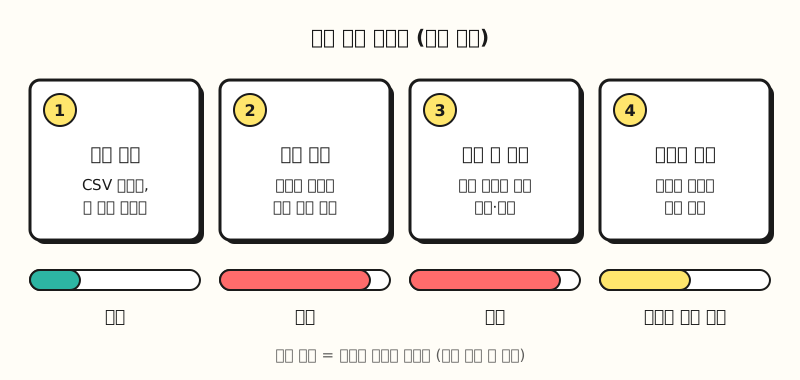 Change the dial at each step: low for tidying numbers and polishing sentences, high for cause analysis and planning. (figure labels in Korean)
Here's a prompt template you could use for step 2. When you ask for deep thinking, giving it the order of what to examine keeps it from spending the scratch paper in the wrong place.
## Role
You are a marketer who analyzes digital ad performance.

## Instructions
From the data below, find the channels whose conversions fell compared with the previous month.
For each channel, work out which of cost, click-through rate and conversion rate changed the most,
and list the causes you can confirm with numbers separately from the causes that are guesses.

## Format
- A table by channel (channel, metric that changed, cause, confirmed or not)
- Below the table, three things to check next month

## Data
<data>
(paste the monthly performance table by channel)
</data>
The Gemini help page says Gemini keeps using the model and thinking level you picked for the rest of the conversation. If you want a different level for each step in Gemini, it may be cleaner to start a separate conversation for each step. I covered the basics of writing prompts in more detail in my prompt basics post.
※ Things to note
- What you can choose depends on your plan. In Gemini, the models and thinking levels you can choose vary by plan, and on Claude Enterprise an administrator may have turned off some models or effort levels.
- The thinking can stop partway. The Claude Help Center explains that if safety systems flag the content, the thinking stops early with a message that the rest is unavailable.
- The thinking you expand is a summary. Even if the thinking looks convincing, you still need to check the evidence behind the answer separately, and if accuracy matters for the piece, see how to reduce hallucinations as well.
- Menu names may change. This area changes easily enough that even the Korean Gemini help page mixes level names, so if you can't find the menu names used here, check each help page for the latest labels.
Wrapping up
A reasoning model's thinking mode is the scratch paper it uses before answering, and the effort level and thinking level are the dials that decide how much of it gets used. Keeping simple, repetitive work low so it runs fast, and raising the level only for analysis and planning that's hard to redo if it's wrong, is how to protect both speed and usage. When you use AI at work, I'd suggest turning this dial now and then as much as choosing the model, and please refer to the criteria table above.
FAQ
- How is a reasoning model different from a regular model?
- A reasoning model goes through a thinking process of breaking the problem down and making a plan before it writes the answer. Google says this process improves reasoning and multi-step planning, and Claude decides on each request whether to think and how much. That's why it may answer a simple question directly without thinking.
- Should I always set Claude's effort to Max?
- No. The Claude Help Center says the defaults are enough for everyday tasks, and that higher effort takes longer and uses more tokens, so you reach your usage limits faster. It's better to raise it only for work that needs thoroughness, like complex analysis or planning.
- Where do I change Gemini's thinking level?
- According to the Gemini help page, you can choose a thinking level (Low·Medium·High) when you pick a model manually below the chat box. If you don't choose a level, it's set to Low, and if you leave it on Auto, Gemini picks the model for you. The ability to switch models manually and the levels you can choose depend on your Google AI plan.
- Am I charged for the tokens spent on thinking?
- In the developer API, yes. Both Claude's and Gemini's documentation count thinking tokens as output tokens, and say you're billed for the full thinking tokens even if only a summary of the thinking is shown.
Related posts
- Tokens and context windows explained - The basics of how thinking tokens show up in pricing
- Claude Fable 5.2 vs Opus 5.5 - Default effort by model and when to reach for the higher-tier model
- Prompt writing basics - How to write prompts that pair well with deep thinking