Naver AI Cafe Agent is a service inside Naver Cafe (Naver's online community platform; Naver is Korea's largest search engine) that takes a question, finds members' experiences in that cafe's posts and comments, builds an answer, and shows the original posts it relied on as sources. Naver started a closed beta on November 9, 2026 in three cafes covering Japan travel, electric vehicles, and luxury goods, and for now it only shows up on mobile for some members. Since the reviews piled up in a cafe become raw material for AI answers, anyone who runs a cafe or does cafe marketing should take another look at post visibility settings and old posts.
"Someone in this cafe has definitely been through this, but searching only turns up a pile of old posts." If you've ever looked for information in a cafe, you've probably had this experience. Even when the same question has been asked dozens of times over the years, picking out the answer that fits you right now meant opening posts one by one and reading through the comments. In this post, let's look at what the AI Cafe Agent that Naver released to solve this problem is, how it differs from AI Briefing and AI Tab, which people already use, and what marketers who work with cafes should check.
What is Naver AI Cafe Agent, and who can use it?
According to Naver's press release, the AI Cafe Agent answers questions based on the information accumulated in a cafe and links to the related original posts, and it has been running as a closed beta since November 9 in the Japan travel cafe "Naildong," the electric vehicle cafe "Tesla Korea," and the luxury goods cafe "Chicment." In the examples the press release gives, asking in Tesla Korea how much battery drains when sleeping in the car with camping mode in winter brings up members' experiences together with the original posts, and asking in Naildong whether a Yufuin ryokan really needs a private open-air bath shows the arguments for and against side by side. Naver highlighted as its key difference that it uses the experience and know-how in posts and comments that are hard to find through regular search or general-purpose AI.
Who can use it is laid out in detail in the Cafe Help Center's eligibility guide.
- Cafe members only: Only members who have joined that cafe can use it, and during the test period it only appears for some members selected for the test, even if they've joined. The press release says it is applied first to some members who have visited the cafe.
- Age and account: Users under 14 can't use it, and it only works with a Naver ID that has completed real-name verification; group IDs aren't allowed.
- Mobile only: For now it's only offered on mobile web and the Cafe app, not on PC.
According to the getting-started guide, the button appears in three places. On the cafe home it sits right above the write button at the bottom right; if you reached a post in a target cafe through Naver search, AI Tab search, or cafe search, it appears at the bottom right when you scroll to the end of the post; and you can also open it from the cafe search bar and the side menu (≡). On the other hand, if you reached a post from a board list or a shared link, or don't have permission to view the post, the button on the post doesn't appear, and the banner in the full menu only shows in the Cafe app, so don't conclude you aren't eligible just because you don't see the button.
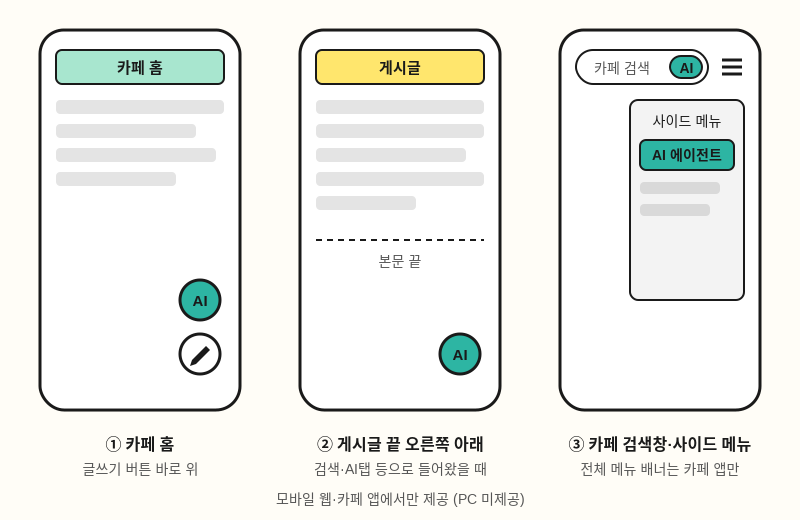 Example figure: a simplified screen layout based on the Help Center's "How to start AI Cafe Agent" guide, not an actual screenshot. (figure labels in Korean)
What content are AI Cafe Agent answers built from?
According to the answer generation guide, when you send a question it finds related content in that cafe's posts and comments and organizes it, and the answer shows the conclusion first, then walks through the reasons and experiences members left. It explains that it sometimes quotes short excerpts of members' own words along with their nicknames, and that for questions where opinions split, it groups similar opinions together and tries not to lean to one side. Another notable point is that for things that change over time, like prices or schedules, it may note the date the source post was written. You can check the sources via the source marks next to answer sentences or the source list below the answer; if a comment is the source, it jumps straight to that comment, and best comments carry a best comment badge.
It's a bit like asking a long-time member. A veteran member says "Someone wrote about that last winter" and gathers a few links to old posts, and if opinions are split, tells you both sides: "Some people say this, others say that." But even a veteran member wouldn't show anyone the posts on a board only the admins can see, and the AI Cafe Agent follows the same principle.
The guide on what content is used for answers splits posts into three groups.
- Posts that allow search and Naver service visibility: These are posts that people arriving from integrated search or cafe search can also read for a certain period, and the AI Cafe Agent uses posts in the same scope as sources for answers.
- Posts that don't allow search and Naver service visibility: Used as sources only when a member who can view that post asks. The press release says that as members level up through activity, the range it references widens, and answers may differ by membership level.
- Author-only posts and deleted posts: Not used.
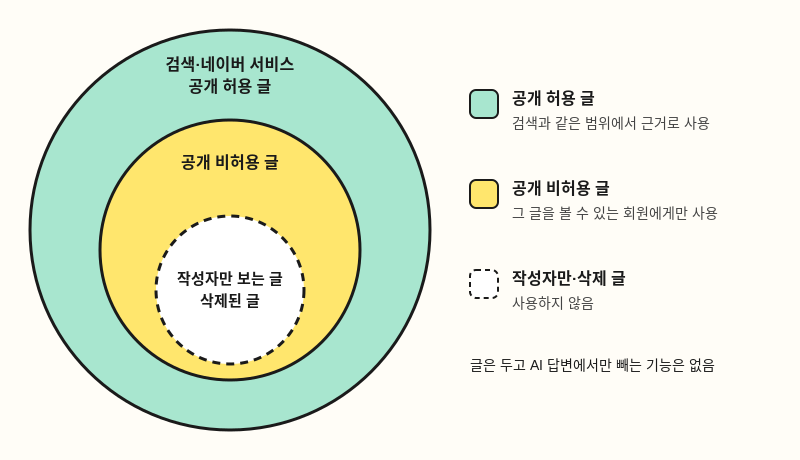 Figure: the three groups from the Help Center's guide on content used for answers, drawn as concentric circles. The scope used as sources narrows toward the center, and posts in the middle aren't used. (figure labels in Korean)
There's one thing worth pointing out here. According to the same guide, deleting a post removes it from answer sources, but it can take time to take effect, answers received before deletion stay in the conversation history, and there's no feature to keep a post while excluding it only from AI answers. So if you want to control whether your post is used in answers, does it ultimately come down to the post's visibility settings?
How is it different from AI Briefing and AI Tab?
Naver already has two services that answer with generative AI. AI Briefing, which summarizes answers above search results, and AI Tab, a conversational search that launched in beta in April 2026 and expanded to all users on June 26. All three show sources, but they differ in where they answer and what they base answers on.
| Criteria | AI Briefing | AI Tab | AI Cafe Agent |
|---|---|---|---|
| Where | Above Naver integrated search results | Conversational tab in Naver search | Inside an individual cafe (mobile) |
| Based on | Web documents collected by Naver search | Search data plus shopping and place info and reviews | That cafe's posts and comments |
| Who | All users (shown depending on the query) | All users | Some cafe members (beta) |
| Good for | Factual info, summarizing multiple documents | Exploration with many conditions, place booking and product recommendations | A specific community's experiences and pros and cons |
| Current stage | Available to all (since March 2025) | Available to all (since June 2026) | Closed beta (3 cafes) |
Looking at these differences as a marketer, the same cafe post can take different paths. According to the AI Briefing launch press release, the multi-source type that combines several sources draws widely on blog, cafe, and clip content, so a cafe post that allows search visibility can become a source both for AI Briefing in integrated search and for the AI Cafe Agent inside the cafe. On the other hand, a post that doesn't allow search visibility can't be read by non-members through any path, so it would likely be hard for it to become material for AI Briefing, which relies on search results; in the AI Cafe Agent, it's a source only for members who can view it.
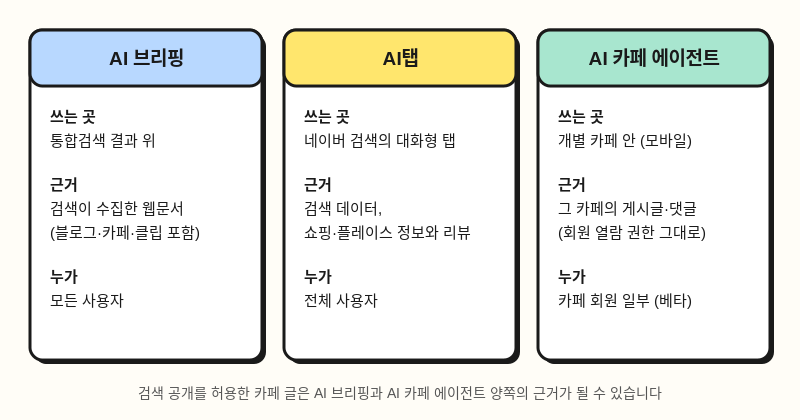 Figure: where each of the three services is used and what it's based on, side by side. Depending on visibility settings, cafe posts can be a source for both AI Briefing and AI Cafe Agent. (figure labels in Korean)
Note: limits to know during the beta
The AI Cafe Agent is still in testing, so it's good to know the conditions and limits the Help Center describes before using it.
- It isn't official information: The reliability guide says answers gather members' experiences and opinions, so they aren't official information, and if an old post is the source it may differ from the current situation, so check when the original was written. It separately states that for specialist fields like medicine, law, and finance, it does not replace expert advice.
- No related posts, no answer: According to when answers aren't provided, if it can't find related posts it shows a notice, and depending on the cafe also shows a shortcut to the Q&A board. It may also decline questions that risk breaking the law or could harm others.
- Rights to quoted posts belong to the authors: The guide on rights to quoted posts states that rights to posts and comments quoted in answers belong to the members who wrote them. Getting an answer doesn't mean you can reuse that content however you like.
- Conversation history is kept: Conversations are saved up to 50 per cafe, and according to the privacy notice they're kept for 12 months. If "Consent to use my conversations for research and service development" is on, they're de-identified and kept for 5 years for research and service improvement, and you can turn it off in Settings at the top right of the conversation list.
If you ask work-related questions, I recommend checking this last item first. The safest approach is to keep things that would be awkward if they got out, like internal schedules or client names, out of your questions from the start.
So what should marketers change?
Right now it's a beta used by some members of three cafes, so it isn't at the stage of changing traffic or results yet. In the service introduction, Naver says it plans to expand gradually so all users can use it and to add more cafes, so if your work involves cafes, it's worth checking things in advance.
1. If you run a brand cafe or community
- Put a reference date on notices: Since answers may show the date a price or schedule post was written, writing "as of [date]" in the body of event, price, and opening-hours notices keeps members from getting confused when they open the original.
- Fix old event posts: There's no way to keep a post while removing it only from AI answers. If you're worried about a finished event post being cited as current information, it's better to edit the post itself, such as adding "Ended" to the title or a link to the latest post at the top.
- Check visibility settings by board: According to the visibility and search settings guide, public posts automatically allow search and Naver service visibility, and even member-only posts can be read by non-members for a certain period through search paths if search visibility is allowed. For boards you want to keep members-only, double-check that search visibility isn't allowed.
- Keep the Q&A board active: Since a shortcut to the Q&A board may appear when there are no related posts, depending on the cafe, it helps members to have a board where questions actually pile up and get answered.
2. If you do cafe viral or review marketing
It's worth remembering that answers bundle many members' experiences into a conclusion and, when opinions split, group similar views and show both sides. My reading is that rather than one or two review posts swaying the whole answer, experiences members have repeated over a long period are more likely to show up in the conclusion. Naver hasn't published how it picks source posts, so this can't be stated as fact. In the end, as with Naver's content principles covered in the AI Briefing post, it's safer to assume that posts with first-hand experience, the honesty of disclosing paid compensation, and a visible date are what will keep being used as material.
3. Try it: how to check if you're a member of a target cafe (hypothetical scenario)
Let's assume a marketer in charge of EV charging accessories is a member of the Tesla Korea cafe and was selected for the beta.
- Open the cafe home in the Cafe app on your phone and tap the AI Cafe Agent button above the write button at the bottom right.
- Send a question about members' experiences, like "What problems do members often have with charging cables in winter?" Don't include internal company information.
- Read the conclusion and opinion groups in the answer, then tap the sources next to sentences to go to the original posts and comments.
- Check the dates of the originals and flag parts that rely on old posts. Answers aren't official information, so don't copy them straight into your report's conclusions.
- If you see an incorrect answer, report it with the feedback or report feature below the answer.
Seen this way, the AI Cafe Agent is closer to an index that quickly finds which originals to read than a tool that researches customer reactions for you.
Wrapping up
Naver AI Cafe Agent answers based on cafe posts and comments and links back to the originals, and for now it's a beta used on mobile by some members of three cafes. The scope of content used for answers follows post visibility settings and member permissions as is, and there's no way to exclude a single post only from AI answers, so if you work with cafes, I recommend starting with visibility settings and old notices. I'll take another look at what changes as more cafes are added. For detailed conditions, see the Cafe Help Center's AI Cafe Agent guide.
FAQ
- Which cafes can use Naver AI Cafe Agent?
- The closed beta that started on November 9, 2026 runs in three cafes: the Japan travel cafe "Naildong," the electric vehicle cafe "Tesla Korea," and the luxury goods cafe "Chicment." It only appears for some members aged 14 or older who joined those cafes and were selected for the test, and Naver says it plans to expand to more cafes based on the pilot results.
- Can I use AI Cafe Agent on PC?
- No. According to the Cafe Help Center, it's currently only offered on mobile web and the Cafe app, not on PC. You need to log in with a Naver ID that has completed real-name verification, and group IDs can't use it.
- Can I stop my cafe posts from being used in AI answers?
- There's no feature to keep a post while excluding it only from AI answers. Author-only and deleted posts aren't used, and posts that don't allow search and Naver service visibility are used as sources only for members who can view them. Deleting a post removes it from sources, but it can take time to take effect.
- What's the difference between Naver AI Briefing and AI Cafe Agent?
- AI Briefing is a full feature that summarizes web documents collected by Naver search above integrated search results and shows them to all users. AI Cafe Agent is a beta service that answers inside an individual cafe using only that cafe's posts and comments, and only some cafe members can use it.
More posts to read
- What Is Naver AI Briefing? How Content Gets Cited as a Source - The conditions for content cited in AI summaries in integrated search
- AI Agent vs Chatbot vs Automation: How to Choose for Work - How to tell apart tools that carry the "agent" name
- Naver Ads AI Features: Smart Recommendations, Ads Assistant, Ad Copy - AI features added to Naver's ad tools