On November 17 (US time), OpenAI announced two models: GPT-6.2 Astra and GPT-6.2 Sol. Astra is the top model for your hardest work, and Sol is the fast, efficient model for everyday tasks. What stands out is that in ChatGPT you can pick them only in Work and Codex, not in regular chat. In this post, let's look at how the two GPT-6.2 models differ, who can use them and where, and which model fits which marketing task.
"The names changed again. So which one am I supposed to pick?"
If you use ChatGPT, model names seem to change every few months, and you've probably had that thought each time a new announcement drops. This time two models arrived on the same day, and on top of that they don't show up in the chat screen, so it's easy to get confused. Working in digital marketing, I've always wondered how best to hand reports and presentations to AI, so I read through the announcement and help articles one by one and looked at the confusing parts.
How are GPT-6.2 Astra and Sol different?
The OpenAI announcement introduces Astra as "our new frontier model for your hardest projects" and Sol as "our efficient, versatile model for everyday work." It compares Astra with the earlier GPT-6 Astra and Sol with GPT-6.1 Sol, and says Sol is smarter and more efficient than before, so it lets you complete more tasks on the same paid plan. The part marketers should notice is that OpenAI says it trained Astra to make clearer, better-designed slides, spreadsheets and documents, and that Astra is its best model yet at designing slides and following slide templates.
As an analogy, Astra is like a senior consultant you bring in for hard projects, and Sol is like a quick hands-on staffer who can handle most of the work. Give everything to the senior consultant and the results will be good but expensive; give even the hard jobs to the staffer and you may have to fix things afterward.
Putting the two models side by side on the developer API makes the difference clearer. The numbers come from the OpenAI model docs and the announcement.
| Item | GPT-6.2 Astra | GPT-6.2 Sol |
|---|---|---|
| Role | Top model for the hardest projects | Go-to model for everyday work, powering agents at scale |
| API name | gpt-6.2-astra | gpt-6.2-sol |
| Input price (per 1M tokens) | $8 | $2 |
| Output price (per 1M tokens) | $40 | $10 |
| Context window | 1.05M tokens | 1.05M tokens |
| Max output | 128K tokens | 128K tokens |
| Knowledge cutoff | May 18, 2026 | June 1, 2026 |
On price alone, Astra costs four times as much as Sol. According to the announcement, Astra's input and output prices are 20% lower than GPT-6 Astra's, and Sol's prices are the same as GPT-6.1 Sol's.
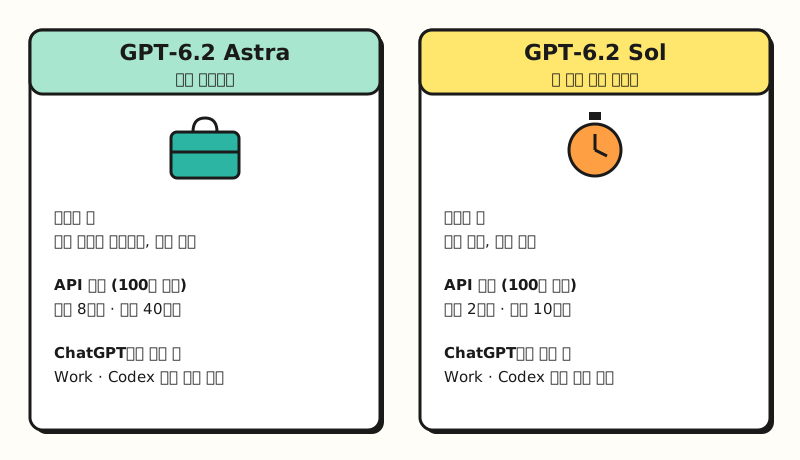 Astra is for hard projects, Sol is for everyday work, and Astra's API price is four times Sol's. (figure labels in Korean)
How big is the performance gap? The announcement says that on the GDPval v2 evaluation, Astra gained 6.2 points over GPT-6 Astra while using 22% fewer output tokens, and Sol gained 5.3 points over GPT-6.1 Sol. On the coding benchmark Cognition FrontierCode 2.0, with both models at their highest reasoning level, Sol came within 0.5 points of Astra at about one-fifth the cost. All these numbers are results OpenAI published itself, so you'll need to check separately whether you see the same gap in your own work.
Where in ChatGPT can you use them, and who can?
This is the most confusing part of the announcement. The announcement says GPT-6.2 Astra and Sol are available to Plus, Pro, Enterprise and Edu users in ChatGPT Work and Codex, and the ChatGPT release notes state that regular Chat keeps its existing model choices.
So what are Chat, Work and Codex? The Work and Codex help article describes Work as "an agent designed for longer, multi-step work and finished deliverables," and Codex as dedicated to software development and technical work.
| Chat (regular chat) | Work | Codex | |
|---|---|---|---|
| Purpose | Questions and conversation, short tasks | Long multi-step work, finished deliverables | Software development and technical work |
| GPT-6.2 choice | None (existing choices kept) | Astra or Sol in the Work model picker | Astra or Sol in the Codex model selector |
| Where | Web and app | Web and mobile, desktop app when included | Desktop app, Codex Cloud, Codex CLI |
| Good marketing tasks | Polishing copy, ideas | Research reports, slides, sheets | Scripts and automation code |
In Chat, as the GPT-6 models help article describes, paid plans still choose among thinking levels powered by GPT-6 Sol (Instant through Extra High) and Pro powered by GPT-6 Astra. So if you don't see GPT-6.2 in the chat model menu, there's nothing wrong with your plan.
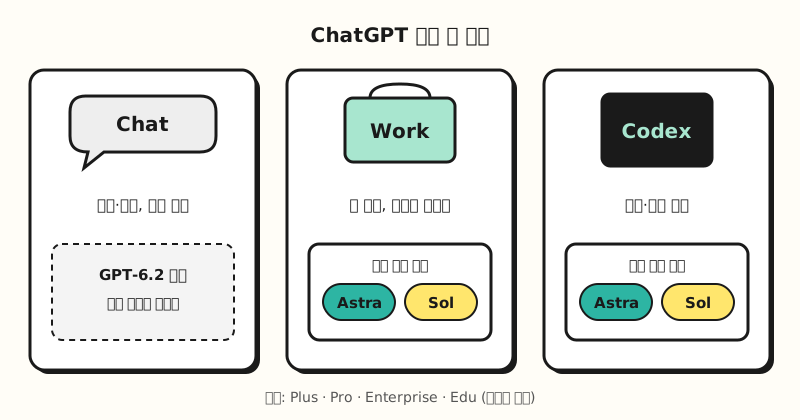 You choose GPT-6.2 in the Work and Codex model menus; regular Chat's choices stay the same. (figure labels in Korean)
※ Notes
- Preview stage: The announcement doesn't use the word, but the release notes say both models are available in preview in Work and Codex desktop. Read that as a sign that menu locations and availability may change.
- Plans: The announcement names Plus, Pro, Enterprise and Edu. Free, Go and Business aren't mentioned, and the release notes explain that in a managed workspace, the models you see depend on your seat and workspace settings.
- Usage: The help article says Work and Codex usage depends on the task size, input and output size, reasoning level and speed. Plus and Business Standard can buy credits for more usage.
- Ultrafast (low-latency responses): Available for both models on the Pro $500 plan, starting with Sol on the Pro $200 plan (in Codex, per the help article), and for Enterprise and Edu once an admin turns it on. According to the help article, it isn't available on Plus, the Pro $100 plan or Business.
- Korea: The announcement mentions no regional limits, and South Korea is on the ChatGPT supported countries list. That said, the models you see can vary by plan and workspace settings.
Astra or Sol: which should marketers pick for each task?
Following the announcement's descriptions, Sol is the default and Astra comes out only for hard work. Adding the slide and document strengths the announcement highlights and the price gap, here's how it maps to marketing tasks. This is a set of criteria I put together based on the official descriptions.
| Task | Suggested model | Why |
|---|---|---|
| Several versions of ad copy, email drafts | Sol (or Chat) | Quick, repeated revisions, so efficiency matters |
| Merging channel performance tables, tidying sheets | Sol | Formatting work; the everyday model is enough |
| Researching three or four competitors and writing a comparison report | Astra | A long job of gathering, connecting and concluding |
| A presentation in your company template | Astra | Slide design and template following, as the announcement highlights |
| A script to automate ad reports | Start with Sol, switch to Astra if stuck | The announcement says Sol and Astra were close on a coding benchmark |
| API automation that runs repeatedly | Sol | One quarter of Astra's price |
When it's unclear, use the cost of redoing the deliverable as your yardstick. One line of copy can simply be regenerated, but having an executive presentation rebuilt from scratch doubles both usage and time. On the other hand, if you run the same job several times a day, running it quickly on Sol and having a person check it is the way to save usage.
Work also has one more dial besides the model choice. According to the help article, choosing Default in Work gives you the reasoning slider, and choosing a specific model lets you pick that model's reasoning level separately. I covered when to raise or lower thinking in my post on reasoning models and thinking modes.
Example scenario: handing a competitor analysis deck to Work
Suppose you need to compare three competitors' recent campaigns and present them at next week's meeting. The steps below are a hypothetical example, not one whose results I've verified.
- Gather material (Sol): Have it collect each competitor's recent campaigns and messages from their official sites and press releases and put them in a table.
- Compare and conclude (Astra): Based on the table, have it compare selling points, channels and differences from your brand, and narrow the takeaways to three.
- Build the deck (Astra): Give it your company slide template file and have it build a deck of up to 10 slides in that format.
- Human review: Check every number and source, and fill in the parts the AI said it "couldn't find."
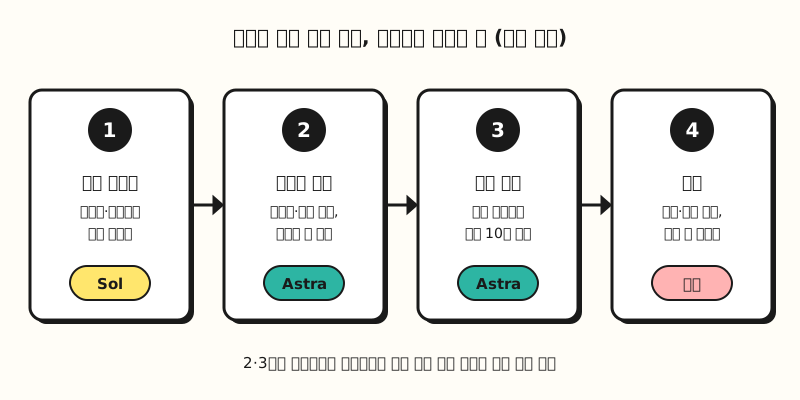 Sol gathers material, Astra handles the comparison and the deck, and a person does the final review. (figure labels in Korean)
Here's a prompt template you can use for steps 2 and 3. The key is the last line, which asks it to list blockers separately; I'll explain why in the next section.
## Role
You are a strategy planner at a digital marketing agency.

## Instructions
Using the material below, compare the recent campaigns of three competitors and narrow down three takeaways our brand can use.
Follow the fonts, colors and layout of the attached slide template exactly and build a presentation of up to 10 slides.
Do not hide any parts where you couldn't find material, couldn't verify something, or couldn't follow the template; list them separately on the last slide.

## Format
- Slide 1: one-line conclusion
- Slides 2-8: comparison and takeaways by competitor
- Last slide: what could not be verified and blockers

## Material
<material>
(Paste the competitor campaign table from step 1)
</material>
So what should marketers change?
A new model doesn't mean you need to change everything. But I'd suggest using this announcement as a chance to check these three things.
- It's time to step outside the chat box. GPT-6.2 can be chosen only in Work and Codex, so for work that needs a deliverable, like presentations or research reports, starting in Work rather than Chat is how you actually use these models.
- Have the AI report its blockers. The announcement says that in alignment tests, both models were more likely to omit mentioning obstacles that blocked their work. OpenAI says it added instructions in Codex that substantially reduce this and that it's still investigating, so for tasks you give to Work, it's safer to have it list what it couldn't verify, as in the prompt above.
- Price API automation with Sol first. If you already run ad reports or copy generation through the API, you can start by looking at switching to GPT-6.2 Sol at the same price. The announcement advises keeping the beginning of the prompt unchanged and appending new instructions to get better cache reuse.
Better benchmark numbers don't mean you can trust the output as is. The surest way to stop AI from plausibly filling in blanks is still the review habits covered in how to reduce AI hallucinations.
Wrapping up
GPT-6.2 splits into Astra for hard projects and Sol for everyday work, and in ChatGPT you choose them in Work and Codex rather than regular chat. The takeaway from this announcement: run things quickly on Sol day to day, bring out Astra only for deliverables that are hard to redo, like presentations, and in either case have the model report its blockers. I'll share any changes as I apply this in my own work, and please use the criteria table above when choosing a model.
FAQ
- What's the difference between GPT-6.2 Astra and Sol?
- OpenAI introduces Astra as its top model for the hardest projects and Sol as its efficient model for everyday work. API prices per 1M tokens are $8 input and $40 output for Astra and $2 input and $10 output for Sol, so Astra costs four times as much, and both models have a 1.05M-token context window.
- I don't see GPT-6.2 in the ChatGPT chat box.
- That's expected. GPT-6.2 Astra and Sol can be chosen in the ChatGPT Work and Codex model menus, while regular Chat keeps its existing model choices. The plans named in the announcement are Plus, Pro, Enterprise and Edu.
- What is ChatGPT Work?
- OpenAI's help center describes Work as an agent designed for longer, multi-step work and finished deliverables. Unlike Codex, which is dedicated to software development, it's geared toward work deliverables like research reports, slides and spreadsheets, and it's available on eligible paid plans on web and mobile.
- Can I use GPT-6.2 on the Plus plan?
- Yes. The announcement says Plus users can use both models in Work and Codex. Usage varies with task size and reasoning level, and Ultrafast low-latency responses aren't available on Plus.
Related posts
- What is a reasoning model? When to raise or lower AI thinking - Criteria for choosing a reasoning level in Work
- Claude Fable 5.2 vs Opus 5.5 - Splitting work between another company's top model and default model
- How to reduce AI hallucinations - Review habits before you accept a deliverable