Naver Ads (N Ads) is the new name of the Naver (Korea's largest search engine) advertiser center as of November 4, 2026, and the change is more than a name: it arrived together with Smart Recommendations (맞춤 추천), where AI looks at your ads first and suggests improvements, and Ads Assistant (애즈 어시스턴트), which points out why an ad isn't showing based on your own ad. On top of that, a Copy Generation (문구 생성) feature that adds AI-written copy to Power Link search ads enters testing on November 19, and because it is switched on by default without any application, advertisers now have a decision to make in advance.
"The advertiser center logo changed. What's actually different?" If you run your own search ads, you may have asked or heard that question this week. In this post, I'll walk through what each of the three AI features in Naver Ads does, what to trust and what to check, and the criteria for deciding whether to keep Copy Generation on or turn it off.
1. What changed with the switch to Naver Ads?
According to the Naver Ads announcement, the URL (ads.naver.com), your account, running ads and budget settings, and Bizmoney (Naver's prepaid ad balance) and coupons all stay the same. The visible change is that emails, texts and TalkTalk messages now arrive under the Naver Ads name, and the real change is the three features released on the same day. The announcement says Naver Ads expands its role from "a management tool where advertisers find and set things themselves" to "a growth partner that looks at your ad situation first and suggests improvements," with the advertiser still making the decision but execution becoming simpler.
Naver's November 5 press release calls the same overhaul an "AI-based advertising agent feature." The term AI agent (AI that breaks a task you give it into steps and handles them for you) has effectively entered the ad management screen, and I understood this overhaul as a structure where AI suggests and people decide.
| Smart Recommendations | Ads Assistant | Power Link Copy Generation | |
|---|---|---|---|
| What it does | Diagnoses campaign issues and suggests fixes with expected results | Explains why an ad isn't showing and how to fix it | Generates copy from your ad and landing page and adds it to the ad |
| Start | November 4, 2026 | November 4, 2026 (renamed existing AI chatbot) | Test from November 19 through 26 |
| Who | All advertisers | Some search ads and display ads (see below) | Power Link ads |
| What the advertiser does | Decides whether to press "Run" (실행하기) | Picks an ad and a search term and asks | Sets on or off per ad group |
| Watch out | AI-generated, may be inaccurate | Doesn't yet cover ranking, click drops or billing | You can't edit the generated copy |
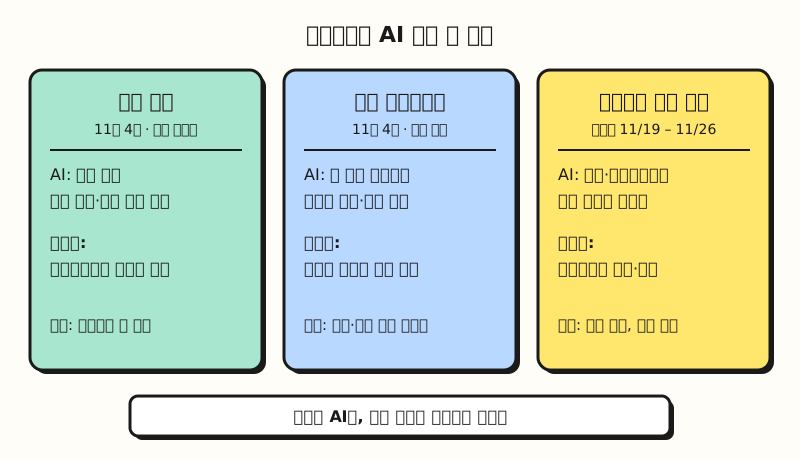 All three features let AI move first, but choosing whether to apply the result stays with the advertiser (figure labels in Korean)
2. What does Smart Recommendations flag first?
Smart Recommendations has Naver Ads look first at changes advertisers easily miss, and shows the issue diagnosis, the recommended fix and the expected results on one screen. On PC you see it in the Smart Recommendations card on the dashboard or the "Smart Recommendations" menu at the top of the left menu, and on mobile you go straight to the recommendation screen by tapping the button in a Naver TalkTalk or text notification. According to the announcement, pressing "Run" (실행하기) has the system apply even complex changes for you, while the press release calls the same button "Go apply" (적용하러 가기), so the label on screen may differ slightly.
It's a bit like a car's warning light that comes with a repair shop estimate attached. Just as you wouldn't replace a part the moment a warning light comes on, when you get a recommendation you should first check that the diagnosis fits your situation. The announcement itself says "the content is generated by an AI model and may contain inaccurate information, and it does not guarantee actual ad performance," and notes that it starts with some improvements and plans to widen the scope of suggestions.
So before pressing "Run," I would check three things.
- The period behind the diagnosis: whether the AI read a change you made on purpose, like a seasonal promotion or a pause, as a problem
- The scope of the change: what actually changes, such as budget, bids or keywords, and whether it's one campaign or several
- What the expected results are: the expected results on screen are an estimate, not a promise
3. How do you find why an ad isn't showing with Ads Assistant?
Ads Assistant is the new name of Naver's existing ad AI chatbot, and it adds a non-delivery troubleshooting feature on top of the existing answers. You tap the Ads Assistant button at the bottom right of the screen and choose an ad and a search term, and it checks real operating information such as on/off status, review, budget, balance, ad period, region and industry settings, and product sales status to tell you the cause and the fix. It differs from the existing help pages in that it looks at your own ad, rather than reading out a generic checklist.
The announcement lists Power Link, Shopping Search and Place Search among search ads, plus all display ads except ADVoost Shopping. However, the press release says it "is applied first to search ads, with support to expand gradually," so if you ask about a display ad that isn't showing and get no answer, I recommend also checking the display ad delivery help page. ADVoost Place, Brand Search, New Product Search and Power Contents aren't supported for non-delivery questions, and it doesn't yet check causes related to ad ranking, click drops or billing.
It's best to ask about one ad and one search term at a time; below are example questions whose results I haven't checked.
The Power Link ad for the keyword "summer dress" in ad group ○○ stopped showing in integrated search this afternoon. Please tell me why and how to fix it.
Shopping Search ad product △△ isn't showing. Please check whether it's a sales status or review issue.
If you still can't fix it after getting an answer, check the two basics in the ad non-delivery help page. Check whether "even delivery" (균등 노출, the setting that spreads the budget evenly across the day) is turned on in your daily budget, and whether you just edited the ad; the page says status changes take 10 minutes to 2 hours to apply, and Shopping Search ads can take up to 1 day. For Power Link, also check the "landing URL collection status" described in the Power Link non-delivery help page, because the landing URL has to be collected and indexed properly for the ad to show.
4. Power Link Copy Generation: keep it on or turn it off?
According to the Power Link Copy Generation announcement, Naver's AI model creates copy from advertiser materials such as your ad copy, landing page and business channel information, together with the user's search intent, and shows it alongside, not instead of, your existing ad copy as an add-on feature. The announcement explains that it is the same feature announced in August and September as "AI Summary Text," with only the name changed. The AI Summary Text announcement shows a test on some traffic in late September and early October, after which the settings and full-launch dates were postponed several times. As of the November 11 revision, the setting opens on November 18, and the test runs from November 19 through 26 on some traffic and some search terms, with the full launch to be announced separately depending on the test results.
Generated copy can appear as part of the ad in places such as a new area at the top of the ad, the title, the summary text next to the favicon, and the promotional text, and during the test the position may differ from ad to ad. During the test, a note saying the ad contains AI-generated copy appears below the Power Link area, and the labeling for the full launch will be decided based on the test results. Search terms related to hospitals and clinics, medicines, medical devices, health supplements, and finance/insurance are excluded for reasons such as ad review rules.
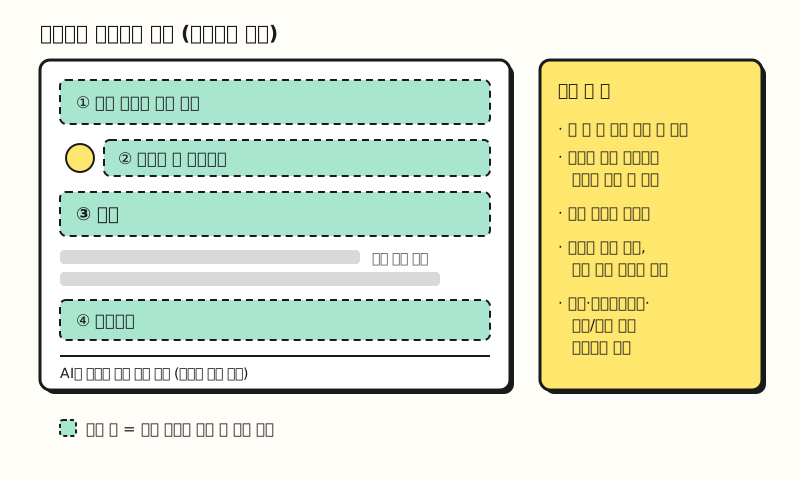 Example figure: a simplified wireframe of the positions listed in the announcement, not an actual search results screen (figure labels in Korean)
There are three things you really need to know when deciding.
- On by default: It applies automatically to eligible ads without any application or setting, and to turn it off you have to switch it off per ad group in the [ADVoost Max creative generation] item in the ad optimization section of "Ad management > Ad group settings."
- You can't edit the copy: The announcement's FAQ says advertisers can't register or edit the generated copy. If it's off, your only options are to correct your ad information and landing page or turn the feature off.
- Seeing the copy that ran comes after launch: The [Copy Generation] tab in "Reports > ADVoost Max Insights," which shows the copy served in the last 7 days, will be provided after the full launch. That means it's hard to see on screen which copy ran during the test.
Ranking and billing work the same way, and clicks on the generated copy are billed normally and included in the standard click metrics. The announcement says turning the feature off has no effect on delivery, ranking or billing, while also asking you to reconsider because you might miss a chance to improve click performance.
Below are the decision criteria I set based on the announcement.
| Ad group situation | My call | Why |
|---|---|---|
| Landing page prices and offers change often and updates lag | Start with it off | Copy is generated from the landing page, so outdated information could slip in |
| Brand with strict wording rules (legal review, banned word lists) | Start with it off | You can't preview or edit the generated copy |
| Regular products, landing page information is accurate and current | Keep it on and watch | Ranking and billing are the same, and your existing copy still shows |
| Short ad copy and a detailed landing page | Keep it on and watch | More room for a description that fits search intent |
5. If you run your own ads, what should you do this week?
Taking someone who runs Power Link ads themselves as an example, here are the steps in order, following the dates in the announcement.
- Before November 18, sort ad groups: Using the table above, split your ad groups into "keep on" and "turn off."
- From November 18, apply the settings: Turn off only the "turn off" groups in [ADVoost Max creative generation] in the ad group settings. According to the announcement, you can set it before the test starts, and it's the same item regardless of match type (broad or exact).
- Before November 19, check landing pages: For the groups you keep on, make sure prices, stock and dates are current. The announcement states that if wording that violates the law comes from the advertiser's materials, the creative and the ad can be stopped without prior notice.
- During the test, check search results yourself: Pick a few core keywords and look at mobile and PC integrated search to see whether copy was added to your ad. It only shows on some traffic, so not seeing it doesn't mean your settings are wrong.
- Every morning, scan Smart Recommendations: Open the Smart Recommendations card on the dashboard and check the three things from section 2 before running anything.
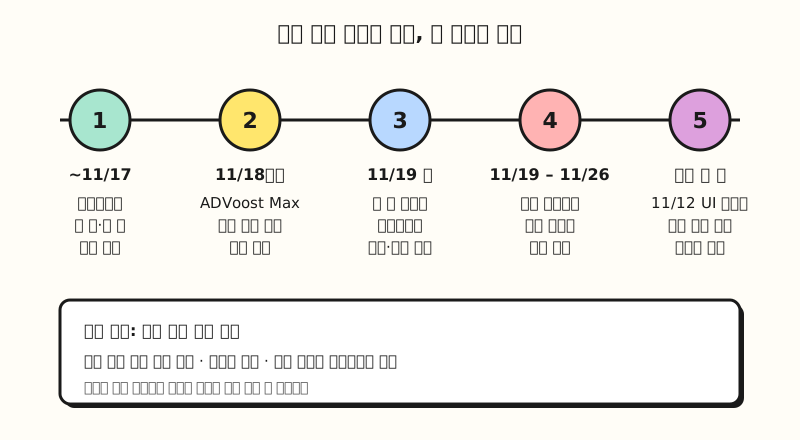 A checklist following the announcement's dates; dates may change depending on Naver's circumstances (figure labels in Korean)
When you compare performance, write down the other changes that overlap. According to the Power Link favicon area UI change announcement, from the afternoon of November 12 the favicon in PC and mobile integrated search Power Link ads gets bigger, and for ads outside the hospital and clinic category, the site name and URL move to two lines if a site name is registered. The November 12 UI change and the November 19 test come one week apart, so reading any click-through rate change from mid-November as the effect of Copy Generation alone could lead you to the wrong conclusion.
※ Note: dates and scope may change
- Both the Naver Ads launch and the Copy Generation schedule carry the caveat that they "may change due to internal circumstances," and Copy Generation has already been rescheduled several times.
- Smart Recommendations notifications currently come by Naver TalkTalk and text message, with KakaoTalk notifications planned.
- First Ad Guide (첫 광고 가이드) only appears to new self-managed advertisers who signed up within 60 days and haven't spent on ads yet. It walks through four steps on the dashboard (registering an ad, topping up Bizmoney, creative review, and checking first ad results) and disappears once ad spend occurs.
Wrapping up
The AI features in Naver Ads diagnose and suggest first, but whether to press the run button and whether to keep Copy Generation on is still up to the advertiser. Power Link Copy Generation in particular is on by default and it's hard to see the copy that ran during the test, so I recommend going through your ad groups once when the setting opens on November 18. I'll share what changed when the full-launch announcement comes out, and for the latest schedule, please refer to the Naver Ads announcements.
FAQ
- Do I need to sign up again or change the URL now that the advertiser center is Naver Ads?
- No. According to the Naver Ads announcement, the URL (ads.naver.com), account and login, running ads and budget settings, and Bizmoney and coupons all stay the same. The main difference is that from November 4, 2026, notifications are sent under the Naver Ads name.
- How do I turn off Power Link Copy Generation?
- From November 18, 2026, you can set it on or off per ad group in the [ADVoost Max creative generation] item in the ad optimization section of Ad management > Ad group settings. It applies by default without any application, so you have to turn it off yourself if you don't want it, and the announcement says turning it off doesn't affect delivery, ranking or billing.
- Can Ads Assistant explain why any of my ads aren't showing?
- No. Per the announcement, it covers Power Link, Shopping Search and Place Search, plus display ads except ADVoost Shopping, and doesn't support ADVoost Place, Brand Search, New Product Search or Power Contents. The press release says it applies first to search ads, so it's best to check display ad support yourself. It also doesn't yet check causes related to ad ranking, click drops or billing.
- Will pressing Run on a Smart Recommendation improve performance?
- It isn't guaranteed. The Naver Ads announcement says recommendations are generated by an AI model, may contain inaccurate information and don't guarantee actual ad performance. Before running one, it's safer to check the period behind the diagnosis, the scope of settings that actually change, and that the expected results are an estimate.
More posts to read
- Naver Shopping Search Ad Placements: Smart Store Detail Page Ads - Naver shopping ad placements that changed around the same time, and the click expectation score schedule
- What Are Meta's Andromeda and GEM? AI Ad Ranking and What Advertisers Should Do - How AI on another ad platform differs
- How to Optimize Search Ads - Checking search ad performance by impression, click and conversion stage