Conversion modeling is how Google estimates conversions it couldn't measure directly, using data from similar users that were measured, and adds them to your reports. The "Conversions" column in Google Ads and GA4's key events and attribution reports contain both observed and modeled conversions. That's why numbers from the last few days sometimes change later, and why report numbers can look different from the raw data.
"Wait, the conversion count I saw yesterday went up when I checked again today?" If you look at ad reports every day, you've probably had this experience at least once. Before worrying that your tracking code is broken, it helps a lot to know that Google mixes estimated conversions into its reports. The numbers become much easier to read. In this post, I'll go over what conversion modeling is, why it's needed, and how it shows up in Google Ads and GA4.
1. What is conversion modeling?
The Google Ads Help article "About modeled conversions" describes modeled conversions as estimating conversions that can't be observed directly, using data that doesn't identify individual users. What's worth noting here is what Google is actually predicting. Google states that it doesn't predict whether a conversion happened, but whether a conversion that already happened came from an ad interaction.
It's easier to understand if you picture a jigsaw puzzle with a few pieces missing. By looking at the patterns and colors around the gap, you can make a pretty good guess at what was in that spot. Conversion modeling works similarly: it fills in the blanks by looking at data from the measurable group of users whose behavior is the same as or similar to the group that can't be measured. The help article explains that it considers broad factors such as device type, time of day, location, and operating system, and builds separate models for each ad channel and interaction type (impressions and clicks).
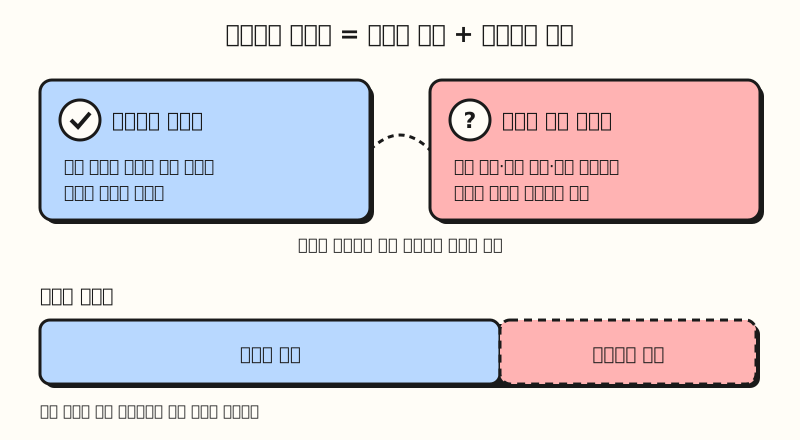 Observed conversions plus modeled conversions make up the conversion count in reports. Bar lengths illustrate the concept and are not actual ratios. (figure labels in Korean)
The GA4 Help article "About modeled key events" says it doesn't use methods that try to identify individual users, like fingerprinting IDs, and instead combines high-level data such as historical key event rates, device type, time of day, and geography. So why does Google go this far to estimate conversions?
2. Why can't conversions be measured directly?
The reasons the help articles give are mainly privacy protection and technical limitations. Without modeling, reports would show only the subset of conversions that can be measured, and bidding on those numbers would mean bidding lower or higher than reality. Here are the typical cases from the Google Ads Help article and the two articles above.
| Case | What gets blocked |
|---|---|
| Third-party cookie restrictions | Browsers that block third-party cookies, like Safari and Firefox, can't measure conversions directly |
| First-party cookie lifetime limits | In browsers that shorten cookie lifetimes, conversions after that period are cut off |
| Cookie consent declined | In countries that require ad cookie consent, if a user declines, consent mode blocks the Google tag from reading and writing cookies |
| iOS App Tracking Transparency (ATT) | Traffic where the app can't use a device ID can't connect the conversion path |
| Cross-device | If someone sees an ad on their phone and buys on their computer, the two actions aren't linked to one person |
Even if your site doesn't use a consent banner, browser cookie restrictions and cross-device purchases are on the list separately, so it's hard to conclude that modeling has nothing to do with your site. So where in the reports do these estimated conversions end up?
3. Where do modeled conversions appear in Google Ads and GA4?
Both tools show modeled conversions combined with observed conversions, not broken out separately. However, how long it takes for the numbers to settle and where they appear differ slightly.
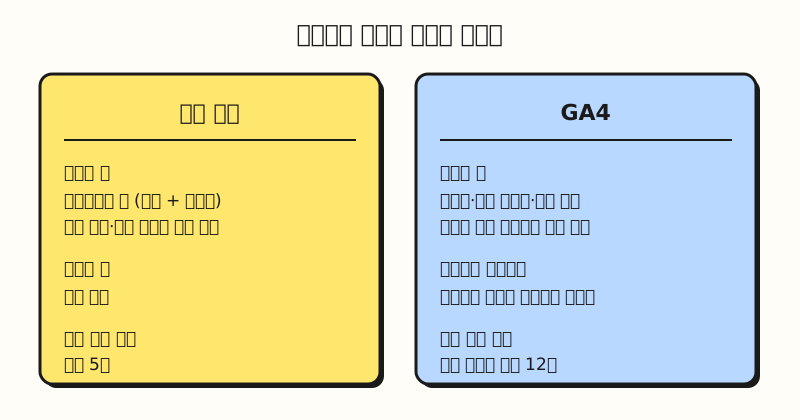 In Google Ads, modeled values go into the "Conversions" column; in GA4, they go into the core reports. (figure labels in Korean)
- Google Ads: Modeled and observed conversions are reported together in the "Conversions" column, and conversion value and attribution paths are reported at the same granularity as observed conversions. This data is also used for bidding, and the help article notes that it can take up to 5 days for modeled conversions to be fully processed and stabilize.
- GA4: Modeled data is included in core reports like Events, Key events, and Attribution, as well as in explorations where you can select event-scoped dimensions. Because channel attribution data is used for model training, it can change for up to 12 days after a conversion is recorded, so the help article recommends choosing date ranges that end before last week.
Google says it only includes modeled values when it has high confidence in their quality. According to the GA4 help article, when there isn't enough traffic to train the model, it either doesn't report modeled key events or attributes them to the "Direct" channel. It's worth keeping this in mind when the Direct channel share looks unusually large.
4. How is consent mode behavioral modeling different?
GA4 has one more feature with a similar name. The GA4 Help article "Behavioral modeling for consent mode" describes a feature that estimates the behavior of users who declined analytics cookies, based on the behavior of similar users who consented. The difference is that while conversion modeling above fills in the link between ads and conversions, behavioral modeling fills in user metrics such as users, sessions, and new users.
Here are the requirements the help article lists.
- Consent mode must be enabled on every page of the site (or every screen, for apps).
- For web, the tags must load before the consent banner, and the implementation must load the Google tag even without consent.
- There must be at least 7 days with 1,000 or more events per day with
analytics_storage='denied'. - There must be at least 7 days in the past 28 days with 1,000 or more daily users sending events with
analytics_storage='granted'.
The help article adds that even if you meet these numbers, you may still not qualify because of other factors such as the ratio of new to returning users. Once you qualify, modeling turns on automatically, but to see it in reports you need to select "Blended" under Admin > Data display > Reporting identity and save, which requires Editor permission or higher on the property. According to the reporting identity help article, Blended uses User-ID if available, otherwise device ID, and modeling if neither is available. The help article explains that choosing another option only removes modeled data from reports and has no effect on collection or processing.
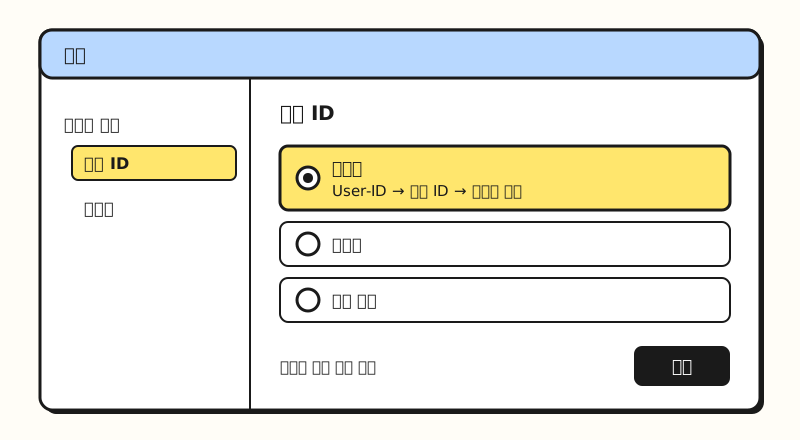 Illustration: a simplified layout of the GA4 Admin > Data display > Reporting identity screen (not an actual screenshot). (figure labels in Korean)
Consent mode comes in basic and advanced implementations. According to the Google tag developer documentation, the basic implementation blocks tags until the user consents, sending no data at all, while the advanced implementation sends cookieless signals even when consent is denied. Accordingly, Google Ads conversion modeling is also split into a general model for the basic implementation and an advertiser-specific model for the advanced implementation.
5. How should you read numbers that include conversion modeling?
- Treat the last few days as provisional: Google Ads numbers can change for up to 5 days, and GA4 channel attribution for up to 12 days. Rather than judging right away from yesterday's performance, I recommend comparing a date range shifted a little earlier.
- They may be slightly undercounted: The consent mode modeling help article says the model is designed to reduce over-prediction, so some conversions that actually happened may not be captured.
- Numbers may differ from BigQuery: GA4 behavioral modeling doesn't apply to audiences, retention reports, predictive metrics, or data exports like the BigQuery export. This is the first thing to check when raw data and report numbers don't match.
- Some cases don't get modeling: Offline conversion imports and accounts with very few weekly conversions may not receive some modeling.
- Increasing observed data comes first: The help articles recommend using the Google tag, consent mode, and enhanced conversions to improve model quality. The more observed data there is, the better the blanks can be filled.
Summary
Conversion modeling estimates and fills in the broken link between ads and conversions caused by cookie restrictions, declined consent, and device switching, using observed data from similar users, and these values are already mixed into the conversion counts in Google Ads and GA4 reports. Once you understand this structure, it makes sense that recent numbers change over a few days and that report numbers differ from BigQuery. I put this together so I'd remember it myself when looking at ad reports. For detailed conditions, please refer to the help articles linked in the post.
FAQ
- Are conversion modeling and attribution models the same thing?
- No. An attribution model is a rule for how to split credit for an already recorded conversion across multiple touchpoints, while conversion modeling estimates and fills in links between ads and conversions that weren't measured. The example in the GA4 attribution settings help article also shows the credit for one key event split across multiple touchpoints so that the total adds up to 1.
- Can I view GA4 data without the modeled data?
- Consent mode behavioral modeling is removed from reports if you choose an option other than Blended under Admin > Data display > Reporting identity. Collection and processing stay the same, and you can switch back anytime.
- How do basic and advanced consent mode differ for modeling?
- The basic implementation blocks tags and sends no data until consent, so Google Ads conversion modeling uses the general model. The advanced implementation sends cookieless signals even when consent is denied, so the advertiser-specific model can be used. The GA4 behavioral modeling requirements also include an implementation that loads tags even without consent.
Related posts
- Understanding attribution models with Google Analytics - The types of attribution models, which are easy to confuse with conversion modeling
- GA4 conversion lookback window, now configurable by the day - How attribution settings differ between key events and conversions
- UTM parameters and GA4 default channel groups - How channels such as Direct are classified