Among most ad channels, search ads produce the highest conversion rate. So does that mean only search ads are effective?
I think many marketers now know that's definitely not the case. Many tracking tools set their attribution model to last touch, so most conversions get recorded under search ads, where the last touch tends to happen. Today I'll write about what types of attribution models Google Analytics offers and how to look at conversions using different criteria.
What is an attribution model?
An attribution model is a way of weighting every touch a user had on the way from arriving on your site to converting, depending on how much influence you consider each touch to have had on the conversion. By default, Google Analytics uses last non-direct click as the default attribution basis for its reports.
Types of attribution models in Google Analytics
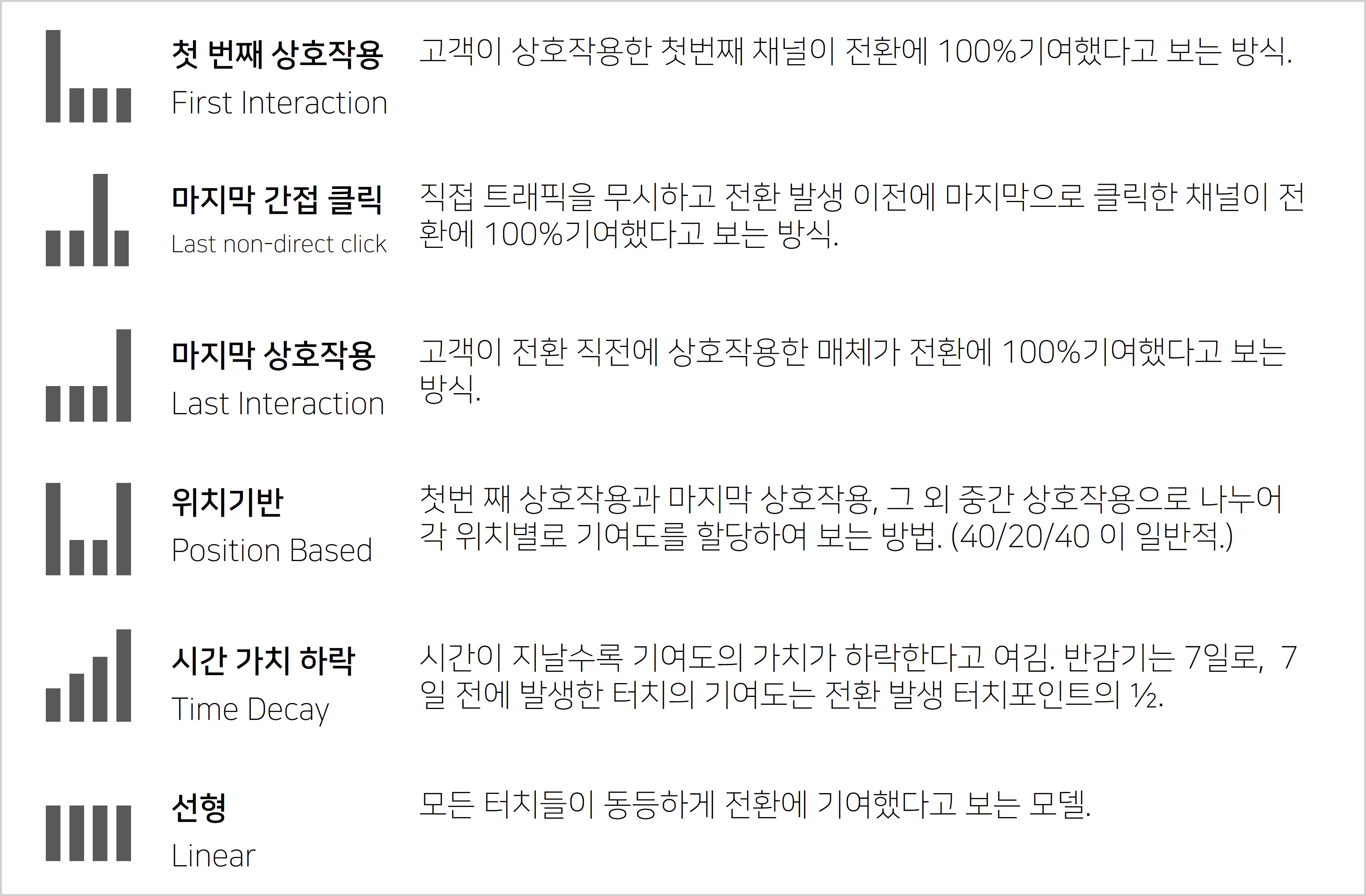
These are the types of attribution models Google Analytics provides by default. Most of them are probably easy to understand, so I'll just briefly cover the difference between the last non-direct click and last interaction models.
The difference between Last Interaction and Last Non-Direct Click
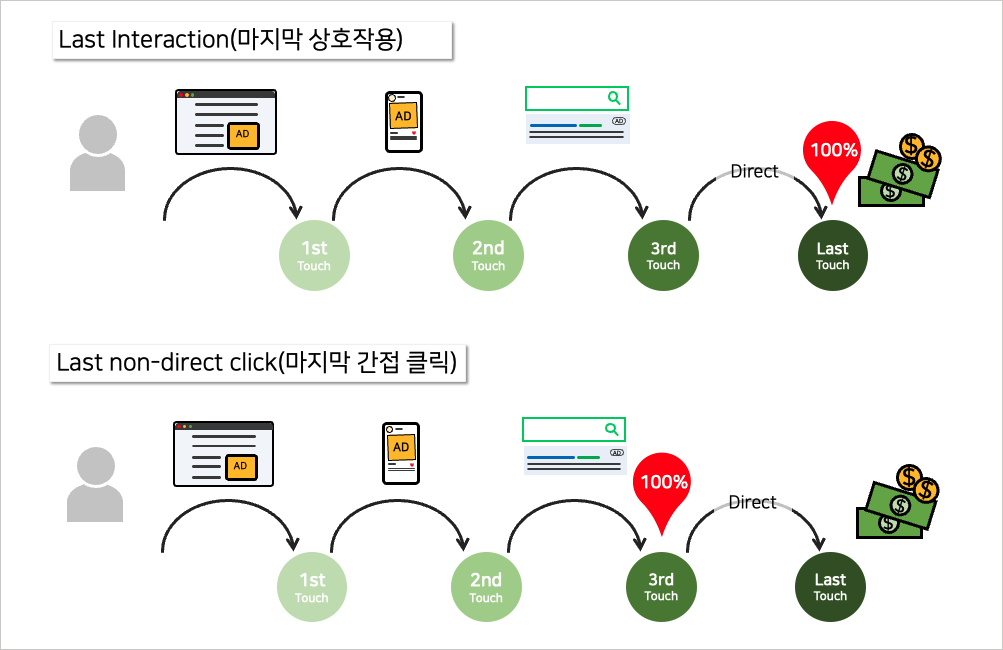
Last interaction is literally a model that treats the channel right before the conversion as having contributed 100% to it. Last non-direct click, on the other hand, ignores Direct traffic and gives 100% of the conversion credit to the touchpoint closest to the conversion among the rest.
Comparing attribution models in Google Analytics
Google Analytics offers a feature that lets you compare conversion results by attribution model. You can find it under Conversions > Multi-Channel Funnels > Model Comparison Tool.
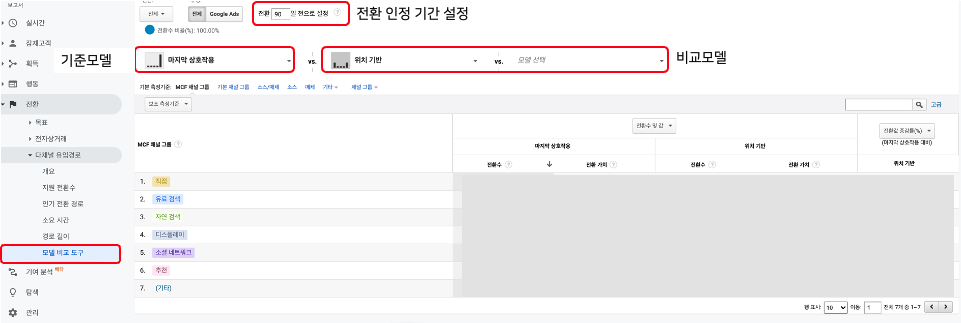
You set a baseline model on the left, and on the right you can choose up to two models you want to compare against it.
Creating a custom attribution model
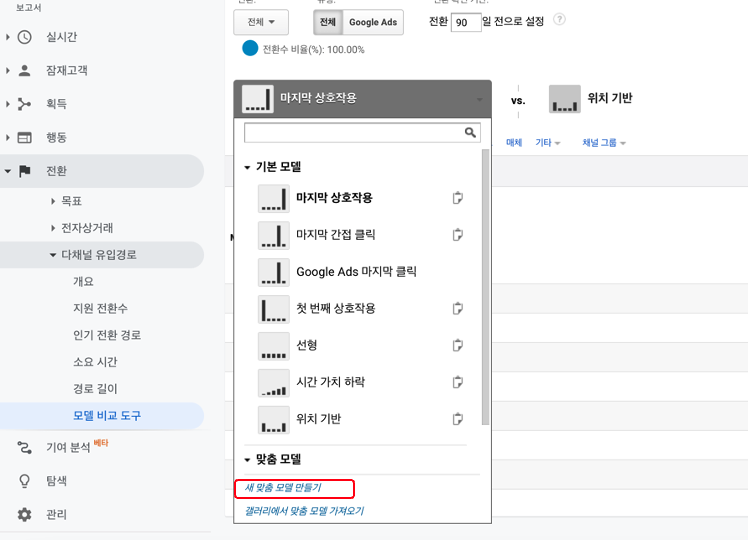
If you want to apply an attribution model other than the defaults GA provides, or add other conditions, you can also build a custom attribution model. At the bottom of the model selection window, you'll see Create new custom model.
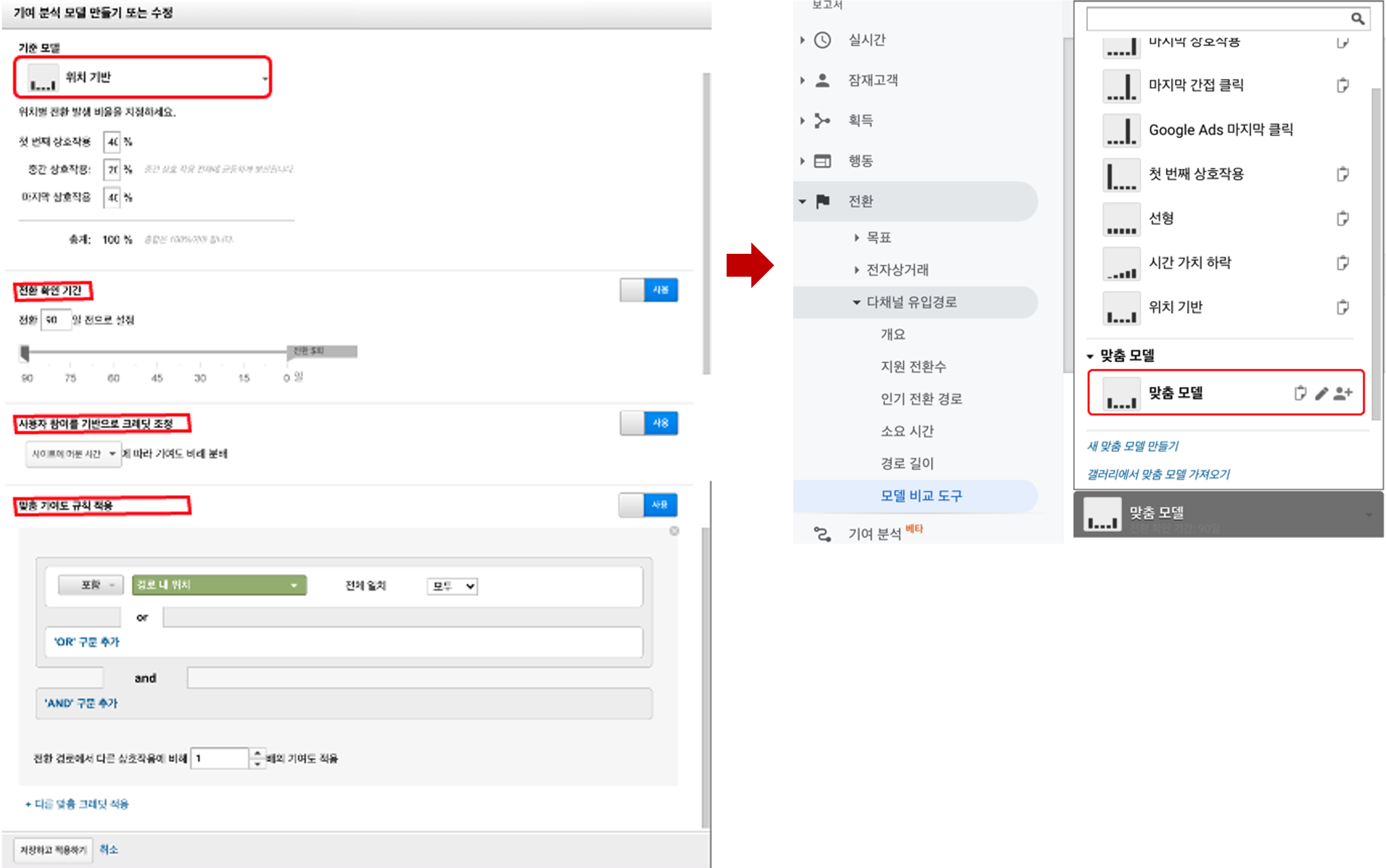
- Lookback window: you can set the lookback window anywhere from 1 to 90 days.
- Adjust credit based on user engagement: distributes credit in proportion to the time visitors spent on the site OR the number of pages they viewed
- Apply custom credit rules: applies x times the credit to users who meet specific conditions
If you have more questions about attribution models in GA, check the Google Analytics Help Center.
When should you use each attribution model?
Each attribution model fits a different situation. Rather than one model being the right answer, what matters is choosing the model that fits your business and campaign goals. Let's go through them one by one.
Last click (last interaction)
This is the simplest model, giving 100% of the credit to the channel right before the conversion. It's useful for short-term promotions and campaigns that drive immediate conversions, but it has a big limitation. For example, if a user learned about a brand from an Instagram ad → read a blog review → and finally searched the brand name and made a purchase, last click counts only the search ad as contributing to the conversion. Even though, without the Instagram ad, there would have been no search at all. This complete disregard for upper-funnel channels is last click's biggest weakness.
First click (first interaction)
Conversely, this model gives 100% of the credit to the channel that first brought the user in. It's useful when acquiring new customers is the main goal, for example when you want to know which channel first introduces you to potential customers in the early days of a brand launch. However, it doesn't reflect at all which channels kept the customer interested during the long process from the first visit to conversion, so rather than using this model on its own, it's better to compare it with last click.
Linear model
This model gives equal credit to every touchpoint. If a customer converted after four touches, each one is considered to have contributed 25%. It's a good reference when you want to evaluate the whole customer journey evenly, but in reality it's rare for every touch to have the same influence. Still, it works well as a baseline when you need to "look at everything without leaving any channel out."
Time decay model
This model gives more credit to touchpoints closer to the conversion. In other words, it considers yesterday's click to have had a bigger impact on the conversion than a click from a week ago. It's especially useful for high-involvement products where the purchase decision takes time (cars, home appliances, B2B services, etc.), because when customers convert after comparing and deliberating several times, the information they get close to the time of conversion often really does have a bigger impact.
Position-based model
This model gives 40% each to the first and last touches, and 20% in total to the touches in between. It's a balanced choice when you want to treat both "the channel that first brought them in" and "the channel that finally drove the conversion" as important. It's one of the models many marketers prefer in practice, and it makes sense because it doesn't miss either acquisition or conversion while still giving some credit to the middle touches.
How attribution models changed in GA4
The move from UA (Universal Analytics) to GA4 brought major changes to attribution models as well. The most important change is that Data-Driven Attribution (DDA) became the default.
Data-driven attribution uses machine learning to analyze actual conversion path data and automatically calculates the credit for each touchpoint. The biggest difference is that it doesn't split credit by predetermined ratios like rule-based models do, but makes its judgment based on actual data.
Another important change is that in GA4 you can choose only last click and the data-driven model, and the rule-based models that existed before, such as linear, time decay and position-based, have been removed. Google decided that the data-driven model reflects credit more accurately.
Tips for using attribution models in practice
Don't stick to just one model
The key to attribution analysis is putting several models side by side and comparing them. Under last click, search ads seem to account for most conversions, but when you switch to first click, there are really many cases where display (DA) or social ads turn out to contribute a lot. Discovering that difference is itself the value of attribution analysis. You get insights like, "Oh, it wasn't just about doing search ads well. Display ads were bringing people in."
Use different models for different reporting purposes
When reporting overall marketing ROI to leadership, it's better to show each channel's contribution in a balanced way with the data-driven or linear model. On the other hand, for practical decisions like adjusting budgets by channel, it's more useful to compare last click and first click to understand which stage of the funnel each channel plays a role in. Use models flexibly depending on your goal.
Trust GA4's data-driven model, but make sure you have enough data
DDA needs enough conversion data to work accurately. Google doesn't publish a minimum requirement, but generally you need at least several hundred conversions a month to expect meaningful results. If you're in an early stage with few conversions or run a niche business, it's safer to compare against last click results too rather than blindly trusting DDA alone.
Don't stop at analysis; turn it into action
No matter how sophisticated your attribution analysis is, it means nothing if the results aren't reflected in your actual budget allocation. If the analysis shows display ads were being undervalued, try increasing the display budget, and conversely, if a particular channel consistently performs poorly no matter which attribution model you use, you may need to make the bold decision to scale it back. Attribution models become a real weapon only when you build a cycle of analysis → hypothesis → budget adjustment → checking results.
FAQ
- Which attribution model does GA4 use?
- GA4 uses Data-Driven Attribution as the default. It uses machine learning to analyze actual conversion paths and automatically calculates the credit for each touchpoint. You can also choose the last click model as an alternative, but the linear, time decay and position-based models from UA have been removed.
- What's the difference between the last click model and the data-driven model?
- Last click is a simple approach that gives 100% of the credit to the last channel right before the conversion. The data-driven model analyzes actual conversion path data and calculates each channel's contribution to the conversion as a share. The data-driven model shows more realistic credit, but it needs enough conversion data.
- Why do attribution models matter?
- Because the evaluation of each channel's performance changes completely depending on the attribution model. If you only look at last click, search ads seem to account for most conversions, but in reality display or social ads often created the first awareness. You need to understand attribution models properly to allocate budget across channels sensibly.
- Which attribution model is right for my business?
- For businesses with a short customer journey to purchase (such as impulse-buy consumer goods), last click fits relatively well. On the other hand, for high-involvement products (B2B, real estate, cars, etc.) or long customer journeys, the data-driven or time decay model gives a more realistic evaluation.
Recommended reading alongside this post: