Claude Haiku 5.5 is a small model Anthropic released on October 7, 2026, built to handle high-volume, repetitive work quickly and cheaply. Its API price for requests of 100K tokens or fewer is $0.10 per million input tokens, 90% lower than Haiku 4.5. In this post, I've summarized Haiku 5.5's pricing and features, and how to decide between it and Sonnet 5.5.
When I wrote my earlier post comparing Sonnet 5.5 and Opus 5.5, Haiku 5.5 was still "coming in the next few weeks." With Haiku 5.5 arriving on October 7, the Claude 5.5 family is now complete: Opus, Sonnet, and Haiku. Your first thought might be, "If it's the cheapest model, isn't it a lot weaker?" In this post, I'll walk through what kind of model Claude Haiku 5.5 is, what it costs, and what kinds of work it's good for.
1. What kind of model is Claude Haiku 5.5?
Anthropic's announcement introduces Haiku 5.5 as the cheapest, fastest, and most capable small model it has released so far. Anthropic says it was designed for high-volume, cost-sensitive work, and that it reliably handles fast, repetitive tasks like summarization and classification. It's the fastest Anthropic model released to date (excluding fast mode on Opus models), so it's said to be a particularly good fit for speed-critical work like real-time customer support and browser control.
According to the Haiku 5.5 documentation, there are three main changes from Haiku 4.5.
- Adjustable effort level: It's the first Haiku model that lets you choose an effort level. Lower effort gives faster, cheaper answers; higher effort gives more thorough ones.
- Longer input and output: The amount it can read at once (the context window) grew from 200K to 1M tokens, and maximum output grew from 64K to 128K tokens.
- Thinking on by default: Adaptive thinking, where the model decides how much to think depending on the problem, is turned on by default.
You can also use it in the Claude apps. Anthropic published the Haiku 5.5 system prompt used on claude.ai and the iOS and Android apps, and the help article on model and effort settings lists Haiku 5.5 among the models whose effort level you can choose. However, you can't turn off Haiku 5.5's thinking in the Claude apps, and I couldn't find official documentation on how much access each plan includes.
2. How much does Claude Haiku 5.5 cost?
Haiku 5.5 has two price tiers depending on request length. According to the pricing documentation, Haiku 5.5 is the only model since Claude 4.6 whose price varies by request length. Here are the API prices per million tokens listed in that documentation.
| Model | Input | Output |
|---|---|---|
| Haiku 5.5 (requests ≤ 100K tokens) | $0.10 | $0.50 |
| Haiku 5.5 (requests over 100K tokens) | $0.50 | $2.50 |
| Haiku 4.5 | $1 | $5 |
| Sonnet 5.5 | $2 | $10 |
Anthropic says Haiku 5.5 is 90% cheaper than Haiku 4.5 for requests of 100K tokens or fewer, and 50% cheaper for longer ones. One thing to watch: Haiku 5.5 uses a new tokenizer (the way text is split into tokens). According to the documentation, the same text counts as roughly 30% more tokens than with Haiku 4.5, so when estimating costs, don't look at per-token price alone; recount your actual token usage.
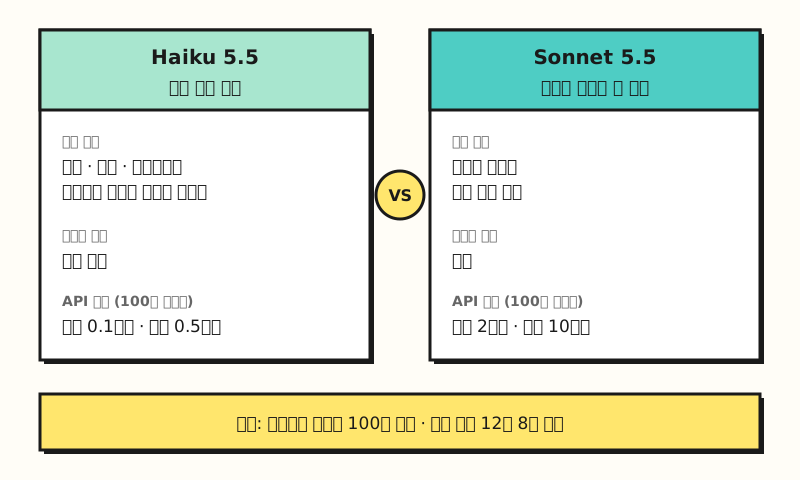 Prices are for requests of 100K tokens or fewer. Context window and max output are the same. (figure labels in Korean)
For high-volume work, discounts are also worth checking. The Batch API, which sends non-urgent requests in bulk, gives a 50% discount on both input and output, and when you repeatedly send the same opening content, prompt cache reads are priced separately at a lower rate. So can you just use this cheap Haiku 5.5 in place of Sonnet 5.5?
3. What's the difference between Haiku 5.5 and Sonnet 5.5?
The models overview documentation describes the two models like this. Sonnet 5.5 is "the best combination of speed and intelligence," and Haiku 5.5 is "for high-volume, latency-sensitive tasks like classification, extraction, and routing." Relative speed is listed as "Fast" for Sonnet 5.5 and "Fastest" for Haiku 5.5, and both share a 1M-token context window and 128K-token max output.
There's a clear gap in capability, too. In its announcement, Anthropic wrote that for complex agentic coding tasks, as measured by Terminal-Bench 4.0, Sonnet 5.5 and Opus 5.5 are still the better choice. Instead, for coding work, it said Haiku 5.5 is a good fit as a helper agent (subagent) that takes on parts of the work under Opus 5.5 or Sonnet 5.5.
This relationship is easy to picture with a parcel distribution center. If Haiku 5.5 is the sorting line that quickly splits huge numbers of boxes by region, Sonnet 5.5 or Opus 5.5 is the staff member who takes the packages that need judgment, like fragile items or boxes with unclear addresses. When the sorting line handles most boxes quickly and cheaply, you only spend expensive time on the boxes that need a human hand.
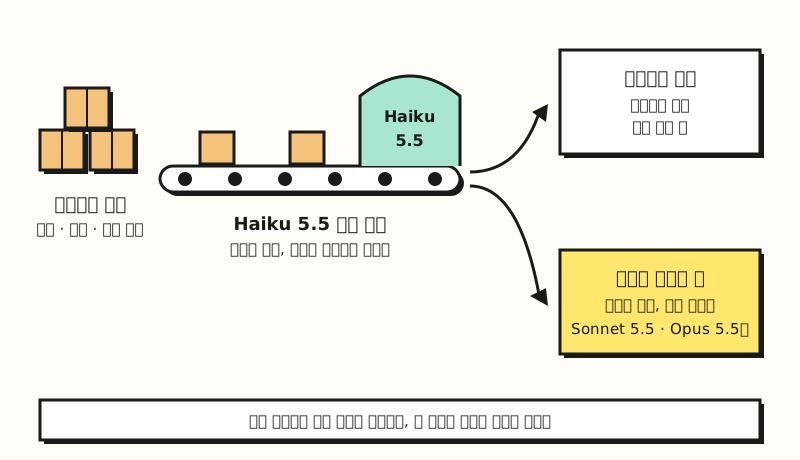 Haiku 5.5 handles simple, high-volume work, and only tasks that need judgment are passed to a larger model. (figure labels in Korean)
The guide to choosing a model describes the same approach. It explains that if a cheap model handles most of the work and only hard judgments go to a larger model, most of your tokens are billed at the lower rate.
4. What can marketers use Haiku 5.5 for?
The official docs and announcement list Haiku 5.5's use cases as classification, extraction, routing (sending requests to the right place), summarization, and real-time customer support. Applied to day-to-day marketing work, tasks like these come to mind. These are examples I put together based on the official use cases, so adjust them to fit your own work.
- Classification: Sorting product reviews or customer inquiries into predefined types like "shipping," "quality," and "refund"
- Extraction: Pulling only fields like material, size, and price from product detail page copy and organizing them into a table
- Summarization: Condensing inquiry logs or meeting notes that pile up every day
- Routing: Sending incoming inquiries to the right department
The announcement also includes HubSpot's assessment. HubSpot said it evaluates new models on CRM tasks like deal reporting, mostly testing small, efficient models, and that Haiku 5.5 got the best score it has seen so far in that evaluation.
So should you just start with Haiku 5.5? The model selection guide recommends an "efficiency-first" approach, starting with Haiku 5.5, when latency matters or you're cost-sensitive and the work is high-volume but simple.
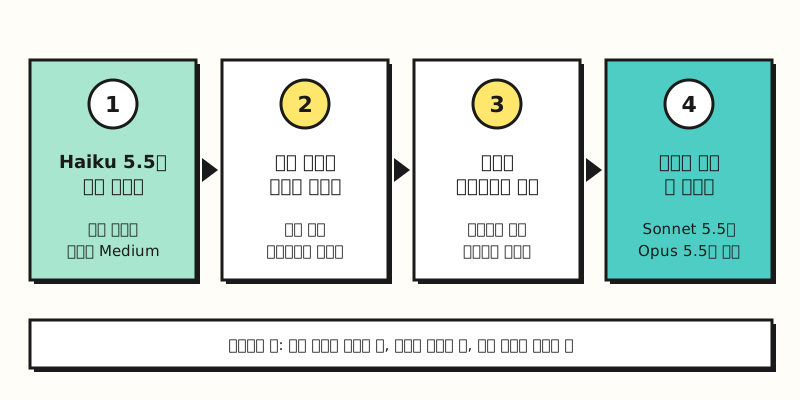 A step-by-step version of the "efficiency-first" approach from Anthropic's model selection guide. (figure labels in Korean)
The same guide also notes that it's often better to adjust the effort level before switching models. Haiku 5.5's default API effort level is Medium, so a natural order is to raise it one step if results fall short, and move to Sonnet 5.5 only if that still isn't enough.
※ Note: What to check if you use the API
If you have work automations using Haiku 4.5 through the API, there are things that won't work by just changing the model name. Here's what's worth knowing from the migration guide for practitioners.
- Recount tokens: The same text counts as about 30% more tokens, so revisit your cost estimates and max output settings.
- Remove temperature settings: Remove
temperature,top_p, andtop_k, which controlled randomness, from your requests, because sending non-defaulttemperatureortop_pvalues, ortop_k, returns an error. - Handle thinking blocks: Since thinking is on by default, a thinking block may appear at the start of the response, so code that read the first block as the answer needs to be fixed.
- Handle refusals: A safety classifier may decline requests, so be ready to receive refusal responses (
refusal).
For reference, on the same day, Claude Max and Team plans started including monthly API credits. According to the help article, Max 5x gets $100 per month, Max 20x gets $200 per month, and Team gets per-seat amounts summed up to a maximum of $500, and unused credits don't roll over to the next billing cycle. Free and Pro plans aren't included, so I recommend checking your plan.
To sum up, Claude Haiku 5.5 is a model that handles high-volume, well-defined work like classification, extraction, and summarization quickly and cheaply, while work that needs a lot of judgment is still a job for Sonnet 5.5 or Opus 5.5. I'll revisit this as I learn how to hand repetitive work like review classification over to Haiku 5.5 myself. For details, see the Haiku 5.5 announcement and the model documentation.
FAQ
- How much does Claude Haiku 5.5 cost?
- On the API, requests of 100K tokens or fewer cost $0.10 per million input tokens and $0.50 per million output tokens; over 100K tokens, it's $0.50 for input and $2.50 for output. Sending through the Batch API gives a 50% discount on both input and output.
- What's the difference between Haiku 5.5 and Sonnet 5.5?
- Haiku 5.5 is for high-volume, latency-sensitive tasks like classification, extraction, and routing, while Sonnet 5.5 balances speed and intelligence. For requests of 100K tokens or fewer, Haiku 5.5's API price is one-twentieth of Sonnet 5.5's, and Anthropic says Sonnet 5.5 is better for complex agentic coding.
- Can I use Haiku 5.5 in the Claude apps?
- Anthropic published the Haiku 5.5 system prompt for claude.ai and the iOS and Android apps, and Haiku 5.5 is listed in the help article on model and effort settings. However, I couldn't confirm availability by plan in the official documentation, so please check the model menu yourself.
- Will switching from Haiku 4.5 to Haiku 5.5 always lower costs?
- Per-token prices dropped sharply, but because of the new tokenizer, the same text counts as about 30% more tokens. Requests over 100K tokens are also billed at a higher rate, so I recommend recounting tokens on your real data and comparing.
Related posts
Posts worth reading alongside this one when choosing a Claude model.
- Claude Sonnet 5.5 released | How it differs from Opus 5.5 and how to choose by task - When to use Sonnet 5.5 vs Opus 5.5, and how to pick an effort level
- What are tokens and context windows? Basics before feeding long documents to AI - What per-token pricing and a 1M-token context actually mean
- Chatbots, AI agents, and automation: what's the difference? - Basics for understanding subagents and work automation