The Gems you've been using in Gemini (your own version of Gemini with instructions and reference files) are turning into skills. For personal Google Accounts aged 18 and over, Gems become read-only from November 17, 2026 and disappear from the Gemini app on December 17, while Workspace accounts for work and school go through the same change in 2027 or later. Remaining Gems are converted to skills automatically, but some files don't come along, so if there's a Gem you rely on, it's safer to deal with it ahead of time.
"The ad report Gem I use every week, will it just vanish if I leave it alone?" If you've stored report wording or brand tone in a Gem, you may be wondering exactly that. In this post, I'll walk through the Gemini Gems to skills timeline, how Gems and skills differ, the steps to move a Gem yourself, and which Gems to move first.
Gemini Gems to skills: what changes, and when?
In a Gemini blog post on September 30, Google announced that skills will replace Gems as the tool for holding instructions tailored to specific tasks. A skill lets you save instructions you use often and pull them out again whenever you need them. The dates for personal accounts are in the Gems transition help article, and the dates for Workspace accounts are in the Workspace transition notice.
| Account | Date | What changes |
|---|---|---|
| Personal account (18+) | November 17, 2026 | Gems transition to skills and become read-only |
| Personal account (18+) | December 17, 2026 | Gems are removed from the Gemini app |
| Personal account (under 18) | To be announced | Transition at a later date |
| Workspace Business and Enterprise | November 17, 2026 | Gems move to the Gemini app's Settings menu (still usable) |
| Workspace Business and Enterprise | On or after March 1, 2027 | Gems can no longer be created, edited or used; remaining Gems move to draft skills automatically |
| Workspace Education | On or after June 1, 2027 | Same as above, and Gems are also removed from Classroom |
It's worth pointing out first that the same date, November 17, means different things depending on the account. On a personal account you can no longer edit Gems from that day and they're deleted a month later, whereas on a Workspace account Gems simply move to the Settings menu and stay usable until 2027. For reference, at the time of writing the Korean version of the help article only says "November 2026: personal Google Accounts," and the dated schedule appears only in the English version, so I followed the more detailed English original.
Some services end alongside it: Opal, Google Labs' mini-app experiment, and "Gems by Google Labs" also shut down in November, and Gems by Google Labs won't be moved to skills. So what exactly is different about the skills that replace Gems?
How are Gems and skills different?
In the words of the help article, Gems are "customized versions of Gemini that help you tackle repetitive tasks or get deep expertise in new areas." Once you opened a Gem, the whole conversation followed that Gem's instructions. Skills work the other way around: they're bundles of instructions you pull out only when needed, inside your regular Gemini conversation. You can pick one directly by typing / (or @ with the updated shortcut) in the chat, and if an active skill is relevant to your request, Gemini may use it on its own.
As an analogy, a Gem is like hiring a dedicated employee for one job, while a skill is closer to keeping work manual cards in one person's desk drawer. You have to change rooms every time you call the dedicated employee, but manual cards can be pulled out two or three at a time without leaving the conversation you're in. In fact, the Workspace Updates post explains that, unlike Gems, several skills can be combined within a single conversation.
| Criteria | Gem | Gemini app skills | Workspace skills |
|---|---|---|---|
| Where | Gemini app and others (open the Gem to chat) | Gemini web, mobile and Mac apps | Workspace Studio, Gmail, Docs, Slides, Drive, Chat (web) |
| How to call | Pick from the Gems list | / or @, automatic use | @ mention, or Gemini picks one |
| Several at once | Can't be stacked like skills | Yes | Yes |
| Files | Instructions + knowledge files | SKILL.md + reference files (100 MB total) | Instructions + Drive file links |
| Who | Ending on a schedule by account type | Personal accounts 18+, no subscription needed | Specified editions such as Business and Enterprise, 18+ |
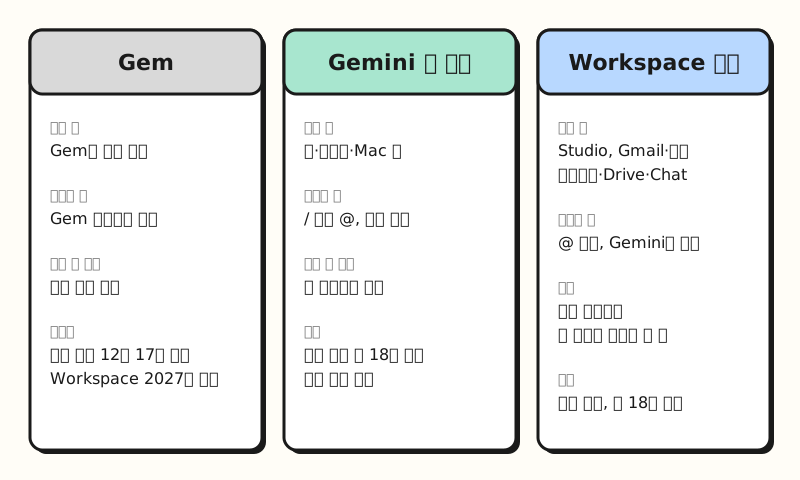 A Gem takes over a whole conversation, while skills are pulled out and stacked only as needed within a conversation. (figure labels in Korean)
One thing to note is that skills follow the open SKILL.md format known as Agent Skills, so you can upload skill files made in other tools to the Gemini app. However, Gemini app skills and Workspace skills don't sync with each other, so to use a skill in both places you have to create it in each.
How do I move my Gem to a skill myself?
Gems on personal accounts become skills automatically, but according to the Gems transition help article, audio, video, legacy Office formats (.doc, .xls, .ppt), archives and GitHub files don't transfer, and if files exceed 100 MB in total, the largest ones are dropped first. So for Gems whose knowledge files matter, I recommend moving them yourself before December 17. Let's follow the steps in the help article.
- Download the knowledge files: On a computer, go to gemini.google.com, click Gems in the sidebar, click the edit icon on the Gem you want to move, and download each file under Knowledge.
- Make a folder: Create a folder named in lowercase English letters and hyphens (e.g.,
weekly-ad-report) and put the downloaded files in it. - Create the skill manually: In Customize → Skills, choose Create → Create manually, paste in the Gem's name, description and instructions, then click Create to save.
- Attach the files: From the new skill's more options menu, click Download to get a
.zipcontainingSKILL.md, moveSKILL.mdinto the folder from step 2, then upload the whole folder with Replace skill. The folder name must match the skill name. - Check for anything missing: Open the Gem and the new skill side by side and compare them to make sure no files are missing.
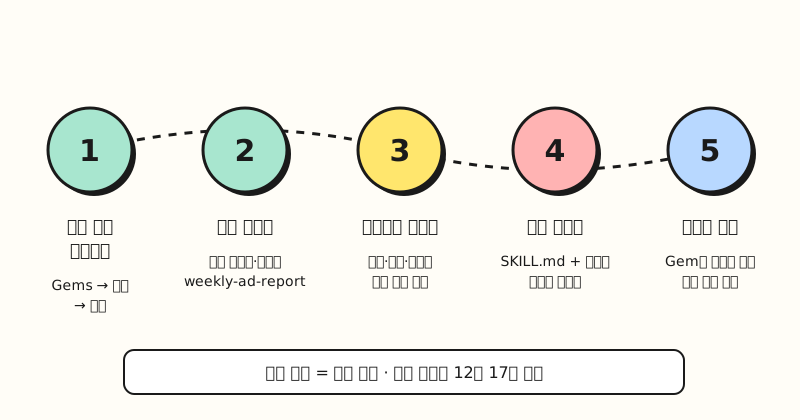 Step 4 is the most confusing one: it isn't a button for attaching files separately, but a way of re-uploading the whole folder containing SKILL.md and the files. (figure labels in Korean)
Sharing permissions on Gems you shared carry over as they are, and Gems others shared with you appear on the Skills page as inactive, so you need to accept them yourself. But if you have several Gems, do you really have to move all of them by hand like this?
Which Gems should I move to skills first?
You don't need to move every Gem yourself. What follows isn't an official rule but a set of criteria I put together based on the transition rules in the help articles, and you can sort each Gem by what its knowledge files are and how often you use it.
| Gem situation | Suggested handling | Why |
|---|---|---|
| Instructions only, no files | Leave it to the automatic transition | Name, description and instructions carry over as is |
| Has PDF or text files and you use it weekly | Move it yourself before December 17 | Hard to tell right away whether files were dropped after the move |
Uses files like .xls (not .xlsx), video or .zip | Convert the files to supported formats and move it yourself | Unsupported formats don't transfer |
| Made as a test and never used | Delete it | The Workspace notice also recommends deleting unused Gems |
| Gem on a company Workspace account | Rebuild it as a Workspace skill before next March | Workspace account Gems are migrated only inside the Gemini app, not into Workspace apps |
The last row matters most in practice: Workspace account Gems are migrated automatically only into the Gemini app, so to use them in Gmail or Docs you need to create new Workspace skills. If your Workspace Studio automations (flows) use the "Ask a Gem" step, you already can't add new ones, and they stop working on or after March 1, 2027, so you should switch them to the "Ask Gemini" step. So while you're moving things over, what's worth fixing?
So what should marketers change?
Picture someone who has been handing the weekly ad report summary to a Gem. That Gem probably holds "report tone," "the order for explaining metrics" and a "brand banned-words PDF" all together, and since skills can be stacked, I recommend splitting it by role while you move it. The example Google gave in its blog post was also a writing style skill used together with a brand guidelines skill to create on-brand assets.
- Split: Turn "report tone" into
write-weekly-ad-summaryand "banned words and style rules" intocheck-brand-wording. The banned-words skill can be reused when writing press releases or social copy too. - Rewrite the description: According to the help article on writing skills, Gemini first looks only at the name and description to decide whether to use a skill, and reads the full instructions only when it's relevant. It advises keeping the description under 1024 characters, with one sentence on what it does followed by when to use it, like "Use when…". The short intro text from your Gem days may not trigger automatic use well.
- Say what to do when information is missing: The same article recommends writing that Gemini should ask the user rather than guess when information is missing. In a report, this keeps it from making up numbers when the period or comparison baseline is missing.
Below is an example that assumes you put the report skill from step 1 into "Create manually" (I haven't run it and checked the results).
Name: write-weekly-ad-summary
Description: Writes a summary paragraph for a manager from a weekly ad performance table. Use when the user asks for an ad report, weekly performance summary or campaign report.
## Instructions
- Explain metrics in the order impressions → clicks → conversions → cost.
- For week-over-week changes, use only the numbers in the table.
## Format
- Three paragraphs or fewer, with a one-line conclusion in the first paragraph
## Common mistakes
- Don't assert causes that aren't in the table.
- If the period or comparison baseline is missing, ask the user before writing.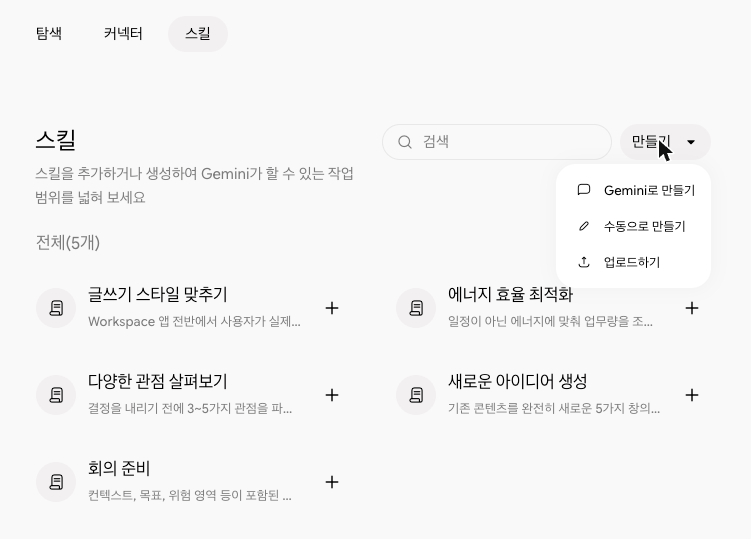 Source: the Skills tab in Gemini app customization (screen in Korean). Click "Create" at the top right to see "Create with Gemini," "Create manually," and "Upload."
On a company account, you should also keep in mind that Workspace skills currently accept English instructions only. For teams working in Korean, polishing the skill structure in the Gemini app on a personal account first may be a more realistic choice than moving everything into Workspace skills right away.
※ Note: limits to know when moving to skills
- 100 active skills: You can create many skills, but only 100 can be active at a time.
- Features not yet supported: According to the help article, skills don't yet work in Canvas or Deep Research, and among the default Gem tools, Create video, Create music and Guided learning aren't supported yet either.
- Sharing and Drive files arriving gradually: Sharing skills with others and adding files from Google Drive and Gemini Notebook are listed as coming "in the coming weeks."
- SKILL.md upload on web and Mac only: Uploading a
SKILL.mdmade on another platform currently works only in the Gemini web app and the Mac app. - Workspace skills scope: Only users 18 and over on specified editions such as Business Starter, Standard and Plus and Enterprise Starter, Standard and Plus can use them, and Google Sheets and Meet aren't supported yet. According to the Workspace skills announcement, Rapid Release domains get a gradual rollout from November 9 and Scheduled Release domains from November 30, and admins can turn the feature off.
- Script limits: Scripts inside a skill can't make external requests, so scripts that need internet access can't be used.
Wrapping up
Gems turning into skills is more than a name change: it's a shift from handing over an entire conversation to stacking small sets of instructions. If you're on a personal account, I suggest moving the Gems that have knowledge files yourself before December 17, and if you're on a company account, gradually switching to Workspace skills and updating your automation steps before March 2027. I'll share again if anything changes as I split my own Gems into role-based skills. For the full schedule, please see the Gems transition help article.
FAQ
- What happens if I leave my Gemini Gems alone?
- On personal accounts, Gems transition to skills and become read-only on November 17, 2026, and are removed from the Gemini app on December 17. Skills are created automatically, but audio, video, legacy Office formats like .doc, .xls and .ppt, and archives don't transfer, and if files exceed 100 MB in total the largest are dropped first, so it's a good idea to download important knowledge files before December 17.
- Will Gems on my company Workspace account disappear in December too?
- No. On Workspace Business and Enterprise accounts, Gems just move to the Gemini app's Settings menu on November 17 and stay usable; creating, editing and using them is blocked on or after March 1, 2027. For Education accounts, it's on or after June 1, 2027. Automatic migration happens only inside the Gemini app, so to use them in Workspace apps like Gmail and Docs you need to recreate them as Workspace skills.
- Do I need a paid subscription to use Gemini skills?
- According to the Gemini app help article, skills can be used without a Google AI subscription, and you need to be signed in and 18 or older. Skills in Workspace apps like Gmail and Docs are available only on specified Workspace editions such as Business and Enterprise.
- Can I write Gemini skills in Korean?
- The announcement says Workspace skills support English instructions only. The Gemini app help article doesn't list supported languages, so I recommend testing for yourself how well instructions in Korean are applied.
Related posts
- Agent Skills donated to the Linux Foundation: one skill across Claude, ChatGPT and Copilot - The SKILL.md format Gemini skills also follow, and how it differs from MCP
- Prompt writing basics: clear instructions, context and roles, examples, output format - Prompt fundamentals that apply just as well when writing skill instructions
- Gemini file creation and editing: fix PPTs, sheets and PDFs right in the chat - Gemini app file features that pair well with skills