An SQL subquery is another query placed inside a query in parentheses, and WITH (CTE) takes that inner query, gives it a name and pulls it up to the top. Up to the last post we filtered, grouped and joined with a single query, but questions that need two rounds of calculation to answer, like "only orders above average" or "total per member, then the average of those totals," are hard to solve with a single SELECT. When I started learning SQL, I didn't know where to start reading when I saw a query with parentheses stacked inside parentheses. In this post, let's use the stationery shop tables from last time to put subqueries in WHERE and FROM, then rewrite the same query with WITH and split it into steps. Queries are written in BigQuery (GoogleSQL) syntax. Previous post: SQL JOIN Explained: INNER JOIN vs LEFT JOIN with Examples
SQL Basics series 11/12 · Full curriculum
Today's concept
In Excel terms, a subquery is like a helper cell. To pick orders above average, you first calculate the average in an empty cell with =AVERAGE(D2:D7), then use that cell in your filter condition. In SQL, you put (SELECT AVG(amount) FROM shop.orders), parentheses and all, where that helper cell would go. WITH is closer to making the helper calculation its own sheet and naming that sheet.
The BigQuery subqueries documentation defines a subquery as a query that appears inside another query statement, and says the full SELECT syntax is valid inside subqueries. That means anything we've learned so far, GROUP BY or JOIN, can go inside the parentheses as is, and when reading, you just work from the innermost parentheses out. First check what the inner query returns, then see how the outer query uses that result.
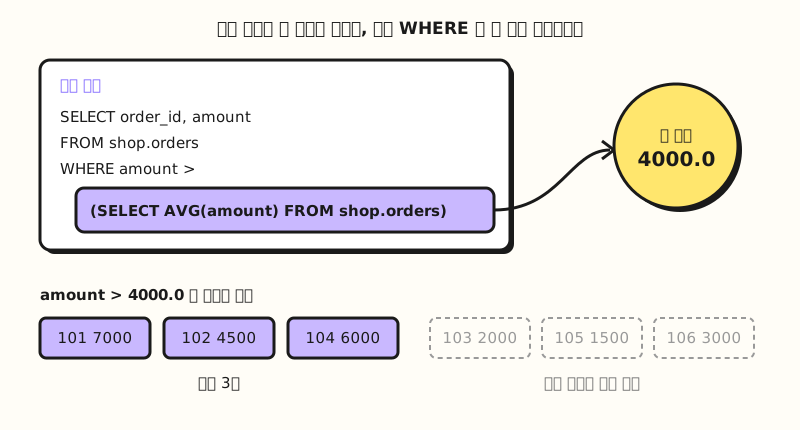 Concept figure: the inner query first produces a single value, and the outer query uses it in its condition (figure labels in Korean)
Follow along: putting SQL subqueries in WHERE and FROM
We'll reuse the members and orders tables from last time (sample data). Order 106 was bought without signing up, so its member_id is NULL.
members
| member_id | name | city |
|---|---|---|
| 1 | Haneul Kim | Seoul |
| 2 | Doyun Lee | Busan |
| 3 | Seoyeon Park | Seoul |
| 4 | Jiwoo Choi | Daejeon |
orders
| order_id | member_id | ordered_on | amount |
|---|---|---|---|
| 101 | 1 | 2026-10-01 | 7000 |
| 102 | 2 | 2026-10-03 | 4500 |
| 103 | 1 | 2026-10-07 | 2000 |
| 104 | 3 | 2026-10-12 | 6000 |
| 105 | 1 | 2026-10-20 | 1500 |
| 106 | NULL | 2026-10-21 | 3000 |
1. One value in WHERE: picking orders above average: As we saw in part 9, you can't put an aggregate function like AVG(amount) directly in WHERE, but you can calculate the average separately inside parentheses.
SELECT order_id, member_id, amount
FROM shop.orders
WHERE amount > (SELECT AVG(amount) FROM shop.orders)
ORDER BY order_id;| order_id | member_id | amount |
|---|---|---|
| 101 | 1 | 7000 |
| 102 | 2 | 4500 |
| 104 | 3 | 6000 |
The inner query returns a single value, the average of the six orders: 24,000 ÷ 6 = 4000.0 (AVG returns FLOAT64, so it has a decimal point). A subquery that returns one value like this is called a scalar subquery. According to the subqueries documentation, a scalar subquery must select a single column, returns NULL if it produces zero rows, and fails with a runtime error if it returns more than one row. An average is always one row, so it's safe to use here.
2. A list of values in WHERE: finding members with an order of 2,000 won or more: If the inner query returns several rows, take them with IN instead of >.
SELECT member_id, name
FROM shop.members
WHERE member_id IN (
  SELECT member_id
  FROM shop.orders
  WHERE amount >= 2000
)
ORDER BY member_id;| member_id | name |
|---|---|
| 1 | Haneul Kim |
| 2 | Doyun Lee |
| 3 | Seoyeon Park |
The inner query returns five member IDs from orders 101, 102, 103, 104 and 106: 1, 2, 1, 3, NULL. Haneul Kim has two orders of 2,000 won or more (101 and 103) but appears only once in the result, because WHERE only decides whether to keep each row of the members table and never adds rows. If we had joined the orders table as in the last post, Haneul Kim would have appeared twice. Jiwoo Choi drops out because 4 isn't in the list.
3. A table in FROM: average revenue per member: If you want "the average amount one member spent" rather than "the average of one order," you have to total each member first and then average those totals. Put the result of the first step in FROM as if it were a table.
SELECT
  COUNT(*) AS members,
  AVG(total) AS avg_total
FROM (
  SELECT member_id, SUM(amount) AS total
  FROM shop.orders
  WHERE member_id IS NOT NULL
  GROUP BY member_id
) AS member_totals;| members | avg_total |
|---|---|
| 3 | 7000.0 |
The inner query produces a three-row table: Haneul Kim 10,500 won (7,000 + 2,000 + 1,500), Doyun Lee 4,500 won and Seoyeon Park 6,000 won. The outer query takes this table under the name member_totals and returns (10,500 + 4,500 + 6,000) ÷ 3 = 7000.0. The guest order isn't something to include in a per-member calculation, so I removed it up front with WHERE member_id IS NOT NULL. The subqueries documentation calls a subquery in FROM a table subquery and explains that the outer query treats its result as a table.
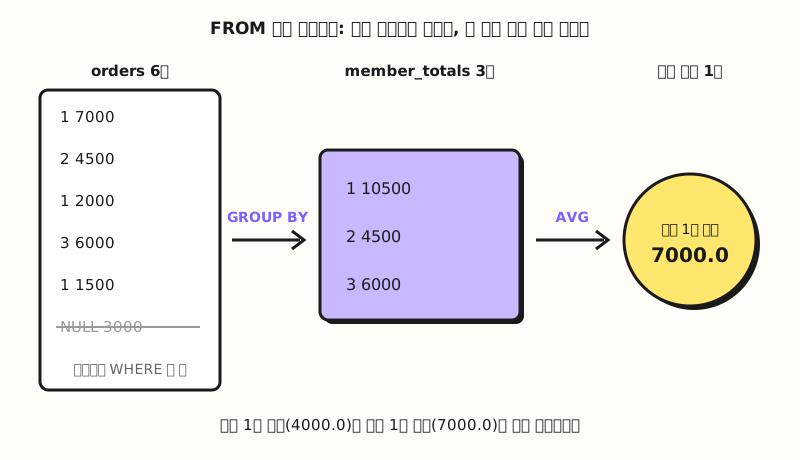 Concept figure: averaging a table that was first totaled per member gives "7000.0 per member," which is different from "4000.0 per order" (figure labels in Korean)
4. The same calculation with WITH: marking whether each member is above average: Pull the inner query from query 3 up to the top and give it a name, and you have WITH. This time let's attach names too, and use CASE WHEN from part 8 to mark whether each member is above average.
WITH member_totals AS (
  SELECT member_id, COUNT(*) AS orders, SUM(amount) AS total
  FROM shop.orders
  WHERE member_id IS NOT NULL
  GROUP BY member_id
)
SELECT m.name, t.orders, t.total,
  CASE WHEN t.total >= (SELECT AVG(total) FROM member_totals)
    THEN 'Above average' ELSE 'Below average' END AS grade
FROM member_totals AS t
INNER JOIN shop.members AS m
  ON t.member_id = m.member_id
ORDER BY t.total DESC;| name | orders | total | grade |
|---|---|---|---|
| Haneul Kim | 3 | 10500 | Above average |
| Seoyeon Park | 1 | 6000 | Below average |
| Doyun Lee | 1 | 4500 | Below average |
member_totals is the three-row table we saw in query 3, and the main query below uses that name twice as if it were a real table: once in FROM to join with the members table, and once in the scalar subquery inside CASE to get the average of 7000.0. The BigQuery query syntax documentation describes a CTE (Common Table Expression) as something that acts like a temporary table you can reference within a single query. All values in the result tables above were counted by hand, since the sample tables are small.
How do subqueries and WITH differ?
All three share the idea of "doing one more calculation"; what differs is where you put it and whether it has a name. Let's line them up based on the queries above.
| Criterion | Subquery in WHERE | Subquery in FROM | WITH (CTE) |
|---|---|---|---|
| Returns | One value (query 1) or a list of values (query 2) | A table | A table |
| Name | None | Alias after the parentheses | Name given at the top |
| Reading order | Innermost parentheses first | Innermost parentheses first | Top to bottom |
| Reusing within one query | Write the same parentheses again | Write the same parentheses again | Just use the name again |
| Good fit for | Rows above average, rows in a list | A single two-step aggregation | Three or more steps, or using the same intermediate table several times |
You can decide which to use by asking, "If I strip out the parentheses, can I see at a glance what this query calculates?" If you're just slotting in one average like query 1, a subquery in WHERE is actually shorter and easier to read. On the other hand, once parentheses start appearing inside parentheses, pulling them out with WITH is better. The PostgreSQL WITH documentation also describes the basic value of WITH as breaking down complicated queries into simpler parts, and adds that writing the same example without WITH would need two levels of nested sub-SELECTs, which is harder to follow.
One thing to note is that WITH isn't a tool for speed. According to the query syntax documentation, BigQuery doesn't materialize the results of non-recursive CTEs, so if you reference member_totals in two places as in query 4, it runs again for each reference, and the documentation says this kind of WITH is useful primarily for readability. This can differ in other DBMSs: PostgreSQL explains that a WITH query is normally evaluated only once per execution of the parent query.
How is it used in practice? A per-buyer revenue by city query
Let's say you're putting "number of buying members, revenue, and revenue per buying member by city" into a monthly report. You need to total each member, attach a city, and group again by city, so it's a three-step question.
- Write the steps in words first: ① revenue total per member ② attach a city to each member ③ group by city, count and average.
- Make one CTE per step: Name each one so you can tell what the result table is, like
member_totalsandbuyer_city. - Check intermediate tables one by one: Temporarily change the main query at the bottom to
SELECT * FROM member_totalsto see that it has three rows, then move on to the next step. - Double-check: Add the guest order's 3,000 won to the city revenue totals and see whether it equals the orders table total of 24,000 won.
WITH member_totals AS (
  SELECT member_id, SUM(amount) AS total
  FROM shop.orders
  WHERE member_id IS NOT NULL
  GROUP BY member_id
),
buyer_city AS (
  SELECT m.city, t.total
  FROM member_totals AS t
  INNER JOIN shop.members AS m ON t.member_id = m.member_id
)
SELECT city, COUNT(*) AS buyers, SUM(total) AS revenue, AVG(total) AS per_buyer
FROM buyer_city
GROUP BY city
ORDER BY revenue DESC;| city | buyers | revenue | per_buyer |
|---|---|---|---|
| Seoul | 2 | 16500 | 8250.0 |
| Busan | 1 | 4500 | 4500.0 |
Seoul is Haneul Kim's 10,500 won plus Seoyeon Park's 6,000 won, 16,500 won, which is 16,500 ÷ 2 = 8,250 won per buyer. The two cities add up to 21,000 won, and adding the guest's 3,000 won gives 24,000 won, so the check works out; Daejeon doesn't appear because Jiwoo Choi placed no orders. You can chain several CTEs in one WITH with commas, and if you write them so that later tables build on earlier ones, the way buyer_city uses member_totals defined above it, the query reads one step at a time from top to bottom.
Practice problems
1. (Easy) Use a subquery to find the order ID and amount of the order with the largest amount.
Show answer
SELECT order_id, amount
FROM shop.orders
WHERE amount = (SELECT MAX(amount) FROM shop.orders);
The inner query returns a single maximum, 7000, so you get order 101, 7000. Unlike ORDER BY amount DESC LIMIT 1, if several orders share the maximum, they all appear.
2. (Medium) How many orders are larger than the average amount, and what do their amounts add up to?
Show answer
SELECT COUNT(*) AS orders, SUM(amount) AS revenue
FROM shop.orders
WHERE amount > (SELECT AVG(amount) FROM shop.orders);
Orders 101, 102 and 104 are larger than the average of 4000.0, so the answer is 3 orders, 17,500 won (7,000 + 4,500 + 6,000). It's the three result rows of query 1 reduced to one row with aggregate functions.
3. (Medium) Use WITH to first count orders per member, then find the names of members with 2 or more orders.
Show answer
WITH member_orders AS (
  SELECT member_id, COUNT(*) AS orders
  FROM shop.orders
  WHERE member_id IS NOT NULL
  GROUP BY member_id
)
SELECT m.name, t.orders
FROM member_orders AS t
INNER JOIN shop.members AS m
  ON t.member_id = m.member_id
WHERE t.orders >= 2;
You get one row: Haneul Kim, 3 orders. Doyun Lee and Seoyeon Park have 1 order each. You could also solve this with HAVING from part 9, but splitting it with WITH lets you read counting, attaching names and filtering separately.
Common mistakes
- A NULL slips into the NOT IN list: If you write
WHERE member_id NOT IN (SELECT member_id FROM shop.orders)to find "members who never ordered," it looks like Jiwoo Choi should appear, but the result has 0 rows. That's because the list contains the NULL from order 106. According to the IN rules in the operators documentation, when there's no equal value and a comparison with NULL produces NULL, NOT IN returns NULL rather than TRUE, and WHERE keeps only TRUE rows. AddWHERE member_id IS NOT NULLto the inner query, or use the LEFT JOIN followed byIS NULLapproach from the last post. - A scalar subquery returns several rows: If you write
WHERE amount > (SELECT amount FROM shop.orders WHERE member_id = 1), Haneul Kim has three orders, so the inner result has three rows, and by the rule we saw earlier you get a runtime error. If you mean "greater than the largest of them," make it one row withMAX(amount); if you mean "equal to one of the list," useIN. - Writing CTEs in reverse order: According to the query syntax documentation, in a WITH without the RECURSIVE keyword, a CTE is only visible to CTEs defined after it. If you put
buyer_cityabovemember_totalsin the practice query,buyer_citywould be calling a name that isn't defined yet, so put the step that must be calculated first at the top.
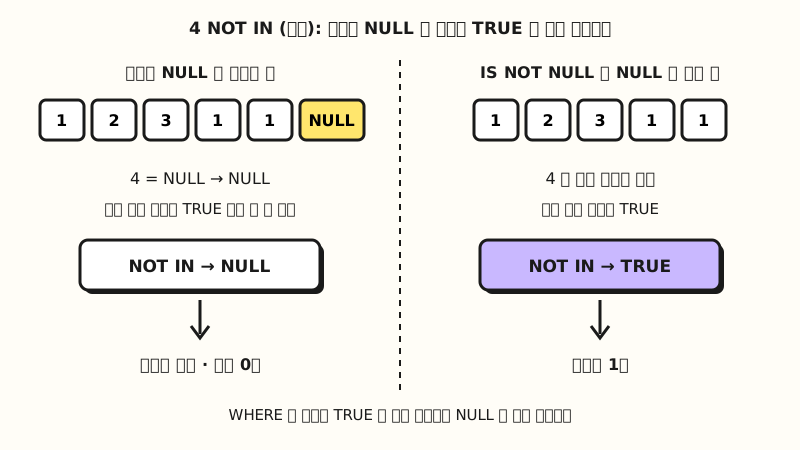 Concept figure: if the NOT IN list contains even one NULL, the comparison can never be TRUE, so no rows remain (figure labels in Korean)
Wrapping up
An SQL subquery builds one value, a list of values or a table inside parentheses first and hands it to the outer query, while WITH gives that inner query a name so the query reads from top to bottom. I'd suggest using a subquery for a single short condition, splitting aggregation with three or more steps using WITH, and making a habit of checking intermediate tables one by one with SELECT *.
I'm studying along with the series myself, so please refer to the full curriculum.
In the next post, we'll tie together everything we've learned and build a report query for cost, conversions and ROAS by channel from start to finish, using sample ad and order tables.
FAQ
- What's the difference between a subquery and WITH (CTE)?
- Both are ways to do one more calculation inside a query; a subquery goes in place, parentheses and all, while WITH pulls it to the top with a name. A table made with WITH can be called by name several times within the same query, but BigQuery runs a non-recursive CTE again for each reference, so it's a tool for readability rather than speed.
- My NOT IN subquery returns nothing. Why?
- If the list returned by the inner query contains a NULL, NOT IN evaluates to NULL instead of TRUE even for rows with no equal value, so they're dropped by WHERE. Add WHERE column IS NOT NULL to the inner query.
- Do I have to give a subquery in FROM an alias?
- In BigQuery syntax, the alias is optional. However, the PostgreSQL documentation notes that the SQL standard requires an alias for a subquery, and that writing one is good practice in queries that might be ported to another system.
Related posts
- SQL JOIN Explained: INNER JOIN vs LEFT JOIN with Examples - SQL Basics part 10, the JOIN we also use inside WITH
- SQL GROUP BY, Aggregate Functions and HAVING: Totals by Channel - SQL Basics part 9, the aggregation we put inside subqueries
- SQL ORDER BY Sorting and CASE WHEN for Price Bands - SQL Basics part 8, the CASE WHEN used to mark above/below average