Can you build a service you can actually use at work with AI tools, even if you don't know how to code? In this post, I walk through how I built a privacy policy generator for GA4 implementations with vibe coding, from planning to completion. I'll share honestly what problem I wanted to solve, which tools I used and in what order, and what I learned as a non-developer building a service.
What Is Vibe Coding?
As AI advances at a very fast pace, it's become possible to build your own service with the help of AI code editors even if you can't write a single line of code. This way of working is called "vibe coding." The term was first used in February 2025 by AI researcher Andrej Karpathy, and it refers to a way of developing where you complete code intuitively by talking with AI, without rigorous design or syntax.
Working in digital marketing, I hear about these developments quickly, and we study them together at work too, so I've ended up building a variety of things. This website was also built with vibe coding.
Still, I wished these tools could be used not just for fun but to make work more efficient. Building a privacy policy generator for GA4 implementations was when I finally got to make a service that actually helps with work.
In this post, I'll lay out the making of the GA4 privacy policy generator I built with vibe coding: what thinking led me to plan this service, and through what process and tools I built and finished it.
Why Update Your Privacy Policy When You Implement GA4?
Google Analytics 4 (GA4) collects behavioral data from users on websites and mobile apps, IP addresses, device information, and more to help analyze user behavior on a website. In some cases, this data may be treated as personal information, which may require legal steps such as obtaining user consent or disclosing information. Personal information protection laws can apply differently depending on the type and content of the information collected, and on where (in which country) the data is stored.
For example, data collected through GA4 is transferred to Google LLC's servers in the United States. Under Korea's Personal Information Protection Act, this counts as an overseas transfer, so the privacy policy must state the recipient, the purpose of the transfer, the items transferred, and so on. Also, cookie-based identifiers (_ga, _ga_<ID>) can count as information that identifies an individual when combined with other information, so related notice is needed.
It's not easy to take care of all this while implementing GA4, and even if you know you need to apply it, digging through the relevant laws is hard, so you may not know which parts to update. That's why I started with the idea of putting together a guide on it.
Why Build a Privacy Policy Writing Guide with Vibe Coding?
A well-made guide to writing privacy policies actually already existed: the Privacy Policy Writing Guidelines (April 2025) published by Korea's Personal Information Protection Commission. The problem was that for someone without much legal knowledge, looking at a whopping 156 pages, it was hard to tell which parts applied and how to adapt them for their own service. I was the same.
But stepping back, I realized that the guidance we need to reference is already fixed, so if we just check what information is being collected, we can show only the parts that apply. In other words, I figured that if I built a tool that takes in conditions matching the user's situation and shows only the guidance they need, it could handle guidance for many cases much more easily.
There were too many cases that vary with GA4 settings to cover in a single blog post, and putting every possible combination into one post would make it hard for readers to find what applies to them. So I decided to build an interactive tool: a service that automatically generates privacy policy guidance matching your conditions, based on a checklist.
In What Order Did I Build the Privacy Policy Generator?
The overall work went through the following five steps.
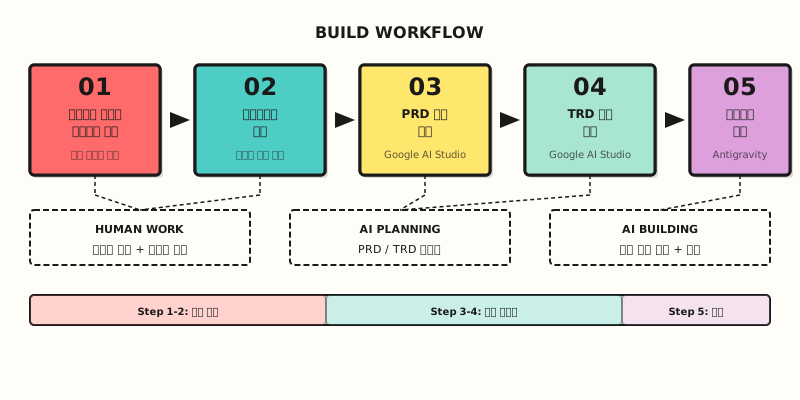
Step 1: Organize privacy policy guidance for each case in Markdown
The first thing I did was organize the various cases that can arise when implementing GA4 into Markdown files, based on the Commission's writing guidelines. Why Markdown? Because Markdown is the cleanest and most structured format to hand to AI tools as context.
The main cases I organized were:
- Only a basic GA4 installation (using automatically collected events only)
- Collecting User-ID to identify logged-in users
- Linking with Google Ads for personalized ads/remarketing
- Using pseudonymized information processing
- Collecting e-commerce events (purchases, cart, etc.)
For each case, I structured the items the privacy policy must include (items collected, purposes of collection, retention period, third-party provision/outsourcing, cookie notice, etc.). This Markdown file became the base data for all the work that followed.
Step 2: Design the checklist of things to confirm with the user
Next, I designed a checklist to determine which case a user falls into. The key was to make it so users can select their situation without knowing legal terms, so I paid attention to rephrasing questions in everyday work language as much as possible.
For example, if you ask "Do you use pseudonymized information processing?", most marketing practitioners would struggle to answer right away. So I showed a concrete description with each item, like "We use pseudonymized data for statistical/research purposes," so people can easily judge even the items they're unfamiliar with.
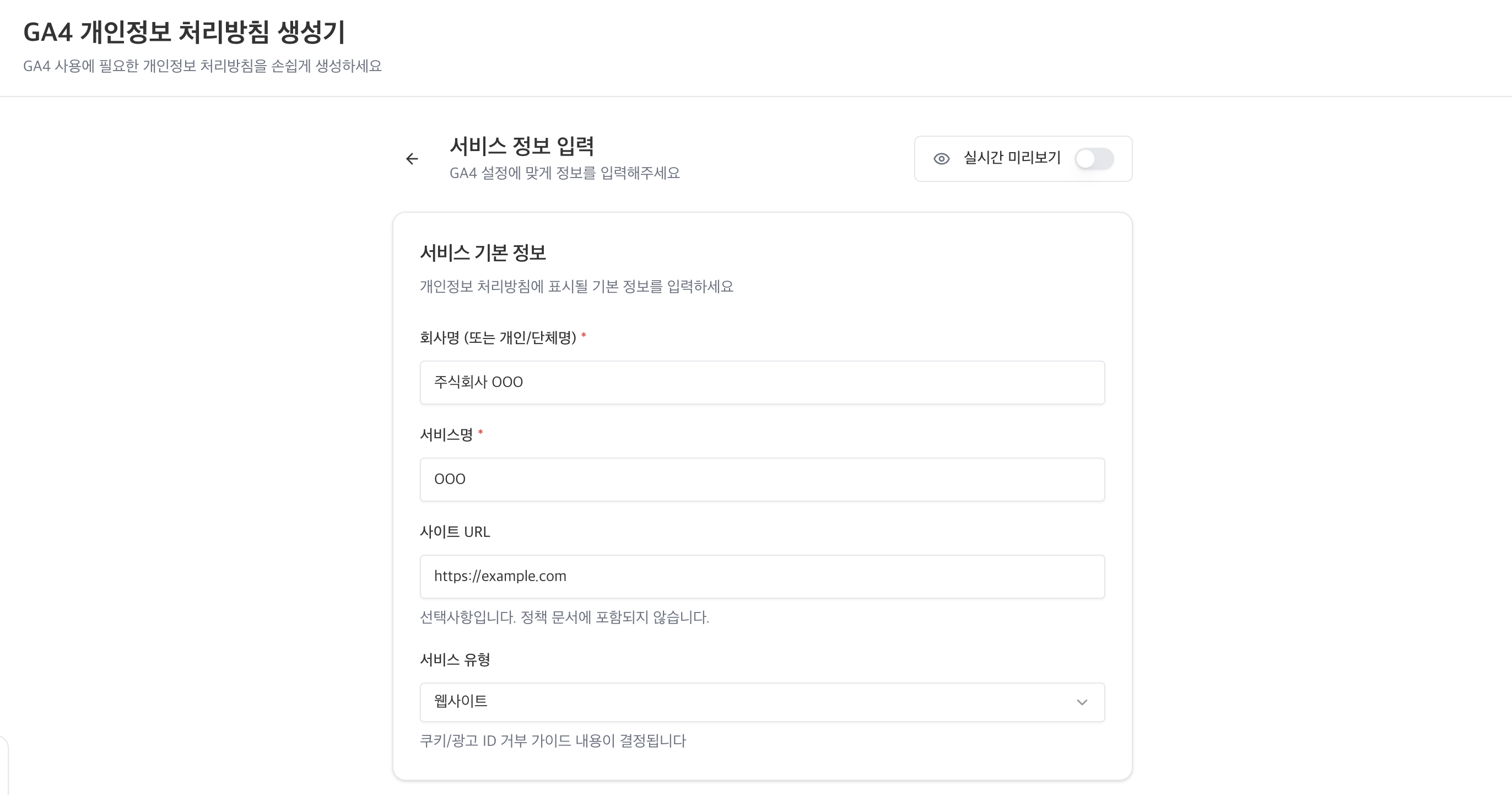
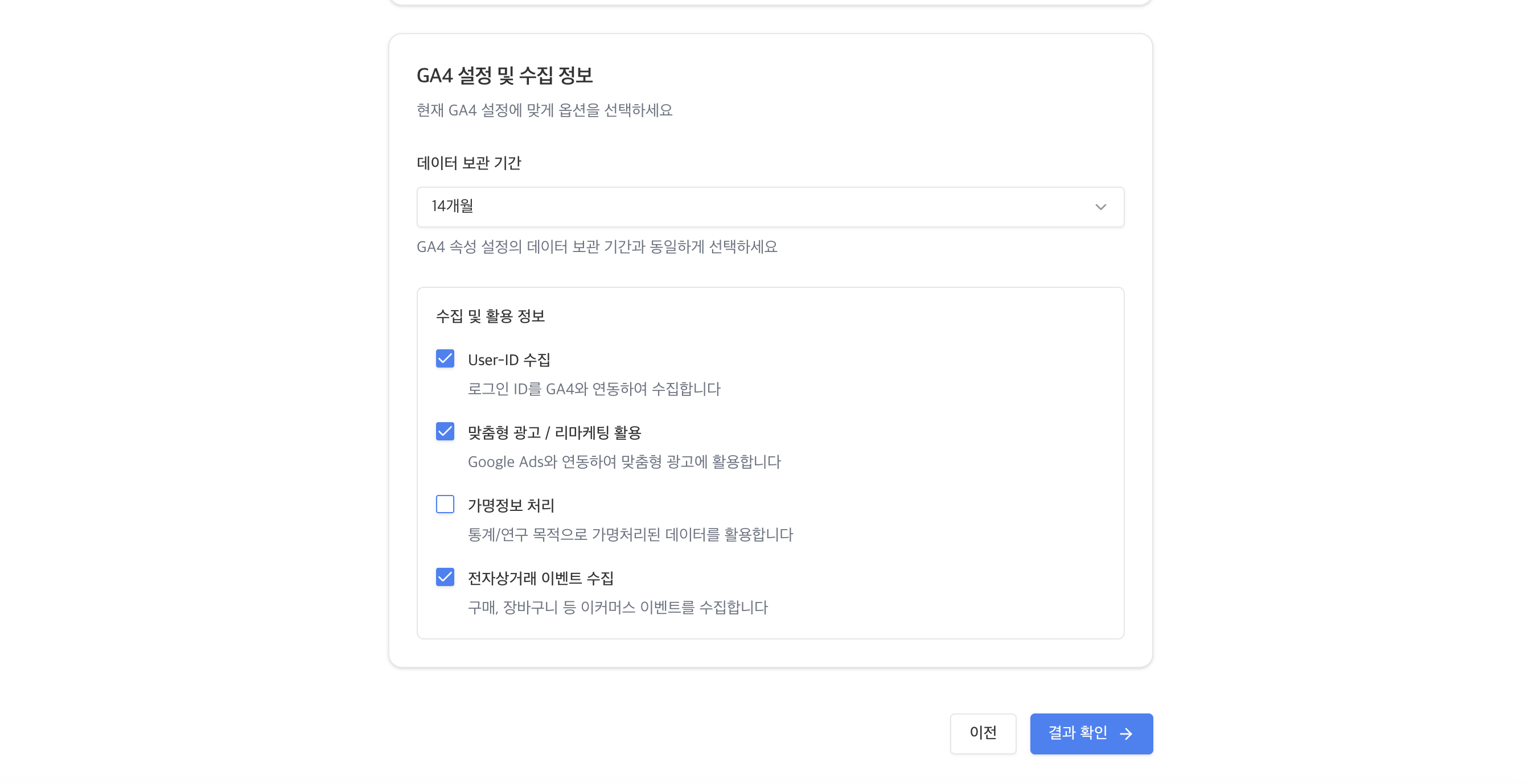
I designed the checklist in two main sections.
- Basic service information: company name (or individual/organization name), service name, site URL, service type (website/app)
- GA4 settings and collected information: data retention period, whether User-ID is collected, whether personalized ads/remarketing are used, whether pseudonymized information is processed, whether e-commerce events are collected
Along the way, I also mapped which section of the Step 1 Markdown guide each combination of checklist answers connects to.
Step 3: Create a PRD with Google AI Studio
With the checklist and guide data ready, I needed a planning document to turn them into an actual service. This is where I used Google AI Studio.
A PRD (Product Requirements Document) is a planning document that lays out a service's purpose, target users, core features, user flow, and so on. In vibe coding, the PRD serves as the key instruction sheet that tells the AI "build a service like this."
I handed the Markdown files and checklist from Steps 1 and 2 to Google AI Studio as context and asked it to write a PRD including the following.
- Service overview: a web tool that automatically generates the privacy policy items needed when implementing GA4
- Target users: digital marketing practitioners, website operators
- Core features: checklist-based condition input → output of privacy policy guidance text matching the conditions → copy/download features
- User flow: answer checklist → preview results → generate privacy policy text → copy
Based on the PRD draft AI Studio wrote, I added and refined the detailed requirements needed in real work myself. You could say the AI sets up the document's skeleton, and a person fleshes it out with domain knowledge.
Step 4: Create a TRD with Google AI Studio
If the PRD defines "what to build," a TRD (Technical Requirements Document) defines "how to build it." It contains the technical requirements needed for development, such as the tech stack, data structure, and component design.
Again using Google AI Studio, I wrote the TRD based on the PRD. While handing the PRD to AI Studio, I also gave it direction, like "Write a TRD to implement this PRD. It'll be a front-end web app, and I want to manage the checklist data as JSON."
The TRD included the following.
- Tech stack: front-end framework, styling approach
- Data structure: a JSON schema linking checklist questions to guidance text
- Component structure: checklist component, results preview component, text output component, etc.
- State management: conditional rendering logic based on the user's selections
You might wonder whether a non-developer really needs to write a TRD, but in vibe coding, the clearer the instructions you give the AI, the higher the quality of the result. If you hand over only a PRD, the AI makes technical decisions on its own, and those decisions may not always be the best.
Step 5: Build the project with Antigravity
With the PRD and TRD ready, it was finally time to build the actual service. The tool I used here is Antigravity. Antigravity is an AI-based code editor released by Google, a platform where multiple AI agents built on Gemini models work together to automate the entire development process.
I started by handing the PRD and TRD to Antigravity together and creating a project. These were the things I found especially useful during the work.
- Conversational edits: I could change code immediately with natural-language requests like "Change the order of the checklist questions" or "Add a copy button to the results screen."
- Live preview: I could see the result right after every code change, so I could quickly verify the design and behavior.
- Iterative improvement: The result isn't perfect from the start, but refining details one by one, like "Widen the spacing here a bit" or "Change the text color in this part," was easy.
Of course, there were times when I didn't get the result I wanted in one go. In particular, as the conditional logic based on checklist conditions grew more complex, the AI sometimes generated code different from what I intended. In those cases, explaining the problem specifically or directing it to refer back to the data structure defined in the TRD solved most issues.
What Does the Finished Service Look Like?
Here's how the finished GA4 privacy policy generator works.
1. Enter basic service information
First, enter the company name (or individual/organization name), service name, site URL, and service type. Since the guidance on refusing cookies/ad IDs differs by service type, I had users choose whether it's a website or an app. Turn on the live preview toggle at the top right, and you can see the results as you type.
2. Check GA4 settings and collected information
Select options to match your current GA4 settings. You choose the data retention period from a drop-down and check the items that apply under collected and used information. When you check whether you collect User-ID, use personalized ads/remarketing, process pseudonymized information, or collect e-commerce events, the privacy policy content for each item is reflected automatically.
3. Review results and copy/download
Based on the information you entered, the items your privacy policy should include are generated. Purposes of processing personal information, GA4-related processing items, retention period, third-party provision/outsourcing, and more are displayed in a structured format, and you can copy each item individually or copy everything at once. I also added an HTML download so you can insert it directly into a web page. The notes at the top also point out additional items the generator doesn't cover.
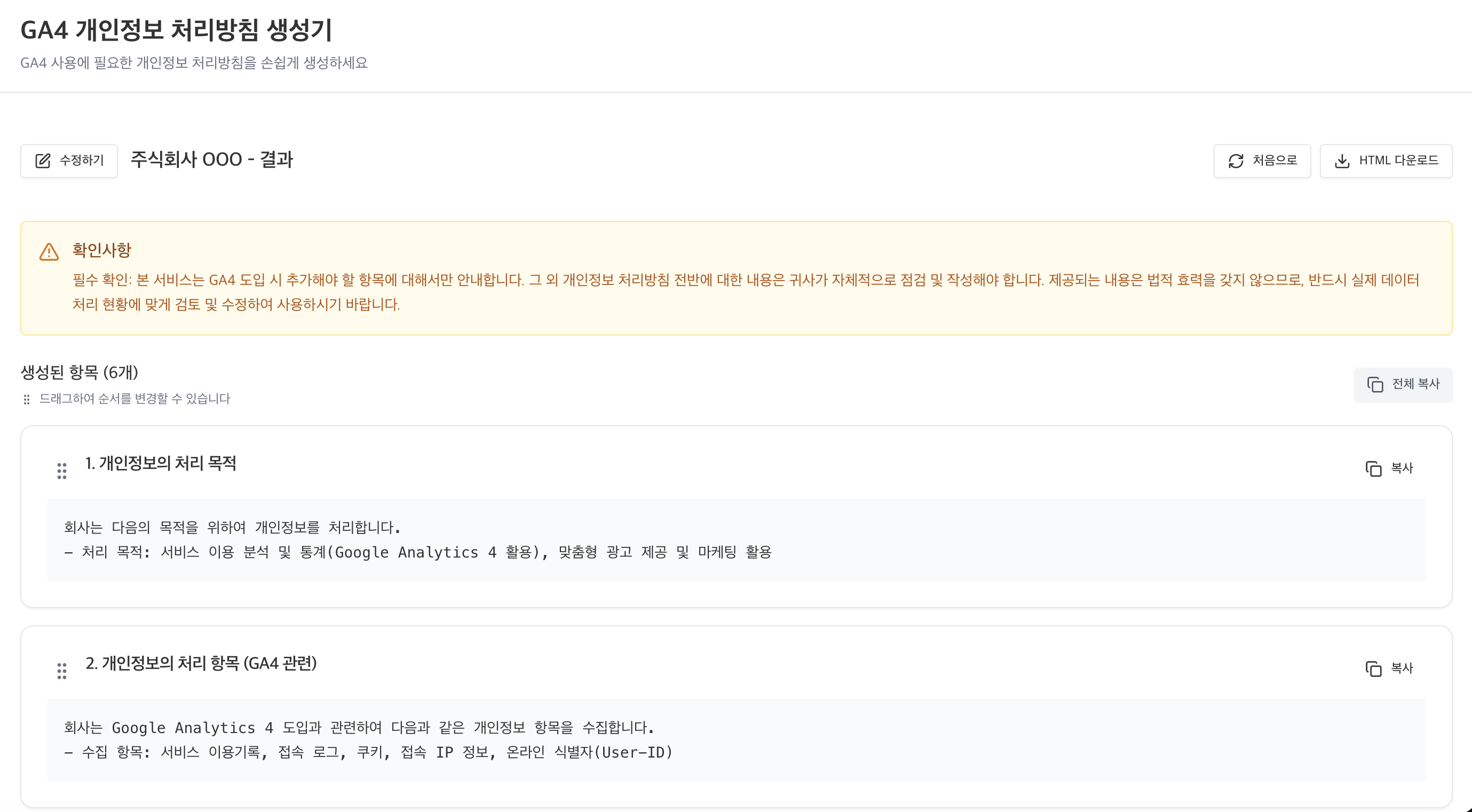
The core value of this service is that you can quickly see and apply only the privacy policy items that fit your situation, without reading the 156-page guidelines from start to finish.
What I Learned Building a Service with Vibe Coding
I gained a few insights from this process.
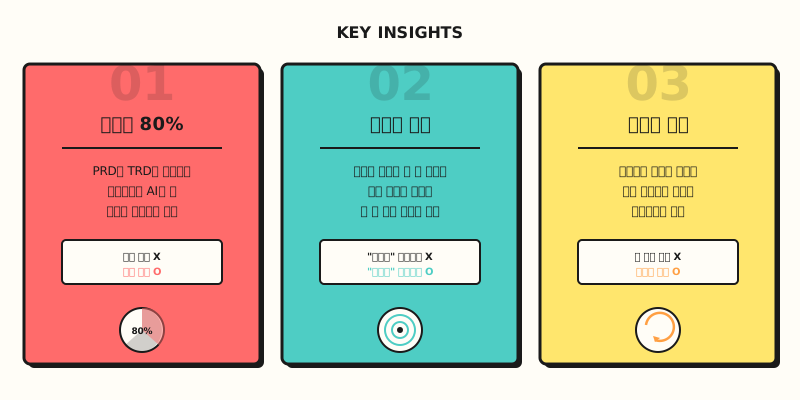
First, planning is 80% of it. Vibe coding doesn't mean you can just tell the AI "build something like this" and get what you want. In fact, the more carefully you write the PRD and TRD first, as in a traditional development process, the more accurate the AI's output. Coding skills may no longer be necessary, but planning skills still are.
Second, domain knowledge is what sets you apart. Anyone can use vibe coding tools, but it was my practical knowledge of GA4 and privacy law that let me build a service people can actually use. I felt that knowing "what to build" matters more than skill with the tools.
Third, it's okay if it's not perfect. If you try to build a perfect service from the start, it's hard to even begin. Building the basic features first and improving as you use it fits vibe coding well. This generator also started out as a simple form with only the checklist and text output, and features like the preview and download were added one by one through repeated revisions.
Frequently Asked Questions
Can a service built with vibe coding actually be used at work?
Yes, it's quite possible. But the key lies not in the tools but in the quality of the planning. In this generator's case, the guidance was organized based on the Personal Information Protection Commission's official writing guidelines, so it can be used as reference material at work. Of course, I recommend getting a legal review before publishing your final privacy policy.
Which tools should I try first to get started with vibe coding?
In this post, I introduced writing planning documents with Google AI Studio and building the project with Antigravity. Google AI Studio is free to use, and if you use Google Workspace, you can use Antigravity with your company account within its limits at no extra charge, so the barrier to entry is low. I recommend getting familiar with the tools through a simple project first, then trying a structured workflow based on a PRD/TRD.
References
- Privacy Policy Writing Guidelines (April 2025) -- Personal Information Protection Commission (in Korean)
- Vibe coding - Namuwiki -- Explanation of the vibe coding concept (Korean wiki)
- Antigravity (editor) - Namuwiki -- Introduction to the Antigravity tool (Korean wiki)
- Google AI Studio -- Google AI Studio