This post walks through how I built a personal blog with Next.js 16, Tailwind CSS, and MDX using AI tools, from planning to deployment. I'll share why I decided to build my own blog, which tech stack I chose, and how I used Claude Code, focusing on the actual build process.
Why build my own instead of using a blog platform?
Blog platforms like Tistory, Brunch (both popular Korean blogging platforms), and WordPress have the advantage of letting you focus on writing. But from the perspective of a marketing practitioner, there were a few things I found lacking.
First, it's hard to control SEO in detail. If you want to configure the sitemap structure, robots.txt, JSON-LD structured data, OG images, and so on exactly the way you want, building it yourself is the sure way. Second, I wanted to integrate GTM and GA4 freely. From event design to A/B testing, I wanted to apply the tools I work with in practice directly to my blog. Third, I needed full control over design and structure.
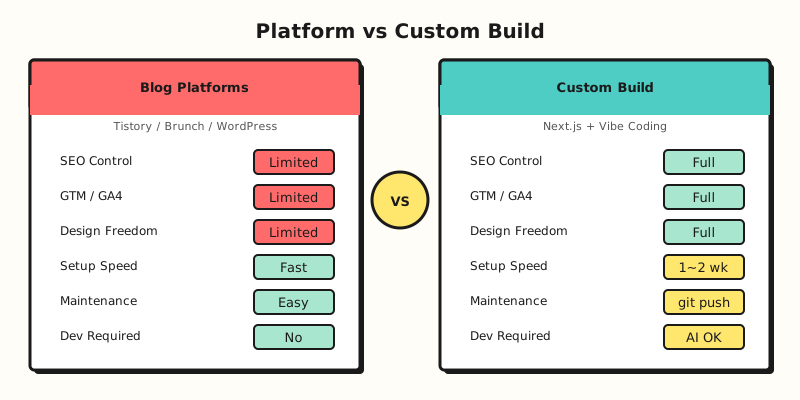
Of course, building it yourself takes development resources. But thanks to vibe coding, those resources shrank dramatically. I saw the potential of vibe coding while building the GA4 privacy policy generator I introduced in a previous post, and this time I decided to go a step further and build a polished website.
How did I choose the tech stack?
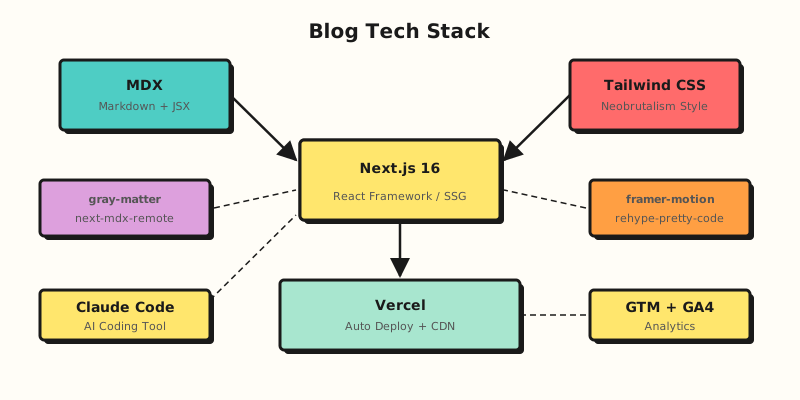
When choosing the blog's tech stack, I set three criteria: fast page speed (SSG-based), easy content management (Markdown-based), and simple deployment and maintenance (free hosting).
Framework: Next.js 16
Next.js is a React-based framework for building websites. It's well suited to sites like blogs where content doesn't change often, and because it builds pages ahead of time, loading is very fast. Pages are generated automatically just from the folder structure, which makes management easy too.
Content: MDX
MDX is a format that lets you embed JSX components in Markdown. You can write posts in regular Markdown while still putting interactive components in the body when needed. With next-mdx-remote, you can manage MDX files in the content/ folder and convert them into static pages at build time. In effect, you can manage content file-based without a CMS.
Styling: Tailwind CSS (Neobrutalism design)
Tailwind CSS is a utility-class-based CSS framework. You can quickly apply consistent styles without building a separate design system, which makes it a good match for vibe coding. I went with Neobrutalism as the blog's design concept, a style characterized by thick borders, vivid colors, and drop shadows. If you ask the AI to "make a card component in a neobrutalism style," it implements it right away with a combination of Tailwind classes.
Deployment: Vercel
Vercel is a hosting platform run by the company that created Next.js. Once you connect a GitHub repository, it automatically builds and deploys every time you push code. For a personal project, the free plan is plenty, and global deployment through a CDN and automatic HTTPS come standard.
How did I use AI tools?
For this project, I used Claude Code as my main tool. Claude Code is a terminal-based AI coding tool that understands the entire project codebase and lets you build features as if you were having a conversation. In this project, I did all of the following with Claude Code.
- Initial project structure design: Folder structure, content parsing logic, automatic page generation setup
- Design implementation: Neobrutalism-style cards, buttons, navigation, and responsive layout
- SEO setup: Sitemap generation, robots.txt configuration, JSON-LD structured data, OG image generation
- GTM + GA4 integration: Inserting the Tag Manager script and setting up event tracking code
- Adding advanced features: GA4 report automation, recommended content component
For example, if I asked, "Read the keywords from each MDX file's frontmatter and reflect them in the meta tags of each post page," it wrote the code in one go using the libraries needed. Being able to handle everything from structure design to design, SEO, and analytics integration with a single tool was the biggest advantage of vibe coding.
What order did I build the blog in?
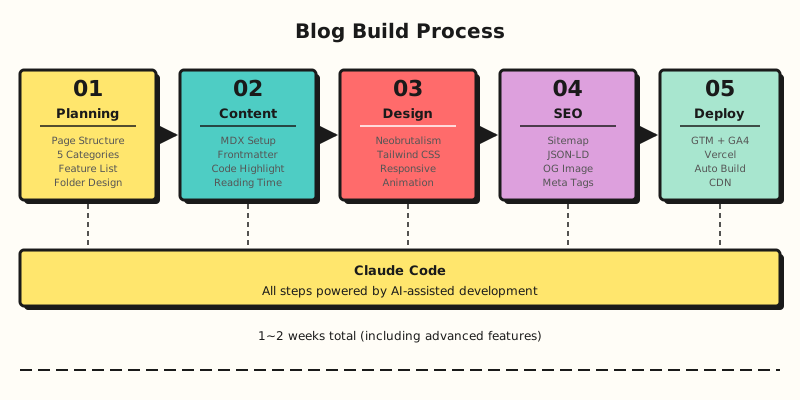
The whole job breaks down into five main steps.
Step 1: Planning and structure design
First, I listed the features and pages the blog needed. The basic structure is the home page, category listings, individual posts, and an about page, and I added search and category navigation on top of that. I split the categories into five based on the nature of the content.
- What I Do: Practical know-how in marketing and data analysis
- What I Think: Thoughts and insights
- What I Like: Stories about things I like
- Where I Go: Records of places
- What I Listen: Music stories
I passed this structure to Claude Code and asked it to set up the folder structure and automatic page generation.
Step 2: Building the MDX content system
Next, I built the MDX content system that's at the core of the blog. The structure has a folder for each category under content/, with the title, date, thumbnail, summary, and keywords defined in each MDX file's frontmatter.
content/
├── what-i-do/
│   ├── ga4-privacy-policy-generator.mdx
│   └── vibe-coding-blog-build.mdx
├── what-i-think/
├── what-i-like/
├── where-i-go/
└── what-i-listen/
I parsed the frontmatter with gray-matter, rendered the MDX body with next-mdx-remote, and applied syntax highlighting to code blocks with rehype-pretty-code. Estimated reading time is also calculated automatically with the reading-time library.
Step 3: Design and UI implementation
I implemented the UI to fit the neobrutalism concept. If you give Claude Code specific styling instructions like "Add a 3px black border and a 4px offset shadow to this card component," it applies them right away with Tailwind classes.
I also added page transition animations using framer-motion. If you ask, "Add an animation that fades in while sliding up from the bottom when the page loads," it sets up motion.div with the appropriate initial/animate properties.
Step 4: SEO optimization
Since it's a marketing blog, I paid special attention to SEO. I implemented the following with Claude Code.
- Dynamic sitemap: Automatically generates a
sitemap.xmlcontaining the URLs of all posts at build time - robots.txt: Sets access rules for search engine crawlers
- JSON-LD structured data: Applies the
Articleschema to each post and theFAQPageschema to FAQ sections - Dynamic OG images: Automatically generates an OG image with the title and category for each post
- Meta tags: Dynamically sets the title, description, and keywords for each page using
generateMetadata
For these tasks, if you state the requirements specifically, like "Create a sitemap.ts file that generates the sitemap automatically. It should go through every MDX file in the content folder and build the list of URLs," Claude Code generates the appropriate code.
Step 5: Analytics integration and deployment
Finally, I integrated GTM and GA4 and deployed to Vercel. I inserted the GTM container script and set up the events to track in GA4, such as page views, post read completion, and tag clicks. This makes it possible to see which content on the blog is popular and how visitors arrive.
Deploying to Vercel is done simply by connecting the GitHub repository. After that, the workflow is complete: you write a new post and just git push, and it builds and deploys automatically.
What I learned building a blog with vibe coding
The planning document determines the quality of the code
As I stressed in my previous post, planning is the most important thing in vibe coding. If you say "Make me a blog," you get an ordinary result, but the more specifically you state your requirements, like "Next.js blog, Markdown content, 5 categories, neobrutalism design," the more polished the result.
Combining AI tools maximizes productivity
I was able to handle everything from structure design to design, SEO, and analytics integration with Claude Code alone. I only used other AI tools in a supporting role, for organizing planning documents when needed. You could say the key to vibe coding is not using lots of tools but giving clear requirements to one tool.
You need practical knowledge to get good results
Even if AI writes the code, people still need to have practical knowledge like SEO strategy or GA4 event design. To ask "Apply the FAQPage schema to the JSON-LD," you need to know why it's needed. Vibe coding removes the limits on your implementation skills, but deciding what to build is still up to people.
Frequently asked questions
How long does it take to build a blog with vibe coding?
Including the planning stage, it took about 1 to 2 weeks to complete the basic structure. That said, this period includes extra features like SEO optimization, GA4 integration, and A/B testing. If it's a blog that simply shows the posts you write, you can easily build one in less than a day. The important thing is not to try to finish it all at once, but to build the basic features first and then add features gradually.
Can I build a Next.js blog without development experience?
Yes. However, if you understand at least the basic concepts of HTML and CSS, it's much easier to review the code the AI generates and ask for changes. Even if you don't know code at all, you can make requests like "Widen the spacing here" or "Change this button's color" to an AI tool, but a basic understanding helps when solving problems like "Why won't the page load?" More than development experience, the planning skill to clearly explain what you want to build matters more.
References
- Top 10 Vibe Coding Tools in 2026 -- A comparison of the major vibe coding tools in 2026
- The Complete Guide to Vibe Coding in 2026 -- A comprehensive guide to vibe coding
- Next.js official documentation -- Documentation for Next.js
- Vercel official site -- The Vercel deployment platform
If you found this post helpful, also check out how I built a GA4 privacy policy generator with vibe coding.