Of all the work you can automate with Google Ads Scripts / Google Apps Script, sending reports is probably the simplest. So as a first task, let's pull a report of the previous day's ad performance into a Google Sheet and have that sheet emailed automatically.
How to Write an Ads Script
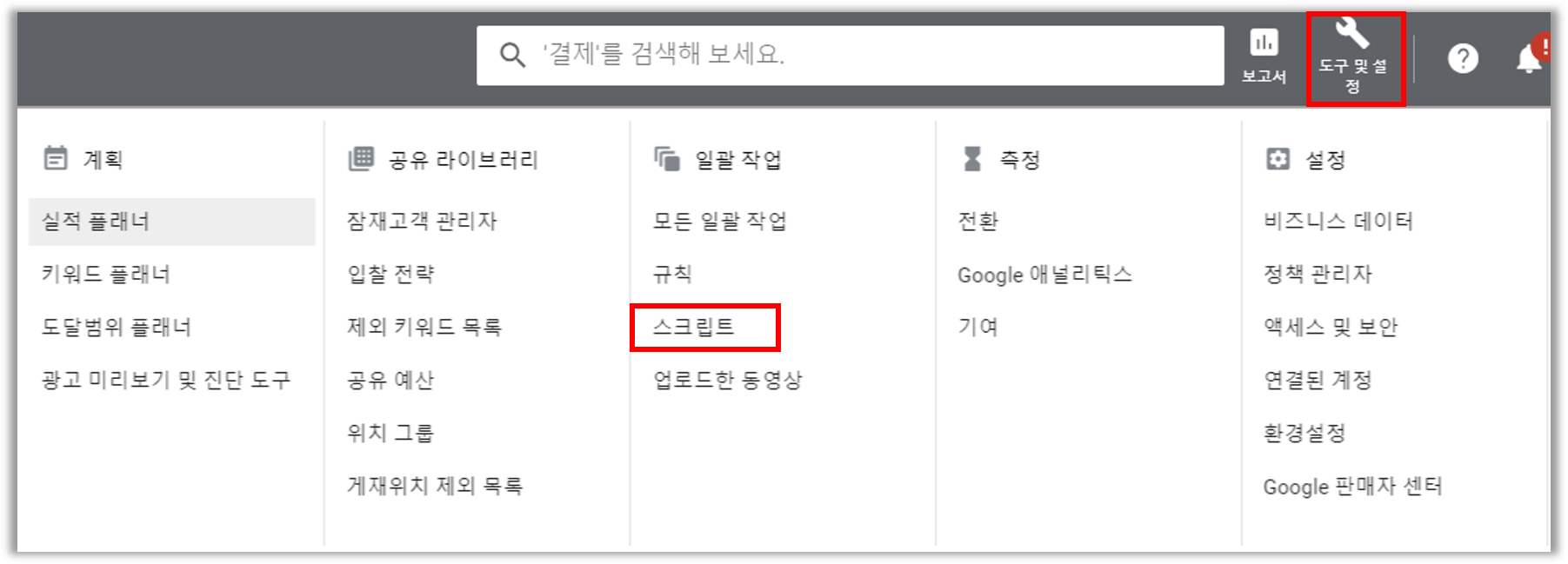
Google Ads Scripts live inside your Google Ads account. In your Google Ads account, go to Tools and Settings > Bulk Actions > Scripts.
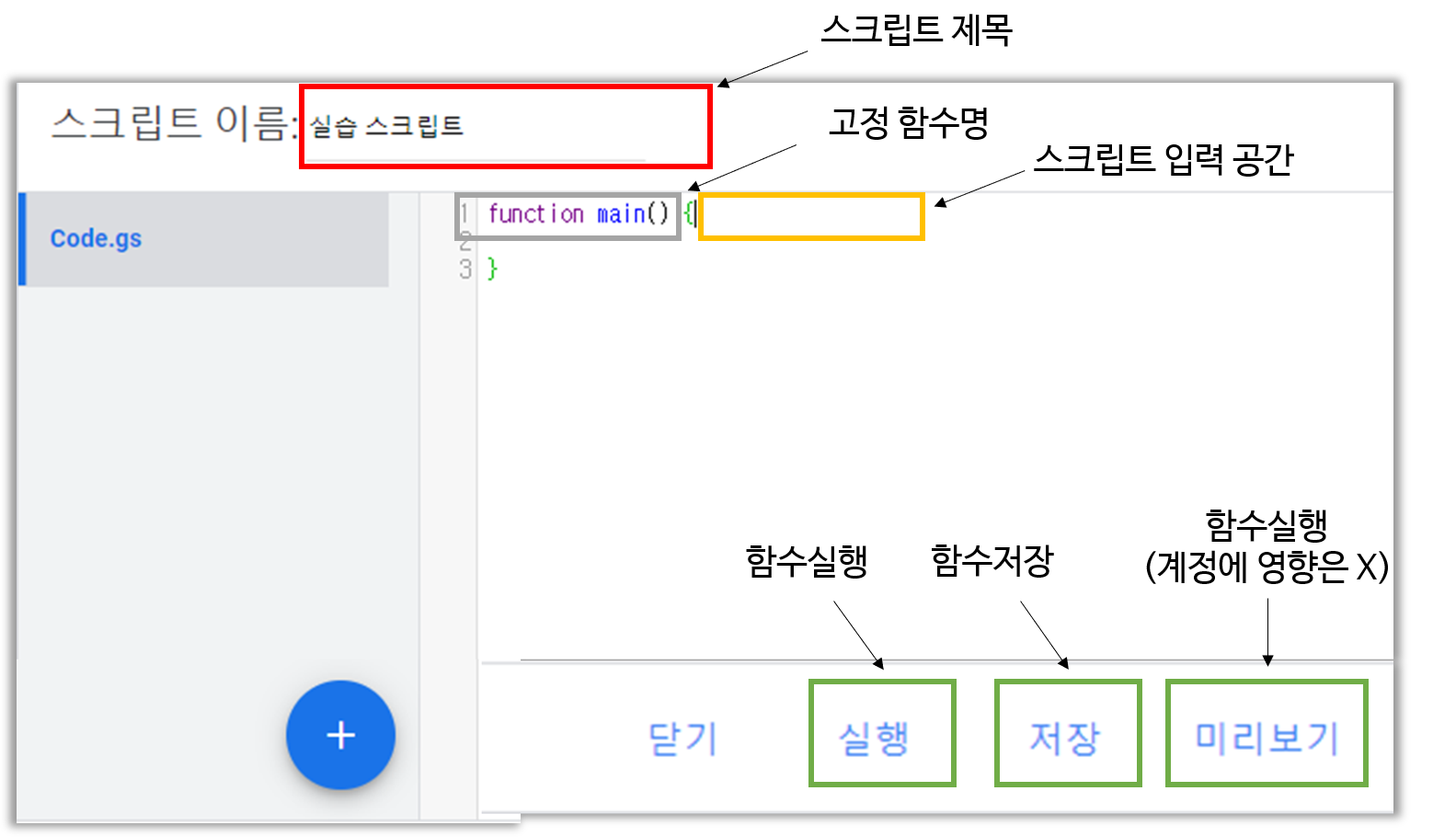
Click (+) to open a new script window, and you'll see function main(). Leave this as is and write your script inside the curly braces. I found that if you rename the function to something other than main, it won't run!
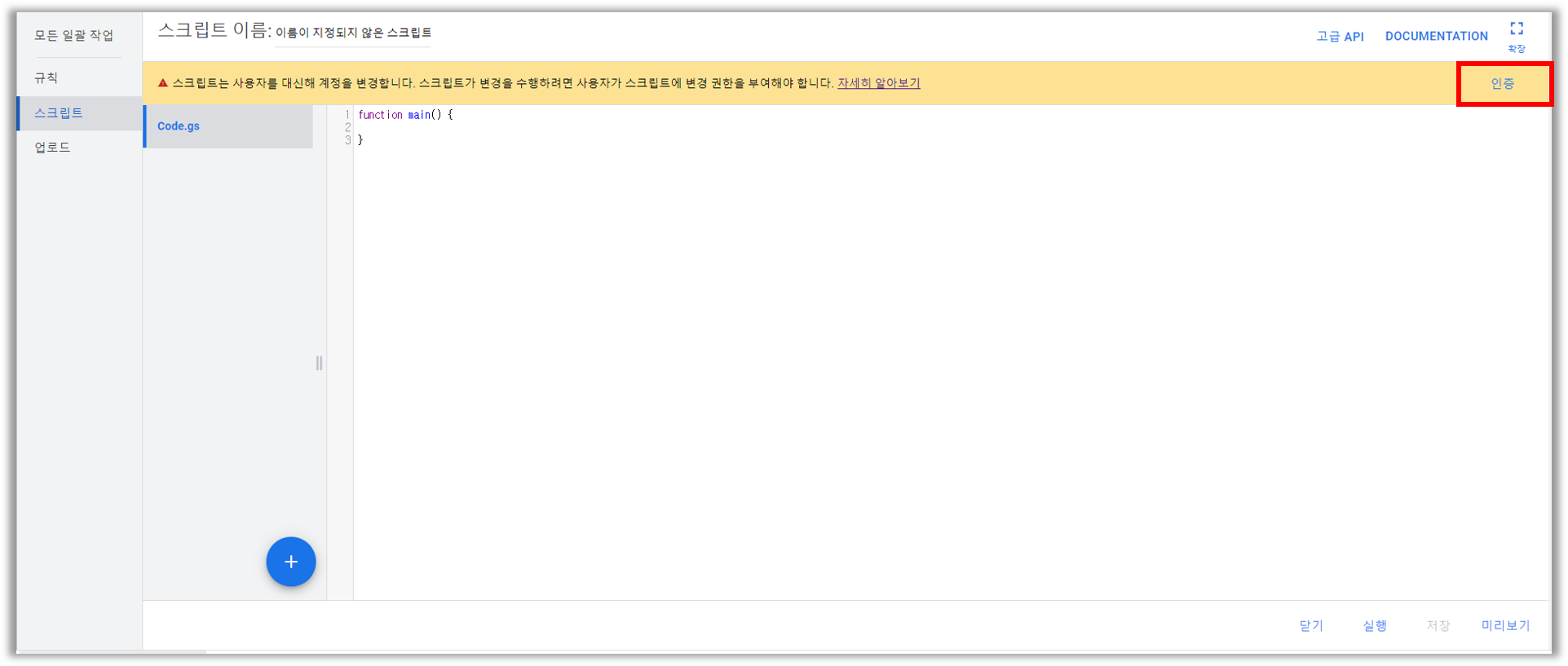
You'll see an alert asking you to authorize, like the screen above. Go ahead and authorize it to allow the Ads Script to access your account.
Now you're ready to write the script.
Automating Report Delivery with Ads Scripts
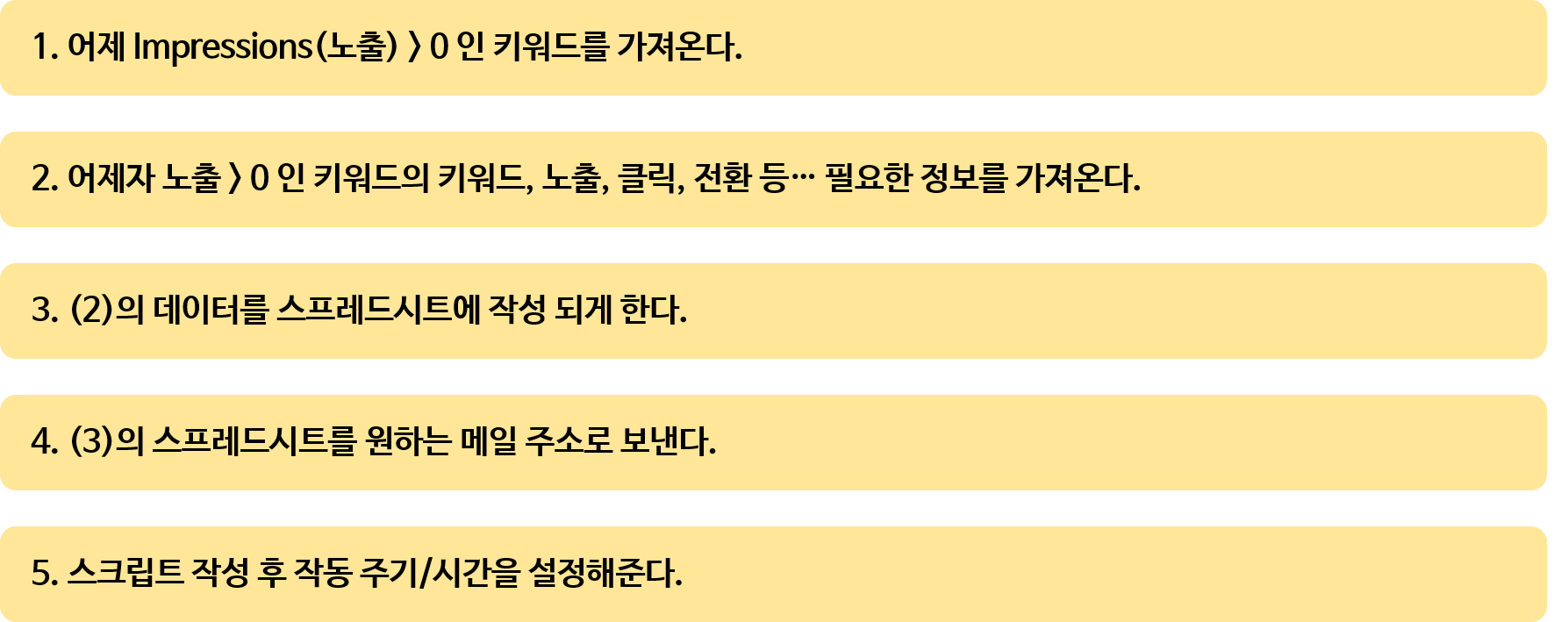
Here's the order for writing the reporting script. First, we pull keywords that meet our conditions, then choose the values from those keywords to include in the report and write them into a spreadsheet, and finally email the URL of that spreadsheet.
I'll write it out step by step below. Follow along!
1. Prepare the spreadsheet for the report and write the labels (report fields) in the first row
The thing to watch out for here is that since the report values need to update daily, you should clear the sheet before entering data.
var spreadsheetUrl = 'Shared spreadsheet URL (link sharing with editor access)';
var spreadsheet = SpreadsheetApp.openByUrl(spreadsheetUrl);
var ss = spreadsheet.getSheetByName('Sheet1');  //Name of the sheet in the spreadsheet to write data to
ss.clear();                                    //Values must update daily, so clear the sheet before entering data
var sheetArray = [['Campaign','Group','Keyword','Impressions','Clicks','AvgCPC','Cost','CVR','Conversions']]; // Write the report fields
2. Get a list of keywords that meet certain conditions
var keywords = AdsApp.keywords()
  .withCondition('Impressions > 0') //Impressions greater than 0
  .forDateRange('YESTERDAY')        //Date range is yesterday
  .orderBy('Impressions DESC')      //Sorted by impressions, descending
  .get();                           //Get the keywords
3. Pull each keyword's data for each report field and add it to the spreadsheet array
while(keywords.hasNext()){              //While there's a next keyword
  var keyword = keywords.next();        //Put the next keyword into keyword
  sheetArray.push([                     //Add the values below to the sheetArray array
  keyword.getCampaign().getName(),      //Get the keyword's campaign name
  keyword.getAdGroup().getName(),       //Get the keyword's ad group name
  keyword.getText(),                    //Get the keyword's text
  keyword.getStatsFor('YESTERDAY').getImpressions(),      //Get the keyword's impressions for yesterday
  keyword.getStatsFor('YESTERDAY').getClicks(),           //Get the keyword's clicks for yesterday
  keyword.getStatsFor('YESTERDAY').getAverageCpc(),       //Get the keyword's average CPC for yesterday
  keyword.getStatsFor('YESTERDAY').getCost(),             //Get the keyword's cost for yesterday
  keyword.getStatsFor('YESTERDAY').getConversionRate(),   //Get the keyword's conversion rate for yesterday
  keyword.getStatsFor('YESTERDAY').getConversions(),      //Get the keyword's conversions for yesterday
  ]);
}
4. Email the spreadsheet URL
if(sheetArray.length > 0){                                                      //If the sheetArray array has at least one entry
  ss.getRange(1,1,sheetArray.length, sheetArray[0].length).setValues(sheetArray); //Fill the spreadsheet
  MailApp.sendEmail('Email address','Email subject', 'Email body' + spreadsheetUrl );      //Send it by email
}
Once you write this and run the script, an email arrives, and you can check the previous day's keyword report through the spreadsheet link in the email.
5. Set the schedule (frequency/run time)
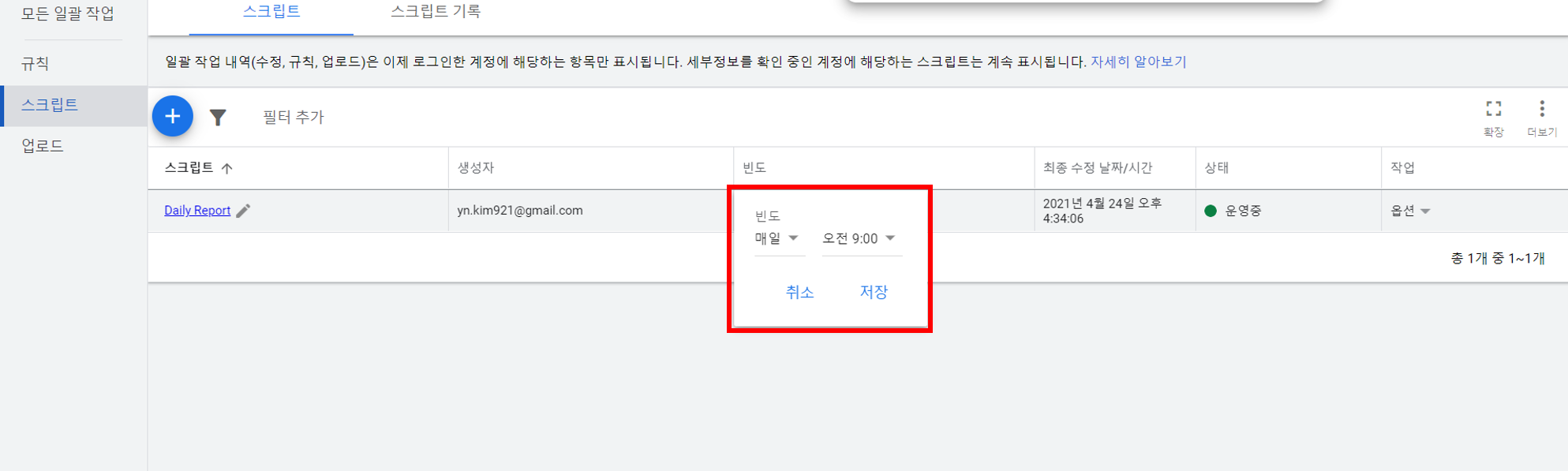
Now save the script, exit, and set how often it runs. Most of you probably check the previous day's ad performance as soon as you get to work, so if you set the script to run at 9 a.m. every day, you'll automatically get a daily keyword report at 9 every morning, right?!
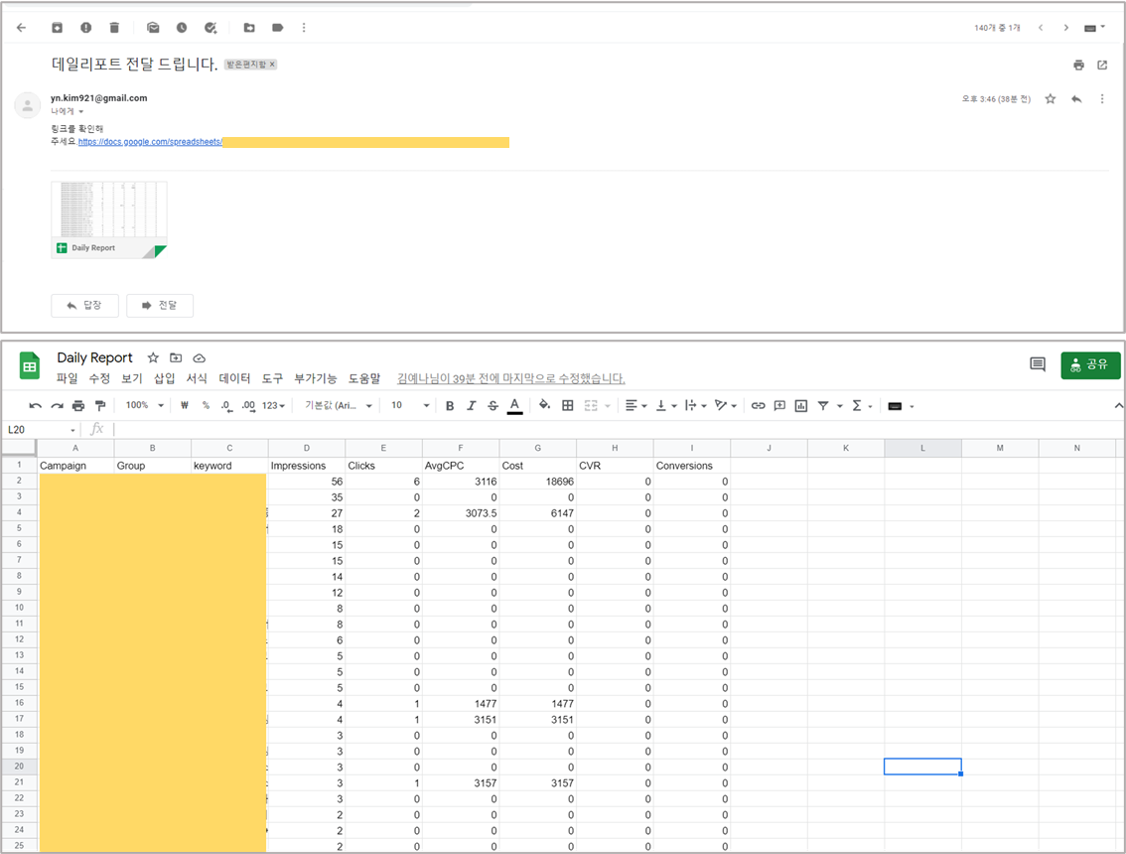
Today we tried daily report automation with Ads Scripts. It may seem hard, but once you write it yourself, you'll get the hang of it. Next time, I'll go over how to write Ads Scripts for bid automation, which takes the hassle out of managing keyword bids.